Customer Service

A few weeks back I had a food tasting session at Orchid Garden and we were happily enjoying the food until the final dish when we were greeted by a entree that we did not specify. It was supposed to be Chinese pancake with sesame covered balls filled with red bean but we got some layered cake and pandan puff (pandan filled curry puff). The unwanted dish was among the initial list of dishes that they would normally serve by them, but my mother/’aunt’ had told the guy in charge, several weeks back, that we wanted to change it to the Chinese pancake and sesame balls.

As the dish that was presented before us wasn’t one we wanted, we informed the (head?) waitress and she said that she understood but since this is a food tasting session we can always change it at the actual dinner. How are you supposed to conduct food testing when the food you want to test isn’t served? I wasn’t satisfied with her answer and apparently neither was my mother or aunt and they managed to ask the chef out of the kitchen to discuss this matter (there wasn’t anybody else in the restaurant so I hope and I guess that did not inconvenient any customers). Seems that there was some confusing or lack of communication and our request was not listed but in the end the chef did prepare the dishes we had wanted.

Around the same time I had a hankering to buy a webcam to try out some stuff. I managed to get an ProLink PCC8020A which is an auto focusing webcam that has ability to record at 1280×1024 (Windows only though) for B$37 from Oregon Systems (located next to Rejoice Chicken Rice in Gadong). Anyway I was playing around with it and swiveled it left and right and managed to break it. Now I didn’t anything that was intended to break it nor did I do anything that it wasn’t designed to do. I took it back and they were kind enough to give me a replacement webcam without any questions asked after I explained to them what had happened.

Recently my brother got a car and when he picked it up, it was handed over by a person who wasn’t the salesman he was dealing with. The car did not have a full tank of petrol but a couple of days later the salesman that he was dealing with called him up and offered to refund him the money for the full tank of petrol. How good is that?

Customer service is important and I believe here in Brunei we need a great improvement. I’m not just talking about when people have complaints but even as a normal customer asking questions: be attentive and courteous. Treat them as how you want to be treated. A bad customer service experience is what will put people off from coming back. Anybody care to share there customer service experiences in Brunei? Please try to be as constructive when giving these feedback as we are all here want Brunei to be a better place =)

I’m Getting Married!

So I should be getting married tomorrow 10am if all things go according to plan and in the process of getting ready for tomorrow and the event, I had a few tech ideas: some which made it and some which didn’t I guess. I’ll talk more about them after I’m back from my honeymoon. Just hope to share and give ideas to others for their own events.

But for now, the live stream is done via the uStream service using uStream Producer client application that utilizes an EasyCap USB dongle (Amazon, DealExtreme) connected to the church cameras =)

timothyandruth.com

A look at the ePad

After hearing BIT Computer had an ePad (a slate/tablet device like an iPad, but running Android) I was curious to take a look as I’ve been looking for a cheap Android reader. Watching videos online with all these cheap Android tablets I knew not to expect much. So I managed to play with it and did come back with a few nice features that I wish other Android phones / tablets would implement.

The ePad has a 7″ screen with a resolution of 800×480 and thus is smaller than the iPad in terms of size and screen resolution. It also has a big bezel close to that of an iPad making it quite big for a smaller device. It has a single microSD card slot for expansion, a single 3.5mm headphone jack and a single micro USB port. It also has a front facing camera and a few other buttons on the side (power, volume up/down) and a ‘home’ button on the front (like the iPad). It is also equipped with standard wireless (presumably 802.11g) and even has an option for ethernet connection (I saw a PPPoE item in the settings).

There is a cable included with the device that converts the micro USB port to standard female USB port which can be used to attach a standard USB keyboard. I personally love this feature as I brings about possibility of using the device as a productivity tool to do regular word processing (Documents To Go is included with the device). I forgot to ask if you could attach a USB drive and have USB On-The-Go just like upcoming Nokia N8 which would allow you to transfer files to and from a USB drive making it more like a mini computer. The webcam seemed to auto focus and I guess it was taking a 320×240 snapshot, the screenshot application was not optimized for the screen resolution and thus had a weird layout (camera output was in a little section on the left and the ‘take picture’ button was all the way on the right of the screen).

Now the device is very unresponsive/sluggish. It was much hard to use than any of the cheap Android tablet videos I’ve seen online. I knew it would be slow and pretty hard at first but it was worse than I expected. After playing around with it, I found the touchscreen sensitive in certain locations but insensitive in others. Pressing the ‘back’ button in the top right corner was pretty hard but selecting input boxes and typing on the keyboard seemed pretty responsive.

The device has a custom toolbar on the top of the screen with custom buttons, most particularly a rotate screen and a screen snapshot button. A screenshot utility is something that no stock Android phone/device has even until now. You can install screenshot application only if you root your device which is not something I would recommend a typical user to do. This leads me to believe that this device could be running as root or that they have done quite a bit of customization.

Android 1.6 is running on the device and it has the Google Market Place among other APK managers/installers in order to install applications. It also has a full license of Documents To Go allowing you to view and edit documents. PDF viewing is done through Documents To Go but I was not able to view PDFs as it was requesting registration of the product in order to proceed. I was not able to test and video playback or web browsing as I did not have any videos on hand or Internet access. So I cannot comment on the abilities or speeds in those areas of the device. I will try go back to test them and take screenshots of all the applications installed.

While this tablet is far from perfect and isn’t a device I could really recommend, I like to see the possibilities that could arise. This device usability is a nightmare due to the unresponsive screen, but this is not an Android problem: it is just that the combination of the touchscreen technology used in this device and a slower processor is causing it. Recently Shanzai showed off a USD$200 Android tablet which seems to be pretty snappy, so it isn’t Android that is to blame. Check out Shanzai for more videos on tablets and at Deal Extreme for reviews by users with these devices. The Eken M001 is one of the cheapest tablets and firmware updates have sped up the device but still is underwhelming in terms of battery life (3 hours max). Another similar tablet would be the US$199 Archos 7 Home Tablet which actually looks better than any of these cheap tablets as it has a more polished product but has it’s own issues (720p playback, good battery life 5+ hours, but no Market Place and iffy touchscreen). Give me an improved version of the Archos 7 Home Tablet with a better touchscreen and slightly better battery life and I would be perfect. While the iPad is a very good product, I still don’t think it’s worth the price and I personally do not like the environment of iOS: I can’t even develop and test applications on my own device without jailbreaking the device or paying Apple for the developer program. I do not like those barriers of entry to a platform. So here I will be waiting for a better Android tablet

Creative Zen V (as a Line-In Recorder) Review

Finally got this review done. Basically I got the Creative Zen V to record sermons at church via direct line-in when connected to a mixer. There are not many line-in recorders these days; Creative had quite a few devices that allow this but they have seem to stopped making them (possibly due to the hiss in the recordings?). Got a good deal at ~B$100 for 2 of them (1GB model, including shipping). Check out the video review

Details of the Creative Zen V

  • Capacity: 1GB / 2GB
  • Audio Support: MP3, WMA, IMA ADPCM, WMA DRM
  • Weight: 43.5g
  • Battery Life: Up to 15 hours for continuous audio playback
  • In-built battery (charges via USB)
  • Voice & Line-In recording supported
  • Line-in recording: 160kb/s, stereo 44.1KHz WMA (66.2MB for 76 min)
  • Microphone recording: 32kb/s, mono, 8KHz WAV (5.9MB for 25.5 min)
  • Monitor recording via
  • Visual level meters
  • Headphone output

Mini-USB connection and connects as an MTP device

  • Windows: no issues
  • Linux: depends on distro but works in recent version of Ubuntu
  • OS X: not supported natively, requires 3rd party application: e.g. XNJB

Main Issues:

  • Buzz/Hiss in line-in recorded audio (check out the video 4:07)
  • Takes relatively long to switch on (~15 seconds)
  • Records to WMA (may need conversion)
  • Possible permanent dimming of screen after extended use (several months)

Windows 7 – Touch Gestures

Ever since the iPhone came out there seems to be a resurgence with touch technology and in particular multi-touch technology. From full all-in-one PC systems like the HP TouchSmart that I’ve seen in Netcom and the MSI WindTop to now the Acer T230H Touch Screen Panel monitor (seen at both Concepts and Netcom). Not knowing what Windows 7 with offered in terms of touch features I looked it up and came across “Using touch gestures” on Microsoft’s Windows 7 microsite (“My favorite ways to use Windows Touch” by John Swenson is also a good read for those considering using a touchscreen)

The main features are:

  • Flicks: basically navigating a page by flicking your finger upwards or downwards as normally seen on iPhones
  • Press and hold: press and holding down on the screen will act as a right click and it will pop-up the context menu
  • Windows Touch Gestures: Pan, Zoom, Rotate, Press and Tap. The first 3 are all similar to Apple’s trackpad multi-touch trackpads gestures but the “Press and Tap” gesture seems new and interesting. In order to activate “Press & Tap” you have to “Press the item with one finger, then quickly tap with another finger, while continuing to press the item with the first finger.”: if you just tap the shortcut menu will appear, if you tap and hold it will be treated as a right click. I’m not sure how well this works in usage and how helpful the shortcut menu is but it is something new and worth exploring
  • The last feature is related to the taskbar: tap the icon in the taskbar and flick upwards and it will show the window menu and jump list

Basically these features aren’t all that great to me, and I feel most of them work on devices with smaller screens and not so much with larger screens. But to all touch enthusiast this should be a good starting point for Windows. Most manufacturers will make their own touch software that runs on top of Windows and provides a more touch friendly experience but they will most likely stick to a multimedia focus or just for goofing around and nothing too productive

No more Skyfire 1.x for Brunei =(

I read @cloud_stride’s tweet and it is sad to here that SkyFire is limiting their access
to certain countries based on Skyfire version. As a start-up they are focusing their time & money on their new Skyfire 2.0 infrastructure.

Skyfire 1.X will no longer be supported outside of North America and Western Europe effective July 1st, 2010.

Note: Skyfire 1.0 and 1.5 will remain available as a free service in the following countries after July 1st: United States, U.K., Canada, Ireland, Portugal, Spain, France, Germany, Belgium, Italy, Finland, Netherlands, Norway, Sweden, Switzerland, Korea and Taiwan.

So no more being able to watch almost any kind of video format or having ‘full web functionality’ (e.g. Javascript this isn’t supported on the default web browser ala WikiMapia) on my Nokia E71. Skyfire 2.0 for Android and iPhone (in the future) should still be supported though.

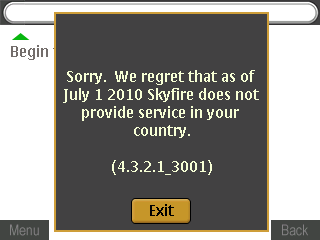
SkyFire does not provide service in your country notification
SkyFire does not provide service in your country

iPhone Development – Day 1

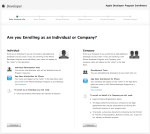
So today I thought I’d try to build an iOS application. Managed to cobble something together over lunch with a lot of copy-paste work going on and no reading of the documentation. Not exactly an ideal way to develop but hey I managed to get a functional application that I wanted. Very rough around the edges but functional nonetheless. I wanted to try it out on actual hardware and realized that I had to sign up for the iPhone Developer Program in order to do so. It costs US$99 a year (~BND$140) but thought I would try give it a go especially since I want to develop an application. So I…

  1. Go through the process of logging in
  2. Entered my personal/billing information
  3. Selected the appropriate program
  4. Reviewed my personal/billing information
  5. Did not read the 37 page license agreement (PDF link), but checking the box anyway

And I get greeted with this:

Apple Online Store is unavailable
Your country either does not have an Apple Online Store or does not offer Apple Developer Products for Online purchase. To complete the purchase of your program, you will need to complete and fax the Purchase Form below

Apple Online Store is Unavailable

Grrrrr. Imagine if I did read that 37 page long license agreement only to be greeted with that. I would have been even more infuriated. Couldn’t they have told me that when I entered my country in my personal details? Or if it depends on current location, they could have done that via my IP. Either way they could have just told me upfront that this is not available for me.

As I won’t be able to get the full experience of the app store approval process I did manage to read this iPhone development story which is a good read and does document some annoyances for developers. While I did not manage to get to the point of transferring any Android application to a physical device I am sure it will not be as difficult as this and I believe it is free as well. But kudos to iOS developers and especially Stack Overflow for having resources that I could just copy and paste and get a functioning application all in a matter of hours without reading the documentation. What happened to policy of developers not being able to tell each other how to program for iOS?