Promises and E2E Testing with Protractor – AngularJS Melbourne – 5th August 2014

angular

Event page | Meetup page

Promises

End to End (E2E) testing of JavaScript with JavaScript (Protractor JS)

  • Braiden Judd @pragmaticyclist
  • Slides
  • ProtractorJS Github
  • Similar syntax to Selenium
  • Navigate:
    • browser.get(‘/#/blogs’)
    • browser.refresh()
  • Selecting:
    • element() : single element / first element
    • element.all() : returns an array
    • Examples
      • browser.driver.findElement(by.id(‘ok’)).click();
      • browser.driver.findElement(by.binding(‘blog.title’)).getText();
      • browser.driver.findElement(by.model(‘password’)).sendKeys(‘password’);
      • browser.driver.findElement.all(by.repeater(‘blog in blogs’)).get(0).getText();
  • Events
    • click() : click the element (e.g. button)
    • sendKeys() : type into a text box

Melbourne AWS User Group – 30th July 2014

aws activateEvent page link / Meetup group

AWS Activate

  • From the folks at Amazon
  • AWS Activate
    • Website
    • A program to provide resources to startups: from free tier usage, labs, webinars, support and AWS credit
    • Self-Starter Package: for any startups
    • Portfolio Package: for startups in select accelerators or seed funds. Will be ‘audited’ by Amazon and will be given much better benefits vs Self-Start Package

Cloud Computing in Africa

  • From Thomas Shaw, the tech man behind
  • Providing unique perspectives with regards to security, reliability, scalability of AWS especially compared to local hosting.

Microservices

Other

  • Kestral
    • AWS management console for the iPhone
    • In development by Rob Amos @bok_


Introduction to Chef Meetup – 28th July 2014

28th July 2014 – Introduction to Chef held at Sacon Group for the Chef Meetup group

Chef and Chef DK: The Chef Development Kit

chef and chefdk

  • by Michael Ducy (@mfdii), a Global Partner Evangelist at Chef
  • PDF slides
  • Chef essentially enables the “infrastructure as code” devops movement
    • Versionable, testable, and repeatable as application code
    • Relies on reusable definitions known as recipes to automate infrastructure tasks
    • Recipes use building blocks called resources (e.g. file / template / package)
    • Recipes are stored in cookbooks
    • A cookbook is the fundamental unit of configuration and policy distribution
    • Chef server stores your recipes as well as other configuration data
    • Chef client is installed on each node in your network
    • Chef client periodically polls the Chef server for new configurations and applies if necessary
  • Chef DK
    • A component of Chef to enable organizations to develop internal best practices for Cookbook development and testing
    • A curated set of open source tools for Cookbook development
    • Download at http://downloads.getchef.com/chef-dk
  • Tools
    • chef – a new command to make development easier
    • Berkshelf – automatically resolve cookbook dependencies
    • Test Kitchen – framework for integration testing
    • ChefSpec – unit testing of Chef cookbooks
    • Food Critic – linting tool for Chef cookbooks
    • Standard Chef tools – knife, chef-zero, ohai, chef-client
  • Other Links

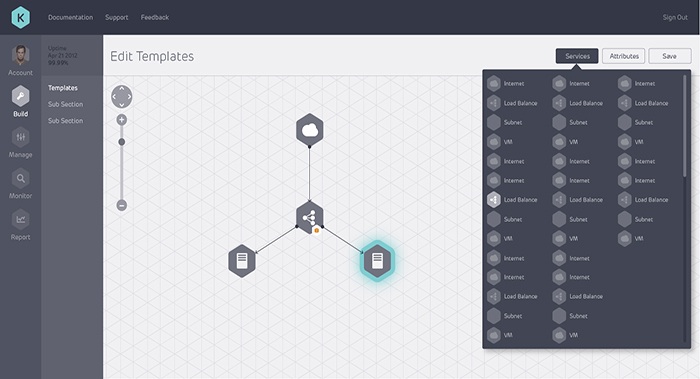
Kumolus

kumolus

MelbDjango Hackfest – 24th July 2014

24th July 2014 MelbDjango Hackfest held at Common Code and hosted by Curtis Maloney for the MelbDjango Meetup group.

Mostly being newbies and with some people interested in testing, Curtis started off showcasing his new Django Classy Settings before covering some topics on testing and other miscellany

TAkeaways / Links from the night

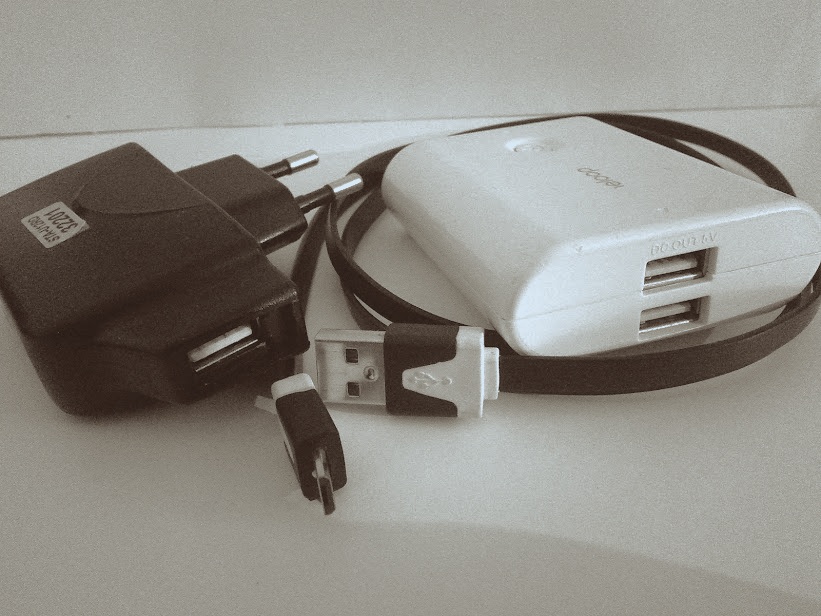
Buying Guide: USB Battery Packs / Powerbank

Powerbank

USB battery packs / powerbanks (or whatever you call them) are great when you’re out and about and need to charge your devices but there are some features which you should look out for when buying one

  1. Buy from a reputable source
  2. Sufficient capacity
    • You need a powerbank that is capable of charging all your devices and has enough juice to get you through the day
    • Phones: ~2000mAH, 7″ tablets: ~4000mAh, 10″ tablets: ~8000mAh
      (iPhone 5S: 1560mAh / HTC One M8: 2600mAh / Lumia 1520: 3400mAh / S5: 2800mAh / iPad Air 2013: 8820mAh / Nexus 7 2013: 3950mAh)
  3. Output Charge speed
    • Ensure it can charge your device at the best and fastest speed
      • Tablets usually 2A
      • Phones usually 1A
  4. Passthrough ability
    • When the powerbank is being charged when connected to a power outlet, passthrough allows it to charge any device connected to powerbank, straight from the power source and not from the powerbank itself: perfect if you want to leave all your other charges behind and charges all your devices with just a single power outlet! (Note: may want to ensure that it charges at full USB charge speed)
  5. Battery gauge
    • Nice quick way to know how much capacity is left in your powerbank
    • Allows rationing of your charge
  6. Charges via a standard USB cable
    • Being able to charge your powerbank using a standard cable is ideal as proprietary charges can be hard to replace if lost
    • Ideally the same cable as your other devices (my powerbank can charge via miniUSB but all my devices use microUSB so it is one extra cable to bring along)
  7. Multiple USB ports
    • for those with multiple devices (or for sharing with others)
  8. Port positions
    • Some USB cables may be bulkier than others and thus powers that are spaced out are useful so that you can utilise all ports at the same time
    • Ideally all ports on a single side so it can be pocketable or just easily placed on a surface standing up if needed
  9. Charges quickly via USB
    • If allows charging via several methods (e.g. proprietary cable as well as via USB), ensure that it can charge quickly over USB (my Sanyo powerbank charges very slowly over USB)
  10. If it supports passthrough, added bonus ability to maintain proper charge, amperage and voltage when plugged/unplugged from power source
    • This use case comes from using your powerbank as the power source for devices like the Raspberry Pi: you want it to provide the power to the Raspberry Pi and if the power source gets disrupted and you do not wish for the device to get restarted, the powerbank must maintain a proper current/voltage so not to trigger a restart.

Note: a 4000mAh powerbank will not charge a 2000mAh phone battery twice due to inefficiencies, battery health and other factors.

DDD Melbourne 2014 – 19th July 2014

DDD Melbourne 2014

Thanks to all organisers, speakers, volunteers and sponsors for the event!

Developer Developer Developer (DDD) Melbourne 2014 held at Swinburne University of Technology.

Key Speakers

Sponsors & Goodies Providers!

Videos

Speakers

Other Links

Notes/Improvements for next year

  • Power extensions & power strips for the workshops
  • Ideally free Internet (unless Troy comes)

ITLT: Power/Home Button Placement

Power button

Turning on a device should be easy and simple and shouldn’t take a lot of effort. Physical buttons are the best: giving you tactile and instant feedback.

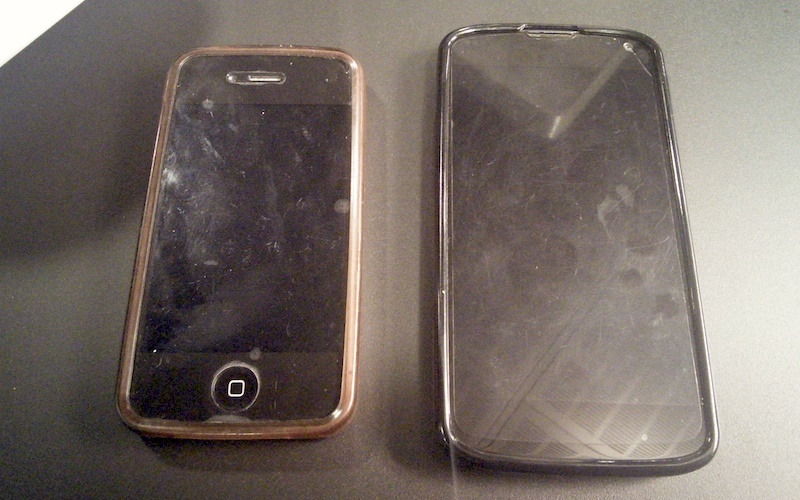
Power Button - one finger vs the claw
Which would you rather?

Devices with physical home buttons (e.g. iPhone / Samsung S series) are the ideal IMO while Nexus devices (e.g. Nexus 4 pictured above) force you to use ‘the claw’.

ITLT: Headphone and USB port placement

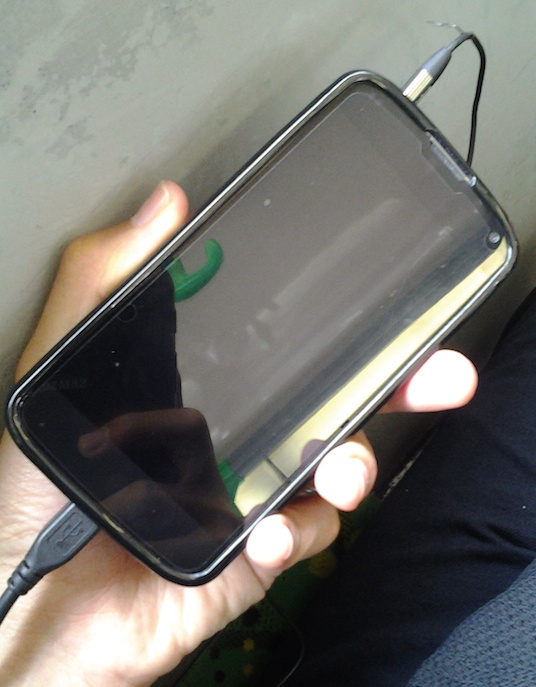
Port Positions
How does one pocket this?

IMHO

  • both USB/charging port and headphone ports should be on the bottom
  • ensures pocketability when charging on the go with a USB battery pack while listening to music

Good

  • iPhone 5S
  • HTC One M8

Bad

  • Nexus 5
  • Samsung Galaxy S5
  • Lumia 930

Other Notes

If you’re stuck on with a device with non optimal port placement, I suggest getting right angle connectors for your headphones as it at least allows the device to rest on the connector without straining anything too much (you could also get a right angled USB connector, but it is yet another thing to worry about if you care about USB charging speeds)

Right Angled Headphone Connector

ITLT: USB Charging Speeds

USB chargers with USB cable

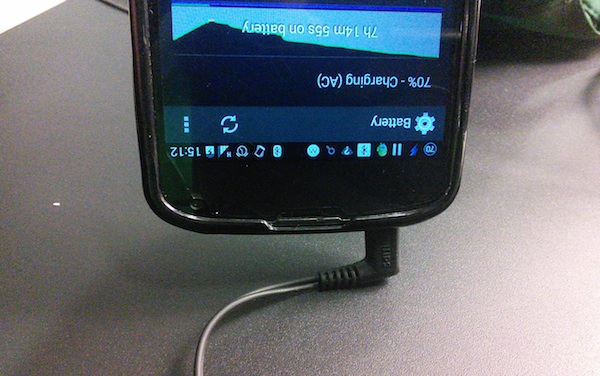
Ever had that moment where you plug your device in, see the charging symbol and thought that you were getting a good charge? Well I’ve had times when despite the charging icon showing, that the battery was actually getting slowly depleted, so here are some tips to make sure you’re charging optimally:

  • Check your charger
    • bigger devices usually require a charger that provides more amperage (tablets usually 2A, phones usually 1A)
  • Check your cables:
  • Check your USB port
    • for your computer / USB external battery packs with multiple USB ports: some ports could charge faster than others
    • find out how much power you’re getting via a device like the Practical Meter
  • Check your charging speed
    • Android
      • CurrentWidget (currently using this an available as a widget and/or on-going notification)
      • Charger Timer (haven’t used but looks good)
  • Force a faster charge
    • There seems to be a few Android apps that do this but it may also be device/kernel dependant. I have not tested these but there are apps like this

Other Notes

  • You can charge a device with a higher amperage charger: the amperage is the maximum rating that the charger can supply. If a device requests 1A then it will supply 1A even if the charger says 2A.
  • Voltage should be matched. 5V is the standard but I’ve seen slight variations of like 4.9V/5.2V but as it is only a small amount they shouldn’t be detrimental unless the device is very sensitive to it.
  • Also if you have chargers that specify power rating (e.g. Apple chargers), use the following formula:
    Power (W) = Current (A) x Voltage (V)

    So given a standard 5V

    • 12W charger will charge at 2.4A
    • 5W charger will charge at 1A.

Deleting files that give an error of “The filename or extension is too long”

del 0-Namespace-https???next-services.apps.microsoft.com?browse?6.2.9200-1?670?en-US?c?AU?Namespace?pc?00000000-0000-0000-0000-000000000000?00000000-0000-0000-0000-000000000000.dat
The filename or extension is too long.

Cleaning up after a Windows 8 restore and had problems deleting some files. According to KB320081 one possible way was to “Use an auto-generated 8.3 name to access the file”. After some searching I found what this means thanks to this post (it annoys me to no end that lot’s of posts just copy and pasted the details in the KB320081 page and don’t explain how to use the 8.3 name for deleting stuff). So the 8.3 name is the first 6 letters of the file name appended with a ~1 with any similar files will have an incremented number (~2, ~3, etc) as shown below.

1. My Chicagotech A.doc => MYchic~1.DOC
2. My Chicagotech B.doc => MYchic~2.DOC

I used this to help delete some files but even that didn’t manage to delete some files. In the end a “del name*” helped

C:\Windows.old\Users\Tim\AppData\Local\Packages\WinStore_cw5n1h2txyewy\AC\Microsoft\Windows Store\Cache>dir
 Volume in drive C is Windows8

 Directory of C:\Windows.old\Users\Tim\AppData\Local\Packages\WinStore_cw5n1h2txyewy\AC\Microsoft\Windows Store\Cache

13/Apr/2014 16:09 <DIR> .
13/Apr/2014 16:09 <DIR> ..
01/Nov/2013 21:35 5,578 0-Namespace-https???next-services.apps.microsoft.com?browse?6.2.9200-1?670?en-US?c?AU?Namespace?pc?00000000-0000-0000-0000-000000000000?00000000-0000-0000-0000-000000000000.dat
28/Oct/2013 13:04 5,578 0-Namespace-https???next-services.apps.microsoft.com?browse?6.2.9200-1?670?en-US?c?GB?Namespace?pc?00000000-0000-0000-0000-000000000000?00000000-0000-0000-0000-000000000000.dat
27/Oct/2013 18:42 5,574 0-Namespace-https???services.apps.microsoft.com?browse?6.2.9200-1?615?en-GB.en-US?c?GB?Namespace?pc?00000000-0000-0000-0000-000000000000?00000000-0000-0000-0000-000000000000.dat
01/Nov/2013 21:35 474 0-ProductTileExtendedByProductGuidForOS-https???next-services.apps.microsoft.com?browse?6.2.9200-1?670?en-US_en-US.en?c?AU?OsUpgrade?0a295e4d-5f14-4b44-9c2e-c98177f9e2f4?pt?x64.dat

del 0-Prod~1.dat   # worked

del 0-Name~1.dat   # didn't work
Could Not Find C:\Windows.old\Users\Tim\AppData\Local\Packages\WinStore_cw5n1h2txyewy\AC\Microsoft\Windows Store\Cache-Name~1.dat

del 0-Name*        # worked