Archive for February, 2010

Bmobile’s 1st Generation 3.5G HSDPA Modem in Ubuntu/Linux

bmobile's 1st Generation 3.5G HSDPA modem

bmobile's 1st Generation 3.5G HSDPA modem

Ever since I had the opportunity of using bmobile’s 3.5G modem to get mobile broadband (via Zoom!) I was curious to see whether it would work in Linux. After much testing, I did manage to get it to work but it wasn’t consistent (it only seemed to work when the modem was tied to /dev/ttyUSB0, so I kepted plugging it in and out and redialed to see if it worked).

For the newer bmobile modem check out this page courtesy of @jikam

Test system: Running Ubuntu 9.04.

  1. Get usb_modeswitch (in Ubuntu / Debian you can “apt-get install usb_modeswitch” which makes things much easier)
  2. Get the usb_modeswitch.conf file and put it in /etc/
  3. The modem is identified an Alcatel One Touch X020 / X030 / MDB-100HU / Nuton 3.5G (lsusb will show ) so search usb_modeswitch.conf and uncomment the section for DefaultVendor, DefaultProduct, TargetVendor, TargetProduct and MessageContent

    ########################################################
    # Alcatel One Touch X020 (aka OT-X020, aka MBD-100HU, aka Nuton 3.5G), works with Emobile D11LC
    # Alcatel One Touch X030 (aka OT-X030, aka Nuton NT36HD)
    #
    # Contributor: Aleksandar Samardzic, Marcelo Fernandez

    ;DefaultVendor= 0x1c9e
    ;DefaultProduct= 0x1001

    ;TargetVendor= 0x1c9e
    ;TargetProduct= 0x6061

    # only for reference and 0.x versions
    # MessageEndpoint=0x05

    ;MessageContent="55534243123456780000000000000606f50402527000000000000000000000"

    ########################################################

    to

    ########################################################
    # Alcatel One Touch X020 (aka OT-X020, aka MBD-100HU, aka Nuton 3.5G), works with Emobile D11LC
    # Alcatel One Touch X030 (aka OT-X030, aka Nuton NT36HD)
    #
    # Contributor: Aleksandar Samardzic, Marcelo Fernandez

    DefaultVendor= 0x1c9e
    DefaultProduct= 0x1001

    TargetVendor= 0x1c9e
    TargetProduct= 0x6061

    # only for reference and 0.x versions
    # MessageEndpoint=0x05

    MessageContent="55534243123456780000000000000606f50402527000000000000000000000"

    ########################################################

  4. Do the actual mode switch for the modem to change the device from USB storage to modem mode:
    sudo usb_modeswitch
  5. Create the USB serial device for dial up:
    sudo modprobe usbserial vendor=0x1c9e product=0x6061
    This step created 3 devices (/dev/ttyUSB0, /dev/ttyUSB1, /dev/ttyUSB2) on my system.
  6. Use the Network Manager Applet to configure a new broadband modem connection with the B-Mobile configuration (APN: bmobilewap)

As mentioned this does not work consistently, so if it doesn’t seem to connection try plugging the USB modem out and back in and retry. I will try find a way to get this more consistent, but hopefully this will help those who are trying to get it to work

OMNI upgrade prices for existing E-Speed subscribers

Ever since the OMNI package was introduced I was curious to see what the upgrade pricing would be. I went to find out the cost for an upgrade to OMNI Lite from an existing E-Speed 512kbps connection and was sadly disappointed to hear that to sign up for OMNI, you would have to pay the same price as a new registration. My quest to have cheap mobile broadband was quelled at that point but recently I was asked if there was an upgrade price to OMNI from existing an E-Speed plan so I decided to take another look and was glad to find out that there was an upgrade path.

OMNI FAQ: Upgrade from Existing E-Speed Subscription

The upgrade cost is B$185 /B$235 (depending on IC)
[3G USB Modem ($100)
+ Deposit ($50 for Yellow or Red IC / $100 for Green IC)
+ Annual License Fee ($25)
+ Administration fee ($10)]

A new registration for OMNI Lite is $263 / $313 and OMNI Max is $325 / $375.

I was told that the cost is the same even if I want to upgrade to OMNI Max (1Mbps E-Speed + 7.2Mbps Zoom) from my existing 512kbps eSpeed Value Surf connection which would be a great upgrade path (saving $140)

Zoom! is a mixed bag of goodness and annoyance as mentioned in my previous findings but for $20/month on top of an existing eSpeed Value Surf subscription, I have to say that OMNI is very good value for money subscription.
(OMNI Max subscription is $22/month on top of eSpeed Premium Surf and OMNI Corporate only $12/month on top of Corporate Broadband Max)

Note: the 3G USB modem is locked to b-mobile SIM and thus cannot be used with any other SIM card. Also upon upgrade, the subscription is considered as a single entity so if you want to terminate either service (eSpeed or Zoom!) you will have to terminate both subscription and resubscribe for the service you want to keep.

Windows XP DPI Registry Fix

The other day I ran into a laptop where the desktop looks like the following screenshot.

Tiny Text and System Icons

Click on the picture to view the full resolution for the image. The text is too small and as you can see there are 3 rows of icons in the system tray! The system tray is the default size and it can fit 3 rows of icons when it can normally only have 1. Tried clicking on “Advanced” button in the “Display Properties” Tab (shown below) and a DLL crashed.

Display Properties Dialog Box

Tried Changing things in the “Advanced Appearance” dialog and managed to make things more usable but it did not solve the problem.

Advanced Appearance Dialog Box

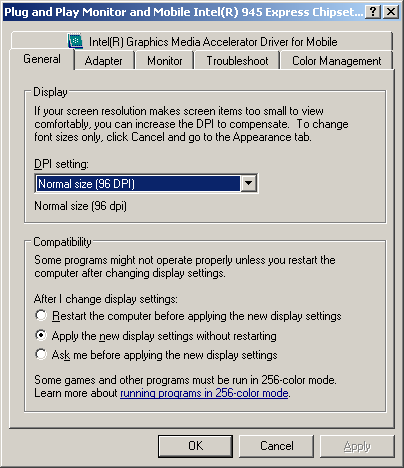
Then it dawned on me that it may be the DPI settings, which can only be accessed when clicking the “Advanced” button to get the graphics card advanced dialog box. But since it crashed I had to get an alternative fix

General Tab of Graphics Card Advanced Dialog Box

After some Googling I found this and modified the registry as follows:

[HKEY_LOCAL_MACHINE\SOFTWARE\Microsoft\Windows NT\CurrentVersion\FontDPI]
"LogPixels"=dword:00000060

[HKEY_LOCAL_MACHINE\SOFTWARE\Microsoft\Windows NT\CurrentVersion\Fonts]
"Courier 10,12,15 (VGA res)"="COURE.FON"
"MS Serif 8,10,12,14,18,24 (VGA res)"="SERIFE.FON"
"MS Sans Serif 8,10,12,14,18,24 (VGA res)"="SSERIFE.FON"
"Small Fonts (VGA res)"="SMALLE.FON"

[HKEY_LOCAL_MACHINE\SOFTWARE\Microsoft\Windows NT\CurrentVersion\GRE_Initialize]
"FIXEDFON.FON"="vgafix.fon"
"FONTS.FON"="vgasys.fon"
"OEMFONT.FON"="vgaoem.fon"

[HKEY_LOCAL_MACHINE\SYSTEM\CurrentControlSet\Hardware Profiles001\Software\Fonts]
"FIXEDFON.FON"="vgafix.fon"
"FONTS.FON"="vgasys.fon"
"OEMFONT.FON"="vgaoem.fon"
"LogPixels"=dword:00000060

[HKEY_LOCAL_MACHINE\SYSTEM\CurrentControlSet\Hardware Profiles\Current\Software\Fonts]
"FIXEDFON.FON"="vgafix.fon"
"FONTS.FON"="vgasys.fon"
"OEMFONT.FON"="vgaoem.fon"
"LogPixels"=dword:00000060

Rebooted and viola! Back to business as per normal

Daikyo Recycling Center Sdn Bhd, Brunei

After finding out that Concepts wasn’t recycling and having spotted recycling bins around Brunei I wanted to find out more about the recycling company Daikyo. So I started by calling them and asking about the locations of their recycling bins in Brunei. To my surprise the lady told me that she could not give that information to me which seemed to defeat the purpose of placing recycling bins around Brunei for people to use. I was told that the recycling bins were placed upon request of the school / company / organization where the bins are located and that people can actually come down to their site to sell things. Curious at the ability to sell stuff I took a trip to their site located at Serasa (Map location on Wikimapia).

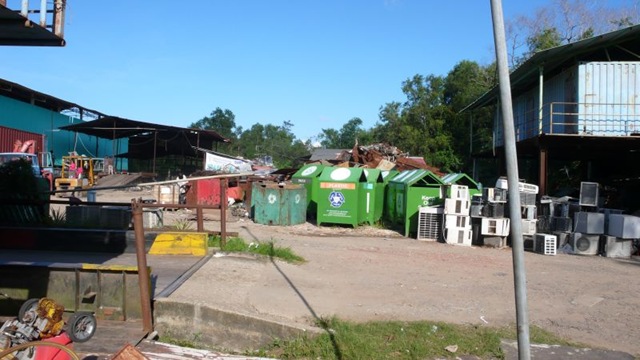
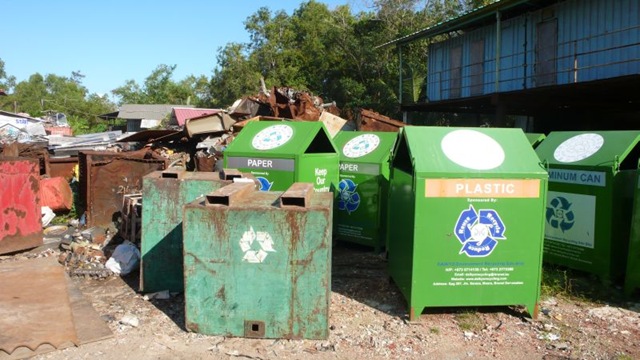
Daikyo was formerly known as Matusin Recycling and as you can see from the sign below they buy all kinds of scrap metal items ranging from plastics to scrap metal to old computers. I wish they were more willing to share information about their operations in Brunei but alas perhaps I will try another day. In the meantime get a look at the place from a few photos I took while I was there

Daikyo Environmental Recycling Sdn Bhd

We buy all kinds of scrap metal:
Zinc, Brass, Lead, Copper Wires/Pipes, Aluminium Wire/Can (Beverage), Scrap Iron, Unserviceable batteries, Waste Papers/Cartons/Books, Magazines and Used Computer
Tempat Pembuangan Kerata Buruk (rubbish dump for condemned cars)

Simpang 287, Jln Serasa Muara, BT 1128, Brunei Darussalam

Tel: +673 2773380, Fax: +673 2773381

E-mail: daikyorecycling@brunet.bn Website: www.daikyorecycling.com

Source: Their signboard shown below

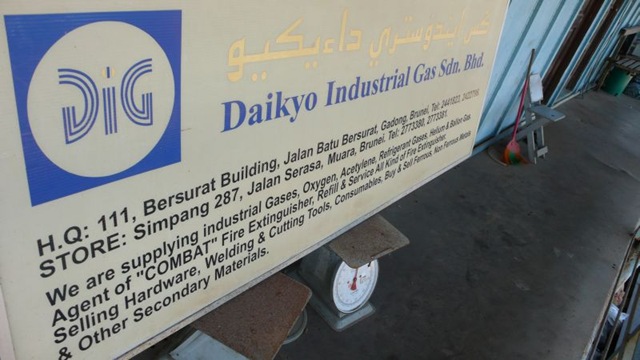
Daikyo Environmental Recycling Sdn Bhd Signboard Daikyo - Entrance Daikyo - Pile of Parts Daikyo - Overview 1 Daikyo - Overview 2 Daikyo - Overview 3 Daikyo - Lonely Old Recycling Bin Daikyo - Old and New Recycling bins Daikyo - Old Recyling Bin - Matusin Recycling Industry Company Daikyo Industrial Gas Sdn Bhd Signboard

Brunei School Terms, Exams & Public Holidays for 2010

School Terms
Term I: Mon 4 Jan – Thurs 18 March (51 days)
Term II: Mon 29 March – Thurs 3 June (48 days)
Term III: Mon 21 June – Thurs 2 Sept (50 days)
Term IV: Mon 20 Sept – Tues 30 Nov (51 days)

School Holidays
Term I: Fri 19 March – Sun 28 March (10 days)
Term II: Fri 4 June – Sun 20 June (17 days)
Term III: Fri 3 Sept – Sun 19 Sept (17 days)
Term IV: Wed 1 Dec – Fri 31 Dec (31 days)

Examination Dates
7 – 14 Jan: Lower Secondary Assessmen Retakes
12 May – 11 June: Brunei-Cambridge G.C.E. ‘O’ Level (May/June)
12 May – 11 June: Brunei-Cambridge G.C.E. ‘AS’ & ‘A’ Level (May/June)
4 – 7 Oct: Primary School Assessment (PSR) (Penilaian Sekolah Rendah)
11 – 16 Oct: Student Progress Examination (SPE) (Peperiksaan Kemajuan Pelajar)
11 Oct – 20 Nov: Brunei-Cambridge G.C.E. ‘O’ Level (Oct/Nov)
11 Oct – 20 Nov: Brunei-Cambridge G.C.E. ‘AS’ & ‘A’ Level (Oct/Nov)
24 & 26 Sept: Arab School Candidacy (PCKSA) (Pemilihan Calon Ke Sekolah Arab)
20 – 29 Nov: (SSSRU) (Sijil Sekolah-Sekolah Rendah Ugama Dh VI)
11 – 21 Oct: Student Progress Evaluation (PKP) (Penilaian Kemajuan Pelajar)
20 Sept – 9 Oct: Certificate of Regilous Studies (SPUB) (Sijil Pelajaran Ugama Brunei)
20 Sept – 9 Oct: Pre-Certificate of Regilous Studies (Pra-STPUB) (Pra-Sijil Tinggi Pelajaran Ugama Brunei)
20 Sept – 9 Oct: Higher Certificate of Regilous Studies (STPUB) (Sijil Tinggi Pelajaran Ugama Brunei)

Public Holidays
2 Jan (Sat): New Year’s Day (In replacement of Fri 1 Jan )
15 Feb (Mon): Chinese New Year (In replacement of Sun 14 Feb)
23 Feb (Tues): National Day
27 Feb (Sat): Maulud Nabi Muhammad SAW (In replacement of Fri 26 Feb)
31 May (Mon): Royal Brunei Armed Forces Day
10 July (Sat): Israk Mikraj
15 July (Thurs): Sultan’s Birthday
11 Aug (Wed): Start of Ramadan
28 Aug (Sat): Anniversary of the Revelation of the Quran (In replacement of Fri 27 Aug)
11 & 13 Sept (Sat & Mon): Hari Raya Aidilfitri (In replacement of Fri 10 & Sun 12 Sept)
16 Nov (Tues): Hari Raya Aidiladha
7 Dec (Tues): Islamic New Year
25 Dec (Sat): Christmas Day


Categories

Twitter Feed

Creative Commons

del.icio.us Bookmarks