Huawei Ideos S7 Overview

I managed to stumble upon the Huawei IDEOS S7 at Yappe IT Store in Serusop selling for B$399 (cash price) and when recording the video below I noticed that quite a few of them have already been bought. Check out the video giving an overview of the device

Specifications

  • CPU: 750 MHz Qualcomm Snapdragon (source: UMPCportal as we forgot to check the processor but it seemed decent enough)
  • GPU: Adreno 200
  • 7″ 800×480 (WVGA) Capactive Multi-Touch Screen
  • Android 2.2 with custom launcher
  • Front and Rear facing 2 megapixel cameras that record in CIF (352×288)
  • 8GB storage (7.51GB available but 116MB for apps)
  • 3G Enabled (standard SIM) with dialer (can make calls and text)
  • Can run Flash (installed from Market)
  • Upto 720p HD playback of mp4 (h264, aac), wmv files
  • Device seems rooted by default (Superuser was installed after factory reset)
  • Connectivity options: Bluetooth, Wi-Fi, GPS, microSD card slot, docking port, 3.5mm headset
  • Other hardware details: Kickstand, Removable battery, Optical trackpad

Pros

  • Budget price B$399: great budget device for a 7″ tablet and phone with calling ability
  • Able to run Flash for a fuller web experience (put settings as ‘On-Demand’ for better performance)
  • Android 2.2 thus you can do mobile tethering (share 3G via Wi-Fi)
  • Rooted
  • Cold boot / Restarts in about 1 minute
  • Decent Performance: it did not seem sluggish or noticeable slow but there were times where it took multiple touches to get the device to respond (could be also due to the plastic film on the device screen)

Cons

  • Only 116MB free for apps
  • A few default apps are landscape oriented and don’t rotate if device is in portrait mode
  • No Office software to read Word/Excel/Powerpoint files (doc/docx/xls/xlsx/ppt/pptx)
  • Battery life may be bad (based on Telstra T-Touch Tab reviews it only has 3-4 hours of typical use: CNET Australia, PC World Australia, Sydney Morning Herald. The T-Touch Tab is a rebranded Huawei S7 but has slightly different hardware)

I doubt this will get any future upgrades because it is an older model and Huawei is releasing an S7 Slim and also the recently announced Media Pad. The main issue with the device will be the battery life: having a removable battery aids it but then you will have to buy another battery and external charger to keep it running. I was contemplating on the device and using it as a mobile hotspot with my b-mobile Zoom! SIM card and using it as a tablet for reading and on the go computing. However with the possible battery life issues, the best bet for my use case is still the Samsung Galaxy Tab which will cost about B$250 more but you get better hardware and a better overall experience. But having said that, I believe this is the cheapest 3G and Flash enabled Android tablet in Brunei. If you’re looking for a budget all-in-one phone and tablet device, and don’t mind the possible battery life issues, this is a good deal.

My Message to Businesses in Brunei

Hello businesses, I’m an blogging to you in particularly today as I wish to convey a few thoughts I have about your online presence. I write this as a consumer who is would rather search for your company online rather than look your number up in a telephone directory. We live in a day and age where we are all connected and having an online presence is key in communicating to your customers and overall having better customer satisfaction.

Having an online presence can be as simple as having a Facebook / Twitter account to having a website with a full fledged shopping cart (or even more), but there are 3 main things that businesses need to communicate:

  1. Information about your business
  2. That you hear what your (potential) customers are talking about
  3. That you care about your customers

Information
Information is the easiest part and is vital for anybody who wants to find something about your business: the main things is that people want to know what you provide (e.g. what products you sell, what services you provide) and if possible, at what cost. Business hours and contact numbers along with an address / map ensures customers know where to find you or how to contact you. This information can easily be put on a website or on Facebook. Twitter may not have the best answer here, but Twitter is more ideal for listening as detailed below. Remember, when giving out information, think of what the customer wants to know: if there is a new shipment of assorted bags: perhaps a snapshot of the bags to let customers have a feel of what they can expect.

Listening
As a business you want to know what people are saying about you: how was their last experience at premises, did they have any issues while being there? Twitter is the best bet for this as it is a more open platform compared to Facebook because Twitter is a more public space and people generally have their profile and tweets in the public for anybody to see. If you hear that a customer has had a bad experience or that they mention suggestions, respond to them. Let them know that you have read / heard what they have to say. This tells your customers that you hear them; that their voices don’t fall on completely deaf ears. Now if there are things that you, as a business owner, can change for the betterment of the customer it is then time to move to the last point of caring.

Caring
You have to care about your customers as they are the ones giving you their money and if they are not happy one way or another, they will take their money elsewhere. A customer complains about a bad experience with a waiter / waitress. What do you do? Get in touch with your customer: tell them that you are sorry for the bad experience, and to make things better offer them a discount the next time they come by. Do random acts of kindness such as giving a voucher to a random person who mentions your business as a sign of appreciation.

In order to carry out these 3 things, I shall focus on the 3 most relevant platforms: a website, a Twitter profile and Facebook page, and also give a few pointers and what you should do on each platform.

Website
A website does not need to be complex and graphically rich: the main point of a website is to give information. This information is likely not going to change very rapidly: e.g. contact number, address and location, business hours. These bits of information are mostly static (i.e. don’t really change) and will be something that you should know already: i.e. there is no real cost in time to generate this. A blog / news update can also be put on a website to let customers know of things happening e.g. new stock has arrived (this could also be be done on Twitter / Facebook as well). A website doesn’t have to be expensive and you can start by creating a free one at places like Blogger, WordPress or Tumblr (and many businesses do this). Now one thing I really feel that business miss out on is branding by not using their own domain name (i.e. the words you type in the browser in order to bring up a website). I see many businesses use Blogger and have their website as this-is-my-business.blogspot.com which is pretty tacky for a business. Buy a domain name: it can be as cheap as US$1 a year (but more typically ~US$20, but could be higher depending on the URL itself). Some domain registrars you may want to check out are: GoDaddy, Domain.com and Hover. Once you have a domain name, you can set up Google Apps for Domains to get company wide email, documents and more.

Twitter & Facebook
The 2 big guns in the social media realm, these are the first 2 places to go to in order to communicate with customers and potential customers. Please make sure your profile/page is public. It can be quite annoying to click a link to your profile/page, only to have to log into Facebook or send in a friend request in order to see the full post / information. In Twitter search and monitor keywords / hash tags which could be your business name or #brunei to see what people are saying about Brunei. One step further would be to follow / friend people in Brunei and see and monitor what they have to say on a daily basis: jump in where you can help / offer advice: i.e. be courteous, caring and genuine. Twitter is easy to set up with any email address but on Facebook you can create a Facebook page under an existing Facebook account or creating a Facebook profile (read why you should create a Facebook page instead of a profile). Whichever you pick, just makes sure it is visible to anybody without having to log into Facebook (yes I did mention this before, but it’s a pet peeve of mine when the information is not public).

Listed below are some notable businesses in Brunei that have recognized an importance in their online presence and are good candidates to look to emulate or learn a few pointers from. If you know any other great businesses in Brunei doing such, do list them down in the comments below.

So businesses who aren’t in the online world, what are you waiting for?

Corner Geeks 5 Part 3: WWDC 2011 – iCloud

Corner Geeks Logo beta 2
MP3 link (right click > save as)

Check out Justin Lee’s keypoint summary of the keynote or just refer to Apple’s iCloud page or the features page for their info about iCloud.

Brief Show Notes

  • What is cloud?
    • Save once. Uploaded and Distributed ‘everywhere’ (i.e. all your devices)
  • 9 uses:
    1. Contacts
    2. Calendar
    3. Mail
    4. Apps Store
    5. iBooks
    6. Backup
      • Daily wifi backups
      • Music / Apps / Books
      • Camera Roll
      • Device Settings
      • App Data
    7. Docs
    8. Photos
    9. iTunes
  • 1,2,3,7) Contacts / Calendar / Mail / Docs:
    • similar to Android and Google or Exchange
    • change once, push everywhere (locally stored vs cloud stored for Google for docs at least)
    • Google at least can access from web. Apple to find out
  • 4,5,9) Apps / iBooks / iTunes
    • Buy once, deploy everywhere or look through purchase history. click to download
  • 6) Daily cloud backup (huge I think. I agree. Google could have done this for Android but doesnt. I want to rant about Android here haha.)
  • 8) Photo stream
    • Syncs photos taken anywhere to all attached devices
      • iOS Devices
      • PCs
      • Apple TV
    • Like Eye-Fi. kind of but requires Internet. Eye-Fi can be local transfer to PC.
    • 1000 photos stored on the device (to save permanently to device, move pic to album)
    • 30 Days limit for all shots on cloud
    • Photos all on PC all saved (iPhoto integeration?)
    • I think this kind of functionality is useful for photographers. I’m suprised not a lot of Bruniean photographers use Eye-Fis.
  • 7) Documents in Cloud / iCloud API (There could be an actual iDisk like thing for normal documents?)
    • iCloud API: Looks like dropbox but seems to be like it’s centered on sandboxes per app basis?
    • Obvious ones are things like Pages and Keynote
    • Being able to sync settings for apps.
      • Game saves
      • To have something like Kindle’s Book resume thing.
      • Hopefully alternative browsers can setup something like Google Sync. Syncs my tabs and bookmarks. Please make this happen.
  • Similar to other exiting services:
  • Possible Issues:
    • Will there be sharing? Or only to personal account?
    • Data caps / be sure not to use all your data quota and end up paying
    • Do we get offline backup?
    • All your data, are belong to fruit
  • 5GB storage space (unsure which files are categorized in the 5GB, but music / photos not included in the quota)
  • Free, No ads
  • Available in the Fall (most likely September) but some features available now with iTunes update on Mac/PC or App Store update on iDevices

Geo-Restrictions: The Biggest Problem for Android in Non-Recognized/Supported Countries

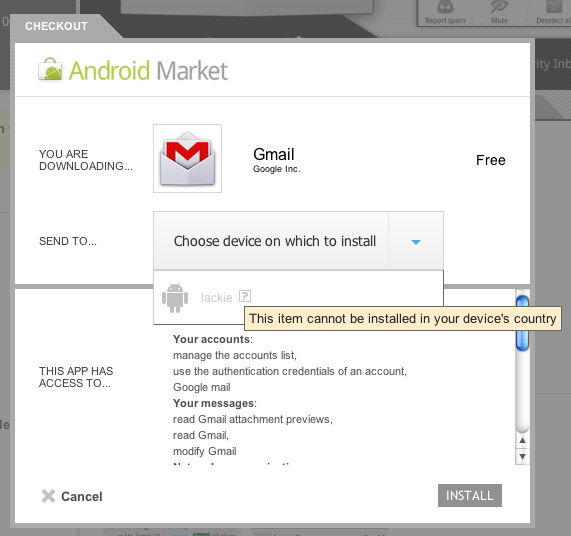
Geo-restirctions for apps in the Android Market is something you won’t hear many people talk about probably because they live in recognized countries where these apps are available. Basically what this means is that when you search for it in the Market app on your Android device, you will not find any results to install. If you use the Android market on the web you get the “This item cannot be installed in your device’s country” message when trying to select your device. This hugely detracts me from trying to recommend Android to users. While I guess many will search for the apk file online and install it, I must stress that this can be a very dangerous thing as it can be malware that you are installing on your device. You must trust your source of applications, if it is not the developer distributing the file, it could be a modified apk installer with malware installed in it.

Some notable apps that are absent from the Market here in Brunei are

As stated in their known issues under “Can’t find app” section, it states the following:

Some users are reporting that they can’t find specific apps on Market. If you can’t find an application, first try editing your search terms; the publisher may have changed the name in the application.
If you’re still experiencing this issue, please make sure that the following conditions do not apply to you:

  • Priced applications availability: Priced apps are only available to buyers in these countries. If you are not in a buyer-supported country, you will be unable to view priced applications.
  • Location: You may only view the version of Market for your country. For example, UK users may only view the UK version of Android Market from their devices. If a developer has not targeted his app to your home country, you may be unable to view it.
  • Mobile service provider: In addition to targeting for location, a developer may also target their application to specific mobile service providers. If a developer is not targeting your mobile service provider, you will not be able to view the application.

From time to time, applications will become unavailable. Publishers might remove their applications from Android Market, or applications may also be removed for policy violations.

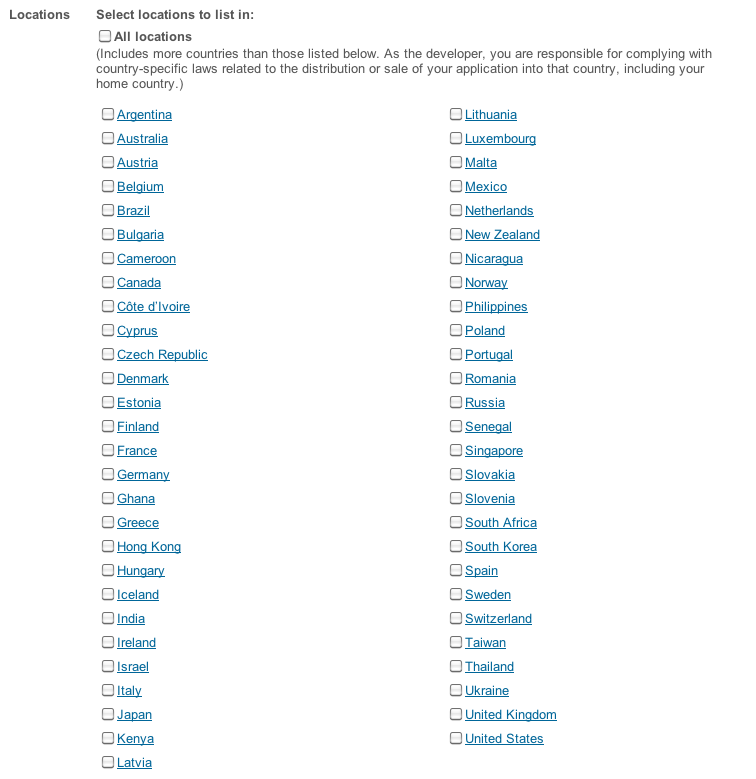
I believe this stems from the following section when developers upload their app into the Market. If the developer does unchecks “All locations” (it is checked by default), the list of countries will be shown and the app will not be available for any country not listed below, i.e. Brunei and others.

What can Google do? They can make Brunei (among other countries) as a supported/recognized country and I presume that would require some business discussions with Brunei banks/mobile carrier/ISP. As a supported country we would probably get access to paid apps as well, but I feel that is unlikely at the moment. Alternatively they can put another check box for “Other Countries” in the listing above so that developers can choose to exclude certain countries but include others.
What developers can do? Where possible make sure “All Locations” is checked, if not host their apk installers on their own site (something that WhatsApp! does)

For an Android fan I feel pretty annoyed about this restriction and is certainly an obstacle as I can’t fully recommend Android devices to people if they have to do ’round-about-things’ such as finding an unofficially distributed apk just to install Skype. Another big issue is with tablets that are able to run Flash but don’t include it out of the box: thus the tablet is neutered to iPad Flash-less status which is sad. I had a Flash apk and installed in on the Acer Iconia A500 but because it wasn’t the latest version it could not run the videos we tested. Also without a recognized country, you can’t even update apps that have been installed previously: we couldn’t update Flash via Market post-install.

There are workarounds as listed below but some aren’t pretty:

Workaround 1: Alternate Store
This is the easiest and I suggest to find a reputable app store such as Opera Mobile Store (I managed to download Skype from here, although it was an older version), but it doesn’t have all the apps I want and thus those need to be sourced from elsewhere. If you know of any other reputable stores that have apps like Skype, do let me know.

Workaround 2: Switch SIMs to a Supported Country
I’ve done this with a Australian Vodafone SIM, and I was able to download Skype. I may even use this to download apks and self-host them for all Android users (as long as I don’t get copyright take downs)

Workaround 3: Root and install Market Enabler
Root your device and install Market Enabler which should allow you to access the apps. I presume this does in software what switching SIMs does in hardware.

Workaround 4: Buy an iPhone / iPod Touch
Yes, I said it. It is a sad but true state of affairs that it is easier on iOS if you register with a US iTunes Account. The hardest thing of registration is is just using the right US address (use Google’s address as there are no taxes in their state according to @mfirdaus). The biggest issue is getting iTune gift cards, something I am still trying to find out for a reasonable price (Places in Brunei that sell them: AV, Incomm & QQeStore). But once that is all setup, it’s all easy sailing.

So Google, I hope you can sort out this problem or Android users will be severely limited in countries that aren’t recognized/supported and would prevent them from recommending Android unless they want to start pirating apps. App developers, please show some love for Android users and host the apks yourself.

Related Links

A First Look at the Acer Iconia Tab A500

The Acer Iconia Tab A500 is the first Honeycomb tablet I’ve seen here in Brunei and is the first proper 10″ Android tablet. As with most Android tablets the specs are somewhat typical: 10″ (1280×800) with dual cameras running on the nVidia Tegra2. @mfirdaus and I managed to play around with the device for over an hour and below is the video overview we took of it. Below the video are further thoughts of the device and sample photos and videos from the device itself.

Full specifications (from Concepts and Acer specification pages)

  • Android Honeycomb(3.0)
  • 10.1” (1280×800) HD Touchscreen
  • 10.24″ x 7″ x 0.52″
  • 10 points Capacitive Multitouch screen
  • 1Ghz nVidia Tegra2 Dual Core processor
  • 32GB built-in capacity
  • Dual Camera (2mp front, 5mp back)
  • GPS, E-Compass, 6-axis Gyroscope G-sensor (auto rotation)
  • Long life 3260mAh x 2 battery
  • Dual display (HDMI output) (micro HDMI port)
  • microUSB expansion slot (up to 32gb)
  • Physical USB port (Full-sized USB port)
  • Dolby Mobile dual speakers
  • Acer Clear.fi app
  • Acer Social Jogger app
  • Acer Photo Browser app
  • Preloaded games (NFS Shift, Let’s Golf, Hero of Sparta)

Weight & Size
I have always thought 10″ tablets were a bit bigger than an iPad but in fact they are similar sizes: The A500 is longer and thicker but narrower than an iPad 2 (A500: 26cm x 17.7cm x 1.33cm, iPad2: 24.1cm x 18.6cm x 0.88cm). However the A500 is relatively heavy at 765g (iPad 2 is 601g), thus if you’re holding on the device it can get tiring.

Screen
The 10″ screen was responsive and we didn’t feel at real / noticeable / annoying lag or unresponsiveness. At a resolution of 1280×800, that is the same resolution as a lot of 13″ or 14″ laptops and is of higher resolution compared to an iPad: this means when browsing you should see more content. Speaking of browsing, with the great browser which has tabs and the ability to install Flash, this would make a great web browsing device.

Honeycomb and Apps
Refer to the previous post on A First Taste of Honeycomb (Android 3.0): in short there are not many apps optimized for Honeycomb and the large screen, but regular apps can still run.

Connectivity
The killer hardware features are the microSD card slot, full sized USB port and micro HDMI.

The microSD card slot enables you to add storage without buying a new device. If you’re on a budget, just buy the lowest capacity device and add microSD cards for your media (do note that microSD cards could be slower than internal storage on device, but is probably cheaper and can be transferred to other devices in the future).

The full sized USB port means you can connect a regular USB keyboard to the device and start typing straight away if you really need to type out of an email / do word processing. This will easily make the A500 into a productivity device with the proper applications. The USB port also means that you can copy files to and from a regular thumb drive like a regular computer which is a great feature. I’ve heard that USB card readers do not work, but I have no confirmation on this.

The micro HDMI port means you can connect the device to a projector / HDTV with display mirroring (display on both device and projector/TV). While this is a great option, I still think an iPad 2 trumps with the VGA dongle because VGA is still very widely used and HDMI is not. For people wishing to use the device for presentations, I would think an iPad 2 with the VGA dongle would be much easier to work with. I don’t believe there is an easy way to convert an HDMI signal to VGA without an external box, which means added cost and added items to bring.

Cameras
The front facing camera is a 2 megapixel while the rear camera is 5 megapixels (and also has a flash) however the picture and sound quality wasn’t stellar: samples below. Do note that the device was covered with clear plastic which would affect both the video and audio quality but I wouldn’t expect quality to be much better than what we got. Audio quality is pretty disappointing. Photos are stored in JPG format while videos in 3GP (H264/AAC).

Photos (jpg)

  • Rear: 5 megapixels (2592 × 1944)

  • Front: 2 megapixels (1600 × 1200)

Videos (3gp format with H264 video and AAC audio)

  • Rear: 720p (1280×720)

  • Front: VGA (640×480)

Battery Life
We could not take the device home to test the battery life of the device but below lists battery tests from other reviews but most reviews say you can easily get an full days worth without issue.

Price
At B$728, the 32GB A500 is priced cheaper than a 32GB iPad 2 (B$798), but do note that a 16GB iPad 2 is cheaper (B$668). IMHO Concepts should have brought in the 16GB version of the Iconia Tab to undercut all iPad 2 prices because with most Android tablets you can add expansion via microSD cards.

Summary
As a consumer device, this is a great device for web browsing, reading and watching movies. If you have TVs/monitors with HDMI input, this is a possible media center device with a purchase of a microHDMI to HDMI cable or a microHDMI to standard HDMI converter. As an office device, this is a viable option is you have HDMI monitors / projectors. The USB port option is great for using external keyboards and transferring of files. Overall Honeycomb is still maturing and is hard to convince people with an Android tablet unless there is a particular function that they need/want that is available on Android or a specific tablet as the iPad, with iOS, has the advantage of apps. Would I get one myself? I doubt so, as I’m looking more of a 7″ device with USB host, VGA out (highly unlikely thus maybe HDMI out) and possibly 3G to wirelessly tether via a wireless hotspot so I may even look out for the Iconia Tab A100 which is a 7″ version that is coming out in a couple of months.

Other Useful Links

Corner Geeks 3: Portal 2

MP3 link (right click > Save Link As…)

We talk about Portal 2, one of the best games of this year and one of the games that has captured people’s hearts and minds (mine included) with the great voice acting, humour and songs that started with Portal 1. Great great songs written by Jonathan Coulton and sung by Ellen McLain

P.S. Portal 2 ringtones are free (for now?) so go download them now!

Other Links:

Still Alive

Want You Gone

A First Taste of Honeycomb (Android 3.0)

**Update 1: added “Other Notes” section**

So last Friday I when I saw the Acer Iconia Tab A500 lying there in Concepts, I just had to get my grubby paws on it and experience Honeycomb first hand. I’ve read about it, seen a few videos of it, but there is nothing like playing with it in person. I had to say that I was pleasantly surprised and felt that I wanted to get a tablet. Take a look at the Honeycomb Overview video that mfirdaus and I manage to take of below:

Honeycomb is Google’s attempt to make a version of Android desgined for tablets and it gives Android a very different and fresh feel to it. It took me a while to get comfortable with it after getting kind of lost initially using the device (i.e. it’s not as simple/simplistic as iOS on the iPad). It has the typical Android homescreen which can be populated with applications shortcuts and widgets which all quick access to information right on the homescreen. With the Android 3.1 upgrade providing resizable widgets would allow users to fill a homescreen full of your emails, Twitter timeline and Facebook wall: it’s like your own Tweetdeck columns for all the stuff that is important to you.

Browser & Flash: A fuller web experience
The browser seems superb with tabs and looks like Chrome/Chromium (my browser of choice). The possibility of playing Flash is really great to me as it provides you a fuller web experience compared to Flash-less browsers where you may come to a page that just doesn’t have HTML5 video or some random Flash navigations. Do note I said the ‘possibility’ of playing Flash because it isn’t available in the Market. This is due to a geographic location restrictions where the developer does not select the app as available to all countries (more of this in a future post). You can always find the APK installer online, but that is always a dangerous option as there is a possibility that the APK is malware or has been modified to include malware on it. Thus it is important to download it from trusted sources.

Connectivity: USB Host & HDMI
The 3.1 update to Honeycomb is especially interesting as it provides better USB host support. This will provide Honeycomb tablets will a greater possibility to replace laptops because you can transfer documents to USB drives and hook up standard keyboard and mice to it. I can imagine going to work, docking your tablet and using it throughout the day for work and when you’re done, disconnect everything and head back home. Currently Android 3.0 on the Iconia Tab supports USB drives and keyboards and I presume that this will be the same for other tablets with USB ports. With most tablets having HDMI ports, they can even be used for presentations and at home on your HDTVs. The only problem I see here is that projectors will typically always have a VGA port, not an HDMI port so this could be limiting.

Apps
A lot of the success of a platform is in the apps and since Honeycomb is still new there aren’t many Honeycomb optimized apps that take full advantage of the bigger screen and the Honeycomb action bar. This should fade with time as developers start taking advantage of Honeycomb devices. Do note that the older non-Honeycomb optimized Android apps still can work with Honeycomb (however this is not a certainty) and when they do work they would probably stretch to fill in the space depending on how the interface was design.

Stability & Usability
I’ve heard that Honeycomb can be a bit unstable with applications, such as the browser, crashing; however I did not experience such crashes in over an hour of playing with the device. Honeycomb is still new and maturing as they work out the kinks and tweak Honeycomb to be a better experience for the user: I found that there was quite a bit of finger/hand travel just to activate and navigate around the system which I guess could get annoying and tiring after longer periods of use.

Other Notes
The low application storage problem seems to be gone in Honeycomb as the whole 32GB of the Acer Iconia Tab A500 that we played with, listed the entire 32GB as available for applications and files, as opposed Android devices that have only a certain much smaller space dedicated for app.Forgot to show it on the video / take a photo but this is a very welcome change and solves the biggest problem with Android for devices with internal memory.

Summary
All in all, I’m excited to see what Honeycomb matures into as it tries to be a competitor to iOS on the iPad. While I feel iOS on the iPad is a better experience for now, I feel Honeycomb will be better for the future. I just hope that it doesn’t always stay in the future and that the future and come quickly to fruition.

Acer Iconia A500 Debunking Misinformation from Brunei Times

I’m pretty happy that @denogoh likes to cover Android but I was pretty sad to see that some of the arguments he made regards to the A500 where just wrong or could be misinformation. This article came out in the Brunei Times on Wednesday 18th May 2011. Below is a screenshot of the E-Paper version

the A500 has a proper-sized USB slot. The list of things you could do with this fabulous gadget include transferring files from pendrive or external harddisk, plug a dongle for Internet wherever you go in the world, very easily find a cable to connect to whatever you want to connect it to)

Just because there is a USB port doesn’t mean it will support any USB device: it needs the necessary drivers for the OS to communicate with the USB device. For instance, there is no mouse support yet (but is supposed to come soon with an over-the-air upgrade). It seems some people are working to get a 3G USB dongle to work with some success but it doesn’t look like something for a regular user.

not to mention it’s quite light (lighter than the iPad 2)

But it is not lighter than the iPad 2 which according to Apple specs is 1.33pounds (601g) for the Wi-Fi only model and 1.35 pounds (613g) for Wi-Fi+3G model. The Acer Iconia A500 is “0.4 pounds heavier than the iPad 2” according to Laptopmag.com while Gigaom reports the weight to be 1.69 pounds and Carrypad reports: 765g. All 3 different sources say that it is heavier.

The video capabilities of the tab is not something to boast about as well, but you do get 1080p later this year

While it does not support extra codecs, the standard H264 in MP4 format, AAC, MP3 should all work fine and they are the typical formats available: similar to the iPad 2. Otherwise software decoding could be used though players like RockPlayer Lite to play files that is not initially supported. Currently 720p output is available with 1080p output to come in the future.

Currently the A500 32GB version is going for B$728 at Concepts which is cheaper than a 32GB iPad at B$798 (however there is a 16GB iPad2 which is cheaper, currently it seems that the 16GB A500 is not brought in). @mfirdaus and I will try do a (possible live stream) video later doing an overview of Honeycomb and the device itself

Want a computer to trade-in?

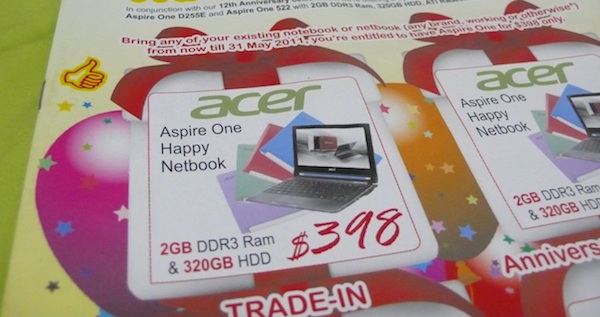
So Concepts Computer is having another trade-in offer at the moment: get an Acer Aspire One Happy for only B$398. I always love this trade-in offer as it gives people a chance to get rid of their old non-working computers and get discount in return. If you can’t get the trade-in offer, it is still going for B$468 under their Anniversary Special Deal.

I have some notebooks that meet this requirement and am willing to give them to anybody who wants to take advantage of this good offer. Anybody interested leave a comment / email me (tim _AT_ thewheatfield.org) / tweet me @thewheat and we’ll be in touch.

Bring any of your existing notebook or netbook (any brand, working or otherwise*) from now till 31 May 2011, you’re entitled to have Aspire One for $398 only.
*Terms & Conditions apply:-
Old Notebook or Netbook can be in working or non-working condition but all main components inlucding motherboard, HDD, processor, RAM, battery pack, power adapter etc… must be present. We reserver the right to reject any products deemed incomplete. Thank you

P.S. I also have desktops that can be used for the other trade-ins that don’t require laptops. Check Concepts website or visit their store to find out the latest trade-in deals

Rationalizing an Acer Iconia Tab W500

Trying to get on the tablet bandwagon, Acer introduced 3 tablets: the W500, A500 and A100. The W500, which has recently been available in Brunei, runs Windows 7 while the other 2 (more interesting tablets) are Android tablets. Sadly with the iPad around, the W500 will undoubtedly get compared to it but honestly it should be compared more to a netbook if anything else. The W500 has netbook specifications and runs a full version of Windows 7 and thus is a different category of a tablet / slate when compared to the iPad. It seems you can even play play Half-Life 2 on the W500 thanks to the AMD (i.e. ATI) GPU.

Specifications of the Acer Iconia Tab W500

  • Genuine Windows 7 Home Premium 32-bit
  • AMD C-Series processor C-50
  • AMD Radeon HD 6250 Graphics,
  • 10.1″ HD 1280 x 800 (WXGA) resolution
  • Acer CrystalBrite™ LED-backlit TFT LCD with integrated multi-touch screen
  • 2GB of DDR3
  • 32GB Solid state drive
  • Fast Ethernet
  • Bluetooth 3.0+HS
  • 802.11b/g/n Wi-Fi
  • Dual Acer Crystal Eye webcams with 1280 x 1024 resolution
  • 36 Wh 3260 mAh 3-cell Li-polymer battery Estimated battery life: up to 6 hours
  • 2-in-1 card reader (SD, MMC)
  • Two USB 2.0 ports
  • HDMI port with HDCP
  • G-Sensor
  • 0.97 kg (2.14 lbs.) with 3-cell battery pack
  • 275 (W) x 190 (D) x 15.95 (H) mm
  • 1-Year International Traveller Warranty

Based on the prices from Concepts the Iconia Tab W500 is B$778 while the Acer netbook (Intel: D255 / AMD: AO522) is B$498: that is a price difference of B$280, which is pretty reasonable as you get a few things with the W500 that you don’t get on a regular netbook are:

  • a higher resolution screen 12800×800 vs a typical netbook resolution of 1024×600
  • dual webcams
  • a touch screen
  • a 32GB SSD
  • the flexibility of using the device as a notebook/netbook or a slate device

You can actually modify a netbook to have a touch screen but you would need to buy and install it yourself which would void your warranty and hopefully you will be able to put everything back together nicely after installation. A 32GB SSD will set you back over B$100 and a touch screen for will also cost US$74 (~B$90) adding up to a minimum of B$200. A high resolution screen and dual webcams can’t really be added to a regular netbook and certainly a netbook won’t have the slate form factor where the screen detaches from the keyboard, so topping up an extra B$80 and you get a fully functioning polished device as opposed to try customizing a netbook into a solid state touchscreen device.

There are some issues with the device itself being that Windows 7 may not be ideal for use with a touchscreen so it may not provide an ideal experience but I guess this is up to user preference and use case: try it out and see if it works for you and what you want to do with the device. Secondly, the SSD is only 32GB meaning after installation of the operating system and any applications needed, there may not be much space left for anything else. An SSD is not meant to be cheap however, it’s mean to be fast and is more robust than regular hard disk drives so this means you can use this device when on the move in a car or train without having to worry about the hard drive getting scratched/damaged if you were to hit a bump. The W500 also probably has a lower battery life compared to a regular netbook but if the added functionality of having a touchscreen slate computer experience is something appealing or useful for you, this could be a viable and affordable option.