Brunei’s Online Shopping Experience – Part 1

I was really encouraged when I first heard of QQeStore several years back. They pioneered the field of online shopping on a local stage and they brought it with a nicely designed website too. Not sure how long after that a rival was born in Shopping.com.bn (I won’t and can’t link to them due to their ridiculous terms of use). I’ve been a customer of QQeStore for several purchases ranging from my old phone (Nokia 3110c) to a Sony Ericsson charger to a hard drive and I was please with the experience but I thought I was time to take a look at these 2 shopping stores and pit them head to head in different features and functionality and tell you which store you should shop at. I recently made purchases from both online stores and document my experiences with them in the following sections.

Covered in this art:

  • Design
  • Usability
  • Product Selection


Design

QQeStore
QQ: Design WIN

Shopping.com.bn
Shopping.com.bn: Design FAIL

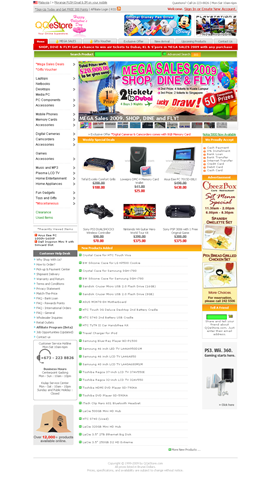
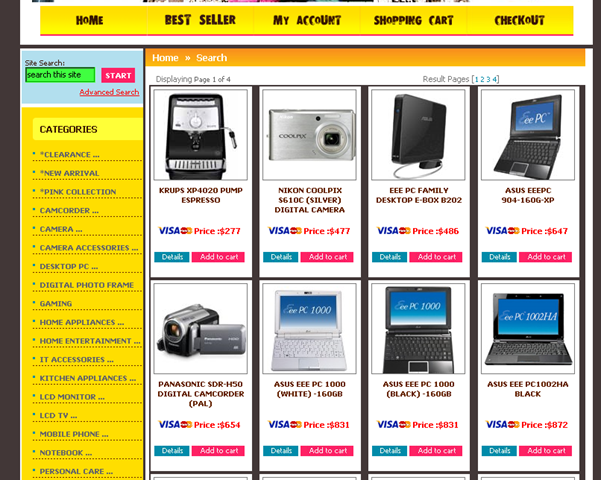
Hands down QQeStore has a great eye pleasing design and is a joy to use: clean, simplistic and functional. Shopping.com.bn is using way too many different colours and

Round 1: QQeStore


Usability

QQeStore

Shopping.com.bn

QQ: Typical page Shopping.com.bn: Typical page

Typical page


QQ: item selection Shopping.com.bn: item selection

Item Selection


QQ: Item Page Shopping.com.bn:Item Page 1/2

 
Shopping.com.bn:Item Page 2/2

Item Page


QQ: Pagination WIN Shopping.com.bn: Pagination FAIL

Pagination


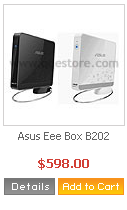
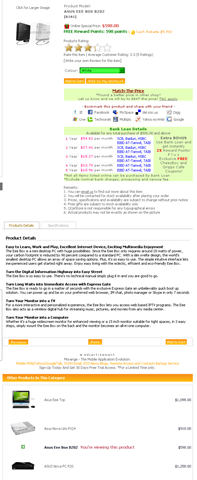
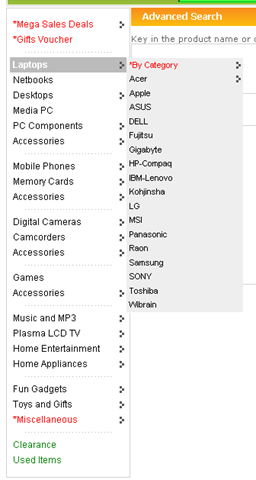
Browsing through the catalogue as you decide to window shop or what item to buy, both stores offer a similar experience but QQeStore stands out by having more product information: “Product Details” and “Specifications” while also offering a section on “Other Products In This Category”, a great way to discover other products that may better suite your needs. The product details is an ideal way to introduce unfamiliar customers with the product and is a great way to give an idea to the customers of what the product does, as to some specifications alone may be complete gibberish. Chalk another point for QQeStore with their “next” and “previous” pagination buttons as both offer small hard to click page numbers, these next and previous links help the process of jumping page to page.

Round 2: QQeStore


Product Selection

QQeStore

Shopping.com.bn

QQ: Product Selection

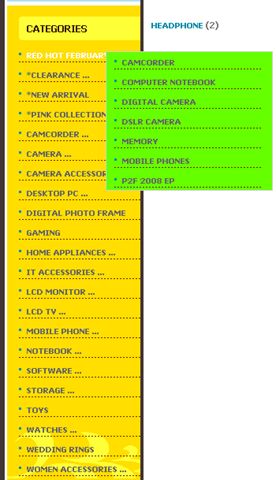
Shopping.com.bn: Product Selection

Both stores are very IT and home electronics related but they other things such as jewelry, wedding rings on Shopping.com.bn and some interesting toys and thinga-majigs on QQeStore

Round 3: Tie (No clear winner)


Part 1 Conclusion

After 3 round QQeStore has the upper hand with 2 wins over 0 for Shopping.com.bn. In the following parts, topics such as the shopping process, hidden charges, security and price will be covered so stay tuned

Using your phone as a modem via USB

image35

Though Bluetooth is a nice wireless way to use your phone as a modem, Bluetooth has it’s issues and sometimes it’s just not worth it when you can connect your phone via USB easily and without fuss. Using a USB cable would ensure faster transfer speeds over Bluetooth, if the maximum Bluetooth speed is capping your speed, and would also utilize less battery from your phone thereby giving advantages if you don’t mind the wires flowing around

Requirements:

  • Ensure your phone is configured to be able to connect to the Internet (example for DSTCom Brunei)
  • Drivers for the phone to be recognized as a modem on your computer (should be on CD that comes with the phone, or in the installed software, or possibly find it online)

Notes:

  • Following guide is done on Windows XP, if you need a Mac version, do lend me your Mac and I can tried make 1 for you =)
  • To obtain maximum connection speeds, the modem’s maximum speed to maximum as detailed here


For All Phones

  1. Connect the phone and install necessary drivers to recognize phone as a modem
  2. Open up “Network Connections” in the “Control Panel” and a new connection should be created
    image41
  3. Use that connection and dial *99# to connect to the Internet
     

For Nokia Phones

Continue reading “Using your phone as a modem via USB”

Using your phone as a Bluetooth modem

As a follow up to “Configuring your phone for mobile Internet (DST)”, in this post I’ll detail how to use  your phone as a Bluetooth modem freeing you from the mess of wires and also providing a way to utilize tethering without installing bloated phone software like the Nokia PC Suite. Using this method also allows DST users with 3G SIM cards and 3G/3.5G capable phones to enjoy the great speeds of DST’s Go! without having to subscribe the the DST Go! service or buying the Go! SIM card or buying the USB modem.

Requirements:

  • Phone with Bluetooth
  • Computer with Bluetooth
  • SIM card with credit (duh)

Requirements for high speed Internet over 3G/3.5G

  • 3G/3.5G phone in 3G mode (3G only or dual mode is acceptable but not GSM)
  • 3G SIM card
  • 3G phone signal (for Nokia phones it is shown with a little “3G” icon under the regular signal bar)

Note1: if phone/SIM does not meet 3G requirements or no 3G signal is available, the phone will fall back to slower GPRS / Edge connection, but the Internet will still be accessible.

Note2: Not all 3G/3.5G phones are created equally and each have a maximum 3G speed that it can obtain. This can hinder These details can be obtained online from places such as GSMArena.com. E.g. Nokia 6680 max 3G speed of 384 kbps, Nokia E51: max speed of 3.6 Mbps.

My current configuration setup:

  • Windows XP Professional
  • Using “dst.internet” as the access point
  • HP Compaq nx6320 notebook
  • Nokia E51 / Nokia 6680 / Nokia 3110c

The following is the brief outline of the procedure utilizing “My Bluetooth Places” software provided by WIDCOMM preinstalled with the notebook, however the concept stays the same over any computer / Bluetooth software:

  1. Pair phone and computer
  2. Configure phone as a Bluetooth modem
  3. Create network connection dialing *99#
  4. Optional: set extra initialization command to:
       +CGDCONT=,,”dst.internet”
           where “dst.internet” is the access point to connect to

Despite the maximum speed defined in the modem settings is 921600 bps (= 900 kbps) which is less than 3.6 Mbps or 7.2 Mbps offered by Go! and typical phones, I have managed to get 1.5 Mbps connections using this Bluetooth method my previous speed tests so I’m not really sure what’s up with that.

Nokia Phones with Nokia PC Suite

Refer to this post. It is for USB connection, but follows the same concept

Detailed Pictorial

Continue reading “Using your phone as a Bluetooth modem”

DST 3G speed tests

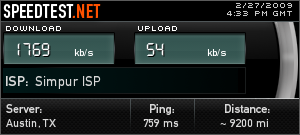
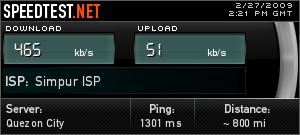
While I did get a DST GO! SIM card quite a while back just to see how it is, I am reluctant to call these GO! speed tests as they were done on my phone with a 3G Easi SIM card, not a GO! SIM card. Basically all mobile phone customers of DSTCom (Prima or Easi) can enjoy the fast speeds of GO! without having to spend anything extra, so long as you have the following

  • 3G / 3.5G phone
  • 3G SIM card

Note: Not all 3G/3.5G phones are created equally and each have a maximum 3G speed that it can obtain. These details can be obtained online from places such as GSMArena.com. E.g. Nokia 6680 max 3G speed of 384 kbps, Nokia E51: max speed of 3.6 Mbps.

Jalan Kebangsaan Lama


UBD: Institute of Medicine


Opera Mini not working in Brunei?

Been having a problem since yesterday of not being able to surf using Opera Mini using dst.internet or dst.wap. Anybody else having the same problems? Did DSTCom block access to the Opera Mini’s proxy servers?

–Update 26/02/2009: All seems well now. I guess it was some mix up over at DSTCom

Configuring your phone for mobile Internet (DST/bmobile, Brunei)

Note: for Android configuration refer to this post

With mobile Internet being very cheap on DSTCom (B$0.05/MB) we all wish to to be surfing the ‘net but before that your phone needs to be configured to do so. The settings supplied by DSTCom are:

For Internet access
Name: DSTInternet
APN: dst.internet
Username: <no username>
Password: <no password>

For MMS
Name: DSTMMS
APN: dst.mms
Username: mms
Password: mms
MMS Server: http://mms.dst.com.bn/mmsc
Proxy Address: 10.100.6.101
Port No: 3130

However it’s not always easy translating these settings to your phone. I recently had issues with a friend’s Sony Ericsson G502 being a Nokia person myself.

Update 1: Due to search requests on bmobile internet connection I shall add it here based on the findings of Hazarry’s work here (PDF file) and bmobile’s iPhone settings.
Bmobile’s APN: bmobilewap. More detailed configuration can be found

For Internet access
Name: bmobilewap
APN: bmobilewap
Username: <no username>
Password: <no password>
Proxy Server Address & port (these settings seem optional as they are not listed in bmobile’s settings PDFs)
HTTP: 129.9.10.20:6500
WAP: 129.9.10.20:6500
Socks: 129.9.10.20:1080

For MMS
Name: bmobile MMS
APN: bmobilemms
Username: <no username>
Password: <no password>
Proxy Server Address & port: 129.9.10.20:6500
Socks: 129.9.10.20:1080

Server Name : B‐Mobile MMS
Gateway : 129.9.10.20
Port Number : 6500
Server Address : http://mms.bmobile.com.bn/was
Connect Via : MMS Servers
Size Limit : 300K
WAP Version : WAP 2.0
GPRS Authentication: PAP

–End of Update 1

Nokia E51 Configuration

Continue reading “Configuring your phone for mobile Internet (DST/bmobile, Brunei)”

Speaking of Bad Terms of Service

While doing some shopping online I came across the following clause in the terms of service from an online store. I would tell you where I got it from but after reading it you’ll know why

7. NO LINKING, FRAMING, MIRRORING, SCRAPING, DATA-MINING OR POSTINGS

Links to the Website without the express written permission of 1GCB are strictly prohibited. To request permission to link to the Website, please send an email to cs@shopping.com.bn. 1GCB may in its discretion cancel and revoke any permission it may give to link to the Website at any time and without any notice or liability.

The framing, mirroring, scraping or data-mining of the Website or any of its content in any form and by any means is strictly prohibited. You may not use any collaborative browsing or display technologies in connection with your use of the Website or to post comments, communications, or any other data of any kind to or on the Website with the intention that such postings may be viewed by other users of the Website.

Brownie points for a clause against data-mining and scraping, though.

We have the right to remain silent… Or do we? Please check the EULA

I was in the heart of Gadong yesterday having lunch with a couple of friends at the only McDonald’s in Brunei and after a quick trip to The Mall we found out they were distributing flags which would seem like a nice thing but their tactics get me a bit wound up. Let me say first that I do believe in patriotism and I will celebrate my country’s upcoming 25th National Day but I believe in asking permission when handling other people’s property. The methods used in distributing some of these flags in the Gadong area was that the people in charge would stick the flag onto your parked vehicle without your prior knowledge. Would some lawyer care to help me to explain to me the legality of this or whether we have the right to protest it? They have done this last year as well and I’m not too sure about the previous years but I take offence to the fact that an unauthorized person is leaving their mark on somebody else’s property. Isn’t that similar to defacing public property or graffiti?

And it was just a day after that incident that I read the new issue about Facebook’s New Terms of Service. Each time we install software we agreed to a EULA (end user license agreement) which dictates how we are supposed to use the piece of software. With online services like Facebook there are the “Terms of Service” / “Terms of Use” by which we inherently agree to when we use the service, whether we bother to read the terms or not. The following is what Facebook has to say about your (/their?) content:

You are solely responsible for the User Content that you Post on or through the Facebook Service. You hereby grant Facebook an irrevocable, perpetual, non-exclusive, transferable, fully paid, worldwide license (with the right to sublicense) to (a) use, copy, publish, stream, store, retain, publicly perform or display, transmit, scan, reformat, modify, edit, frame, translate, excerpt, adapt, create derivative works and distribute (through multiple tiers), any User Content you (i) Post on or in connection with the Facebook Service or the promotion thereof subject only to your privacy settings or (ii) enable a user to Post, including by offering a Share Link on your website and (b) to use your name, likeness and image for any purpose, including commercial or advertising, each of (a) and (b) on or in connection with the Facebook Service or the promotion thereof. You represent and warrant that you have all rights and permissions to grant the foregoing licenses.

Facebook basically states that they have the rights to use any content of yours for any purpose they like without asking you for permission. This problem has been around for quite a long time and was noticed by Jan Shim. For all content creators out there I hope this is a wake up call to all of your and for non-content creators there is still something else to worry about with online services and especially social sites such as Facebook, and that is privacy / identity issues. LSM’s take on this is dealt out in his article entitled “My identity in the hands of strangers”. On top of that I will add Andy ITGuy’s post on “25 Random Reasons I Won’t Tell You 25 Random Things About Me”.

So before you go on registering for that website offering you some great deals or just so you can read an article, perhaps you should reconsider your actions of signing away a bit of your personal information…. Or just check BugMeNot to see if you can just sign in using readily available credentials.

**Update 18th Feb 2009: It seems that Facebook has reverted back to the previous Terms of Service as told by founder, Mark Zuckerberg after the user uproar. A good sign that at least they are listening to users feedback and possibly taking a little page out of Google’s book with Google’s “Don’t be evil” motto