Nice to see that Seri Qlap Cineplex have recently created an RSS feed for their movie listings. Only caveat is that it doesn’t seem to be updated as quickly as the website’s schedule, but a thumbs up nonetheless.
Powered by ScribeFire.
http://blog.thewheatfield.org
Nice to see that Seri Qlap Cineplex have recently created an RSS feed for their movie listings. Only caveat is that it doesn’t seem to be updated as quickly as the website’s schedule, but a thumbs up nonetheless.
Powered by ScribeFire.
Been having a problem since yesterday of not being able to surf using Opera Mini using dst.internet or dst.wap. Anybody else having the same problems? Did DSTCom block access to the Opera Mini’s proxy servers?
–Update 26/02/2009: All seems well now. I guess it was some mix up over at DSTCom
With mobile Internet being very cheap on DSTCom (B$0.05/MB) we all wish to to be surfing the ‘net but before that your phone needs to be configured to do so. The settings supplied by DSTCom are:
For Internet access
Name: DSTInternet
APN: dst.internet
Username: <no username>
Password: <no password>For MMS
Name: DSTMMS
APN: dst.mms
Username: mms
Password: mms
MMS Server: http://mms.dst.com.bn/mmsc
Proxy Address: 10.100.6.101
Port No: 3130
However it’s not always easy translating these settings to your phone. I recently had issues with a friend’s Sony Ericsson G502 being a Nokia person myself.
Update 1: Due to search requests on bmobile internet connection I shall add it here based on the findings of Hazarry’s work here (PDF file) and bmobile’s iPhone settings.
Bmobile’s APN: bmobilewap. More detailed configuration can be found
For Internet access
Name: bmobilewap
APN: bmobilewap
Username: <no username>
Password: <no password>
Proxy Server Address & port (these settings seem optional as they are not listed in bmobile’s settings PDFs)
HTTP: 129.9.10.20:6500
WAP: 129.9.10.20:6500
Socks: 129.9.10.20:1080For MMS
Name: bmobile MMS
APN: bmobilemms
Username: <no username>
Password: <no password>
Proxy Server Address & port: 129.9.10.20:6500
Socks: 129.9.10.20:1080Server Name : B‐Mobile MMS
Gateway : 129.9.10.20
Port Number : 6500
Server Address : http://mms.bmobile.com.bn/was
Connect Via : MMS Servers
Size Limit : 300K
WAP Version : WAP 2.0
GPRS Authentication: PAP
–End of Update 1
Continue reading “Configuring your phone for mobile Internet (DST/bmobile, Brunei)”
So it was today that the ‘O’, ‘AS’ & ‘A’ Level Results came out and in the recent days before, it was pretty well advertised that students could get the results by SMS. So when I heard word that the results were out I went to the Registration page to be greeted with a pretty, how would I put it, not so aesthetically pleasing site. Yes I know functionality is what is important and I do personally believe in that and I know my skills in design need a lot of work but come on people!
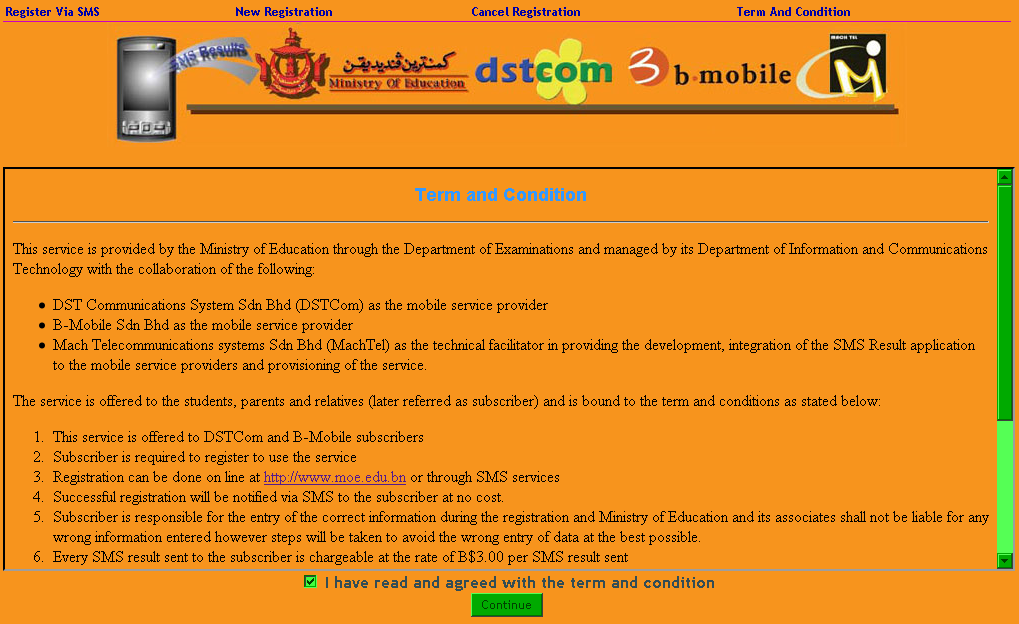
The site in question
So I decide to take a look around and see how they handle the registration of users….
Step 1: Input Details
Step 2: Confirmation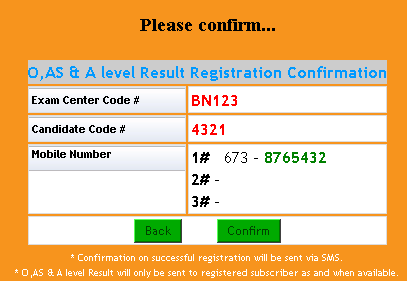
Step 3: Nothing, we’re done!
It does state that registration is free which is good however they was a huge flaw in the design process of this registration. As shown in the next 2 steps:
Step 4: Receive Confirmation SMS
Registration for BN123 4321 CANDIDATE NAME is successful.

To cancel the registration, type MOE CANCEL 98765 and

send to 8885555
Step 5: Receive Results SMS
O LEVEL RESULT 2008

Exam Center: BN123

Candidate Index: 4321

A.M = A

B.M = A

BIO = A

CHE = A

COM = A

ENG = A

MAT = A

PHY = A

RSLT = 8 0
–Update: Actual candidate name and results changed for illustration purposes
Part 2 will be released once Mach Telecommunications Systems fixes the exploits in question (or if they don’t do anything about it, forcing me to release it)
Update: Read Part 2 here
So recently my sister got me a Nokia E51 (GSM Arena) for my birthday, replacing my Nokia 3110 classic. Well actually it was more of her asking me what phone I want and she gave me the money to buy it.
I’ve been eying the phone for quite a while particularly for the connectivity options (HSDPA, Bluetooth, Wi-Fi) and relatively reasonable price of B$398. Based on the comment count over at shimworld people are/were interested in this phone (I guess the focus is now on the Nokia E71 / E63. A bit over my typical device budget but I guess technology is just expensive, heh.
Most reviews online have mentioned the keypad is pretty good but I beg to differ, I’ve had issues with it, from not recognizing the next button pressed, but especially due to the placement of the backspace button. I vary the way I type on my phone, from the single handed method using my thumb to the 2 handed double thumb method. I found blind typing (I do not use dictionary) very hard, especially for words that utilize 2 letters from a single button, example food (f-o-o-d) which I would typically type by pressing 333,666,down,666. Notice I press the down button on the 4 way navigation keypad so that I can move on to typing the next ‘o’ without having to wait, but due to the placement of the backspace key, I tend to hit it, instead of the down button, leading to frustration. I’ve had to modify my typing habits by using the right button instead of the down button, but also due to the placement of the backspace key, when I do need to use it, I may end up hitting down / 2. Of course this is greatly reduced if I use to hands and if I stare at the phone thus forcing me to uni-task on typing. I think the button are cluttered around the navigation keypad and is a disadvantage for the chubby fingered like myself, you end up pressing the wrong buttons, leading to frustration. The typical complaint of the side rubber buttons (power, record, volume up and down) which are hard to press but that’s mentioned in all reviews and I knew about it but it is a concern.
The rest of my issues (so far) are with the S60 platform / Symbian OS that the E51 runs on, in comparison to my old Nokia 3110 with it’s S40 3rd Edition platform. The E51 runs S60 3rd Edition Feature Pack 1 with the following firmware (as obtained by dialing *#0000#)
220.34.37
20-10-2008
RM-244
Nokia E51(14)
I am not sure how much of these issues are Nokia issues, S60 (and thus Nokia) issues, Symbian issues or just plain ole too-fussy-lil-me issues. Whichever way it is, they are issues that plague me once and a while and some that plague me day after day. In light to these issues I have to say the 3110c is superior to the E51 when it comes down to usability (but certainly not on functionality) on a day to day use. I have to say the E51 is too thin for taste and the 3110c has a pretty much perfect form factor and keypad, 2 things that will get me every time. Now if Nokia would make an E51 fit into a 3110c case that would be perfect!
Powered by ScribeFire.
So DST just launched it’s OntheGo! service which is a “mobile portal product by DSTCom providing information and entertainment contents which can be accessed by all DSTCom customers on 3G as well as on GPRS/EDGE.” (yet again with the ‘!’ at the end of the name). It seems like a competitor to bmobile’s mobi.TV but as you can see from the completely different channel selections they are for different target groups.
| OntheGo! | mobi.TV | |
|---|---|---|
| Rates | Various as below | $9.90 for 16 channels (does not state if there is a charge for streaming, which I believe there would be) |
| News | CNN | CBNC,Al Jeezera |
| Sports | ESPN Sports | Golf Asian Tour, Extreme Sports |
| Entertainment | Disney, Nickelodeon, Astro Ria, and Astro AEC | fashionTV, F Men, Luxe TV, Asian Food Channel, Travel Channel, Fun Little Movies, E!, Fish Tales, Animax, Taffy Kids |
| Music | MTV, Astro Hitz | C Music, Trace TV |
| OntheGo! Rates | ||
|---|---|---|
| Browsing | Free except for Mobile ESPN & Star SPorts Mobile $1 each per month. Islamic Portal $3 per month and data charges apply for Facebook, Yahoo!, Daily News, Simpur Mobile Portal & Music Chart | |
| Video On Demand | ||
| < 2 minutes clip | $0.30 per view / $0.50 per download | |
| >= 2 minutes clip | $0.50 per view / $0.80 per download | |
| Video stream | $0.05 per min | |
| Live stream | $0.05 per min | |
| Webcams | $0.05 per min | |
| Downloads | ||
| Ringtones, Phone Themes, Screensavers | $1.50 per download | |
| Wallpapers, Calendars, MMS Greetings | $0.50 per download | |
| MMS Uploading | $0.05 per MMS | |
| Games | $4.00 per download | |
OntheGo! is trying to do more than mobi.TV by being a portal like iTunes which has it’s music store, video store and application store. It’s trying to be a one stop shop which for the moment. And I say this just from the information I get online (Brunei Times | Brudirect | Borneo Bulletin) because I can’t access the site on my phone / on my computer / via a proxy so I can’t take a look at what it’s like. I like the fact that they are trying to build media access on the go, however I think we still need better backend work. I’ve heard complaints about DST Go! speed, probably due to everybody jumping on that band wagon thus sharing the speed within the area of usage and I still get GPRS connection errors now and again. And I guess they should get the website up, running and ready when the news is out! Because that is totally unacceptable.
Powered by ScribeFire.
I wonder if it’s just me or is the MSN Messenger Protocol having issues lately. I’ve had minor issues with it in the past few months and even heard of issues with it during my university days when which was over 2 years ago (wow, how time flies). The complaint over 2 years ago was when sending messages (using the standard MSN Messenger) it would give an error saying that the message couldn’t be delivered. And thus the conversation would end and the party who got the error message tries to send more messages and they keep failing. I didn’t suffer that problem at that time but in the recent months I’ve had it with Miranda. I first thought it was a Miranda issue so I changed Digsby and alas the same problem. Sometimes the error message says that the message failed to send due to a time out so naturally I would send it again and I was told I sent the same message twice (or even more).
I remember a friend of mine having an issue of time delays with MSN and so he tried a simple (far from being scientific) experiment sending the same message with 2 different instant-messaging (IM) protocols (GTalk and MSN) and the GTalk was practically instantaneous while the MSN took quite a while.
Today a friend of mine said she was online the whole afternoon and didn’t get any message, she then went to appear offline and all the messages flooded in.
With all these issues with the MSN protocol and the heavy reliance (at least from my experience) on the MSN protocol for business purposes it seems to me that people should migrate to another IM protocol. From the observations above it seems that MSN is an asynchronous protocol meaning that when you send it, you are not sure when the other party will receive it. I would recommend using a synchronous protocol but the problem with all these IM platforms and social sites it always depends on where your friends/family/business partners are at. You can move but if nobody else moves with you, it’s futile. Wondering if there is any widely used open IM platform that allows migration of contacts of this sort. This is also a reason why Identi.ca is pretty interesting to me, which is a micro-blogging service just like Twitter, Jaiku and Plurk but as it’s FAQ says
How is Identi.ca different from Twitter, Jaiku, Pownce, Plurk, others?
Identi.ca is an Open Network Service. Our main
goal is to provide a fair and transparent service that preserves users’ autonomy. In
particular, all the software used for Identi.ca is Free Software, and all the data is available
under the Creative Commons Attribution 3.0 license, making it Open Data.The software also implements the OpenMicroBlogging protocol, meaning that you can have friends on other microblogging services
that can receive your notices.The goal here is autonomy — you deserve the right to manage your own on-line
presence. If you don’t like how Identi.ca works, you can take your data and the source code and set up your own server (or move your account to another one).
Wouldn’t it be great if your data were free and open?
Powered by ScribeFire.
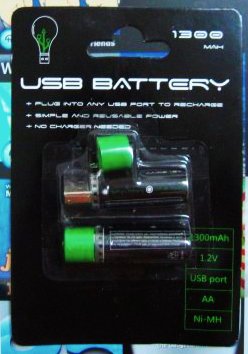
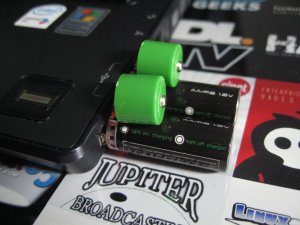
I just found them unique and gadget guy in me couldn’t resist. Too bad it’s only 1300mAh which is pretty dismal when they have batteries of double that capacity. But anyway it’ll help me de-clutter the area with out the need for a wall charger.
I was happy with the mouse but little did I know that in my final year I would get see quite a bit of the Razer Diamondback in my future.
Diamondback specifications:
I got the original Diamondback as a birthday present from the guys. Thanks again guys! =D (I’m pretty sure it was more of Zhenyang’s idea though) It came bundled with the Razer eXactMat so it was a nice deal. While playing in a Counter-Strike Source competition ended up winning a Diamondback Plasma edition (nice blue glow with an invisible laser compared to the red glow of the visible LED). Winning was mostly due to our great leader Ultima of Xtreame ChaotiX. The Diamondbacks are nice and light but the 1600 DPI takes quite a bit of getting used to and with retail prices of over $60 they were not the kind of mice you would want to get for every desktop / laptop you use. And this leads me back to the quest for the mouse: a an affordable mouse with decent specifications that can be used by even gamers. And as I was strollilng Hua Ho Yayasan I found it.
Enter the Logitech Optical Mouse USB

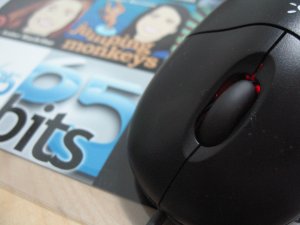

Not an eye catching name at all; heck it was pretty hard for me to find the exact name, I thought it was just a description of the product not the actual name!
The tilt wheel can be rocked left / right and these 2 buttons can be customized from zooming to scrolling to simulating a keypress (or even a combination of keypresses). Tested it with Battlefield 1942 and the performance of the mouse was flawless: perfect tracking without any skipping or the ‘why-am-I-facing-the-ground/sky’ problem when you move the mouse too quickly and the hardware just can’t keep up with it. And to top it all off the mouse cost $16.90. $16.90!! Yeah it’s more than those el-cheapo $10 mice but add the extra $6.90 and you will not regret getting this mouse: unless of course you need a small compact mice (or any other reason that this mouse won’t find your requirements) but for everything else I would recommend this mouse for everybody. Period.
The Logitech Optical Mouse USB: Functionality, simplicity all at a great cost (but not a great name)
— TheWheat
Powered by ScribeFire.
As the guy from Berakas continues to do us a great service I thought I’d help chip in with this Google spreadsheet Mobile Broadband Speeds Tests – Brunei: Comparisons (http://snipurl.com/gozoom).
 The Wheat Field