Introducing the Corner Geeks

Corner Geeks Logo beta 2
MP3 link (right click > Save Link As…)

So after a month after recording our first episode, here we go: Firdaus (@mfirdaus) and I talk about OS X with his recent purchase of his MacBook Air, and the discussion goes a bit technical/inside-baseball talking about keyboard shortcuts and we even ended up talking a bit about the iPad.

Do let us know what you think: feedback is highly appreciated =)
Tweet us: @thewheat / @mfirdaus

Buyer Beware: Why Knowledge and Price Checking is Important

At times we all need a new gadget, be it out of a want or a necessity and so you search online to find the gadget that suits you and then try to find the best deal, however online prices may not be the best deal after all. Also some people may not even do research and using the ‘if it costs more, it usually is better’ rule as a yard stick for their decision. Below are 2 screenshots from 2 different online shops in Brunei: QQeStore and Incomm.

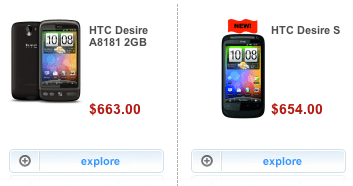
Below: Incomm showing the HTC Desire going for B$663 while the Desire S goes for B$654 ($9 cheaper)
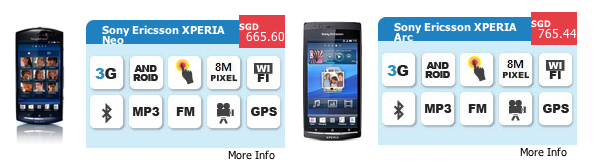
Below: QQeStore displays that the Xperia Neo is B$798 while the Arc is B$788 ($10 cheaper)
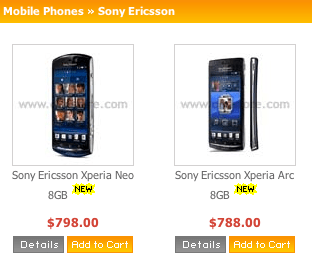
Due to the price difference, it could bring somebody to believe that the HTC Desire is better than the Desire S and the Neo is better than the Arc. In actual fact it is the other way around: the Desire S is a new generation after the Desire and while the Arc is a flagship phone thus is a higher premium phone. This is why knowledge is important, buyers should educate themselves with any device that they wish to get so they don’t run into any gotcha moments after buying it.

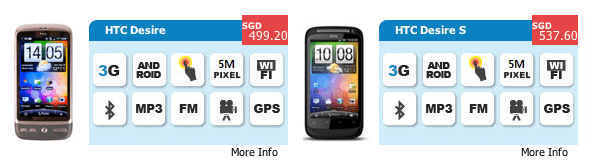
However, if you don’t have the time to check for all the details and reviews, doing an online price comparison with a store that keeps prices up to date (vs the typical Bruneian depreciation-does-not-exist price). Check the 4 local online stores: QQeStore, Shopping.com.bn, eMall and Incomm for price comparisons first then go on to check other online stores. One place I found recently for phones and tablets is SGBest.com. While I haven’t shopped with them, nor am I affiliated to them in any way, it seems like a good tool for price comparisons. The typical a-newer-and-better-device-has-a-higher-price mentality usually works in this case as shown in the screenshot below showing the phones used in the previous example, showing the Arc and Desire S being more expensive than the Neo and Desire respectively.
I hope this serves as a public service announcement or even just some link sharing of online stores for you to do your tech price comparisons for your future shopping endeavours. If you have any links to share, feel free to leave some in the comments, we will all thank you for helping us lighten our wallets and purses =)

P.S. there is always eBay Global (searches all eBay sites around the World, not just US) and DealExtreme (for lots of little gadgets and stuff – the closest thing to RadioShack I can get)

Want a computer to trade-in?

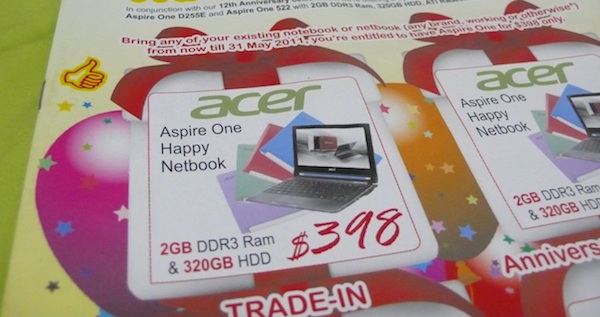
So Concepts Computer is having another trade-in offer at the moment: get an Acer Aspire One Happy for only B$398. I always love this trade-in offer as it gives people a chance to get rid of their old non-working computers and get discount in return. If you can’t get the trade-in offer, it is still going for B$468 under their Anniversary Special Deal.

I have some notebooks that meet this requirement and am willing to give them to anybody who wants to take advantage of this good offer. Anybody interested leave a comment / email me (tim _AT_ thewheatfield.org) / tweet me @thewheat and we’ll be in touch.

Bring any of your existing notebook or netbook (any brand, working or otherwise*) from now till 31 May 2011, you’re entitled to have Aspire One for $398 only.
*Terms & Conditions apply:-
Old Notebook or Netbook can be in working or non-working condition but all main components inlucding motherboard, HDD, processor, RAM, battery pack, power adapter etc… must be present. We reserver the right to reject any products deemed incomplete. Thank you

P.S. I also have desktops that can be used for the other trade-ins that don’t require laptops. Check Concepts website or visit their store to find out the latest trade-in deals

Rationalizing an Acer Iconia Tab W500

Trying to get on the tablet bandwagon, Acer introduced 3 tablets: the W500, A500 and A100. The W500, which has recently been available in Brunei, runs Windows 7 while the other 2 (more interesting tablets) are Android tablets. Sadly with the iPad around, the W500 will undoubtedly get compared to it but honestly it should be compared more to a netbook if anything else. The W500 has netbook specifications and runs a full version of Windows 7 and thus is a different category of a tablet / slate when compared to the iPad. It seems you can even play play Half-Life 2 on the W500 thanks to the AMD (i.e. ATI) GPU.

Specifications of the Acer Iconia Tab W500

  • Genuine Windows 7 Home Premium 32-bit
  • AMD C-Series processor C-50
  • AMD Radeon HD 6250 Graphics,
  • 10.1″ HD 1280 x 800 (WXGA) resolution
  • Acer CrystalBrite™ LED-backlit TFT LCD with integrated multi-touch screen
  • 2GB of DDR3
  • 32GB Solid state drive
  • Fast Ethernet
  • Bluetooth 3.0+HS
  • 802.11b/g/n Wi-Fi
  • Dual Acer Crystal Eye webcams with 1280 x 1024 resolution
  • 36 Wh 3260 mAh 3-cell Li-polymer battery Estimated battery life: up to 6 hours
  • 2-in-1 card reader (SD, MMC)
  • Two USB 2.0 ports
  • HDMI port with HDCP
  • G-Sensor
  • 0.97 kg (2.14 lbs.) with 3-cell battery pack
  • 275 (W) x 190 (D) x 15.95 (H) mm
  • 1-Year International Traveller Warranty

Based on the prices from Concepts the Iconia Tab W500 is B$778 while the Acer netbook (Intel: D255 / AMD: AO522) is B$498: that is a price difference of B$280, which is pretty reasonable as you get a few things with the W500 that you don’t get on a regular netbook are:

  • a higher resolution screen 12800×800 vs a typical netbook resolution of 1024×600
  • dual webcams
  • a touch screen
  • a 32GB SSD
  • the flexibility of using the device as a notebook/netbook or a slate device

You can actually modify a netbook to have a touch screen but you would need to buy and install it yourself which would void your warranty and hopefully you will be able to put everything back together nicely after installation. A 32GB SSD will set you back over B$100 and a touch screen for will also cost US$74 (~B$90) adding up to a minimum of B$200. A high resolution screen and dual webcams can’t really be added to a regular netbook and certainly a netbook won’t have the slate form factor where the screen detaches from the keyboard, so topping up an extra B$80 and you get a fully functioning polished device as opposed to try customizing a netbook into a solid state touchscreen device.

There are some issues with the device itself being that Windows 7 may not be ideal for use with a touchscreen so it may not provide an ideal experience but I guess this is up to user preference and use case: try it out and see if it works for you and what you want to do with the device. Secondly, the SSD is only 32GB meaning after installation of the operating system and any applications needed, there may not be much space left for anything else. An SSD is not meant to be cheap however, it’s mean to be fast and is more robust than regular hard disk drives so this means you can use this device when on the move in a car or train without having to worry about the hard drive getting scratched/damaged if you were to hit a bump. The W500 also probably has a lower battery life compared to a regular netbook but if the added functionality of having a touchscreen slate computer experience is something appealing or useful for you, this could be a viable and affordable option.

iPad 2 Launch in Brunei

So today was the launch of the iPad 2 in Brunei and @mfirdaus and I managed to do a bit of live streaming coverage. I got there just before 9am and noticed that there already was a queue of about 10 people but soon after that when the AV staff arrived on the scene they put up a proper queue with queue posts and a with a nice little sign.

I asked the AV staff on hand about how many units they have, and was told “alot” and not to worry. But sadly about 15 minutes after that @JustCinful went in to get hers, but was told that there were no more 3G models in stock and could only pre-order. She was about 50th in the queue, so there weren’t that many people before her. I honestly wish AV gave a specific number of units rather than a vague terms like “a lot”.


Above is a Photosynth panoramic image at 10:08am after the first batch of 20 went in.

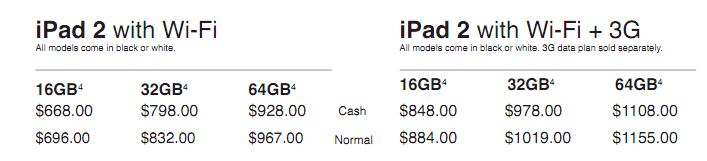
At about 3:30pm after recording a uploading the video and did some other recording, I went to AV and they still had Wi-Fi models in stock. Final prices are below and contact AV on Facebook, Twitter (@ave_brunei) or call them at +673 223 7650 (Kiulap) / +673 245 6436 (Mall)

iPad 2 Wi-FI

  • 16GB: B$668 / B$696 (Cash/Normal)
  • 32GB: B$798 / B$832 (Cash/Normal)
  • 64GB: B$928 / B$967 (Cash/Normal)

iPad 2 Wi-Fi + 3G

  • 16GB: B$848 / B$884 (Cash/Normal)
  • 32GB: B978 / B$1019 (Cash/Normal)
  • 64GB: B$1108 / B$1155 (Cash/Normal)

Check out the edited live coverage video below

Ubuntu 11.04, Natty Narwhal, has been released

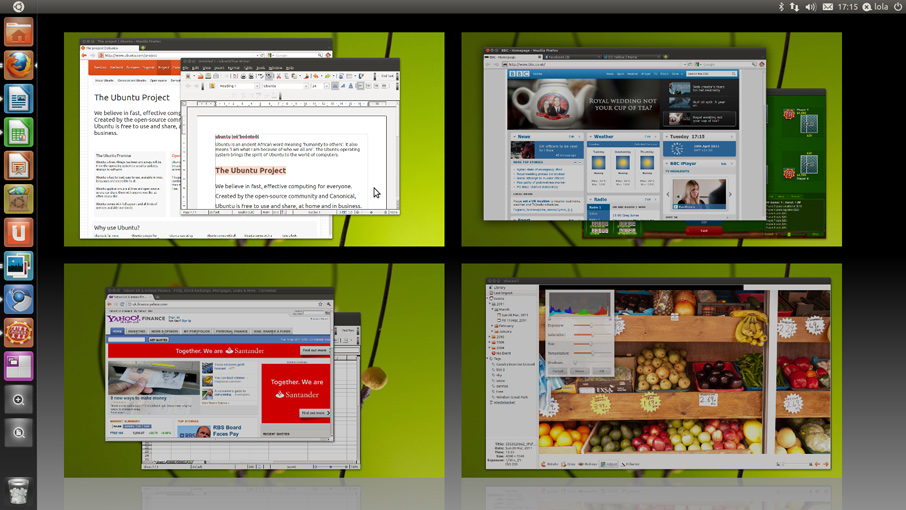
The first version of Ubuntu for this year has been released. It is dubbed Natty Narwhal or for easier date reference 11.04. Check out the release naming scheme on the Wiki that includes the history of this naming convention. But in all seriousness the main new change is that they have changed to the Unity as the desktop environment instead of Gnome. This brings a refreshed look to this Linux distribution as well as providing added functionality. Check out OMG! Ubuntu’s guide to Natty Narwhal and Ubuntu’s own “What’s New” page.

Summary for UI changes as well as naming convention:

  • Unity: a new desktop environment which could be described as the desktop / user interface that the user sees when they log in. It is comprised of the Launcher, the Dash and the Panel
  • The Launcher: This seems more like OS X’s dock than WIndows task bar. You can launch applications from from it and open windows should shown in the launcher
  • The Dash: similar to the Window’s Start button (or now the Windows button), this will allow you to look through and launch any application installed
  • The Panel: situated at the top of the screen, this acts as a global menu bar just like OS X, but also integrates with other applications through the indicator area (similar to Windows’ notification area)

Go try it out and download it now. You don’t even have to install it, just burn it to a CD or install it to a USB drive and boot straight from it to see how your hardware handles it. For the computer enthusiast there is no reason not to give Ubuntu a try and delve into the world of Linux.

Brunei iPad 2 Pricing from AV Electronics

I believe I’ve stumbled upon the iPad 2 pricing for tomorrow’s launch. Cash price is matches as Singapore’s prices.
** hint: check the Facebook link for iPad 1 and improvise ;-) **
**update: yup prices are confirmed correct**

iPad 2 Wi-FI

  • 16GB: B$668 / B$696 (Cash/Normal)
  • 32GB: B$798 / B$832 (Cash/Normal)
  • 64GB: B$928 / B$967 (Cash/Normal)

iPad 2 Wi-Fi + 3G

  • 16GB: B$848 / B$884 (Cash/Normal)
  • 32GB: B978 / B$1019 (Cash/Normal)
  • 64GB: B$1108 / B$1155 (Cash/Normal)

Health Promotion Campaign

The Health Promotion Centre is currently holding a Health Promotion Campaign that started last week. As you can see below from the schedule that have sent out this week is vaccination week and according to their Facebook page there will be a “Healthy Cooking Demo” by RBC and Serikandi at 9am and 230pm on Friday. It is free and a first come first serve basis.

As a takeaway from this campaign, I hope this sets an example for other departments/organizer to invite bloggers and also to organize events during non-working hours for people with regular day jobs to attend. Perhaps also a full program with times for each program so it will be easier for people just to pop by if they are free. Perhaps I’m being too idealistic but if they want participate, and not just newspaper coverage, it needs to be done after office hours. I commend the Health Promotion Board for being proactive in inviting bloggers and also being active on their Facebook and Twitter pages: other organizations should take some tips from them

P.S. I would like to thank Shahiran (or @TalkingAloudBru as he is known online) for formally inviting to Bruneian bloggers (myself included) to participate in the 3 week program. Sadly last week was a very busy week as I was involved with some Easter preparations on top of a regular 8-5 day job. Hope to check out a few of their things events / exhibitions soon.

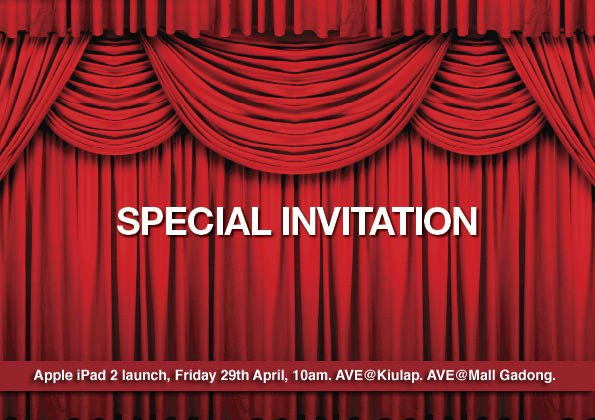
iPad 2 launch in Brunei

After hearing word of the iPad 2 launch in Singapore on the 29th while doing Tech Talk Coffee Shop tonight, I was surprised to see that AV Electronics, the premium Apple reseller in Brunei is also having their launch on Friday 29th at 10am at both their Kiulap and Mall stores. Singapore prices are listed below and I would think Brunei prices will be slightly higher, perhaps B$50 to B$150 higher, but kudos to AV Electronics for getting it the same day as Singapore. From the Facebook page AVE mentioned that they have “around 100 different SKU of accessories” but the iPad 2 dock won’t make it in time for the launch.

Singapore iPad 2 Pricing

WiFi

  • 16GB: SGD$668
  • 32GB: SGD$798
  • 64GB: SGD$928

WiFi + 3G

  • 16GB: SGD$848
  • 32GB: SGD$978
  • 64GB: SGD$1,108