Why I Have and Use 4 Different Browsers

My relationship with web browsers has not been a monogamous one. It used to be with Opera and then Firefox but now I have 4 with me and each serves their purpose. The best part about these browsers is that they are all cross-platform and thus is available on Windows, OS X and Linux (and probably BSD and many other platforms too). I use both Chrome and Chromium for daily surfing with Firefox and Opera for special functions. Each browser has their own pros and cons and below I explain why I use each browser.

Chromium/Chrome

chromium logo chrome logo

I started migrating to Chrome after the Pwn2own results came out with Chrome being unscathed. For those who don’t trust Google there is always Chromium on which Chrome is based on. Chrome/Chromium are light weight and fast browsers and I love the ability to install add-ons without restarting the browser. Sometimes I segregate general surfing and more private surfing (i.e. requiring user login) into separate browsers just as an added precaution (paranoia). Private surfing will be more for trusted sites thus will less vulnerable to cross-site scripting or other attacks from the browser used for general surfing. However I do find stability is an issue sometimes with tabs randomly locking up and not loading (however the great thing about Chrome is that you can kill an individual tab without the entire browser crashing). Some times I click a link and Chrome seems to just hang there and not load the page. If I try the link in Firefox, it’s fine
+ Security, Light Weight, ability to install add-ons/extensions without browser restart
Stability and robustness sometimes an issue

Firefox
firefox logo

Firefox is still with be because I find it the most stable but more importantly for the Video DownloadHelper extension. Download embedded Flash videos from YouTube, Vimeo and many more video sites or just embedded videos without having to visit a secondary page. I cannot stress how easy it is to use Video DownloadHelper to get videos off the Internet: it’s great for downloading videos for watching later. This is especially if you have a slower Internet connection as it downloads in the background as opposed to loading in a tab that you can accidentally close or even worse yet, have the video fully loaded only to accidentally click on a link and the video starts loading from 0 when you return (especially annoying with embedded YouTube videos)
+ Stable. Robust. Great add-on/extensions support
Add-on/extension installation requires a browser restart. Slow to start up

Opera
opera logo

I have been an Opera user and fan since version 3.21 and when it was still a Shareware application. Though it hasn’t made much impact on desktop browser, it has had a huge impact on mobile browser with Opera Mini. Opera is used when I want to surf on a slower Internet connection or where it’s not very reliable and the reason is Opera Turbo. Basically Opera Turbo is the technology behind Opera Mini but for the desktop: it sends pages to Opera’s servers for compression and optimization. This is great if you’re trying to save money if you pay for the amount of data you download (e.g. on 3G connections). Opera has lots of features built right into the browser and thus means you don’t need to install extra add-ons/extensions like you need in Chrome/Chromium and Firefox. I love the feature to toggle style sheets, image loading and Javascript (among other things) easily at the click of a button. Whenever there is a site that seems to render weirdly on other browsers, I usually load it up in Opera and disable styles so I can read the content. If I want to save precious bits, I turn Opera Turbo on, and disable loading images. Opera even has an e-mail client and webserver (can be used to share files, stream music and even host temporary sites) built into the browser.
+ Opera Turbo & lots of features out of the box (ability to toggle style sheets, Javascript, images)
Not widely supported as other 2 browsers and has rendering quirks (may not render/show webpages as nicely as other browsers). Slow to start up

Johnny Long’s Hackers for Charity Update at Shmoocon 2011


Hear what Johnny Long and hackersforcharity.org have been up to thus far. Just had to share this as it is just so inspiring of what he’s been up to and this journey with Hackers for Charity

Related information about Johnny and the how you can get involved with Hackers for Charity:

HP Veer, Pre 3 and the TouchPad

HP just announced 3 products:

  • TouchPad: 9.7″ tablet with phone integration (take calls / send text from the tablet itself) available in summer
  • Veer: a credit-card sized phone with portrait slide-out QWERTY keyboard available in early spring
  • Pre 3: the successor to the Pre 2 with a bigger and higher resolution screen available in summer

What’s interesting as well is that they announced that webOS is coming to PCs later in the year (probably more for touch based devices). I would have preferred a 7″ tablet but I guess placing it head to head with the iPad in terms of size makes it a direct alternative to the iPad with out the “it’s too small” / “it’s too big” argument for 7″/10″ tablets. Specs seem good, but more importantly we will have to see if developers will jump on yet another mobile platform.

Catch the full event coverage at Engadget. Quick specs of the device listed below

TouchPad

  • 9.7-inch XGA capacitive, multitouch screen with a vibrant 18-bit color, 1024×768 resolution display (iPad-like sized and screen resolution)
  • 13.7mm thick x 190mm tall x 240mm wide
  • 1.6 pounds
  • Qualcomm Snapdragon dual-CPU APQ8060 1.2GHz
  • Front-facing 1.3-megapixel webcam for live video calling
  • webOS 3.0
  • Beats Audio technology
  • Rechargeable 6300 mAh (typical) battery
  • Wi-Fi 802.11 b/g/n
  • Bluetooth 2.1+ EDR
  • 16/32GB storage
  • 1GB RAM (Twice the memory of Pre 2)
  • True multitasking
  • Touch-to-share (tap phone to ‘transfer’ URL to the phone)
  • Flash
  • Phone integration (text / call from TouchPad with via Pre 3)
  • QuickOffice, Google Docs, Dropbox, and Box.net compatibility. VPN, video calling, wireless printing. Kindle app for webOS
  • WiFi version (available in summer) as well as 3G and 4G versions
  • More specifications here

Pre 3

  • 3.58-inch multitouch screen with a vibrant 24-bit color, 480×800 resolution WVGA display
  • webOS 2.2
  • 5-megapixel auto-focus camera with LED flash, HD (up to 720p) video recording
  • Forward-facing VGA camera
  • Wi-Fi router functionality for up to five devices using HP mobile hotspot.
  • Qualcomm Snapdragon 8×55 1.4GHz processor
  • HSPA+ and EVDO Rev A World Phone
  • 802.11 b/g/n
  • Bluetooth 2.1+ EDR
  • 8/16GB storage
  • 512MB RAM (same as Pre 2)
  • 1230mAh battery
  • Available this summer
  • More specifications here

Veer

  • 2.6-inch multitouch screen with a vibrant 18-bit color, 320×400 resolution
  • Qualcomm MSM7230, 800Mhz
  • webOS 2.2
  • 5-megapixel camera with extended depth of field, geotagging, and video capture
  • Credit card-sized: 15.1mm thick x 84.0mm tall x 54.5mm wide
  • Wi-Fi router functionality for up to five devices using HP mobile hotspot.
  • Snapdragon 7230/800MHz
  • HSDPA 7.2/HSUPA 5.76. Quad-band GSM/EDGE: 850/900/1800/1900. GSM/GPRS/EDGE
  • 802.11 b/g
  • Bluetooth 2.1 + EDR
  • 8GB Storage
  • 512MB RAM (Same as Pre 2)
  • 910 mAh (non-removable); up to 5.0 hours of talk time or 300 hours of standby time.
  • Available in early spring
  • More specifications here

What to look out for in an Android device

Android Robot from Google via Wikipedia

Want to get a new Android device / phone? Here are a few things to take note of that should be helpful in making your decision.

CPU & RAM

Sadly I cannot deny that this is true, especially for the lower end of the Android device market. Basically this combination will dictate how smooth the device feels. The 600MHz on the LG Optimus One is fine because it is combined with Android 2.2 and 400+MB of RAM. I think the LG Optimus One is an ideal candidate for base specifications of and Android device. It’s fast enough for the device to have a smooth and fluid appearance. Cheap Android devices may give low end CPUs and low amounts of RAM leading to a sluggish Android experience: thus I would suggest anybody looking at cheap devices to actually test it out to see that it’s not too sluggish for your liking. A lower CPU will cause webpages to render slower as well due to it requiring CPU power to process Javascript or just plain HTML to render the page.
Recommended: at least 600MHz processor w/ 300MB RAM

OS Version

Android 2.2 also known as Froyo is what I would recommend the device to have and ideally have it installed by default. Froyo has been optimized so that it will run faster than Eclair (Android 2.1) on the same hardware. It also has extra features like moving applications to the SD card and also Flash if the hardware supports it.
Recommended: at least Android 2.2

Screen Resolution

I say that an HVGA screen (480×320 resolution) is the minimum resolution you should look at for a phone size device as (1) it provides a better browsing experience by displaying more of the content on screen & (2) there will applications that won’t support lower resolutions. Typically applications that won’t support this resolution will just be games but I feel a better web browsing experience is much more beneficial. Do note that screen size may be important too as a high resolution on a small screen size makes default text pretty small, so it is something to consider. For a 7″ tablet device, I think WVGA (800×480) is sufficient. Higher resolutions typically just make things look crisper and although that is nice, personally I don’t think it really makes much of a difference (I only recently realized that the HTC Desire has a WVGA screen, didn’t really notice it until I found out about Flash specifications that require at least a VGA screen, more on that later).
Recommended: at least HVGA screen (480×320 resolution) for a phone size device & at least WVGA (800×480) for a 7″ tablet size device

Available Phone Storage

This is a very big problem that I outlined here and may be something relegated for only budget devices but it is always something to be aware of. You don’t want a brand new device only to find out you are limited to install a limited amount of applications. I think 1GB would be the ideal amount as currently I’m struggling with my LG Optimus One’s limited 172MB of storage. While I do have 60+ self installed applications (only about 12 games), for a power user I think 500MB should be the minimum.
Recommended: at least 500MB for power users / gamers or 150MB for casual users

Android Market & Google Applications Availability

This is not a big deal for most phones as they typically have the Android Market, but due to Googles requirements not all Android devices can have Google applications and the Market. This means the device will have to use a 3rd party application store (there are several) but they may not offer all that is offered in the official Market. This problem will be mainly seen in tablets. e.g. Archos 70, Archos 101, Toshiba AS 100. There are ways around this, but require the community to provide it. This may work for the Archos devices but may not work for other tablets (e.g. those manufactured in China as seen on Shanzai.com). There are alternative app stores such as SlideME, AndAppStore and AppsLib or you can just download apk’s from GetJar or the developer’s website if available.

Flash Availability

If having Flash is important to you (for the sake of just being able to view certain sites), do take note that there is a minimum hardware requirement for Flash 10.1 on mobile. It requires Android 2.2 and and a hardware vector FPU. For VGA devices: Dedicated Cortex A8 (ARMv7) 550MHz App Processor with Neon for A8. WVGA devices: Dedicated Cortex A8 (ARMv7) 800MHz App Processor.

Battery Life

This is if you want your device to last throughout the day or just for regular use. Lots of the cheap China tablets have pretty bad battery life (~3 hours maximum) and give for a generally bad usability experience of having to be near a power outlet. Do note that WiFi usage is much less power hungry that 3G, so when possible use WiFi. My Optimus One can last the entire day on WiFi and be over 60% of the battery level at 6pm (unplugged at 7am with 100%) but if I’m on 3G it will practically die by 3pm (10+%/hour) (Note: The Optimus One has a 1500mAh battery).

Updates / Firmware Updates

Updates for new Android versions are totally dependent on the manufacturer of the device, so even if Android 2.3 Gingerbread is out now, it won’t come to your device until the handset manufacturer prepares a firmware specifically for that device. There are ways around this by installing custom firmware but that is unsupported by the manufacturer and could be harmful to your device (check out XDA developers, MoDaCo or CyanogenMod for custom firmware). According to this article HTC has the best track record followed by Motorola and Samsung with Dell, LG and Sony having 0%. For the Optimus One, I feel that it doesn’t have to have an update: 2.2 is sufficient and if I have a device with 2.2 being the last update I could live with that.

Launcher / Home Screen

HTC devices come with HTC Sense which is HTC’s custom UI launcher, Samsung has something similar with their TouchWiz UI and Motorala has their Motoblur. While these may be a consideration for some as they have special widgets and features, don’t be let down if your device doesn’t have any of these because Android has many launcher replacements that are just as good, if not better. Popular ones are LauncherPro, ADW Launcher and Go Launcher EX; and what’s best about these launchers is that they can be used on any device, giving you a consistent feel on all devices.

Conclusion

I hope the information helps you decide on a good Android device for you or just informs you a bit more about the Android platform. The Android platform is a good one and offers great things like multi-tasking and notifications which iOS does not have. There are some annoyances or issues I have with Android that makes me wish for a Symbian (S^3) phone due to some extra functionality such as true multi-tasking, but more on that in a future post.

EasiDial for DST Easi Card Users

So yesterday I decided to do some Android development. I wanted to learn the basics of creating and app to be used for the SMARTER app that will be developed shortly. This idea for the app has been in my mind for quite a while and was spurred on when my brother who went on holiday outside Brunei asked me how to make phone calls using Easi when roaming. I knew that you couldn’t just do a normal call but had to dial a special USSD code to dial (the code being *101*Mobile Number#). Now, it’s not a hard thing to do, to jot the short code down but having a dedicated app lets you have some piece of mind knowing that it has what you need to make the call.

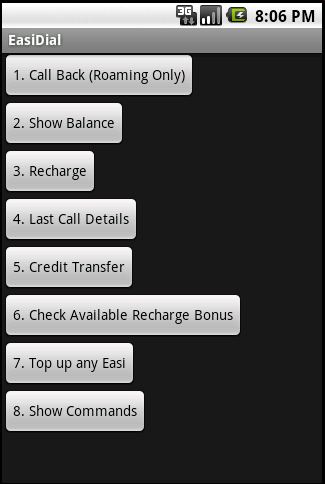
It’s not much: basically all that it is, is a graphical representation of all the *100# code functionality. Note that this is a beta application so there may be some issues. I have yet to try “1. Call Back”, “3. Recharge”, “5. Credit Transfer” and “7. Top up any Easi” but will try do so, in the next coming days to make sure they work. You can downoad the apk file here or get it on the Android Market (computer link)

Making Registration/Questionnaire Forms in Google Docs

Last Saturday a friend asked if it would be possible to have an online registration form for a camp their organizing, so I thought it would be a perfect time to look at Google Docs as I remembered that they had a form creation functionality and I was pleasantly surprised and what I discovered.

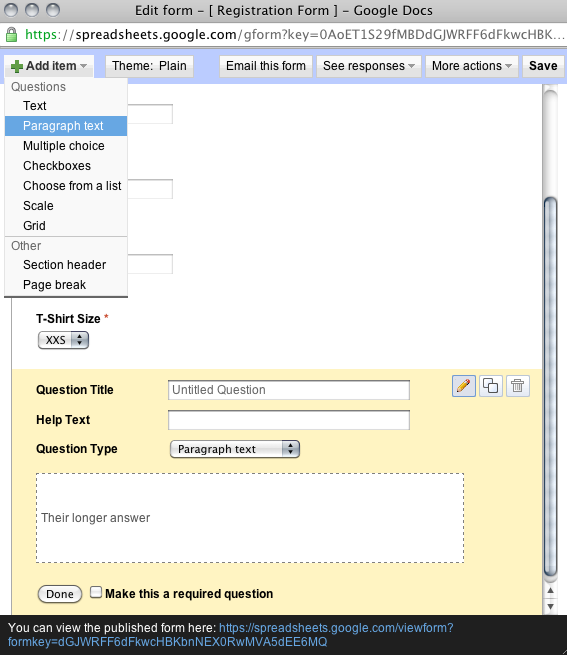
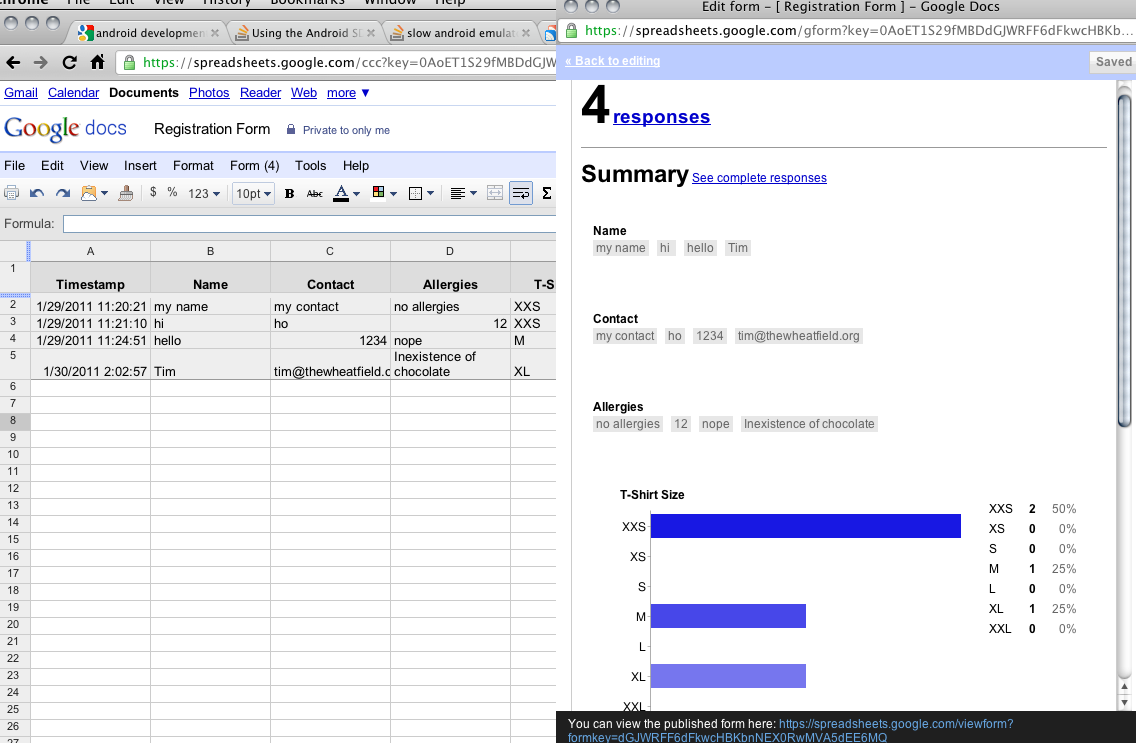
What is great is that Google Docs provides a relatively simple way to create the form and share it online (remember to change the privacy settings to public/not require a sign in if you want the public to answer). Above is a simple form that I came up with in about 5 minutes of playing around with the Form builder: just select the field type from a drop down list (text / multiple choice / checkbox / etc) and enter the question details and mark the field as required if necessary. Drag and drop the fields to arrange their order. Plain and simple yet effective. Now aside from that, you can also choose a theme from their presets although I don’t think you can make any changes/customizations to the theme, but nonetheless a nice option as opposed to a standard white background form. Not only does it generate the form, but all the responses are automatically linked to a spreadsheet and charts are even drawn up based on the the answers to the questions. So if you need a quick registration form / questionnaire all it takes is 10 minutes of your time to generate a simple form and be able to share it with anyone.

Step-by-Step Guide in Creating Forms using Google Docs:

  1. Sign into Google Docs
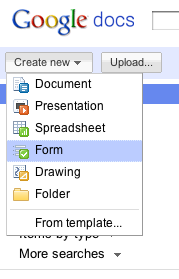
  2. Go to the “Create new” drop down menu and select “Form”

  3. Create the necessary fields/questions

  4. Set the proper permissions in the Spreadsheet that gathers the data (In Form Editor: See responses > Spreadsheet. In the Spreadheet: Share > Sharing Settings)

  5. Embed / share the link
  6. Gather responses / data from people filling in the form
  7. View responses

Fixing the BruDirect “White Page of Nothingness” Problem

So previously I had written about “Fixing BruDirect’s Grey Container of Emptiness” but it seems that the workaround of decreasing the font size does not work any longer (doesn’t work in Chromium / Chrome). So the BruDirect problem now has slightly changed: fro grey container of emptiness to the white box of nothingness as shown below.

The Fix:

  • Install this user style I created http://userstyles.org/styles/43231?r=1295959046
  • You can install it in Chromium / Chrome by just clicking the link and installing as a user script (it can be later uninstalled from the Extensions page). Firefox users can use GreaseMonkey to install user scripts.
  • Alternatively you can use Stylish (Firefox extension, Chromium / Chrome extension). I had some problems with Stylish for Chrome. Chrome Stylist can be used for manually editing the fix.
  • For the advanced users who just want the CSS snippet to fix it, it is as follows:
    @-moz-document domain('brudirect.com') {
        #horiz-menu li, #horiz-menu li .link 
        { font-size: 11px; } 
    }
    

So after the fix is installed, Brudirect should work again

SMARTER eVisual Communication System (eVCS) System Specifications

With respect to the previous post SMARTER Seeks Help to Develop App for ‘e-pad’, I did manage to meet with Malai, the founder of SMARTER, on Friday afternoon and have a discussion with him regarding my interest to volunteer for this project. I managed to detail out some specifications of the system and general information regarding their current systems. Do read the following and if you can contribute do comment below or tweet me @thewheat

Current Flipbook System

  • Currently SMARTER utilizes physical flipbooks in order to help autistic persons communicate. These are physical booklets that have to be brought around and can be cumbersome. The wish is to digitize this flipbook system and to be used on an Android tablet [there are 2 models currently in possession: one with a 7″ screen and the other an 8″ screen. (links are to similar Android tablets of that screen size)]
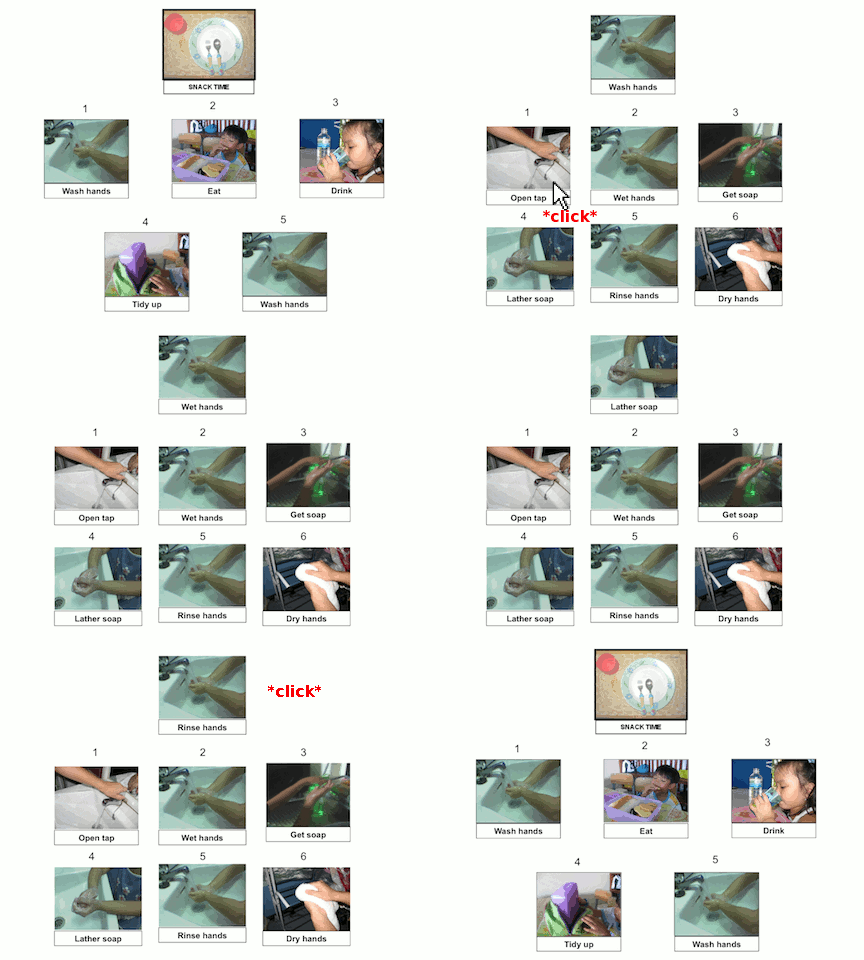
  • There is a self-made flipbook system using Microsoft Powerpoint that lets the user click on an action and be brought to a new slide showing the next task/action to take, but this requires a lot of manual effort in creating the flipbook and results in a large file size just for a single activity (17.7MB Powerpoint file for a 25 slide flipbook with 25 different actions/task). This is too cumbersome and needs to be improved
    Existing PowerPoint Flipbook
    Existing PowerPoint Flipbook
  • Flipbooks can be categorized into 2 categories
    • Non-sequential
    • Sequential

    Current Flipbook Samples
    Current Flipbook Samples
  • Sequential types are used for activities such as “Washing Hands” which has a sequence which is shown below and other non-sequential activities such as “I want to go shopping”, or “I want to go home””Washing Hands” sequence:
    1. Open Tap
    2. Wet Hands
    3. Get Soap
    4. Lather Soap
    5. Rinse Hands
    6. Dry Hands
  • Flipbooks are customized per person (autistic people identify with photos if they in the photos performing that action/task)

Proposed Application Specifications:

  • The application should have a graphical representation of the possible actions / activities for the user to select
  • Each item may have sub-items (e.g. First item is “I want to go shopping”, sub-items can be “I want to go to The Mall”, “I want go to Hua Ho” or “I want to go Yayasan”)
  • Voice clips can be played back went an item is selected (e.g. TapToTalk which speaks the action such as “I want to go out”)
  • For sequential activities, there should be an indication of the “next action” to inform the autistic person that there is a pending action to do (during my discussion with Malai, he mentioned that if there is no indication of a next step they could spend all their time doing a current action/task)
  • Pictures and voices must be customizable and be able to be changed by the guardians of the user.
  • Similar applications: TapToTalk, Voice4u, AACSpeechBuddy

Proposed Plan Of Action

  • For the initial stage, I propose a web-based working demo due to the following reasons:
    • it will allow relatively quick changes and mockups
    • it will allow for discussion of features as the actual Android application is developed
    • it can serve as a replacement for the current Powerpoint flipbook system and thus have increased efficiency in creating new flipbooks
    • allow the Brunei community of web developers to play around with HTML and Javascript interactions to see what could work best for the system
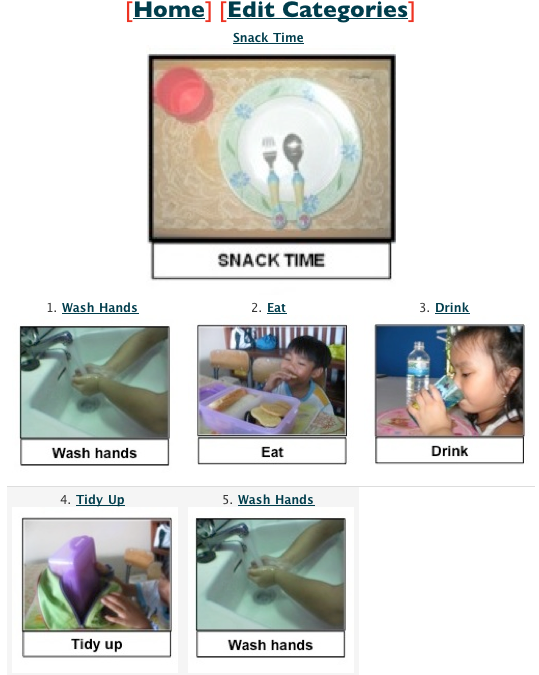
  • I have put together a working demo where users can add items (called categories) and specify sub-items to be displayed.
    eCVS Demo System
    eCVS Demo System
    eCVS Demo System - Edit Category
    eCVS Demo System - Edit Category

How You Can Help

  • Do you have any HTML / Javascript know how? Try create a usable interface for system. I will try show them to the people at SMARTER and we can proceed from there
  • Perhaps when the system is more fully functional you can help will data population by adding categories, finding sample images, doing voice recordings.
  • Give some feedback or thoughts on anything that you see: there may be something that you have thought about that has not occurred to any of use. Knowledge sharing beneficial to all =)
  • If you have anything to contribute, do let leave a comment stating how you could help

SMARTER Seeks Help to Develop App for ‘e-pad’

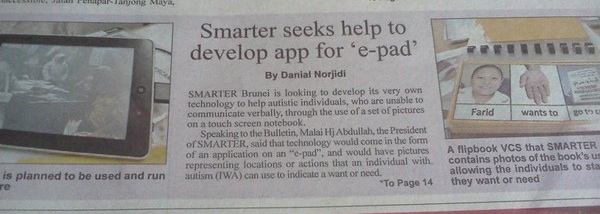
When I read this article about SMARTER Brunei seeking for help with regards to developing an e-Visual Communication System (VSC) to help their autistic individuals, I thought it would be a great opportunity for the community to help out. They plan to use an Android 2.2 tablet called an “e-pad”. I have pledged to code the application and am seeking out anybody else willing to help out in this project. So far there is some support from @emmagoodegg and @bahit. Anybody else interested do comment and specify what you can help out on.

Things to do in the near future: talk to the people in charge and get the specifications on the application.

The Biggest Problem with Android: Low Available Phone Storage

LG Optimus One's Available Internal Phone Storage of 172MB After a Factory Reset

So after obtaining an Android phone for an extended period of time and exploring Android and the applications, I found what I feel to be one of the biggest hinderance / annoyance / problem with Android: available phone storage. For many people they may think, just adding a large SD card can solve this issue, but this is not the case. All Android phones have RAM and ROM figures in their specifications that are listed on the manufacturer website or websites like GSMArena but the figure may not be accurate for ROM storage.

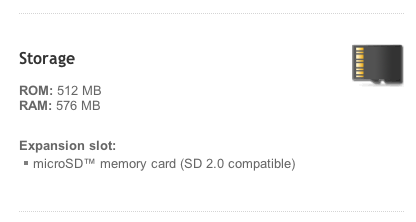
RAM (Random Access Memory) is needed to store temporary application data/information and helps a device multi-task smoothly. ROM (Read Only Memory) is where the phone operating system and applications reside and each device comes with a base set of operating system features and applications that cannot be uninstalled. This will take away some of the available ROM from the user leaving them with less than the figure stated on the official ROM amount. A good example is the HTC Desire which has 512MB ROM according to the specifications page but according to PCMag there is “only 117MB of available internal storage“. 117MB isn’t much and this is the main reason that hinders me from recommending a Desire. It is a very good phone but this is a major issue that can’t be solved.

Android 2.2 helps alleviate this problem by allowing applications to be moved to SD cards however this will only work on applications that support this feature and even if they do, they cannot move the entire application to the SD card; there will always be some part of the application on the internal storage. When you get low storage on your phone things get uglier and the phone may not function properly. I had about 20MB of available phone storage and I tried to add a phone number to an existing contact and was greeted with an “Memory Full: Not enough phone storage space”. I was adding a single 10 digit phone number to a contact and there isn’t enough space to process / store it.

I notice slowness below 25mb free, and around 10/15mb free space, it starts rejecting texts. You’ll get a warning message when your space is too low, use that as a sign that you need to dump your old texts/mms messages, and maybe delete a program or two that you don’t ever use.(Source: Samsung Intercept Forums)

“App data including your call history, contacts, etc. contributes to your phone storage space as well” (Source: Droid Forums.net)

This will lead to Android users to ensure that they have sufficient phone storage and this in turn limits them trying new applications and exploring what Android has to offer. Some people may argue that you don’t need so many applications and that you should delete the apps that aren’t frequently used, but that isn’t solving the problem and if you’re testing out applications you can easily hit the over 200MB (I hit the Optimus One’s ~150MB ‘limit’ of 172MB after installing applications that I wanted to test and a handful of games). I found it very frustrating when I could have a huge SD card with 10+GB free that can’t be fully utilized for applications. It honestly feels like such a waste of space.

I think this is where Android could learn from Windows Phone 7 here where the SD card is fused/combined with the internal storage. This fusing would allow users to upgrade their internal storage at any time allowing users to be in charge of their device. This fusing would also solve the problem of applications not supporting moving to the SD card as the fused SD card would be treated as internal phone memory. This would give the opportunity of the user to upgrade their storage if needed, as opposed to putting the responsibility of the the developer to support moving the application to the SD card as it is now.

Perhaps this is an issue that manufacturers have not decided to take action upon or perhaps they feel that it isn’t a real big issue. Just due to the fact that it hinders exploration of new apps really gets to me. Newer phones come out with larger ROM sizes but how much is available to the users? I checked a friend’s new HTC Desire HD with only a handful of applications install and there was 0.9GB of phone memory still available (specifications of ROM state 1.5GB, thus assume ~1GB available for applications). Will this problem only be for budget phones in the upcoming future? The HTC Desire was by no means a budget phone when it was released (and still isn’t a budget phone) but it has a low amount of internal storage. Could current phones suffer this same problem in the future? Only time will have the answer and in the mean time, this is a big point of contention for me and makes choosing an Android device a bit more challenging. Follow up post on “Things to look out for when buying an Android phone/device” should come soon.