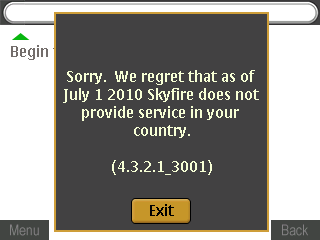
Skyfire 1.X will no longer be supported outside of North America and Western Europe effective July 1st, 2010.
Note: Skyfire 1.0 and 1.5 will remain available as a free service in the following countries after July 1st: United States, U.K., Canada, Ireland, Portugal, Spain, France, Germany, Belgium, Italy, Finland, Netherlands, Norway, Sweden, Switzerland, Korea and Taiwan.
So no more being able to watch almost any kind of video format or having ‘full web functionality’ (e.g. Javascript this isn’t supported on the default web browser ala WikiMapia) on my Nokia E71. Skyfire 2.0 for Android and iPhone (in the future) should still be supported though.
So today I thought I’d try to build an iOS application. Managed to cobble something together over lunch with a lot of copy-paste work going on and no reading of the documentation. Not exactly an ideal way to develop but hey I managed to get a functional application that I wanted. Very rough around the edges but functional nonetheless. I wanted to try it out on actual hardware and realized that I had to sign up for the iPhone Developer Program in order to do so. It costs US$99 a year (~BND$140) but thought I would try give it a go especially since I want to develop an application. So I…
Apple Online Store is unavailable Your country either does not have an Apple Online Store or does not offer Apple Developer Products for Online purchase. To complete the purchase of your program, you will need to complete and fax the Purchase Form below
Grrrrr. Imagine if I did read that 37 page long license agreement only to be greeted with that. I would have been even more infuriated. Couldn’t they have told me that when I entered my country in my personal details? Or if it depends on current location, they could have done that via my IP. Either way they could have just told me upfront that this is not available for me.
As I won’t be able to get the full experience of the app store approval process I did manage to read this iPhone development story which is a good read and does document some annoyances for developers. While I did not manage to get to the point of transferring any Android application to a physical device I am sure it will not be as difficult as this and I believe it is free as well. But kudos to iOS developers and especially Stack Overflow for having resources that I could just copy and paste and get a functioning application all in a matter of hours without reading the documentation. What happened to policy of developers not being able to tell each other how to program for iOS?
So my sister got an iPad and one of the first things I did was to load up my Unofficial Lite Edition of The Brunei Times E-Paper to see how it looked and I was surprised at how bad it rendered the text in the images. It looks fine on my computer and even on a Nokia E71. I wonder why it looked bad on Safari on the iPad. Now if I saved the image and viewed the saved photo in Photos, it turned out fine. Anybody care to explain this to me?
Note: this seems to happen with images that are bigger than the native resolution of the display (or that have to be scaled down in Safari. If I open an smaller image that does not require scaling, the text is fine and clearly visible
Below: Nokia E71 (in Web Browser) and iPad (in Safari) showing the same page (iPad image seems slightly out of focus but close up of the iPad image can be seen in the 2nd photo)
Below: Close up of the page in Safari
Below: As mentioned, if I save the image and open it in Photos it seems fine.
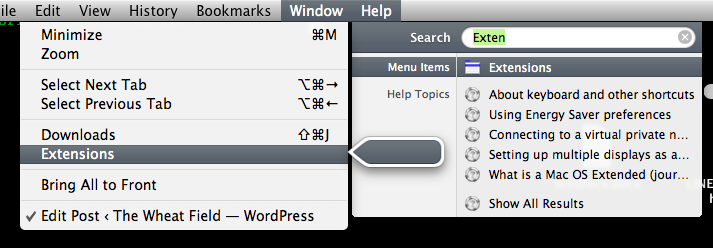
I encountered this cool tip while watching some Mac Break Work. If you can’t remember where to find an exact menu command in program in OS X
Go to the Help Menu
Type word to search for the command. This will populate a list of possible matched commands
Highlight the particular command and click it to execute it or just hover over it and see the ‘magic’. Not only will it open the menu under which the command is listed under but it will also have a little moving pointer that points you to the command
This is great for exploring commands and just finding where a particular command has disappeared to in the menus
Despite there being an option for Windows version of VLC, it seems to be absent in the OS X implementation of it. In order to run multiple instance of VLC on OS X you will have to open up Terminal and run the following command
/Applications/VLC.app/Contents/MacOS/VLC Source
This assumes that you installed VLC into the Applications folder. Otherwise you will have change it to the appropriate path where it is installed. It seems that running multiple instances of a program is discouraged by Apple’s usability guidelines (as mentioned by the forum poster) which would be ironic as I believe QuickTime files in Windows all open in a new window / instance as opposed to using an existing one.
One thing I love about Firefox is the Video DownloadHelper. Not only can it be used to download YouTube videos but it can also detect video in any webpage and offer a download link. This is good for situations where you let a YouTube video load only to find that it has stopped loading half way or something messed up. Also having a copy of the file lets you play it while you’re offline too. One thing that has always got me confused was the download links you get on a YouTube page as shown below
There are 2 .flv links and 2 .mp4 links and each file means something different. If you check YouTube’s wikipedia page there are 6 formats in use and as you can see the a high fmt value (which is the number after “HQ” in the download links above) is not necessarily the best quality and also an .mp4 file link is also not necessary the better quality file.
YouTube file formats
Confusing isn’t it? So I downloaded fmt 34,18 and 35 and the following are screen captures from the video of each of them. I did not download 720p or 1080p as I believe those 2 have the highest quality and the 1080p video link did not display in the listing too.
MP4 (fmt 18), resolution: 480×270:
MP4 (fmt 18) blow up to the same resolution (854×480) for comparison:
FLV (fmt 34), resolution 854×480 (am not sure why the resolution is the same as fmt 35 even though the specifications says it shouldn’t be):
FLV (fmt 35), resolution 854×480:
Based on this video it seems that MP4 makes the video blurry and soft while the FLV files (both format 34 and 35) seem hard to differentiate between. Also take note the file sizes:
MP4 (fmt 18): 14.5MB
FLV (fmt 34): 21.8MB
FLV (fmt 35): 30.1MB
MP4 (fmt 22): 66.8MB
Taking that into account, I recommending downloaded the MP4 if you are more concerned about file size (and data charges if using 3G to download) while stick with FLV 35 for good quality without huge file sizes of a 720p/1080p MP4 high definition video file.
A day after the iPhone 4 was announced with 720p video recording and iMovie for video editing, the Motorola Milestone XT has launched in Singapore with 720p video recording with HDMI out (similar to the Nokia N8) and Nokia also reveals video editing on the N8 (as shown below)
Check out Tech65‘s first look at the Milestone XT below, with pricing with StarHub contracts over at Justin’s blog
I’m personally more interested with Nokia only cause it’s a device with an OS that has yet been released to the public and has features such as USB on-the-go. USB on-the-go allows it to connect to a USB drive for reading and writing purposes just like a regular computer. How cool is that!? Nokia’s timing of releasing footage of movie editing on the N8 has to be a straight punch to iMovie for iPhone 4 and the only issue, specifications wise, for the N8 is the screen resolution of 640×360. Based on Engadget’s smart phone comparison, it’s the 2nd worst of the bunch just after the Palm Pre. However, I still believe in Nokia as it has features like file management via bluetooth, meaning I can transfer files to and from the phone wirelessly. While it may not be as fast as USB, the convenience factor trumps it and I use it all the time with my Nokia E71. Specifications-wise the N8 is similar to the iPhone 4 but being a new OS there could be issues, but I’m hoping that Nokia will use it’s many years of phone making experience to add that extra touch to their new product that could give iOS and Android a run for their money
So I was trying to lay out some icons on the desktop (OS X 10.5.8) and noticed a weird and frustrating issue/problem.
I clicked and dragged an item (using the Trackpad)
Moved it to a location I wanted to place it
I let go of the trackpad
Now we would all think the item would place itself where I had placed it or if auto-arrange is on, to the closest square in the grid. But oddly enough that didn’t happen. If anybody has an answer for me
Check out WWDC live blog coverage by: gdgt | Engadget
Yet again Apple has blown the competition away in several areas with the revelation of the new iPhone 4. Looks (almost?) exactly like the leaked phone and while lots of things were expected there are a few more treats that Apple has thrown in. Firstly the display. Just like the iPad is uses an IPS display which is more power hungry but produces better viewing angles and better colour representation and also like the iPad is uses a resolution that is completely different from the competition. It uses a 960 x 640 display while the maximum resolution I’ve seen on an Android phone is 854×480. I think the reason behind this resolution is that older applications can be scaled exactly 2 times on the screen (old resolution was 480×320) which is easier on the processing and thus better on battery life. Also, this resolution provides the same number of pixels you would find in a typical netbook with 1024×600 screen resolution. This is a great improvement but the only concern is if application developers try to squeeze too much on the screen and make text too small to read.
The camera has HD recording AND editing. Bringing iMovie to the platform is what makes it more of a killer product for those doing in the field recording. You no longer need a laptop to edit videos out in the field. This will aid bloggers at conferences and events a whole lot. The camera finally has a flash and I believe Apple camera will continue to be one of the better ones on the market. Even today the 3GS camera holds it own with the image quality and video capabilities. Tap to focus for video introduced in iOS 4 is another added bonus for video bloggers: no longer do you need a dedicated camcorder. For the ultimate road warrior who always need to be mobile, yet functional this is almost a no brainer. Better to have an iPhone 4 rather than a camcorder and a netbook for video editing. iMovie can export HD video so I would assume that it can edit HD video too. So while you can get a cheap HD camera like the Kodak Zi8 or a Flip Mino HD, the iPhone trumps them in the added functionality and almost matches them on price.
Apple’s A4 processor is found inside and is of no surprised and is one of the contributing factors to the better battery life while still offering great performance. Simple things like an extra microphone for noise canceling is an added bonus just like the 3-axis gyroscope which will be big for games. On the topic of games: 2 huge games Farmville and Guitar Hero are coming and for the general consumer Netflix is coming to the iPhone too. There was also mention of iAd for developers which means of more free applications for consumers with hopefully less obtrusive ads. Better battery life is really icing on the top as many Android phones suffer in that aspect, its a bit of adding salt the the wound of bad battery life that Android has.
Use of micro SIM is a disappointment but expected. While you can hack together one by cutting an existing SIM card there are safer alternatives like Cut My SIM (main site seems down so here’s an article from Gizmodo about it). FaceTime is currently supported on iPhone 4 only as it is a new standard and Steve mentioned that they are going to make it an open standard but only the future will tell what happens. Currently it is not available over 3G/cell network but I’m not sure if this restriction is just to US (probably they are waiting for AT&T to upgrade their infrastructure to handle the extra load) or is something embedded into the application itself.
All in all this is a worthy upgrade to the iPhone line and now Android phone makers need to be pretty worried with the lead Apple has once again in terms of hardware and capability of their new device. Android still has multi-tasking and openness going for it, but is it enough? Multi-tasking on iOS 4 may be multi-tasking done right: it may have it’s limitations but if it gives the general consumer the multi-tasking they need, Android’s multi-tasking feature may just be moot. iPhone 4: Quality hardware on an existing proven platform with good application and developer support










 The Wheat Field