Lightning talk slides presented at the first Brunei Geek Meet 2 weeks back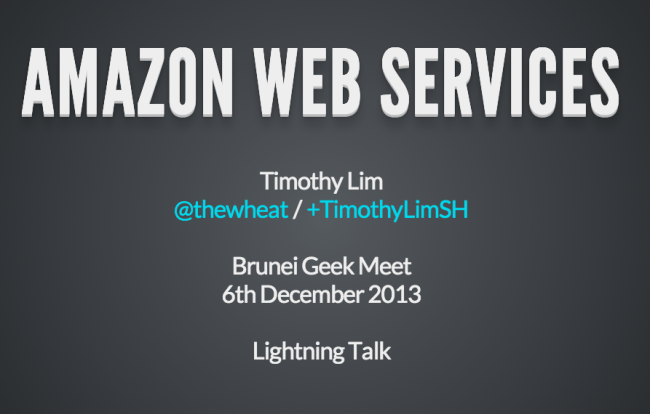
MongoDB – Quick Start Installation and Usage
2 weeks back I attended yet another RHoK Melbourne event and ended up working on a project with NodeJS & MongoDB: both unfamiliar territories for me and thought it would be a good opportunity to create a quick start guide: here is the MongoDB one
Installing and Running the Server
- Get the binaries on the download page (http://www.mongodb.org/downloads) and get the necessary download for your platform (Windows/Linux/OS X/Solaris). Following commands will be based on OSX but similar actions can be one on other platforms
- In a terminal, navigate to where you downloaded the package and extract it
cd ~/Downloads
tar -zxf mongodb-osx-x86_64-2.4.8.tgz
- Create a folder to store your database
cd mongodb-osx-x86_64-2.4.8
mkdir db
- Start the server specifying the folder created
bin/mongod --dbpath=db
Terminology coming from the typical relational database world
| Relational Database | MongoDB |
|---|---|
| Database / Schema | Database |
| Table | Collections |
| Row | Record |
| Field / Column | Field |
Quick start of the MongoDB Shell
- Connect to the server
Navigate to the folder where the files are extratcted, run the mongo Javascript shell (which has tab completion)cd ~/Downloads/mongodb-osx-x86_64-2.4.8 bin/mongo
- List / show databases
show dbs
- Select a database (no need to created a database)
> use unicorn
switched to db unicorn
> db
unicorn
- Show collections (tables)
show collections
- Inserting a record (row in a table)Collections do not need to be initialised, they are auto generated.
Below shows the output of the Mongo shell. system.indexes contains indexes for collections> show collections > db.unicorns.insert({name: 'Aurora', gender: 'f', weight: 450}) > show collections system.indexes unicornsMismatched fields
db.unicorns.insert({name: 'Aurora', gender: 'f', weight: 450})
db.unicorns.insert({name: 'Leto', gender: 'm',
    home: 'Arrakeen', worm: false})
Arrays
db.unicorns.insert({ name: 'Solnara', loves:['apple', 'carrot', 'chocolate']}) - Listing / Querying records
> db.unicorns.find()
{ "_id" : ObjectId("52b65132eb122da0e6dd19a9"), "name" : "Aurora", "gender" : "f", "weight" : 450 }
{ "_id" : ObjectId("52b6519127026146f128de90"), "name" : "Leto", "gender" : "m", "home" : "Arrakeen", "worm" : false }
Items have _id auto generated. No need to set an auto increment field.
Filtering and field selection
db.collection.find(
   {andedFilters},
   {fieldWith1AsShow0asHide}
)
Search by name and show only name and worm fields
> db.unicorns.find({name: 'Aurora'}, {name: 1, worm:1, _id: 0})
{ "name" : "Aurora" }
> db.unicorns.find({
    $or: [{name: 'Aurora'}, {'name': 'Leto'}]},
   {name: 1, worm:1, _id: 0}
)
{ "name" : "Leto", "worm" : false }
{ "name" : "Aurora" }
Paging and Limiting results
db.unicorns.find().skip(1).limit(2)
Record Counting
db.unicorns.count()
db.unicorns.find({'name' : 'Aurora'}).count()
Distinct
db.unicorns.distinct('name') db.unicorns.distinct('name', {$or: [{'name' : 'Leto'}, {'name':'Aurora'}]}) - Query Selectors
- Comparison:
- $gt / $lt ($gte / $lte): Greater/Less than (or equal).
- $ne, $in / $nin: Not equal. In / Non in
- Logical: $or, $and, $not, $nor
- Comparison:
- Updating:
Update first matching recorddb.unicorns.update( { name: 'Aurora' }, { $set : { weight: 10 } } )Update all matching records
db.unicorns.update(
  { name: 'Aurora' },
  { $set : { weight: 10 } },
  { multi: true }
)
Update matching record but insert if doesn’t exist
db.unicorns.update( { name: 'Roooooodles' }, { $set : { weight: 10 } } , { upsert: true } ) - Deleting:
Deleting all records:db.unicorns.remove()
Delete all matching records
db.unicorns.remove({name: 'Aurora'})Delete only first matching record
db.unicorns.remove({name: 'Aurora'}, true) - Drop collection
db.unicorns.drop()
Other Considerations
- No joins. But has embedded documents
> db.unicorns.insert({name: 'Aurora', gender: 'f', weight: 1450, owner: {'name': ['You', 'Me']}})
> db.unicorns.find({'owner.name': 'Me'}, {'name': 1, 'owner.name': 1, _id: 0})
{ "name" : "Aurora", "owner" : { "name" : [ "You", "Me" ] } }
Further References
- The Little MongoDB book (got a copy at the MongoDB User Group and it’s a nice short intro. Physically – 34 pages in a A5 format)
- Mongo DB Manual
- GUI-style administrative interface
Brunei Geek Meet and RHoK (Random Hacks of Kindness) Brunei

Today marks the first meetup of Brunei Geek Meet (http://www.meetup.com/BruneiGeekMeet/), a meetup where I hope to start fostering the meetup culture that I’ve been experiencing here in Melbourne. We aim to be run by the community for the community. I believe that everybody has something to share and I want Brunei Geek Meet to be a platform for people to contribute to the community as a whole: be it as a learner, as a presenter, as a mentor, as a discussion starter, etc. We are more technology oriented (but are open to geeks of any kind!) and we intend to have talks, code labs, hacknights/days and other events where people can attend, learn and contribute in their own ways.
I am also please to announce that we have a license to hold a RHoK event in Brunei. With the tagline “Hacking for Humanity” RHoK believes in providing a platform for people (particularly technologists) to do social good and make the world a better place.

This is done by hackers working to solve a community problems which can be used in the region of the problem, and even to a bigger audience of the World. When I first attended RHoK, it brought me back to the days I was working on the SMARTER eCVS and I want RHoK Brunei to be of the same nature: for us to see a local need and for technologists to team up to work on a solution.
With that, I would like to extend an invitation to any individuals or organisations that are facing or know of problems that could use a technological solution to get in touch with me and so we can kick off some discussion on how the developer community of Brunei could help. My contact details are tim@thewheatfield.org / @thewheat. I truly hope that you can be a part of RHoK and help contribute to the betterment of the Brunei developer community by providing a real world problem that we, as a community, can get together and help solve.
Considering Android Development: A bit of basics and then some

This was the talk I gave at GDG Brunei DevFest 2013 and I aimed for the content to be basic and accessible with a workable app, so that the attendees could use it as a starting off point for the hackathon, should they want to learn how to build an Android app.
I should have published the APK on the Play Store before the talk so that people could have downloaded the app and see what I was building as part of the talk
Source code: https://github.com/CornerGeeks/GDGBruneiDevFest2013/
GDG Brunei DevFest 2013 – Hackathon
It was the 9th and 10th of November that GDG Brunei DevFest took place and I was lucky enough to be physically there to help run the event and Hackathon. It was a fun, and as with all things tech, there were technical difficulties but you live and you learn.
We split the hackathon into 2 sections: 1 for competing and 1 for learning. I tried to take the OpenTechSchool approach by giving them some resources and being around if they had any questions. I have to say that I really did enjoy going from table to table to see what people were working on and interact with them.
The hackathon document we shared is available at http://gdg.com.bn/hackathon_doc and is a work in progress. Below is some feedback I have for the teams that participated in the hackathon and I myself do welcome any feedback on the way we ran the event and the document shared.
RTB Connect
- A good consolidation of links, but need to work on focus and polish (be more than just a collection of links to the website)
ITB+
- Feature complete (minus the demo fail, given benefit of doubt that it works) and solves their problem at hand
- Had good future expansion idea of using GCM for messaging
- Suggestion to possibly use 3rd party logins (e.g. Facebook / Twitter / OpenID) as seemed like yet another login mechanism
- Felt that the novelty and community aspects were lacking
Prograstinators : Foodish
- Looks nice and a good social crowd sourcing idea
- Design seems to be a fixed mobile width only (would suggest responsive design)
- Not so novel: similar idea to Urbanspoon and Find Me Food
- Seem to be the folks from http://www.morningmobi.com | http://cikgu.tv | http://www.megabond-productions.com (all the best in your other ventures) (p.s. I got the MorningMobi link in the source code of your page)
Order Easy
- A good use of WordPress as the CMS
- Extra points from me for using the Raspberry Pi!
- Seems like a good business solution but felt community aspect was lacking
Panda Codes
- Would suggest trying to use some responsive web design frameworks like Twitter Bootstrap / Zurb Foundation to make it usable for mobile
- I think I saw that if a user registered, they could see the entire user registration listing. Regular users shouldn’t see such information and that should only be shown to admins
- -Presentation tip: prefill the form fields before hand. Took quite a while to fill in the form, and with a 2 minute presentation limit, it just wastes time
Find me Food
- Good effort and hope you all learned how to build a web app. Keep at it and learn
MJL
- A nice native Android app look
- Liked the crowd sourcing nature to solve a problem which contributed to the novelty and community aspects
- Obviously wasn’t fully complete but the finish and design did look nice and seems to be on the right track
- Looking forward to seeing it on the Play Store
WTS
- Nice use of GPS location and extracting data from Google maps
- A good effort and the social good is there
If any of the participants would like to plug their own company / apps / on-goings, feel free to post a comment below. We also hope to have more events like this in the future, with a community aspect to it, so if you have ideas just throw them in and we’ll see what we can do! Hope to see you all at the next corner…
Melbourne Fringe Festival – Unofficial Offline Guide
Melbourne Fringe Festival Unofficial Offline Guide
http://thewheatfield.org/mff/
A couple of weeks back it was time for the Melbourne Fringe Festival again and I was keen to see some shows and there was a heck of a lot of events to go to that it was pretty overwhelming to search through and I had issues with actually looking for events. Thought it would be a good time to learn some Python and use Zurb Foundation.
Source Code available at https://github.com/thewheat/melbourne-fringe-festival

Problems I faced when using the Melbourne Fringe Festival website
- A lot of data 300+ events and with max items per page, there was still 9 pages
- Searching relied too much of going to the event detail page, and having over 300 events, this would be very time consuming
- Had to go to event detail page to view:
- description of event (had to view page in order to find what the event is about: title and subtitle was not enough information)
- dates
- prices
- venue
- Couldn’t search by budget
Features of the Unofficial Offline Guide
- Viewing all events on 1 page
- Show all necessary info on list page (event description, dates, prices, venue)
- Search by date, category, venue, cost
- Offline access
- Should work with lower end phones (pauses between searches)


Use your Android Phone as a Wireless Adapter for your Computer
So my Linux install going messed up somehow and I was left with no wireless driver installed. I know that you can use Android phones to USB tether mobile data (e.g. 3G/4G/LTE) but I didn’t know that you can do the same over WiFi!


Now while in OSX I’m pretty sure it worked out of the box previously, it seems that you need now need to download the HoRNDIS driver. With Linux (Ubuntu) it worked out of the box and in my previous usage of USB tethering, Windows should work automatically as well.
IP and Me – Android App

A simple network utility that:
- lists all network interfaces and their IPs
- is a small package (51KB apk file)
- ad-free
Play Store link | Direct APK link
This spawned out of me noticing that many network capable Android apps ignore the Bluetooth or WiFi Direct Peer-to-Peer networks: they don’t seem to work despite it being a network with an IP (e.g. AirDroid). While this app doesn’t solve that problem, it does help me to know what IPs I have. Some may ask, why didn’t I just look through the Play Store, and while that is a valid question, it probably would take more time looking for an app that meets the 3 key points of IP and Me and also, is a good learning platform to start learning Android development in a more structured manner.
Is My Google Maps Broken?
Phone, Laptop, Tablet: All clicked on the same ‘address’ link from Android Australia MeetUp page and the Nexus 4 location is incorrect (Nexus 4 and Nexus 7 opened the link from the Meetup app, while the laptop from the webpage)

When opening the webpage link in Chrome for Android on both the Nexus 4 and Nexus 7, they both report the same incorrect place! So the Nexus 7 has changed marker positions…

And now loading the link in the Meetup page on the Nexus 7 goes to the wrong location
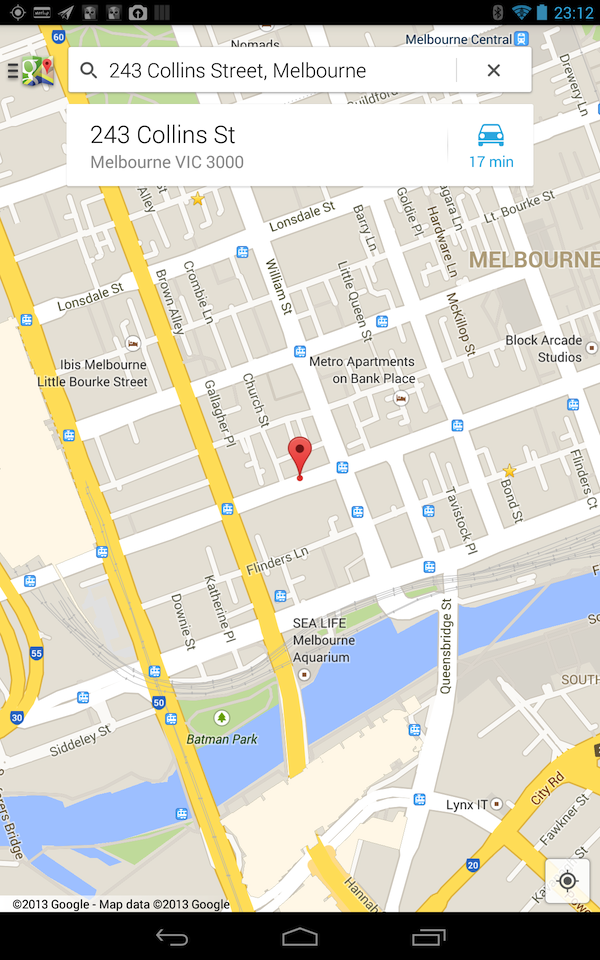
This is strange as a couple of months back, I had a similar situation shown below. The weird thing here is that both screenshots taken on Nexus 4s: just different ones (and obviously the one that didn’t work was mine!). Though taking a closer look shows that the non-distinct grey circle indicates the correct location. But why are the views so different? But whatever it is, all I know is that Google Maps has

Android Still has Low Phone Storage Space Problem
A couple years back I though that Android had a big problem with Low Available Phone Storage Space for apps and after reading Ausdroid’s recent review of the Medion 4, it seems that this is still an on-going issue.
The device in question is the Medion 4 which is advertised with “4GB Memory” on Aldi’s site, but according to AusDroid, there is only 500MB allocated for apps (the rest of the space can still be used to store photos/files but not apps without some rooting and hacking).
Filesystem             Size   Used   Free   Blksize
/data                  503M   151M   351M   4096
My 16GB Nexus 4 has 12.9GB allocated to the /data partition which is a bit less than 13.6GB of a 16GB iPhone 4 (can’t seem to find a definitive answer for the iPhone 5) but is still a majority of its storage unlike the Medion 4. The Samsung Galaxy S4 has a separate issue which is not exactly the same but gives the same results to the end user: a false sense of storage space (only 8.8GB free from the 16GB model due to Samsung’s customization of Android with its own skin & apps). While it’s not as bad as the Microsoft’s Surface RT storage debacle (15GB free in a 32GB Surface RT, 28GB free in a 64GB Surface Pro. Source: Microsoft’s Surface Disk Page FAQ), both of these situations don’t give me much confidence when recommending non-Nexus Android devices with X GB of storage.
At least if it is just Android customization (ala Samsung), flashing a custom ROM should be able to solve the problem. I’m not sure if the partitioning (ala the Medion 4) can be solved using a custom ROM, but even if it does, you will need to find a ROM that supports your device: so you hope that your devices isn’t a weird obscure one.
So when you buy an Android device, you can’t say for certain that you have a majority of the advertised storage available for apps. I can only assume that Nexus devices would give you the best experience in terms of not being ‘cheated’ for storage space, but I guess this gives more credence to the fact that Google has lost control of Android and that some manufacturers are still giving Android a bad name.
 The Wheat Field