Mockups and more with Keynote + Mapping with Openlayers
Friday, Aug 19, 2016, 6:30 PM
Au Lait Ground Floor Seri Q-Lap Mall, Kg Kiulap Bandar Seri Begawan, BN
3 Geeks Went
Hello everybody! Continuing from the previous BGM session of #DesignAndCupcakes (thanks for all the cupcakes Yasmin!) and our last hack session, we’ll be sharing some findings with all of you.Agenda• 6:30pm: Event Kick off• 6:35pm: Mockups and more with Keynote (and some Powerpoint) Firdaus will be covering how to use Keynote/Powerpoint to gener…
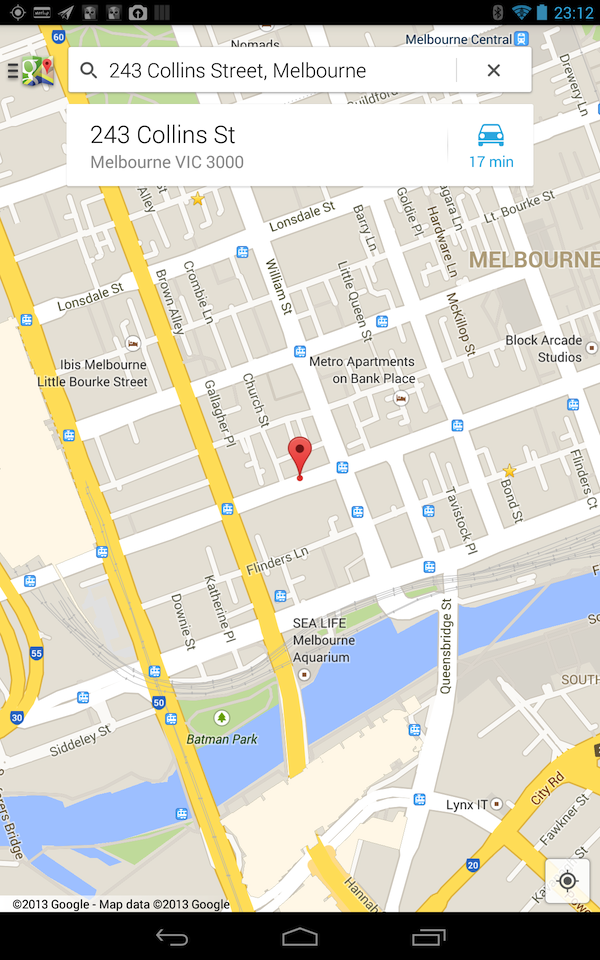
Phone, Laptop, Tablet: All clicked on the same ‘address’ link from Android Australia MeetUp page and the Nexus 4 location is incorrect (Nexus 4 and Nexus 7 opened the link from the Meetup app, while the laptop from the webpage)
When opening the webpage link in Chrome for Android on both the Nexus 4 and Nexus 7, they both report the same incorrect place! So the Nexus 7 has changed marker positions…
And now loading the link in the Meetup page on the Nexus 7 goes to the wrong location
This is strange as a couple of months back, I had a similar situation shown below. The weird thing here is that both screenshots taken on Nexus 4s: just different ones (and obviously the one that didn’t work was mine!). Though taking a closer look shows that the non-distinct grey circle indicates the correct location. But why are the views so different? But whatever it is, all I know is that Google Maps has
A couple of months back, I noticed that the Google Maps app on my LG Optimus One phone couldn’t zoom in as far as it could before (unless my memory is failing me). Below is the maximum zoom level on the phone
This is not the maximum zoom of the Google Maps android application as my ZTE V9 tablet can zoom in much further as shown below
Google Maps on the ZTE V9 at full zoom – Brunei
Google Maps on ZTE V9 slightly zoomed out
While you may think that this is a trivial matter, it really rises as a problem when I look for tram stops and street names here in Melbourne. Take a look at the CBD of Melbourne in the screenshot below and see how problematic this is: I can’t see the names of the smaller streets and I have to tap each tram stop in order to see the stop name.
To rub salt into the wound, apps that use a map view can zoom in further than the Google Maps application! Below are screenshots via the Domain.com.au app.
Map View on the Optimus One at full zoom – Melbourne CBD
Map View on the Optimus One slightly zoomed out – Melbourne CBD
I’ve tried to search for a reason for this discrepancy and have yet to find one. The map settings are both the same in the tablet and phone. CPU and RAM-wise, both devices are comparable: 600MHz each with about 420MB of RAM. Both devices are rooted with my Optimus One running the official Android 2.3.3 ROM from LG and the tablet running Android 2.3.7 via CyanogenMod. The only other difference would be screen size and resolution: 7″ 800 x 480 screen on the tablet and 3.2″ 480 x 320 screen on the phone.
Anybody who has a clue what’s going on, do let me know. Any help would be well appreciated.






 The Wheat Field