Give me quality over prestige any day.. or at least a working eraser on a pencil
My name in Chinese / My Chinese name
Mr Friday Nite’s Signature
Parking Idiots in Gadong, Unitek area
Powered by ScribeFire.
http://blog.thewheatfield.org
Give me quality over prestige any day.. or at least a working eraser on a pencil
My name in Chinese / My Chinese name
Mr Friday Nite’s Signature
Parking Idiots in Gadong, Unitek area
Powered by ScribeFire.
While clearing my feeds I found a post regarding the iPod with video and connecting it to a TV. After hearing of the iPod TV Out lockout, where the new iPod classic and nano (the fatty) can no longer output video without a US$49 cable as opposed to a regular cheap video cable (US$5), I was curious. Despite finding out that the post was about the older iPod with video which, is clearly stated in the title (my be the lack of sleep), I did find out something interesting. If you follow the link HOW-TO: Cheaply watch iPod videos on your TV you will read the following
2. Plugging the AV cable into the TV
You’re probably thinking that you don’t need help doing this one. Well let me tell you, you do. Since Apple wants you to buy their proprietary cable, they decided to be sneaky. They send the video over the Red RCA cable (usually yellow). Therefore, they send the audio over the white and yellow cables. Oh you’re so tricky Apple, whatever will we do? In easier words, do the following:
Red RCA plug -> TV’s yellow RCA jack
Yellow RCA plug -> TV’s white RCA jack
White RCA plug -> TV’s red RCA jack
A standard RCA output but non-standard function. Just another example of the Apple lock-in for those who try putting a regular cable find out it doesn’t work properly and do not know better and end up buying a ‘specialized’ cable.
Anyway I took a look at the Leopard Guided Tour and there are some interesting and cool things being introduced (Quick Look, iChat screen sharing and Time Machine). Strange enough there was a good discussion on Windows Weekly 38. With Windows Vista still being introduced (to me, due to the slow uptake), the recent release of Ubuntu 7.10 last week and the soon to be released Leopard (tomorrow) there really is a 3 way OS battle that I hope to give a few thoughts about in a later post.
Powered by ScribeFire.
In my search of being lazy and wanting to blog I stumbled upon ScribeFire which is a Firefox extension/add-on.
Features that I love:
I highly suggest it as if you use Firefox it’s just a simple add-on and doesn’t require installation of a separate application while providing good and simple blogging tools. Only downside is that there doesn’t seem to be much information of on the features it provides on the ScribeFire website.
Powered by ScribeFire.
Edit: My bad you can add new Categories. You can even edit posts if you press the right button (which I didn’t the first time :P)
So here I am at my sister’s place for the night as my mom wishes that she not stay alone while her husband, my brother-in-law, (okay that still sounds weird to say and type for that matter) and while lying down in front of the TV I see something move out of the corner of my eye. I turn my head and see a frog!

Powered by ScribeFire.
Just want to say Crossloop rocks!
CrossLoop – Simple Secure Screen Sharing
- Connect Any Two PCs on Earth
- Available in 21 Languages
- File Transfer Capability
- Switch control to make collaboration easier
- View Only and Share Control modes
Indeed simple to use, the only problem is that there needs to be an actual person on both ends as there is manual interaction which is actually an added layer of security.
On the computer you want to connect to.
1) Start Crossloop
2) Click the Host tab

3) Tell friend (the person who wants to control the PC) the Access Code
4) Click Connect (can specify if session is to be controllable by the client or just a view only session by clicking the keyboard and mouse icon)
 or
or 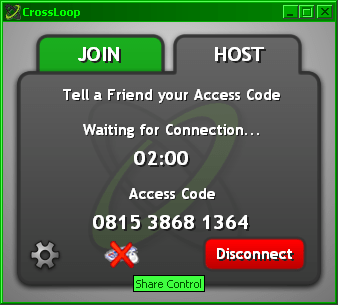
For the connecting client computer
1) Start Crossloop
2) Get Access Code and type it in
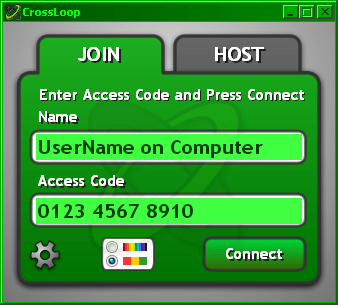
3) Click Connect

4) Host computer screen should pop up in a VNC window for control / view (depending on host setting)
Powered by Zoundry
Edit:- I don’t know why I called it Crossloops when it is so clearly stated Crossloop (no wonder I couldn’t find info about it in Google :P)
Is it me, or are the recent AVG updates (4 or 5 I think) requiring computer restarts. It annoys me….
Blogged with Flock
Tags: avg, updates, anti-virus

 The Wheat Field