Archive for January, 2010

The Apple iPad

The Apple iPad

The Apple iPad was just announced yesterday and Engadget has a nice launch day roundup for their coverage and if you read the editorial many are disappointed or don’t see anything great about the device. While it is an evolutionary device it could have been killed by the hype of what it would be and how it would revolutionize the way we use tablets (which it doesn’t as the moment). Touted too much of a tablet, it is actually more of a media player / content consumption device / ebook reader.

Some of the iPad specifications:

  • Multitouch 9.7" screen
  • 1024×768 resolution screen
  • 720p HD video playback
  • 9.56" x 7.47" x 0.5" (242.8mm x 189.7mm x 13.4mm)
  • 10 hours battery life
  • 1.5 / 1.6 pounds (0.68 / 0.73 kg) (Wi-Fi / Wi-Fi + 3G model)
  • iPhone OS
  • Wi-Fi version: US$499/$599/$699 (16GB/32GB/64GB)
  • Wi-Fi + 3G : US$629/$729/$829 (16GB/32GB/64GB)

Coming for a netbook background all these specifications look great except for the iPhone OS and possibly the price point. Most netbooks have a 10” screen with a resolution of only 1024×600 and most websites made for these lower resolutions especially since the browser window (with toolbars + menus) already consumes some screen real estate leaving an even smaller portion for proper web browsing. Having a 1024×768 resolution screen that can be oriented landscape or portrait gives the device added flexibility in rendering webpages.

Having 720p HD video playback and 10 hours of battery life the iPad trumps almost all netbooks and to add insult to injury it is lighter and smaller. Now while this battery life estimate is not tested, Apple’s battery life specifications typically hold up in real world testing (I can personally attest to the 13" Mac Book Pro battery life). Having a 1st generation netbook that gets about 4 hours of battery life and having a 13" Mac Book Pro with 7 hours battery life, 10 hours of usage out of the iPad is simply outstanding especially given the size and weight of the device. A typically netbook will be about 3 pounds and about 3 times the thickness of an iPad with a battery life of about 9 hours (current Pine-trail netbooks) and costs in the range of US$300-$400.

The biggest issue is that it comes with the iPhone OS which limits connectivity with only iTunes and that it does not do real multi-tasking (limited multi-tasking ala iPhone). Multi-tasking is a huge factor if they’re touting it as a tablet which is why I don’t really consider it a full-fledge tablet but more of a bigger iPod touch and fits in between an e-book reader and a tablet (both of which where widely seen at CES this year: e-book readers and tablets at CES). For now I will stick with my netbook and wait for ION (or similar technology) to get better for possibly gaming netbooks like the upcoming Alienware M11x.

So in essence the iPad is a bigger iPod touch: more than an e-book reader, less than a tablet


Other notable facts:

  • Seemed very responsive (kudos to the processor)
  • 3G models are unlocked
  • iWorks available (US$10 an application)
  • Projector output possible (with an additional adapter)
  • Bluetooh / Accelerometer / A-GPS (A-GPS available only in the 3G model)
  • Microphone for possible VOIP over 3G

Issues with the iPad

  • No multi-tasking (yet?)
  • No Flash (yet?)
  • No camera
  • Tied down to iTunes and Apple
  • Micro SIM slot (not the typical normal SIM slot)
  • No native USB (use dock connector with extra attachments)
  • Finger-printed filled screen
  • Terrible name: iSlate or iTablet would have been fine, but iPad is just weird

DST Go! + Netbook promotion

After stumbling across this complaint on DST’s promotion of bundling an Acer Aspire One with Go! subscription I went down to DST to find out whether the complaint was valid. The promotion banner is shown below

DST's Go!   Netbook Promotion

The complaint basically says that the $543 up-front payment advertised is for the laptop + modem and not the 6 month subscription which would add up to the same amount. If this was the case it would have been a real scam and after my findings that Concepts is not recycling and also Sheraton pizza issue makes me wonder if we need a consumer rights / better business bureau in Brunei to monitor and catch any businesses doing any sleight of hand tactics or wordings that will misled customers.

So I went to DST in Delima and asked if the promotion was still valid. I was told that it was no longer valid so my hopes were dashed to find out if the complaint was valid. So a few weeks later I went to pay my mom’s DST bill and thought I would ask if there were any laptop promotions for the Go! subscription as previously had and I was in luck. The lady at the counter told me the offer of the Acer netbook was still valid, though low on stock (about 6 units left). So after she explained things to me I found out that the complaint that $543 was to pay for the laptop and modem is not true for the current promotion. Now things could be different now than what was previously told to the customer when they made this complaint. It could have also just been a staff member who did not understand the promotion or was simply trying to personally scam the customer or it could even be DST changing the promotion. But that aside, according to her the lady basically you are just paying $78 x 21 months for the regular non-student Unlimited plan and that the only extra charges is for the deposit ($50 for locals, $100 otherwise) and license fee ($25). The $543 is an advance for the last 6 months of the subscription meaning you pay ($543 + deposit + license fee) up-front and 15 months of $78 (or 24 months of $58), starting from the month after purchase. This means locals will pay in total $1713 ($543 + 15 * 78) for the regular package or $1815 ($423 + 24 * 58) for the student package (foreigners add $50 due deposit of $100 instead of $50)

So in essence you are signing up for a 21 (or 30) month contract and you pay a flat rate of $78 (or $58) a month and you get a free netbook and modem which is a pretty darn good deal. As with all contracts you are tied down to the provider and in this case it’s for 21 (or 30) months which may seem long but you could easily get a 3G wireless router (eg. Prolink 3.5 mobile broadband router) to connect the modem to and use it for Internet at the office or at home. A very viable option for office use without having to pay commercial prices for an E-Speed line.

So DST has this offer going for their mobile broadband while bmobile has their iPhone promotion. Being somebody who is looking for an unlimited 3G broadband plan both these offers seem enticing and will be something I cover in a future post as I decided which one to take, if any at all.

Application of the Day: VobEdit

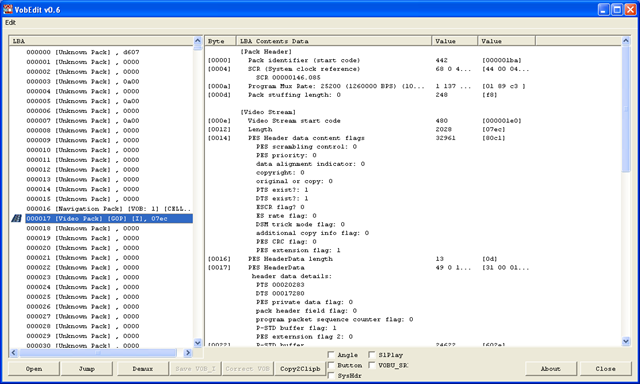
VobEdit screenshot - main screen

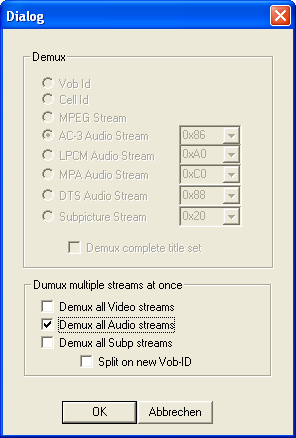
VobEdit (download link) allows you to extract the audio and/or video files from DVD VOB files. Typically I will use ffmpeg to extract audio or video streams from DVDs, but sometimes the DVD were not burned properly giving ffmpeg an error that prevents the extraction. Here is where VobEdit comes it. Select the VOB file, click the "demux" button, select the stream, select save location and you’re done! Other features include splitting, joining and remuxing VOB files

VobEdit screenshot - extract all audio streams 

Kudos to Doom 9 for providing great resources for VOB tools and many other DVD/encoding/transcoding information

bmobile Zoom! (+ E-Speed, DST Go!) Findings

Ever since bmobile and DST launched their mobile broadband offerings (Zoom! and Go!)I was interested to see which one offered the best deal. I’ve had a few weeks with the bmobile’s Zoom! service using the older modem with 3.6Mbps max speeds and did some speed tests and real world tests. In the real world tests it got frustrating at times with quite a few timeouts and YouTube videos loading only to stop loading half way. Real world download tests weren’t fantastic, typically under 512kbps which is even slower than the lowest tier E-Speed plan. My regular locations were at home in Jalan Kebangsaan Lama, and at the old airport road which is basically just across Telbru Headquarters. After a while I found out that doing a regular speed test at Speedtest.net was not giving optimal results, I would get less than 300kbps (~40KB/s) download speeds but in actual fact when I download podcasts I would get over 500kbps (~60KB/s) easily.

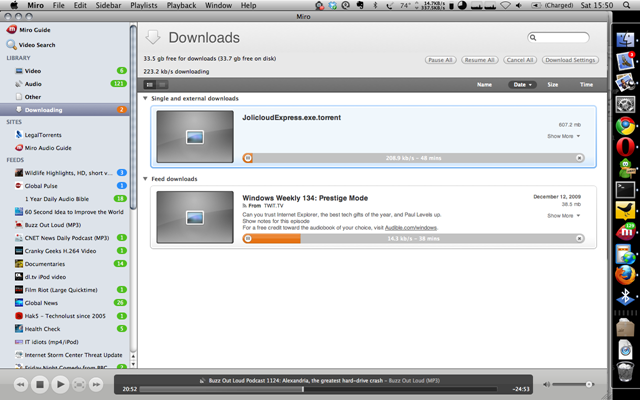
I found that if I do multiple downloads/connections I would be able to get faster speeds. I was able to roughly max out the modem to the full 3.6Mbps connection (but that was close to Telbru, not at home). At home torrenting some music off Jamendo managed to get up to 100KB/s but it was not consistent. Below shows a torrent downloading at over 200KB/s.

Jollicloud torrent getting over 300KB/s download on bmobile's Zoom!

I know location and people/connection saturation are important factors for any mobile broadband connections and honestly I’m pretty jealous of David Cheok’s reports on his Go! getting good speeds in Subok

“actually.. have been getting avg 500KB daily.. last night was good coz it broke 700KB..”  (via Twitter)

He also went on to say the following statement which I totally agree with:

“if downloading is your thing, Go for GO. If good response time/less lag, Zoom. Even better, espd.” (via Twitter)

That also brings me to another important fact that Go! seems to have pretty bad upload speeds (up to 20x less than Zoom!). If you’re planning on uploading photos or doing some streaming video from your webcam or even Skype, Go! may not be the answer you’re looking for. For anything to do with uploads, stick to E-Speed or Zoom!

Zoom! speedtests: Behind MOE (Old Airport), Jalan Kebangsaan Lama, Desa Cafe (Delima), Aman Complex, MOF

Go! speedtestsBehind MOE (Old Airport), Jalan Kebangsaan Lama, Giant


Categories

Twitter Feed

Creative Commons

del.icio.us Bookmarks