Baiduri FAST not fast at all

So I decided to try Baiduri Bank’s phone banking system called FAST to see how it is and I can say my experience was a total hassle. I’ll give them props that they allow users to apply online but lucky unlucky me had to sign up through the ATM.

I did receive the letter from them a long time ago with my PIN and procedures but like any lazy person I put it somewhere and forgot about it and lost it somewhere. So I had to get my PIN reset. This wasn’t much of a problem, just had to go down to Baiduri and wait for the new pin to arrive. My own fault, I admit so no worries. So I got my new PIN the day following my request (good response time Baiduri), logged into the FAST system and tried doing some bill payment and got the error that I didn’t have any account linked to my FAST service. Looking back on it, it could have been stated in the initial documents I got telling me I had to register for the account. I called the FAST hotline and was told I would be able to get the accounts activated right away. So off to Baiduri I went again to link up my accounts. I was told I had to wait a few days for it to get activated.

So here I would like to bring up the inconsistencies between the person on the phone line and the person behind the counter serving me. I had a similar experience with AV Electronics and I really annoys me when two difference sources from the same business tell me two different things. I don’t mind understating and over delivering but overstating and under delivery is never good in the business world.

Anyway so I wait for a few days, and try the FAST service several times only to get the “there are no accounts linked to your FAST service” automated voice coming from my phone. So I finally called the hotline to tell them my situation which I had to re-register my account numbers with them and within 20 minutes they called me saying that my accounts were linked up. Finally I thought, but that wasn’t the end. So I log into the FAST service, and finally happy not to hear that I have no accounts linked to FAST and proceeded to try pay DST and Telbru bills. And what do I get? The automated voice telling me that the payment failed (I have more than enough cash in my account for the transaction to go through). I was so annoyed with that I proceeded to an ATM to pay the bills without issue. My Baiduri experience seems to be getting more frustrating from their ‘over secure’ iBanking system leading me to forget my login credentials once again.

Baiduri I love the fact that you have the functionality of bill payment via phone / ATM / iBanking. I love the fact that the response to my PIN reset request was swift. So moving away from the technical side, try work on the user experience and making it easier for the user to get what they want to get done because if your customers aren’t happy something is really wrong

Sounds of Hope, Brunei

The following text is taken from their Facebook Page
Sounds of Hope website URL: www.sohbrunei.com
Sounds of Hope’s BIDB Wish

It is a network of Young People in Brunei Darussalam who volunteer their time, talent and resources in helping Families in Poverty in Brunei Darussalam by giving them hope, assisting them to get back on their feet to have a better life. The group of young volunteers aim to create a community of youths against poverty.

Mission
Help achieve HM’s vision of “Zero Poverty by 2035” by mobilizing young Bruneians to engage in positive activities that will help fight poverty, all in the spirit of volunteerism and community service.

Brief Beginnings
Ms. Amalinah Abdullah invited her friends to visit some families in poverty in the various districts in Brunei Darussalam. The visits began in early March 2009. She and her friends were deeply moved with the varying situations of these families in poverty that the team wanted to help in any way they can. By just simply donating money will not be enough.

Ms. Amalinah and her friends founded “Sounds of Hope”. It is just a small informal group of young volunteers who came forward to accept the challenge of finding out the poorest among the poor in Brunei and look for creative ways to help them. They are now informally called as the SOH Team of Young Volunteers. Ms. Nur Judy Abdullah was taken in as volunteer “adviser” for the team.

Supporters
In the visits that SOH has done, the Ketua Kampong (Village Head), District Office, Officers from the Community Development Department and Islamic Religious Council were kind enough to share with us their list of people in poverty who receive monthly support from the government.

Partners
There is an upcoming Charity Gala Night which SOH is organising in partnership with the Women Business Council of Brunei Darussalam. The Charity Gala Night has been approved by the Ministry of Home Affairs this coming 3rd October 2009. The aim of the event is to raise more funds for families in poverty and assist them in various ways specifically in the areas of skills training and further education.

SOH is open to partner with other relevant NGOs and GOs on activities related to poverty reduction.

Get Involve

Mobilize
We hope to mobilize the youths in Brunei to take an active role in advocating for poverty reduction in their own communities. SOH will soon expand its team of young volunteers to the four districts of Brunei Darussalam.

Educate
Road shows/ conferences/ exhibitions will be done in the future featuring the many faces of poverty in Brunei to inform and make the youths aware on how they can participate in meaningful activities that will make a difference in the lives of families in poverty in Brunei Darussalam.

Volunteer
The spirit of volunteerism will be promoted among the young volunteers through the sharing of their time, talent and resources. The youths will be the future leaders in their own community and the best way to enhance their social consciousness level is through involvement on poverty reduction activities.

Raise Funds
Creative activities to raise funds for families in poverty will be spearheaded by SOH Team of volunteers.

Care – A community of caring volunteers

Photos
We are working on a website to post photos of our volunteer efforts and the families we have helped.

Videos
We have taken videos of our visits and will continue to document our various efforts for the benefit of the volunteers, families in poverty, government agencies and donors.

Facebook /Twitter/Blogs
A community forum in the internet will be developed to allow the youths in Brunei to voice out their ideas and advocacies in relation to HM’s titah on “zero poverty in 2035”.

Initial Programs of SOH Brunei

Adopt a Family in Poverty
A donor/sponsor can adopt a family in poverty and SOH team of volunteers will help facilitate the funding for a specific project like home repair, payment of debt (if qualified), buying of boat (for some fishermen who depends on fishing for living), buying of wheelchair for disabled people, hearing aid for the deaf, or walking cane for the blind.

Sponsor a Child’s Educational Needs
There are children who cannot go to Religious school because they cannot afford the uniform. Others cannot afford the books, bags and school projects and other fees in school.

Sponsor a Skills-Training Program for Women
Low educated women who are divorced or widowed can create or supplement their income through home-based self-generating income activities. They can only do so if they are trained in various skills such as beading (doing beadworks for clothes), massage, cooking skills, gardening, handicraft making etc.

Microcredit Program for Unemployed Women
When the women gain skills after the training, they will need some small capital to start their business. A microcredit scheme will be most helpful to jumpstart their small business.

SOUNDS OF HOPE Charity Gala Night

Fund Raising Event

” Sounds Of Hope ” (SOH) is organizing a charity gala night , which is supported by the Women Business Council of Brunei Darussalam. The SOH charity gala night is held to raise public awareness for the Brunei families suffering from poverty. The organizer is working on raising funds to help these families in easing their financial burdens as well as improving their living conditions and their daily life.

If all goes well and as planned, the charity gala night will be held on October 3, 2009 at the Jerudong Park Amphitheater around 7pm.

The Visits – An eye-opener for most young volunteers

The team, made up of Brunei’s own concerned youths, had recently visited homes of Brunei families in poverty and will continue to visit more homes within the four districts over the next few months. The visit is aimed at giving SOH young volunteers to have a first hand experience on the living conditions of families in poverty.

What the team found was disheartening. There are families that need immediate help and these families seem to have been overlooked by the Bruneian community. The families that SOH is helping are not only Brunei Malay Muslims but also those who are permanent residents.

Volunteers of SOH got a glimpse of their living conditions and their daily lives. Through interactive discussions with members of the impoverished families, SOH found out what these families needed and realized what actions can be taken to give them immediate help.

This initiative is a response to a Titah made on 4th of March 2008 during the opening ceremony of the first meeting of the 4th session of the Legislative Council by His Majesty the Sultan and Yang Di Pertuan of Brunei Darussalam, where the monarch expressed his desire for the country to achieve zero poverty rate by 2035.

SOH became aware of the lack of a specific non-government organization in Brunei to help those suffering from poverty.

SOH feels that they need to take the first step to address this issue. One of the ways they feel that they are able to help is by organizing a charity concert to raise funds to help these families.

At the same time, sounds of hope wishes to promote local talent through this charity concert.

Auditions have been held and potential performers have been selected to perform for this charity event.

After the Charity Gala Night , the funds raised through out the charity drive will go towards helping these families in poverty wherein a special committee for SOH will be formed to managed donations and funds raised.
Regular updates on where the funds go and who are the beneficiaries will be posted in the website of SOH.

Before the recipients of the funds are selected, their living conditions will be monitored and their background will be examined and at the same time all caution will be taken to ensure that only those who truly need the help will receive assistance.

Sounds Of Hope feels that it is time everyone gets together to address poverty in Brunei.

For further details, please contact:

soundsofhope.brunei_AT_gmail.com

YOU WANT TO BE A VOLUNTEER?

For those who wants to become an SOH Volunteer, please email to soundsofhope.brunei_AT_gmail.com your answers to the following questions: How do you define poverty? What does poverty mean to you? Do you have the time, talent and resources to be an SOH Volunteer? If yes, please describe how you can help. Please leave your name, brief profile, why you are interested in the issue on poverty and contact details.

Brunei’s 2nd Confirmed Case of A(H1N1)

As read by Frankie Chan on News at 10, RTB1, 21st June 2009:

The Ministry of Health has confirmed the second case of influenza A(H1N1) in Brunei Darussalam. According to the Ministry’s press release this 2nd case, a Bruneian aged 16 years, returned home from Singapore on the 18th of June 2009. She was well on the flight home and on arrival to the country. The patient only started to develop symptoms on the 19th June 2009 and went to seek medical treatment at the outpatient services at the health centre at Jalan Ong Sum Ping on the 20th of June 2009.

The patient is currently under treatment at the Pengiran Muda Mahkota Pengiran Muda Haji Al-Muhtadee Billah Hospital in Tutong and is in stable condition. The Ministry of Health is tracing all contacts and will quarantine those at risk. The statement says that as the patient only started to develop symptoms only 12 hours after arriving in the country, the Ministry of Health will not be contacting passengers on flight BI 422 which arrived from Singapore on the 18th of June 2009. This is due to the minimal risk of infection to other passengers at that time. However those who have recently arrived from affected countries are advised to seek medical treatment if they develop symptoms of influenza A(H1N1).

Meanwhile, the first local case of influenza A(H1N1) as reported previously is improving and still under treatment at the Pengiran Muda Mahkota Pengiran Muda Haji Al-Muhtadee Billah Hospital. All contacts of this case have been identified and are currently under quarantine.


Download audio recording

For updates and some of the latest news follow Dr P Hishamuddin’s on Twitter, who is the Head at the Disease Control Division at the Ministry of Health, Brunei.

Update 23/06/2009

Seems that our Twitter source has been muted by the fact that his team has been ordered to keep him out of the loop. It seems that upper management was not happy with his efforts to inform the public of the on-goings of the CDC team have been kept away from him as shown in his tweets show below.

head honchos at MoH disappointed in me giving out info about h1n1. what info did i give apart from numbers and travel history?

about 24 hours ago from web

Getting no more updates from my CDC teams on h1n1.guess the head honchos have cut me off.

about 13 hours ago from mobile web

Thus now we are left to speculate what the exact situation is and having to wait for official news channels to get back to us. It is indeed a sad day…

Brunei.fm

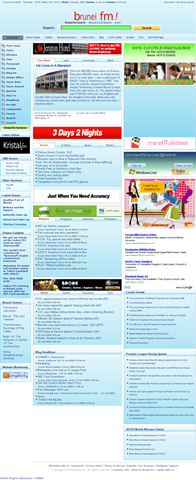
I stumbled upon Brunei.fm one day on Twitter and was wondering what exactly they were up to. My brother mentioned it looked a lot like Yahoo before the current design change. A portal service as seen from the wealth/clutter of links, it was hard to understand what they are trying to do.

Brunei.fm vs Yahoo Homepage:
Brunei fm homepage screenshot Yahoo! homepage screenshot

I guess the one of the main attractions of the site would be the Brunei search engine of local content. A huge feat to try to compete against the behemoth that is Google. I tried searching for a few terms such as "ministry of health", "ministry of education", "ministry of finance" and "anti corruption bureau" and found that Google provided much better results especially with the "pages from Brunei (halaman dari Brunei)" option.

Brunei.fm Search Engine:
Brunei.fm Search Engine banner ad

Google’s Brunei content search:

image

Brunei.fm seems to be searching through a list of known Brunei websites which could be a good thing for Brunei websites with good content but not good Google Juice.

Brunei.fm has a ton of features and some interesting ones are

  • Brunei Community Directory: a list of communities/organizations in Brunei
  • Yellow Pages: the yellow pages with ability to add your own entry
  • Your News: user submitted content
  • News: regular news stories nicely categorized
  • Online office: have your operating system / desktop with all your files available to you anywhere with Internet access, with ability for word processing and personal information management features

Running on Joomla, WordPress (with Buddypress), eyeOS, Jamroom, osTube and possibly other solutions, Brunei.fm is making use of currently implemented technology to provide a wealth of features. The site as a whole is still pretty in an on-going process as I’ve seen many things that aren’t working either giving links to non-existent pages (404: Services > Contact Us) or non working features (Yellow Pages registration not working). Relying on different underlying technologies one hopes that they would unify the login process but alas this isn’t the case making Brunei.fm a portal of disjointed services, each requiring a login of its own. They need to try to implement OpenID authentication for each of the services.

But all in all Brunei.fm is an interesting portal to keep an eye on to see what else they are going to be up to.

TelBru Telephone Directory pickup: FAIL

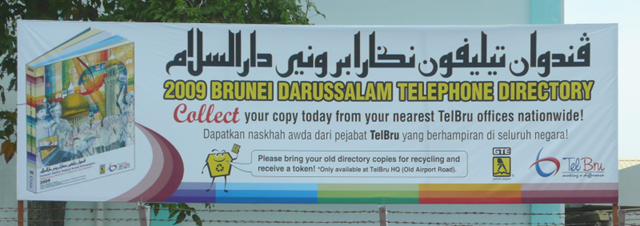
2009 Telephone Directory collection banner

When I was reading the papers last week I came across the announcement that the 2009 edition of the telephone directory was out so I went down to TelBru to pick it up only to be told that they were not available yet. So I went back thinking that they shouldn’t announced it in the papers if they weren’t ready to give it out. I don’t remember notice giving any starting date, so I would say it would be safe to assume that it was starting on that day. Oh well, so I thought I’d come back another day.

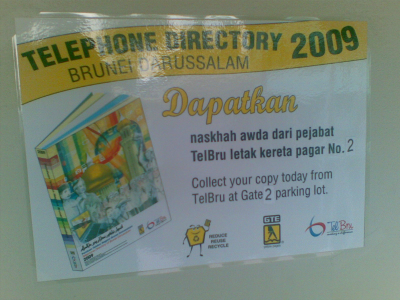
So today I tried to get the phone directory yet again and was happy to see the following sign on the wall at Telbru telling me to get them at Gate 2 parking lot.

Notice to collect Telephone Directory 2009

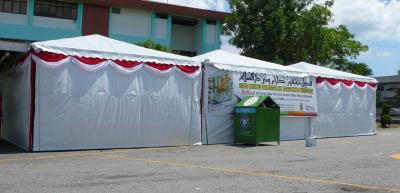
Now perhaps it’s just me, but I didn’t know where Gate 2 parking lot is. But since I parked my car in one of the parking lots and didn’t see any sign of the Telephone directories I thought I should head to the other parking lot. I was happy to see a couple of white tents and even happier to see a familiar Daikyo recycling bin (view the entire list of Brunei recycling bins).

White huts with a recyling bin

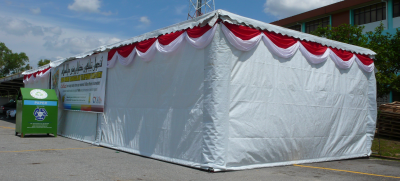
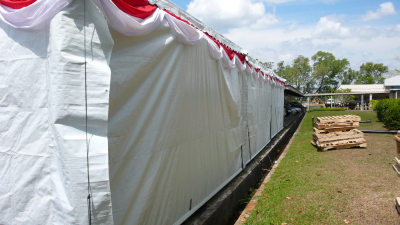
But did you notice something strange about the photo of the white huts? Nobody’s there! It’s not open. The entire thing is sealed shut! I tried to peer behind the canvas and I did notice a table and stacks of what it seems to be telephone directories in bundles wrapped in brown paper. However I could only get into the tent if I was willing to break and entering so I decided against it.

Sealed shut!:

No way in. White huts completely sealed up - front view 

No way in. White huts completely sealed up - rear view

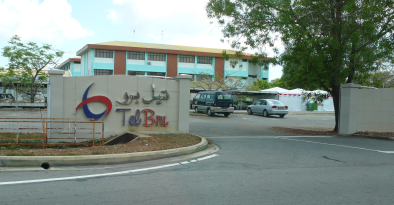
So dejected and foiled yet again to get my telephone directories, I left the place. Leaving through a gate labeled as “Gate 3” and swinging around the front I passed the white tents yet again, and was waiting to see the sign “Gate 2”. But there was no sign to be seen except for the big “TelBru” sign…

Is this Gate 2?:

Gate 2.. I think

Lessons to be learnt

  • If reference to the announcement in the newspaper: If you advertise, please state the availability date, don’t make your customers waste their time going there only to find out that they can’t get it
  • If reference to the notice to collect at Gate 2: customers may not be familiar with your premises, so a map or directions to get to the location would be highly beneficial
  • In reference to the gate with no number: if you give a location make sure it’s labeled clearly! The worse part is being the the right place and not knowing it
  • In reference to nobody being at the tents: If you’re closed for business please state it, same reasoning as the first point.
  • TelBru cares about recycling!

    Notice of a special

    I’m happy that TelBru is taking the initiative and giving people incentives to recycle. Good on them for helping us Bruneians play our part in helping to preserve this Earth. I’m glad to report that the recycling bin was practically full.

I know it may seem trivial to point out these things as in total it probably took up about an hour of my time, but I was pretty frustrated as it was my second time going there only to be disappointed both times and which no real explanation why I couldn’t get what I came for. But at least I hope this provides some constructive criticism to all and anybody who may face a similar situation.

Update: 3rd time’s a charm! And on the booth they had the operating hours as shown below. For accessibility reasons the operating hours are:

    Monday-Thursday: 0830-1200, 1315-1700
    Friday:0830-1145, 1400-1700

Operating Hours

Why was the operating hours only on the booth that was enclosed in the tent? It serves almost no purpose because if you can see it, the booth is open and you can pick up the telephone directories. But if you get there and the tent is all closed up you’re left with absolutely no information… Guys next time do put the operating hours on the tent itself! Saves confusion and annoyance of coming only to find it closed again…

Local Brunei Content

I’m always on the look out for what content Bruneians or people in Brunei are producing. From Adam Groves’ episodic The Jo & Jul Show to David Cheok’s Cinematography and the many photos of the many other Brunei bloggers.

Recently I discovered  Akinari Production (thanks to @oxba). Comedic performances with good music to set up the scenes. Nicely done. Below is one of their episodes/shows entitled “Don’t mess with Hafiz”. Enjoy!

I Love Kuala Belait

Raymond Crooke‘s song performance “I Love Kuala Belait”:

I saw this quite a long time back and I thought I posted it up but must have been the case of the tweets of Twitter (<shameless_plug>@TheWheat</shameless_plug>) that I tweeted and didn’t blog about. He was a part of a group called the Belaiters when he was here in Brunei and now it seems he’s trying to 1001 songs in 1001 days. Wow that’s commitment. The 1001 songs in 1001 days reminds me of Jonathan Coulton‘s Thing a Week project that led to his geek stardom and now he plays gigs across the US. And for all the JoCo fans out there don’t forget to get a copy of BEST. CONCERT. EVER. which was performed and recorded in front of a live audience in San Francisco, CA at The Great American Music Hall.

Mobile Internet (DST) in Ubuntu with a Nokia E51

I heard about Ubuntu’s 3G support quite a while back, but yesterday was the first time I actually tried it out. This was done using a Nokia E51 connected via USB with a DST Easi card with Ubuntu 9.04. Please note of the importable troubleshooting note below

  1. Connect the phone and set connectivity mode to “PC Suite”
  2. A configuration wizard should pop up as shown below:

    New Mobile Broadband Connection - Welcome screen 

    If the wizard does not show, start it manually by following these steps:

    1. Go to the Ubuntu Menu: System > Preferences > Network Connections
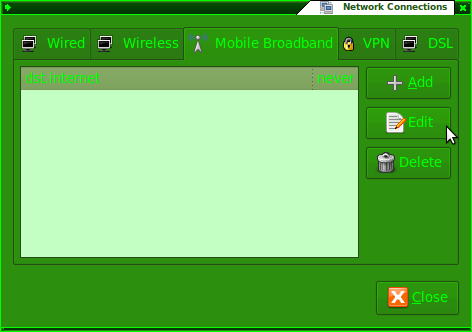
    2. Go to the “Mobile Broadband” tab and click the “Add” button
      Network Connections - Add a new Mobile Broadband Connection
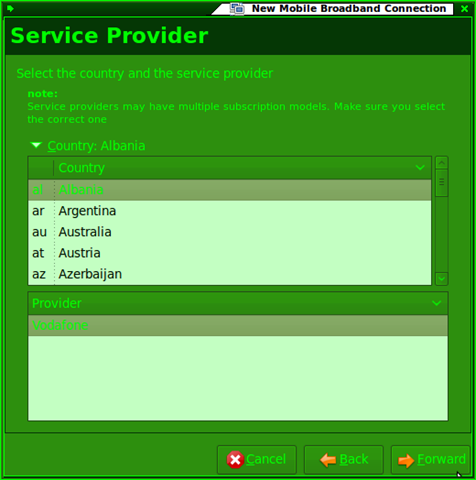
  3. Select the any setting as they will be manually edited later. For this example I chose Albania and Vodafone as the country and provider respectively as it has minimal configuration changes
    New Mobile Broadband Connection - Select Service Provider
  4. Give the connection a name: “dst.internet”
    New Mobile Broadband Connection - Name it / Summary
  5. Go to Network connections (System > Preferences > Network Connections) and edit the newly created connection
    Network Connections - Edit new connection
  6. Ensure the configuration is as follows:
    • Number: *99#
    • APN: dst.internet
    • Username and password can be left blank
    • If the Albania > Vodafone settings were used, only the APN needs to be changed

    Edit connection - Mobile Broadband Tab

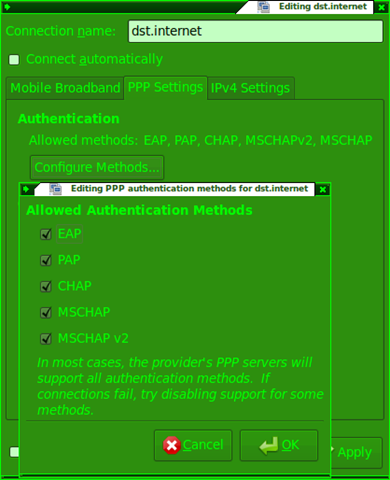
    Edit connection - PPP Settings Tab

    Edit connection - PPP Settings Tab - Configure Methods...

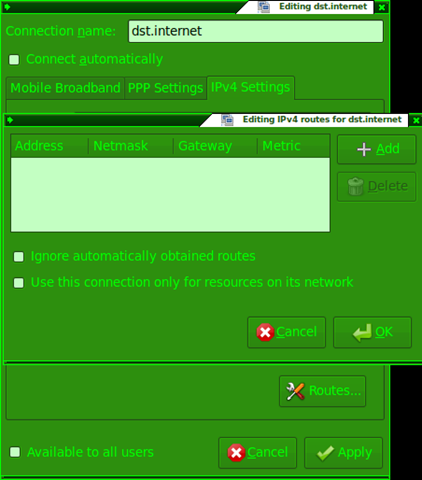
    Edit connection - IPv4 Settings Tab

    Edit connection - IPv4 Settings Tab - Routes 

  7. Left click the network manager applet and connect to the newly created “dst.internet” connection

    Connect to dst.internet via Network Manager applet

  8. Enjoy your mobile broadband =)
    Connection Information 

Now I wonder if this works for the DST Go! and bmobile Zoom! modems….

Troubleshooting Note

If you have a problem connecting please note this bug that causes the connection to timeout if there is a shell running as root. So close all terminals open. It took me 2 hours to figure this out so I hope you won’t have to suffer the same.

More Lessons in Web Security / Best Practices

So one day I was browsing the Brunet homepage and saw the link to Live Webcams around Brunei, interested I clicked the link only to be greeted with the following meaningless page in Firefox.

Page view in Firefox

So thinking they implemented some IE specific page I loaded up IE and was prompted to install an Active X control. I looked at the source code of the page to figure out what it was using and was interested in what I saw

    NV1.MediaSource   = "61.6.207.177" ;
    NV1.MediaUserName = "Admin" ;
    NV1.MediaPassword = "123456" ;
    NV1.Httpport      = 80 ;
    NV1.RegisterPort  = 6000 ;
    NV1.ControlPort   = 6001 ;
    NV1.StreamingPort = 6002 ;
    NV1.MulticastPort = 5000 ;

    NV1.ASEMediaSource   =  "202.160.45.35";
    NV1.ASEMediaUserName =  "Admin";
    NV1.ASEMediaPassword =  "123456";
    NV1.ASEControlPort   =  6001;
    NV1.ASEStreamingPort =  6002;

IP addresses and user credentials… So decided to do some more exploring and found out the code is basically some copy-paste work done from ACTi documentation on their IP webcams. Found out they have freely available tools to interact with the web cams themselves. While some utilities only allow scanning web cams on the same network I found that the Snapshot utility allowed me to specify the IP addresses and user credentials and was able to generate snapshots at specific intervals. I wish they used this instead of the live streaming webcam option as it helps save on the bandwidth and makes it much more accessible from any browser that supports images, but then they’ll have to run the application on a Windows server. Oh well

After some more poking around on the ACTi site and the documentation for their webcam’s API I found out that you could visit a specific URL (eg http://61.6.207.177/cgi-bin/system?USER=Admin&PWD=123456&SYSTEM_INFO) on the server and retrieve (and possibly even change) information on webcam. Also noticing the Httpport variable I tried visiting the webcam IP (http://61.6.207.177) and was greeted by the web configuration page as shown below.

Web cam web configuration page

Entering the Admin user name and password I was given full reign on the configurations of the webcam including specifying new users and even changing the password of the Admin user itself, thus rendering all the webcam pages useless. So I email the people over at Brunei via the contacts page and got no responses. Called them up the following week and the lady on the phone said she’d refer me to a technician and that I should just wait for a call from them. A few hours later I got a call from a technician seeking to clarify this problem I found and thanked me for my mail and the next day when I checked the webcam pages it was all rectified! Nice swift work people at Brunet. A round of applause.

Lessons to be learnt:

  1. Change your default settings/password/user credentials: obvious as it is, quite a few places in Brunei that have free wireless, have not changed their passwords. Using a default passwords page found easily online can easily allow any unauthorized users to change settings and even deny users access to the service or possible DNS spoof users (meaning that even if your browser says you’re on paypal.com or facebook.com it could still be a malicious site that farms your user credentials as it points a different IP address altogether).
  2. Understand what you are doing and the security concerns that will arise. In this case, don’t just copy and paste code, see that all is working and be done with it. Analyzing the code clearly shows an administrator login. Understand that any visitor to the page can view the source and see this user credentials. I guess the fact that when people see that it works they can’t be bothered about fiddling with it, in fear of screwing things up. Another scenario would be when somebody wires up their wireless router, switches on the power and all of a sudden they can surf wirelessly they don’t care about setting a wireless password, let alone changing the router configuration password. The old saying “if it ain’t broke, don’t fix it”, just doesn’t work in security(software/ firmware/ hardware needs to be updated to fix security vulnerabilities)

These are just a few simple lessons that we can learn but in the field of computer security there is so much more to be afraid of and we as users need to be more knowledgeable. Places you can start would be Security Now and for the slightly more enthused/technical PaulDotCom Security Weekly. For the more layman kind of person do check out Security Now transcripts, show notes and old episodes as they are very useful. Both these shows are podcasts which in essence is like recorded video or audio that you can watch or listen to anytime you wish: consume the shows you want, at your own viewing pleasure – anytime, anywhere. All you need is a computer, or for audio shows: an audio/MP3 player, for video shows: a video player. A misconception is that iPods are needed to listen/watch podcasts, and that is just plain WRONG. At the least you can use your computer to listen or watch them.