Post by Email on WordPress.com

By getting a Mac and using OS X I’ve lost the ability to use Windows Live Writer which has to be the best blogging software out there offered free by Microsoft. So with that loss in mind I had to find an alternative way to blog and found out about the ability to post by email.

Steps to enable Post by Email on WordPress.com

  1. Dashboard > My Blogs
  2. Click on “Enable” on the appropriate blog (this will generate an email address for your to send your posts to)
  3. Email to the address generated
Ensure that you keep this email address private as anybody who mails to this address will be able to post on your blog

Typical bold, italics, links and images work without issues. Multiple images can even be combined into a gallery. Shortcodes enable configuration of meta data and post settings. They are short pieces of text that can be put anywhere in the post and are listed below.

  • [category x,y,z]
  • [excerpt]some excerpt[/excerpt]
  • [tags x,y,z]
  • [delay +1 hour]
  • [comments on | off]
  • [status publish | pending | draft]
  • [password secret-password]
  • [slug some-url-name]
  • [title Your post title]
  • [end] – everything after this shortcode is ignored (i.e. signatures)
  • [nogallery] – disables the auto-gallery and displays all images inline

This is great as it allows you to compose an email using the mail client of your choice and use your mail client’s rich text editing features too. As WordPress is pretty strict on the tags you use, take note that not all your rich text formatting will be transferred to WordPress.com’s strict HTML tag policy, thus it may be useful to submit the post as a draft and preview it in your dashboard before publishing it.

Brunei Times E-paper Downloader

Update (2010/08/10): It seems that The Brunei Times has changed their online newspaper to use SWF files instead of JPG files so you can’t easily view the files anymore =(. The download script has been changed to download SWF files
——————————————————–
So I love the fact that The Brunei Times has a great looking website, started Twittering, had video news and most importantly has an E-Paper which is an exact replica of their actual newspaper available online. It’s great that they allow people to read the papers in such a way, but my distaste for Flash led me to be curious of how to get the actual images displayed for offline reading. While looking in Firefox’s web cache I found the URL of the pages:

Page 1 default view: http://www.bt.com.bn/e-paper/images/page1.jpg
Page 1 zoomed in: http://www.bt.com.bn/e-paper/images/page1_zoom.jpg

Armed with that knowledge I started building a script that would let me download these files onto my computer for reading at a later time and possibly even copying the files to my phone and reading it there.

Requirements:

Usage:

  • Double click the download script to download the news for the day. This will download the news into a folder of the given date
  • Open the folder and read the news

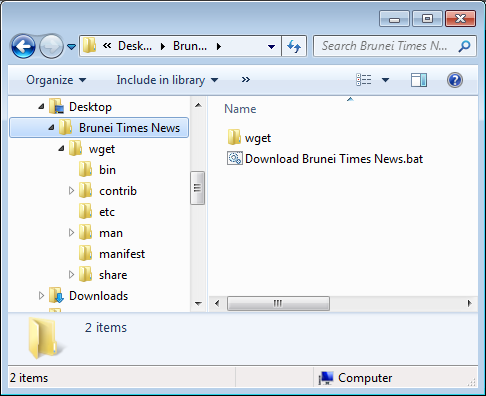
Screenshot of downloaded files

My OS X Issues

So I recently got a 13″ Macbook Pro and after month with it as my full time operating system, here are my issues with the Mac OS X as a heavily keyboard dependent user who has been in a Windows and Linux (Ubuntu/Debian) world for many years.

Command + Tab Application Switcher

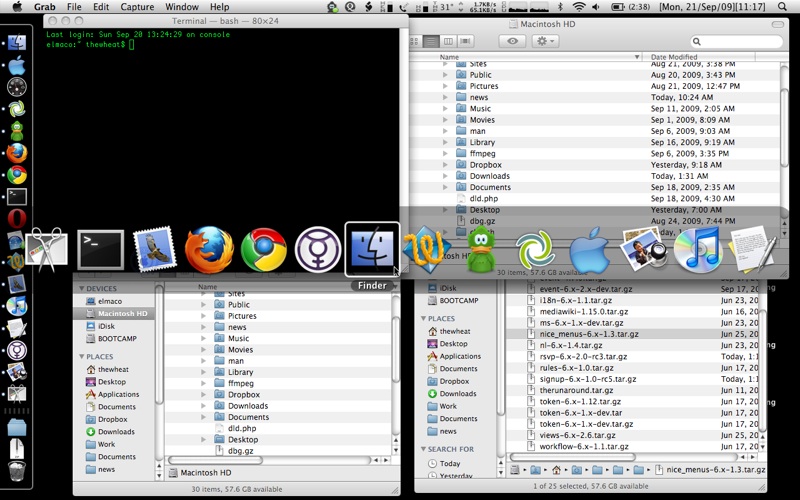
One of the things apparent to me when I used a Mac previously was that when you Command + Tab (Mac’s version of Window’s Alt+Tab) to switch between open applications, it won’t show all the current windows open, just the applications. So, for instance, if you have 3 Finder windows open, when I Command + Tab I will only see one icon as show below.

3 Finder windows, 1 Finder icon in the application switcher
3 finders 1 icon

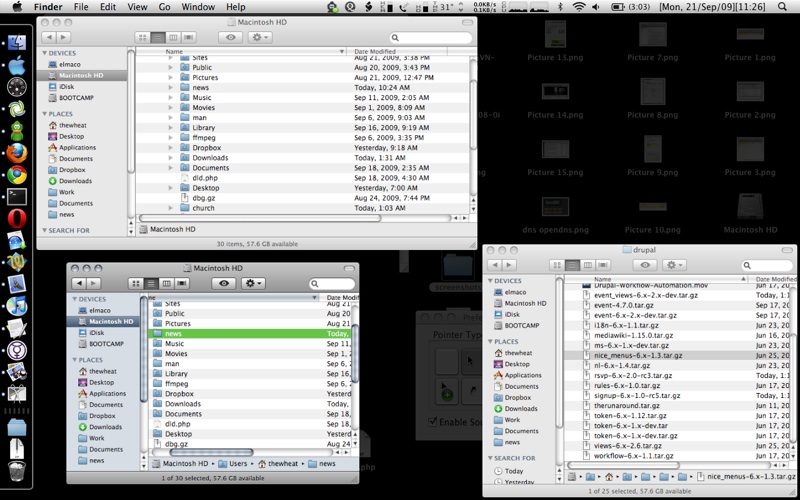
I can see the rationale for this as it doesn’t clutter the application switcher screen but I personally do not like it. There is a way to switch between multiple windows of the same program (Alt + `)(Command + `) which is good that it is accessible but still the inconvenience of having to switch to the application before switching to the right window. This is detrimental to my workflow and productivity on a Mac. I guess to combat this, expose was created for window selection. Expose nicely lays out all open windows on one screen for the user to select and bring to the foreground, and it is even keyboard accessible. However it is not as efficient as alt+tabbing on Windows because each time expose launches, you would have to search for the correct window on the screen before clicking it and proceeding. Witch solves this problem but it will cost you (€9.95) and I’m actually surprised at how few people want this option (current score is: -21).

Expose in action on 3 Finder windows:
expose finder

Finder

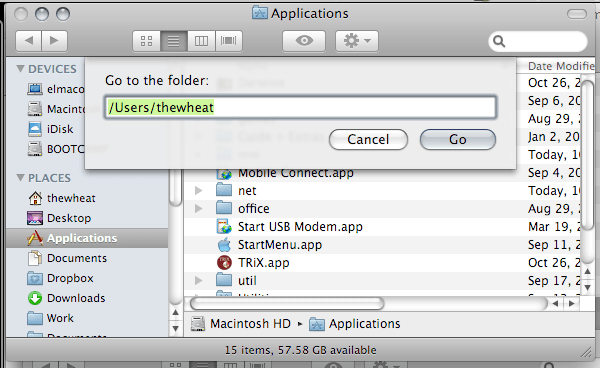
Finder is the equivalent to Window’s Explorer used for file management. One thing that became apparent to me when moving between OS’s is that OS X likes to create hidden files on USB drives and these files are never show in Finder. You simply can’t show hidden files in Finder. I also like to go to the folders by typing in the location using the address bar in Windows. This is something I also cannot do easily with Finder: the “Go To Folder…” dialog box has no auto complete and just does not offer the flexibility of a address bar where I can type and search on the fly.

OS X’s “Go to the folder” dialog instead of an address bar
finder go to folder

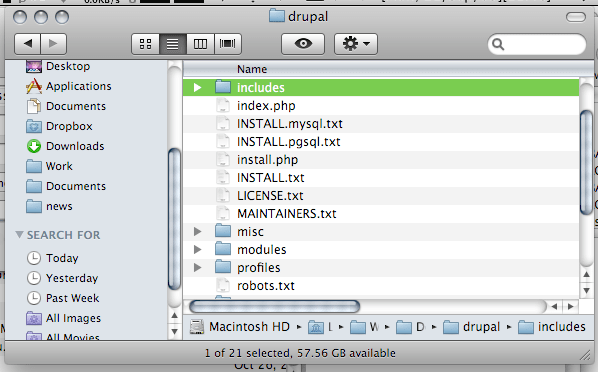
In Finder you cannot list directories first. Thus if you’re trying to access a folder that is deep in your folder hierarchy, you are just searching the sub directories of a folder, you will find yourself searching for the folder among the files. There really needs to be an option for this.

Folders sorted together with files instead of before
finder folders and files mixed

Cut and Paste
No copy and paste but cut and paste. Yes there is cut and paste in a text editor but there is none for file management in Finder. This is a big deal for me as I will use cut and paste very heavily in file management as it allows me to do all my file management via the keyboard. With Finder you’re forced to use the mouse to move files by dragging the folders into the necessary location. This ends up to be a huge time waster. It seems some 3rd party file managers (Path Finder and RAGE Macintosh Explorer) do implement cut and paste feature but if you cut files and forget to paste them (or you interrupt your cut with a copy and paste elsewhere) you can lose the files you previously cut. Windows and Linux has had cut & paste for years and here is Mac OS X without it. I find that hard to believe and also that only now in Snow Leopard you can restore your (accidentally) deleted file to the original location.

Replace not Merge
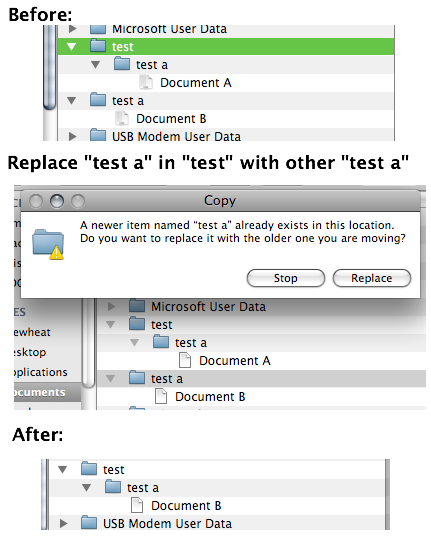
Take note that if you have 2 folders (A and B) of the same name and try to replace one folder with the other (drag folder A to folder B’s enclosing folder) do take note that it will replace folder B with folder A and not merge the 2 folders into one. Thus any files in folder B will be lost. This is very important and I can forsee a lot of cursing and swearing if this concept is not understood. For the record Windows merges the 2 folders giving the user with a folder containing files from both of the folders.
finder replace not merge

Menu Bar

So on a Mac the Menu Bar is always on the top and menu items change dynamically based on which application is currently in focus. The problem here is that you have to select the application first before being able to access any menu. So if you have another application window besides the current window you are using you cannot just access the menu item of the other window, you will have to click on the other window, move your mouse back up to the top of the screen where the menu bar is and file the item. Another time waster. You also cannot navigate menu items like you can in Windows. In Windows you can simply press the Alt key and menu bar is selected and thus you can use the navigation keys to move around the menu. Quick and simple. You can even use shortcuts to access menu items by pressing the key for the letter underlined in the menu. While you can place focus on the Menu bar in OS X using an awkward shortcut of Ctrl + F2 (am trying to find a way to mimic the single button Alt keypress in Windows) , there is no possible quick navigation of the menus.

On the right side of the menu bar there are icons/text that act as shortcuts to certain fuctions (e.g. wireless, bluetooth, volume control) or just for information display. The problem is that some programs have enough menu items to hide some of these icons and there is no way to view these icons in the hidden state. The only way around this is to remove functionality/information from the menu bar itself, preventing me from using it the way I want to. Windows has a feature to hide system tray icons and there is a toggle button to show them all. OS X needs a feature like this.

Menu bar in Mail – hiding some icons

menu bar mail
Menu bar in Finder – revealing hidden icons
menu bar finder

Window Menu

In Windows you can access the window menu by pressing Alt + Space. You can do things like maximize, minimize, restore and close the current window. You can even resize and move the window just by using the keyboard. That is just great and helps productivity. For OS X there is no window menu. You have to use the mouse to move and resize the window. Worse yet you can only resize the window my using the resizer in the bottom right of the window; you can’t resize from any other corner, ONLY the bottom right. I found that Afloat allows moving and resizing windows via the mouse as well as “always on top” and transparency features that I get with Compiz in Linux.

Zoom / (Smart) Maximize

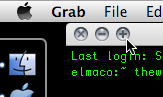
In Windows the title bar has 3 buttons: minimize, maximize and close. In OS X you also have 3 buttons (on the left rather than the right), close, minimize to dock (-) button and zoom (+) button. Zoom does a ‘smart’ maximize that maximizes the window to occupy the optimal space, not the full screen. I can see that makes sense because when you maximize windows sometimes you get a lot of whitespace or useless space, but the issue with this is that it is inconsistent between applications and gets frustrating at times. So I found RightZoom that makes the Zoom button do a maximize like Windows and better still adds a shortcut to this.

OS X’s zoom button: love it or hate it
zoom button

Home and End

If you work with any kind of text in Windows I believe the Home and End buttons are your friends as they are mine. It seems these friends have had a change of heart in the Mac world. I’m using a standard (Windows) keyboard with and when I press the Home / End buttons they bring me to the start / end of the document I’m editing instead of the start / end of the line that I’m used to. I know there is the Command + Left / Command + Right to do this but call me lazy if I think an extra button to press too much inconvenience. Thankfully I found DoubleCommand which allows the Home and End keys to work as I expect them to.

Inaccessible window/dialog box that float on top

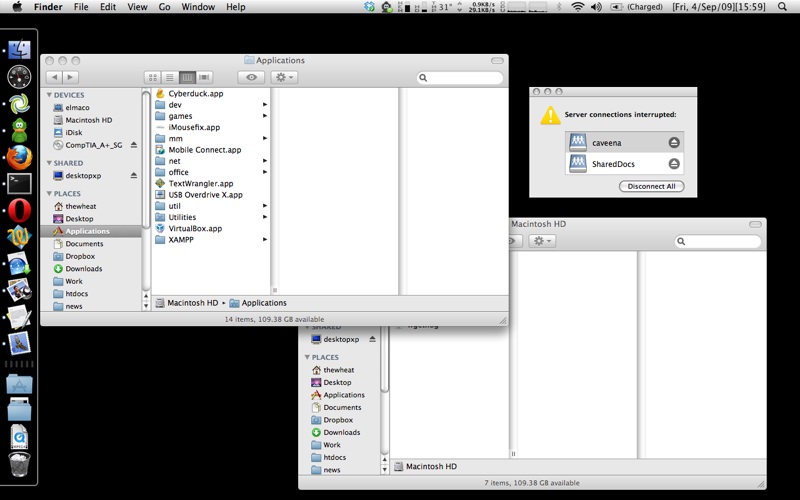
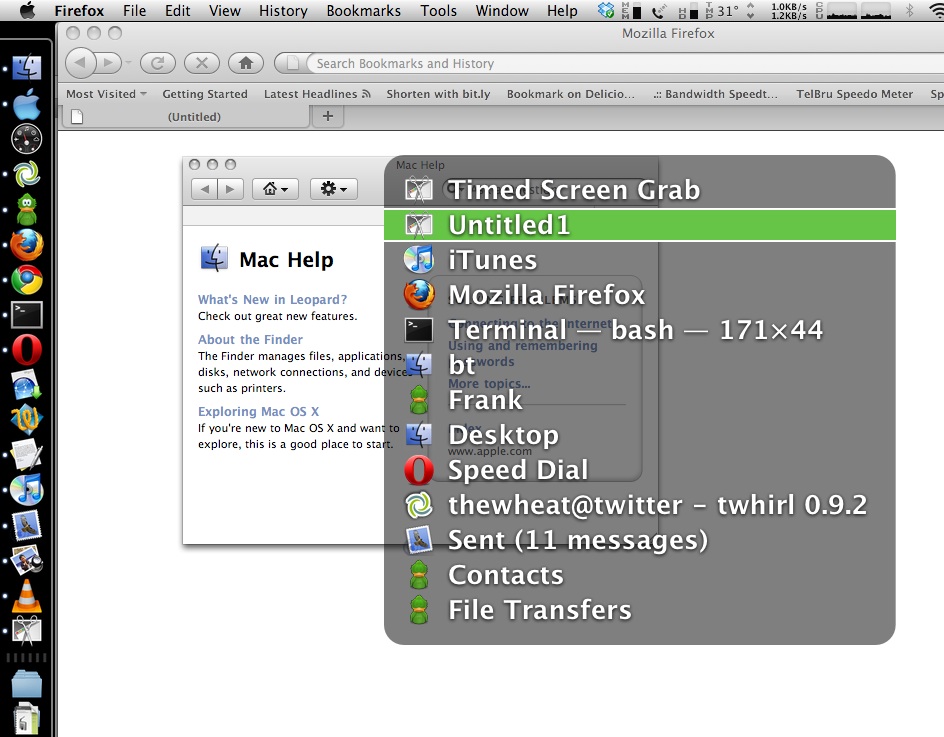
I found that there are some windows/dialog boxes that cannot be accessed via the keyboard application switcher (Command + Tab) or window switcher (Command + `). Open TextEdit (though I think it works in all applications), in the Menu bar > Help > TextEdit help. The window that appears is now inaccessible by the standard keyboard window selector shortcuts mentioned but can be accessed via expose. The worst part is that the window floats on top of everything you’re doing forcing me to reach for the mouse or find the window in expose. This can also happen if a samba share goes offline and you have it mounted

Mac Help window inaccessible via Witch (which is supposed to show all opened windows)
inaccesible help window

Keyboard inaccessible dialog box / help window
no selecteable dialog box same with help filepicture 1

Conclusion

These are my main issues with OS X and there are several other (minor) issues. As you can see there seems to be people with similar situations to mine as there are 3rd party applications developed to overcome these issues. After using a Mac I have realized that Macs jeopardize (my) keyboard skill portability due to the use of the command key instead of ctrl key for many functions and also due to the fact that Apple keyboards have a different layout. I guess the same can be said for long time Mac users in the Windows / Linux world but the fact that Apple not only dictates OS X’s the software but the Apple hardware and both ‘offend’ my quest for keyboard shortcut portability. Just as how Opera changed their new tab shortcut to Ctrl + T from Ctrl + N many version ago for consistency among the other tabbed browsers I can only hope and dream that Apple would give an option to make OS X shortcuts work like they do in Windows.

Mozilla Service Week + Software Freedom Day

Next week (14th-21st September) will be Mozilla Service Week. In the midst of it is Software Freedom Day on the 19th and Mozilla’s One Web Day. I’m planning to serve/participate in all these events by placing myself in different locations in Brunei each day and just being available to help anybody with their web/technology issues/problems.

Below are just a sample of the many things that can I intend to provide assistance for:

  • How to configure your phone to access the Internet
  • How to transfer Youtube videos to your computer / phone
  • How set up a website
  • How to customize your website
  • Trying out Linux
  • Getting legal free software
  • How to create videos
  • How to get free legal shows online

Basically to paraphrase Tekzilla‘s intro:

“If you’ve got a question, We’ve got an answer for you. And if we don’t we’ll track down somebody who does”

I have approached some places and to get approval from them to utilize their place for Mozilla Service week. So far I’ve got a green light from Foodzone (Gadong Properties) and Blue Eden/Inderaloka Biru (Kiulap) and I’m trying to get a place in Delima/Serusop (Easyway?), Gadong central (Coffeebean? Mall food court?), Lambak (Wywy?) and Bunut Area (Wywy?). Basically all I need is a place to sit down with an Internet connection, power sockets (for me and anybody else who comes along) and accessible to people.

I know this may not be much but I’m trying something new and hope to continue doing something like this as a weekly event as a contribution back to the community of Brunei. If you have any suggestions do comment or tweet me @thewheat. I’ll post latest info via twitter but will hopefully have a proper schedule by Sunday so if you’re free do drop by and say ‘hi’. Feel free to come join me and help out too =)

blogAd

P.S. I have to thank @jidah for mentioning Mozilla Service Week and OneWebDay as that’s where I learned about it and thus led to this.

Concept Computer’s Monitor Trade In Promotion

So one day I was flipping through the newspapers and I saw that Concept Computers was doing a trade in offer for old monitors to get a $50 discount on a brand new LCD monitor.

Concepts Monitor Trade-in Promo Advertisement

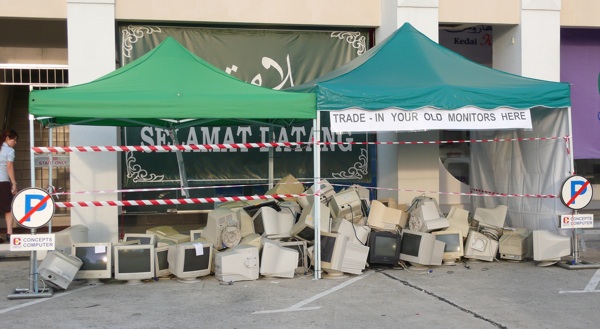
It’s great that they were taking both working and non-working monitors and this sort of business practise is not common in Brunei at all. So when I went to exchange 3 old non working monitor’s for LCDs I was happy to see a site of old monitors. Photos of the monitors being hauled away are available at AnakBrunei’s post

Pile of old monitors traded in

So I would assume that they were going to recycle the monitors as they accepted both working and non working monitors, but I had to check with them. Actually I wanted to get the contact of the recycling center they were going to send it to. So I asked the staff there and they informed me that I should as their boss Mr Vincent Pao. He happened to be there at the shop so I approached him and asked whether they were going to recycling the monitors. He told me that he was going to throw them away!! He did mention that they would give some away but that the last time they sent quite a lot of computer equipment to be recycled they only got B$200+ from it. So he tried another method. There were recyclers offering to take the monitors from him but he wanted to sell the monitors to them to at least get a better return on investment I guess. But they didn’t want to pay for them so he said they were better off throwing it away.

After hearing that I thought what a bummer. I’ll go hug a tree to make up for it (actually that reminds me about the ISB‘s Million Trees Project and BIBD‘s commitment to match each tree for every 4000 bought). But at least he did mention that they were giving some away. I will try to follow up on this issue as now they are having a printer/scanner trade-in: any printer/scanner for an All-In-One (Print-Copy-Scan) Epson Stylus TX100 for just B$98 available while stocks last and before 30th September. On a lighter note I have to say that Concepts Computer is the only innovating computer store in Brunei (to my knowledge), from organizing seminars on Windows 7, Panda anti-virus and now offering these trade-in offers. Other computer stores in Brunei, I hope you step up your game plan to exceed the things Concepts are doing!

Printer Trade-In

** Note: This information was gathered on the 25 August 2009 from a discussion between myself and Mr Pao. If they did end up sending it to a recycling center do let me know. Thanks

The Unofficial Lite Edition of the Brunei Times’ E-Paper

The Brunei Times has their official E-Paper which is a digital version of their actual daily print edition but it’s based on Flash and it’s pretty cumbersome to navigate and read the papers. So I managed to extract the URLs of the images and create…

The Unofficial Lite Edition of the Brunei Time’s E-Paper

Perfect to load up the Complete version, let it load and have the entire newspaper right in front of you to start off your day.

Update (19/Nov/09): Seems that Brunei Time is blocking direct image loading. While a fix is being worked on, use Brunei Times E-Paper Downloader to get the news.

Using wget to resume downloads that require cookie credentials

I’ve been having an issue recently (not sure if it’s the Mac) but it has indeed become very apparent to me, that I would download things (applications / videos / ISOs / etc) in Firefox and the download would ‘finish’. It shows it as completed in the downloads window but in fact it is a truncated download. As seen in the screenshots below the SDK finished at 1.6GB when in fact the actual full file size is 2.1GB.

Misleading completed Firefox download

I initially tried using wget to download the file but got a ERROR 403: Forbidden error probably due to some cookie credentials. So not wanting to waste my 1.6GB download that took about 12 hours I resorted to looking into getting wget to work with cookies and was happy to see that the folks who created wget indeed had an option to load the cookies file. Sweet! Very sweet indeed. So next task was to get the cookies out of Firefox which was a bit more of an issue.

Export Cookies was known to work but it was not compatible with Firefox 3.5 so I had to download the Nightly Tester Tools to allow Export Cookies to work. Export the cookies (“Tools > Export cookies”) and in Terminal/Command line and enter the wget command to resume the download as follows:
wget --server-response --continue --load-cookies cookies.txt http://location/of/download

Download wget (Windows | Mac)

Baiduri FAST not fast at all

So I decided to try Baiduri Bank’s phone banking system called FAST to see how it is and I can say my experience was a total hassle. I’ll give them props that they allow users to apply online but lucky unlucky me had to sign up through the ATM.

I did receive the letter from them a long time ago with my PIN and procedures but like any lazy person I put it somewhere and forgot about it and lost it somewhere. So I had to get my PIN reset. This wasn’t much of a problem, just had to go down to Baiduri and wait for the new pin to arrive. My own fault, I admit so no worries. So I got my new PIN the day following my request (good response time Baiduri), logged into the FAST system and tried doing some bill payment and got the error that I didn’t have any account linked to my FAST service. Looking back on it, it could have been stated in the initial documents I got telling me I had to register for the account. I called the FAST hotline and was told I would be able to get the accounts activated right away. So off to Baiduri I went again to link up my accounts. I was told I had to wait a few days for it to get activated.

So here I would like to bring up the inconsistencies between the person on the phone line and the person behind the counter serving me. I had a similar experience with AV Electronics and I really annoys me when two difference sources from the same business tell me two different things. I don’t mind understating and over delivering but overstating and under delivery is never good in the business world.

Anyway so I wait for a few days, and try the FAST service several times only to get the “there are no accounts linked to your FAST service” automated voice coming from my phone. So I finally called the hotline to tell them my situation which I had to re-register my account numbers with them and within 20 minutes they called me saying that my accounts were linked up. Finally I thought, but that wasn’t the end. So I log into the FAST service, and finally happy not to hear that I have no accounts linked to FAST and proceeded to try pay DST and Telbru bills. And what do I get? The automated voice telling me that the payment failed (I have more than enough cash in my account for the transaction to go through). I was so annoyed with that I proceeded to an ATM to pay the bills without issue. My Baiduri experience seems to be getting more frustrating from their ‘over secure’ iBanking system leading me to forget my login credentials once again.

Baiduri I love the fact that you have the functionality of bill payment via phone / ATM / iBanking. I love the fact that the response to my PIN reset request was swift. So moving away from the technical side, try work on the user experience and making it easier for the user to get what they want to get done because if your customers aren’t happy something is really wrong

OS X Snow Leopard in Brunei

Now a Mac user for a week (thanks to the special educator’s discount =D) I knew Snow Leopard was coming and apparently it’s coming sooner than expected, on the 28th of August 2009. So I sent a tweet to AV Electronics asking them for the prices and availability in Brunei and their response was:

  • B$48: Single user
  • B$78: Family Pack (5 Apple computers in one household. Non-commercial use)
  • B$268: Single Mac Box Set (for non-leopard users)
  • B$369: Family Pack Mac Box Set (for non-leopard users)
Snow Leopard Prices in Brunei

Snow Leopard Enhancements and Refinements

Estimated time of arrival 31st August, so go book your copy at AV Electronics
Kiulap: +673 2237650/1
Mall: +673 2456436
Email: info_AT_ave.com.bn

Update 1 [2009/08/28]
So today I got a response from AV Electronic’s Twitter feed that they will have the Up-to-Date program for recent Mac owners. So recent Mac owners (Mac bought on or after 8 June 2009) should be able to get Snow Leopard at an even a greater deal. Currently in Singapore it’s S$18 so here’s hoping it will be like B$20 here.

AV Electronic's response regarding the up to date program

Funny thing though. I personally went to AV Electronics yesterday and ask them if there are any offers for recent Mac owners. And the person told me ‘no’. After that to find out today that they do offer such an offer, it makes me, as a customer, feel cheated of the facts. I would have felt even more cheated had I pre-ordered Snow Leopard at B$48 only to later find out I could have got it for cheaper. It’s not the price but the principle of the matter. Hope AV will work on their inter staff communication on their business activities to help provide customers the better service with accurate information to make the best choice.

Acer Aspire One eRecovery Issues: “The system is not fully installed. Please run setup again”

Having a problem restoring from a recovery partition?
Getting an error saying “The system is not fully installed. Please run setup again.” after the recovery partition copies the files to a partition and reboots?
Answer:
Make sure the recovery partition is set to hidden.
Use a Gnome Partition Editor or a Linux boot CD to do so.
Continue reading “Acer Aspire One eRecovery Issues: “The system is not fully installed. Please run setup again””