Thanks to anakbrunei for tweeting the following
anakbrunei: Simply Wow! I love it! RT @logomotto: The most creative writing > http://bit.ly/12bODO
http://blog.thewheatfield.org
Thanks to anakbrunei for tweeting the following
anakbrunei: Simply Wow! I love it! RT @logomotto: The most creative writing > http://bit.ly/12bODO
I’m sure we have driven places and seen what we think to be our soon to be parking space only to be greeted with this:

There are many variations of these adhoc reserved parking spaces for shop owners and their stuff. I’m just wondering on the legality of/guidelines for them
Taken from critiques on Business Process Reengineering (BPR) from Wikipedia
The most frequent and harsh critique against BPR concerns the strict focus on efficiency and technology and the disregard of people in the organization that is subjected to a reengineering initiative. Very often, the label BPR was used for major workforce reductions. Thomas Davenport, an early BPR proponent, stated that:
“When I wrote about “business process redesign” in 1990, I explicitly said that using it for cost reduction alone was not a sensible goal. And consultants Michael Hammer and James Champy, the two names most closely associated with reengineering, have insisted all along that layoffs shouldn’t be the point. But the fact is, once out of the bottle, the reengineering genie quickly turned ugly.”
Michael Hammer similarly admitted that:
“I wasn’t smart enough about that. I was reflecting my engineering background and was insufficient appreciative of the human dimension. I’ve learned that’s critical.”
“insufficient appreciative of the human dimension”: I think I suffer from this at times, many more than not
So one day I was browsing the Brunet homepage and saw the link to Live Webcams around Brunei, interested I clicked the link only to be greeted with the following meaningless page in Firefox.

So thinking they implemented some IE specific page I loaded up IE and was prompted to install an Active X control. I looked at the source code of the page to figure out what it was using and was interested in what I saw
    NV1.MediaSource   = "61.6.207.177" ;
    NV1.MediaUserName = "Admin" ;
    NV1.MediaPassword = "123456" ;
    NV1.Httpport      = 80 ;
    NV1.RegisterPort  = 6000 ;
    NV1.ControlPort   = 6001 ;
    NV1.StreamingPort = 6002 ;
    NV1.MulticastPort = 5000 ;

    NV1.ASEMediaSource   =  "202.160.45.35";
    NV1.ASEMediaUserName =  "Admin";
    NV1.ASEMediaPassword =  "123456";
    NV1.ASEControlPort   =  6001;
    NV1.ASEStreamingPort =  6002;
IP addresses and user credentials… So decided to do some more exploring and found out the code is basically some copy-paste work done from ACTi documentation on their IP webcams. Found out they have freely available tools to interact with the web cams themselves. While some utilities only allow scanning web cams on the same network I found that the Snapshot utility allowed me to specify the IP addresses and user credentials and was able to generate snapshots at specific intervals. I wish they used this instead of the live streaming webcam option as it helps save on the bandwidth and makes it much more accessible from any browser that supports images, but then they’ll have to run the application on a Windows server. Oh well
After some more poking around on the ACTi site and the documentation for their webcam’s API I found out that you could visit a specific URL (eg http://61.6.207.177/cgi-bin/system?USER=Admin&PWD=123456&SYSTEM_INFO) on the server and retrieve (and possibly even change) information on webcam. Also noticing the Httpport variable I tried visiting the webcam IP (http://61.6.207.177) and was greeted by the web configuration page as shown below.

Entering the Admin user name and password I was given full reign on the configurations of the webcam including specifying new users and even changing the password of the Admin user itself, thus rendering all the webcam pages useless. So I email the people over at Brunei via the contacts page and got no responses. Called them up the following week and the lady on the phone said she’d refer me to a technician and that I should just wait for a call from them. A few hours later I got a call from a technician seeking to clarify this problem I found and thanked me for my mail and the next day when I checked the webcam pages it was all rectified! Nice swift work people at Brunet. A round of applause.
Lessons to be learnt:
These are just a few simple lessons that we can learn but in the field of computer security there is so much more to be afraid of and we as users need to be more knowledgeable. Places you can start would be Security Now and for the slightly more enthused/technical PaulDotCom Security Weekly. For the more layman kind of person do check out Security Now transcripts, show notes and old episodes as they are very useful. Both these shows are podcasts which in essence is like recorded video or audio that you can watch or listen to anytime you wish: consume the shows you want, at your own viewing pleasure – anytime, anywhere. All you need is a computer, or for audio shows: an audio/MP3 player, for video shows: a video player. A misconception is that iPods are needed to listen/watch podcasts, and that is just plain WRONG. At the least you can use your computer to listen or watch them.
As Ashton Kutcher beats CNN in terms of Twitter followers and celebrities joining the ranks (Shaq, Ellen, Oprah, Britney) what are the more creative uses of Twitter other than answering the question of “What are you doing?”?
The 2 recent ones I’ve seen are:
PS Brunei has recently seen an upsurge of Twitterers too, with some newbies being well known Reeda Malik (anakbrunei) and Rano (ranoadidas). Others to note would be David Cheok, Ali Janah, Jan Shim (Shimworld). Find more people from Brunei here (not perfect but may help)
Via anakbrunei.org tagboard in response to his post
SMARTER Dad: Those interested to join the ” Charity Walk ” please contact this number 8743777 ( Malai ) , 8734427 ( Hajijah ), 8865646 ( Major Talip ) 8769264 ( Edwin Chong ) , 8732046 ( Hj Yusuf ) … You all can join the walk from one stop or another on 2 May or 3 May . Walk for Charity …8 stop altogether the shortest being 3 km only …Reeda you can join the last to GIANT ..
Calling all people in Brunei to help SMARTER raise the B$1.9 million needed for their new building. Too bad I’ll be in Singapore attending a friends wedding, would have loved to join in this event
After wearing my pair of specs for about 5 I decided it was time for me to get a new pair. So where do I go to find them? To the world wide web of course! I read somewhere that you could get a great deal on glasses if you buy them online and true enough I found Zenni Optical which offered frames + lens starting at US$8.00. The only thing you needed was your prescription. The shopping experience couldn’t be simpler:
They will ship it from different locations depending on where you are and so for me, they shipped from Hong Kong and it came within 2 weeks!
| Prescription: | B$5.00 |
| Frames + Lens: | US$8.00 |
| Clip-on Sunshade: | US$3.95 |
| Shipping cost: | US$9.00 |
| Total: | ~B$37.50 |
| Purchased: | 11th March |
| Left Hong Kong: | 19th March |
| Arrived in Brunei post office: | 25th March |
My $30+ glasses complete with case, cloth and clip-on shades. Sweet!
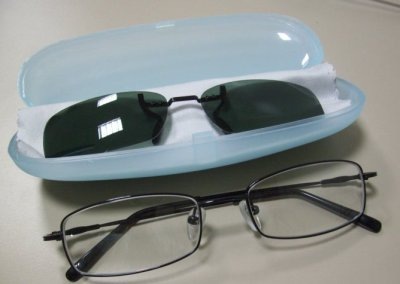
I had the glasses checked with an optician and the glasses’ prescription is indeed correct and my only complaint is that my head is too big so the end pieces are slightly pressing against the sides of my head and I’ve had that with one of my older pairs of glasses. In face these frames have are wider than my old ones, just that the old frames end pieces were designed to curve out and in vs the straight of these from Zenni Optical. So if you have a big head you may want to take note (the pair I got is listed here and has a frame with of 137mm). But all in all I highly recommend Zenni Optical and will definitely shop there in the future!
Don’t tell me this has never crossed your mind when you encounter Parking Idiots


Powered by ScribeFire.
As a follow up to this post and in light of Earth Hour and An Inconvenient Truth we should all pitch in to help Earth sustain generations present and generations to come. So what I have is a list and location of…
You can contribute by sending me a photo and giving me a link to the location of the place. To find out the location try using Show Me Where’s It’s At!, a little something I created to help show people where a particular place is.
Ever had a person ask you if you know where a certain place is and you couldn’t get a good map to show them? Well I ran into this issue and I wanted a quick way to add a marker to the map and pass that information on to the necessary person. So here I introduce….
Just click on the map to get started. Fill in the details. Create and give the link to the person who needs the information. A quick sample: Brunei’s National Stadium

 The Wheat Field