Days in the life of S60 with a Nokia E51

So recently my sister got me a Nokia E51 (GSM Arena) for my birthday, replacing my Nokia 3110 classic. Well actually it was more of her asking me what phone I want and she gave me the money to buy it.

I’ve been eying the phone for quite a while particularly for the connectivity options (HSDPA, Bluetooth, Wi-Fi) and relatively reasonable price of B$398. Based on the comment count over at shimworld people are/were interested in this phone (I guess the focus is now on the Nokia E71 / E63. A bit over my typical device budget but I guess technology is just expensive, heh.

Most reviews online have mentioned the keypad is pretty good but I beg to differ, I’ve had issues with it, from not recognizing the next button pressed, but especially due to the placement of the backspace button. I vary the way I type on my phone, from the single handed method using my thumb to the 2 handed double thumb method. I found blind typing (I do not use dictionary) very hard, especially for words that utilize 2 letters from a single button, example food (f-o-o-d) which I would typically type by pressing 333,666,down,666. Notice I press the down button on the 4 way navigation keypad so that I can move on to typing the next ‘o’ without having to wait, but due to the placement of the backspace key, I tend to hit it, instead of the down button, leading to frustration. I’ve had to modify my typing habits by using the right button instead of the down button, but also due to the placement of the backspace key, when I do need to use it, I may end up hitting down / 2. Of course this is greatly reduced if I use to hands and if I stare at the phone thus forcing me to uni-task on typing. I think the button are cluttered around the navigation keypad and is a disadvantage for the chubby fingered like myself, you end up pressing the wrong buttons, leading to frustration. The typical complaint of the side rubber buttons (power, record, volume up and down) which are hard to press but that’s mentioned in all reviews and I knew about it but it is a concern.

The rest of my issues (so far) are with the S60 platform / Symbian OS that the E51 runs on, in comparison to my old Nokia 3110 with it’s S40 3rd Edition platform. The E51 runs S60 3rd Edition Feature Pack 1 with the following firmware (as obtained by dialing *#0000#)

220.34.37
20-10-2008
RM-244
Nokia E51(14)

  • No message details for each SMS received: when I put my SIM card into the phone for some reason it did not have the DST SMS centre programmed into the SIM card or the phone couldn’t retrieve it from the SIM card. On a side not it retrieved Singapore’s M1’s SMS centre, as I used my old phone in Singapore and had to configure it as such. Anyway I thought to myself, it’s ok I’ll just go into an SMS I have received and check the message details and the SMS centre will be there. Sadly I was mistaken and I had to go into my old phone check a message there and get the details from that
  • Text functions (copy/cut/paste) not available in all text boxes/input fields: This one really surprised me and is pretty self-explanatory.*Update: 17/Dec/2008: I just realized pressing the * key brings up a menu with the copy/cut options
  • Active standby shortcuts contain a fixed number of applications: On my 3110c I could choose as many applications as I wanted to and the shortcuts could be scrolled left or right
  • No capitalise feature if in middle of word: If you want to capitalise a letter in the middle of the word and you press the case toggle button (#) it will change to all caps instead of (auto change to all caps)
  • No easy tone selection: Just say you want to change your ring tone, and in the ring tone selection it lists ALL the songs available in your memory card and all you can do is scroll up or down one at a time. That’s how the E51 does it. The 3110c had a great work around which was to use the gallery application (which was basically a file manager) and find the tone and in the menu selection there would be a “use tone as..” menu item, then you can select what type of tone to use it for, be it alarm, ring tone, etc. The E51’s file manager has no such thing and the gallery application is now a single list of all media (categorized by Images/Video/Tracks/Sound clips/etc) rather than in a folder hierarchy which makes things much harder to find.
  • Defaults to no alarm when creating meeting: I rather have an unwanted alarm go off than not having any alarm for a meeting, wouldn’t you?
  • Symbol order when pressing the 1 button is different: Why can’t it be consistent? I don’t want to know that to get an apostrophe (‘) on one phone is achieved by pressing the 1 button 5 times while on another phone it is 3 time. There should be consistency among a brand.
  • Cannot insert contact number/name into SMS message: You will have to open the contacts application copy the appropriate information, switch back to the SMS application and paste. Inefficient and troublesome

I am not sure how much of these issues are Nokia issues, S60 (and thus Nokia) issues, Symbian issues or just plain ole too-fussy-lil-me issues. Whichever way it is, they are issues that plague me once and a while and some that plague me day after day. In light to these issues I have to say the 3110c is superior to the E51 when it comes down to usability (but certainly not on functionality) on a day to day use. I have to say the E51 is too thin for taste and the 3110c has a pretty much perfect form factor and keypad, 2 things that will get me every time. Now if Nokia would make an E51 fit into a 3110c case that would be perfect!

Powered by ScribeFire.
TelBru / E-Speed Customer Service

My delayed Telbru / E-Speed story as promised here.

So I’ve had quite a bit of E-Speed issues since the Olympics and most of the time I just suffered with it but a few weeks ago I decided to file a complaint. I have to say I’ve had a pleasant experience with the technical support when they’ve come down to my place. Take it the first 2 times they came I wasn’t in, so I wasn’t sure what exactly they did if they did much at all. However from the past 3 visits when they came, I explained the exact problem to them face to face and they informed me of the possible issues and went about fixing it.

Apparently when the E-Speed was installed (a few years back) they didn’t do the job properly. My telephone line has phones upstairs and downstairs each with different connection points, and the upstairs connection was used for E-Speed via a DSL filter connected to the modem while the downstairs phone was left as is. This is NOT how it is supposed to be done because the connection downstairs is connected straight to the mains bypassing the DSL filter. The correct way is for the main connection from the telephone pole outside to be connected to a DSL filter and the telephone line output from the filter is supposed to be used for any telephone connections (both upstairs and downstairs).

The E-Speed people told me the wiring is a contractor issue which I should handle which is understandable since they did the telephone wiring in the house, which is fair enough. They did notice some noise in the telephone cable so they called up TelBru technicians who proceeded to change the cable from the telephone post to my house. E-Speed worked however only that night did I realize that the phone couldn’t make outgoing calls. So the next day I called them again and the TelBru technicians came over. I have to say the person who filed my complaint didn’t understand me too well as her description of my complaint was wrong (I’ve had other issues pertaining web hosting questions that the person on the help line really did not understand me and said that they’d get a technical officer to get back to me, but they never did, but alas that is another issue), but anyway I explained the issue of the wrongly wired connections to the Telbru technicians and they started fixing it without charge! After that I’ve been having a pretty good and steady Internet connection. So a big shout-out and kudos to the E-Speed and TelBru, let’s just get some better / more informed people on the telephone lines so as not to make mistakes. Imagine if I wasn’t home and they tried to fix the problem described which was wrong and thus wasting the time of everybody. So let’s just hope Brunei strives for better customer service in all departments and places because I’m pretty sure that we all know we need it

Powered by ScribeFire.

Disable Embed Autoplay

So yesterday I got annoyed at some auto playing music when visiting a blog and I couldn’t find a userscript to disable it so I coded my own. I actually read more of the Dive Into Greasemonkey documentation this time and added it to my userscript page.

Hmmm just tried it in Opera and it didn’t really work. Oh well will modify some other time since I still use Firefox most of the times (still haven’t made a transition back to Opera yet, I blame inertia). Still wondering how to manage these little projects of mine (I should update the projects page…), wondering if should but it on a separate blog/host (currently using brother’s web host for http://thewheatfield.org subdomains but using WordPress.com for the http://blog.thewheatfield.org), unsure of how to make things accessible while keeping things low for maintenance purposes. Suggestions are always welcome

Powered by ScribeFire.

Semi-baptised Laptop

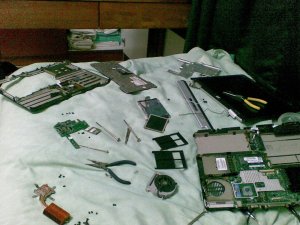
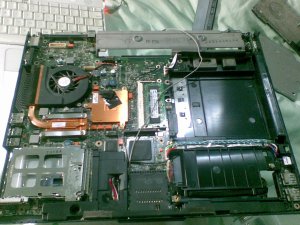
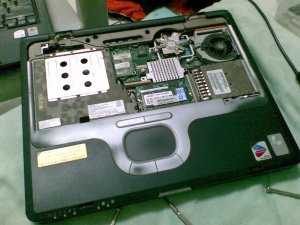
Water spillage > funky lines on screen > up until 2 stripping the laptop thanks to the HP manual page for my laptop and I ended up with this.. a decapitated and naked laptop
Laptop innards

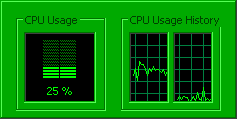
After a day of playing around (and thinking the keyboard was shorted [I guess I really need to learn to put the connector in properly, but it did seem right the first few times… *shrug*]) and stressing over the situation all is fine it was all down to one thing…. disabling SATA native mode. Doh! What a wasted day and time. But one thing I did notice is that the CPU utilization seems to be ~20% all the time on one core…. strange (don’t remember it being that way at all)
Screen shot of Windows Task Manager's CPU utilization

Powered by ScribeFire.

26

Wow… The guys from 20+ CG just celebrated my upcoming 26th birthday just now. And as they all left and I was clearing up and I thought. I was thinking that 26 seems so much older than 25 and that 26 years of life should account to something. I guess it’s like an epiphany, maybe not a huge one but an epiphany nonetheless. I remember I used to talk with NTT and how we would joke something like:

“So we’ve/I’ve lived X many of years and what have we/I achieved? ‘Nothing!'”.

(fill X with your age)

That ‘Nothing’ is a lie that we tell ourselves trying to belittle ourselves and yes we shouldn’t think that way, but I guess from tonight I want my life to mean something. I want the answer to the question to be ‘something’. I want to make a change. I want my life to mean something, but not just to me, because what is a life if a person changes only themselves and not touching the lives of others? They say no man is an island so let us not be islands. For those who know me, I’ve had my hermit island days and even the sit-at-the-back-of-church-and-play-with-my-PDA-you-better-not-bug-me days. But I think as I turn 26 I’m trying to be a link in a chain, a node in a mesh network, a seeder in torrents. Let us be a people that will not say “What have I done? Nothing!” but let us strive to be a people of change. I’m sure we’ve all heard of inspirational stories where they usually end the story with something like, “go chase your dreams” or “don’t let anybody tell you, you can’t make it”, so I kind of feel obligated to end off with a phrase. But I guess all I can say is, let your life not be nothing, make a difference. So wherever you are, whatever you’re doing, make a difference. As cliché as it may sound, it has so much more meaning to me right now.

Take care all and God bless!

Powered by ScribeFire.

DST’s OntheGo! on the fritz?

So DST just launched it’s OntheGo! service which is a “mobile portal product by DSTCom providing information and entertainment contents which can be accessed by all DSTCom customers on 3G as well as on GPRS/EDGE.” (yet again with the ‘!’ at the end of the name). It seems like a competitor to bmobile’s mobi.TV but as you can see from the completely different channel selections they are for different target groups.

OntheGo! mobi.TV
Rates Various as below $9.90 for 16 channels (does not state if there is a charge for streaming, which I believe there would be)
News CNN CBNC,Al Jeezera
Sports ESPN Sports Golf Asian Tour, Extreme Sports
Entertainment Disney, Nickelodeon, Astro Ria, and Astro AEC fashionTV, F Men, Luxe TV, Asian Food Channel, Travel Channel, Fun Little Movies, E!, Fish Tales, Animax, Taffy Kids
Music MTV, Astro Hitz C Music, Trace TV
OntheGo! Rates
Browsing Free except for Mobile ESPN & Star SPorts Mobile $1 each per month. Islamic Portal $3 per month and data charges apply for Facebook, Yahoo!, Daily News, Simpur Mobile Portal & Music Chart
Video On Demand
< 2 minutes clip $0.30 per view / $0.50 per download
>= 2 minutes clip $0.50 per view / $0.80 per download
Video stream $0.05 per min
Live stream $0.05 per min
Webcams $0.05 per min
Downloads
Ringtones, Phone Themes, Screensavers $1.50 per download
Wallpapers, Calendars, MMS Greetings $0.50 per download
MMS Uploading $0.05 per MMS
Games $4.00 per download

OntheGo! is trying to do more than mobi.TV by being a portal like iTunes which has it’s music store, video store and application store. It’s trying to be a one stop shop which for the moment. And I say this just from the information I get online (Brunei Times | Brudirect | Borneo Bulletin) because I can’t access the site on my phone / on my computer / via a proxy so I can’t take a look at what it’s like. I like the fact that they are trying to build media access on the go, however I think we still need better backend work. I’ve heard complaints about DST Go! speed, probably due to everybody jumping on that band wagon thus sharing the speed within the area of usage and I still get GPRS connection errors now and again. And I guess they should get the website up, running and ready when the news is out! Because that is totally unacceptable.

Powered by ScribeFire.

QWOP

QWOP

If at first you don’t succeed try try again…

QWOP finish screenshot

It has come a long way from my doing the Funky Chicken Leg as seen below, to beat the game literally on 1 knee
QWOP Funky Chicken Leg cheat way of winning

P.S. For those wondering how far back you can go, there is a block at the -3m position. Yes I did try hahaha
QWOP block at -3m screenshot

Fun, frustrating, fulfilling game and pretty inspirational all from a simple running game!

For some videos check out Youtube QWOP search. Perhaps I’ll make a few videos of how to beat the game: the Funky Chicken Leg way (or other non-running methods) and also the proper way to run (or at least the way I do, because I don’t think my method is optimal)

Happy playing people!

Powered by ScribeFire.