Brunei’s Online Shopping Experience – Part 1

I was really encouraged when I first heard of QQeStore several years back. They pioneered the field of online shopping on a local stage and they brought it with a nicely designed website too. Not sure how long after that a rival was born in Shopping.com.bn (I won’t and can’t link to them due to their ridiculous terms of use). I’ve been a customer of QQeStore for several purchases ranging from my old phone (Nokia 3110c) to a Sony Ericsson charger to a hard drive and I was please with the experience but I thought I was time to take a look at these 2 shopping stores and pit them head to head in different features and functionality and tell you which store you should shop at. I recently made purchases from both online stores and document my experiences with them in the following sections.

Covered in this art:

  • Design
  • Usability
  • Product Selection


Design

QQeStore
QQ: Design WIN

Shopping.com.bn
Shopping.com.bn: Design FAIL

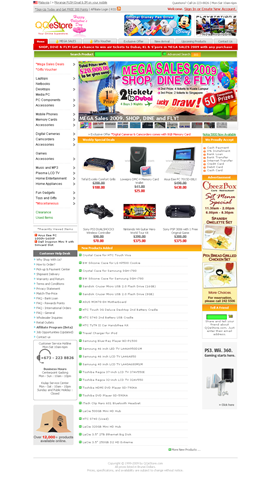
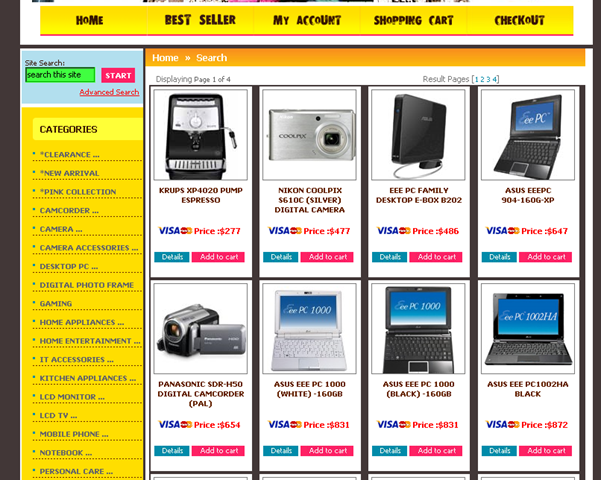
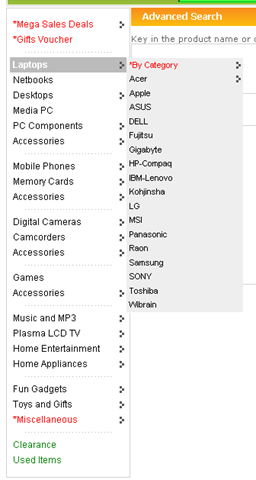
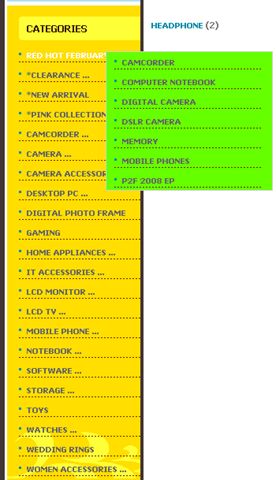
Hands down QQeStore has a great eye pleasing design and is a joy to use: clean, simplistic and functional. Shopping.com.bn is using way too many different colours and

Round 1: QQeStore


Usability

QQeStore

Shopping.com.bn

QQ: Typical page Shopping.com.bn: Typical page

Typical page


QQ: item selection Shopping.com.bn: item selection

Item Selection


QQ: Item Page Shopping.com.bn:Item Page 1/2

 
Shopping.com.bn:Item Page 2/2

Item Page


QQ: Pagination WIN Shopping.com.bn: Pagination FAIL

Pagination


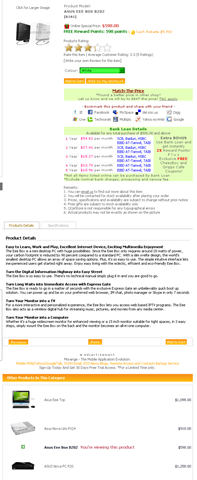
Browsing through the catalogue as you decide to window shop or what item to buy, both stores offer a similar experience but QQeStore stands out by having more product information: “Product Details” and “Specifications” while also offering a section on “Other Products In This Category”, a great way to discover other products that may better suite your needs. The product details is an ideal way to introduce unfamiliar customers with the product and is a great way to give an idea to the customers of what the product does, as to some specifications alone may be complete gibberish. Chalk another point for QQeStore with their “next” and “previous” pagination buttons as both offer small hard to click page numbers, these next and previous links help the process of jumping page to page.

Round 2: QQeStore


Product Selection

QQeStore

Shopping.com.bn

QQ: Product Selection

Shopping.com.bn: Product Selection

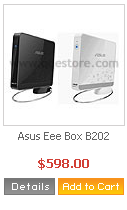
Both stores are very IT and home electronics related but they other things such as jewelry, wedding rings on Shopping.com.bn and some interesting toys and thinga-majigs on QQeStore

Round 3: Tie (No clear winner)


Part 1 Conclusion

After 3 round QQeStore has the upper hand with 2 wins over 0 for Shopping.com.bn. In the following parts, topics such as the shopping process, hidden charges, security and price will be covered so stay tuned

Using your phone as a modem via USB

image35

Though Bluetooth is a nice wireless way to use your phone as a modem, Bluetooth has it’s issues and sometimes it’s just not worth it when you can connect your phone via USB easily and without fuss. Using a USB cable would ensure faster transfer speeds over Bluetooth, if the maximum Bluetooth speed is capping your speed, and would also utilize less battery from your phone thereby giving advantages if you don’t mind the wires flowing around

Requirements:

  • Ensure your phone is configured to be able to connect to the Internet (example for DSTCom Brunei)
  • Drivers for the phone to be recognized as a modem on your computer (should be on CD that comes with the phone, or in the installed software, or possibly find it online)

Notes:

  • Following guide is done on Windows XP, if you need a Mac version, do lend me your Mac and I can tried make 1 for you =)
  • To obtain maximum connection speeds, the modem’s maximum speed to maximum as detailed here


For All Phones

  1. Connect the phone and install necessary drivers to recognize phone as a modem
  2. Open up “Network Connections” in the “Control Panel” and a new connection should be created
    image41
  3. Use that connection and dial *99# to connect to the Internet
     

For Nokia Phones

Continue reading “Using your phone as a modem via USB”

Opera Mini not working in Brunei?

Been having a problem since yesterday of not being able to surf using Opera Mini using dst.internet or dst.wap. Anybody else having the same problems? Did DSTCom block access to the Opera Mini’s proxy servers?

–Update 26/02/2009: All seems well now. I guess it was some mix up over at DSTCom

Configuring your phone for mobile Internet (DST/bmobile, Brunei)

Note: for Android configuration refer to this post

With mobile Internet being very cheap on DSTCom (B$0.05/MB) we all wish to to be surfing the ‘net but before that your phone needs to be configured to do so. The settings supplied by DSTCom are:

For Internet access
Name: DSTInternet
APN: dst.internet
Username: <no username>
Password: <no password>

For MMS
Name: DSTMMS
APN: dst.mms
Username: mms
Password: mms
MMS Server: http://mms.dst.com.bn/mmsc
Proxy Address: 10.100.6.101
Port No: 3130

However it’s not always easy translating these settings to your phone. I recently had issues with a friend’s Sony Ericsson G502 being a Nokia person myself.

Update 1: Due to search requests on bmobile internet connection I shall add it here based on the findings of Hazarry’s work here (PDF file) and bmobile’s iPhone settings.
Bmobile’s APN: bmobilewap. More detailed configuration can be found

For Internet access
Name: bmobilewap
APN: bmobilewap
Username: <no username>
Password: <no password>
Proxy Server Address & port (these settings seem optional as they are not listed in bmobile’s settings PDFs)
HTTP: 129.9.10.20:6500
WAP: 129.9.10.20:6500
Socks: 129.9.10.20:1080

For MMS
Name: bmobile MMS
APN: bmobilemms
Username: <no username>
Password: <no password>
Proxy Server Address & port: 129.9.10.20:6500
Socks: 129.9.10.20:1080

Server Name : B‐Mobile MMS
Gateway : 129.9.10.20
Port Number : 6500
Server Address : http://mms.bmobile.com.bn/was
Connect Via : MMS Servers
Size Limit : 300K
WAP Version : WAP 2.0
GPRS Authentication: PAP

–End of Update 1

Nokia E51 Configuration

Continue reading “Configuring your phone for mobile Internet (DST/bmobile, Brunei)”

Social Moths

While the folks in Singapore has Ping.sg which is a Community Singapore Blog Aggregator developed by U-zyn who has even been touted as the next Kevin Rose and was nominated as one of Business Week 25 Asia’s Young Entrepreneurs.

Well us Bruneians have…

Social Moths


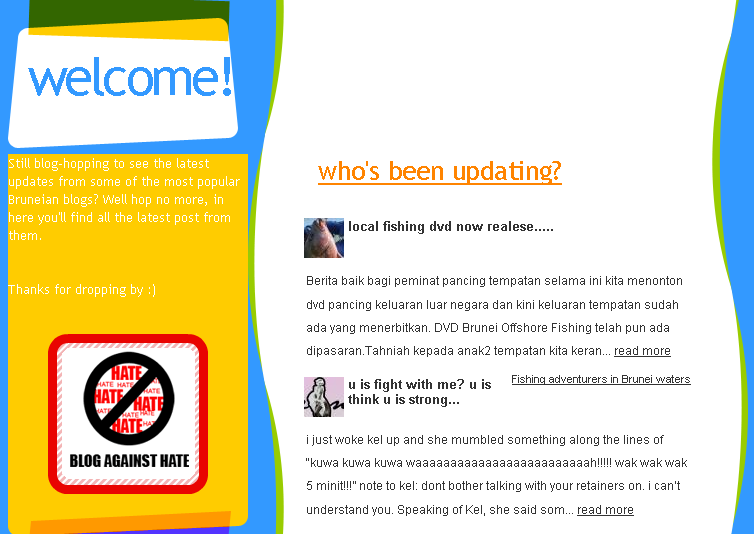
Socialmoths Screenshot
(click to enlarge)

Still blog-hopping to see the latest updates from some of the most popular Bruneian blogs? Well hop no more, in here you’ll find all the latest post from them.

This is a great site for those who want to know what Brunei bloggers are up to, especially with the recent on-going article at CNET Asia entitled “Brunei Bloggers, a retrospective look” (Part 1, Part 2, Part 3).

It’s a great medium for those who haven’t found the joy of newsfeeds (e.g. RSS). But while I wonder where the “Register my blog” link or FAQ is, it makes me think I’m not much of a social moth to know how this site works *shrug*

Powered by ScribeFire.

–Update 090206: Added screenshot of Socialmoths

A Lesson in Web Application Security Part 1

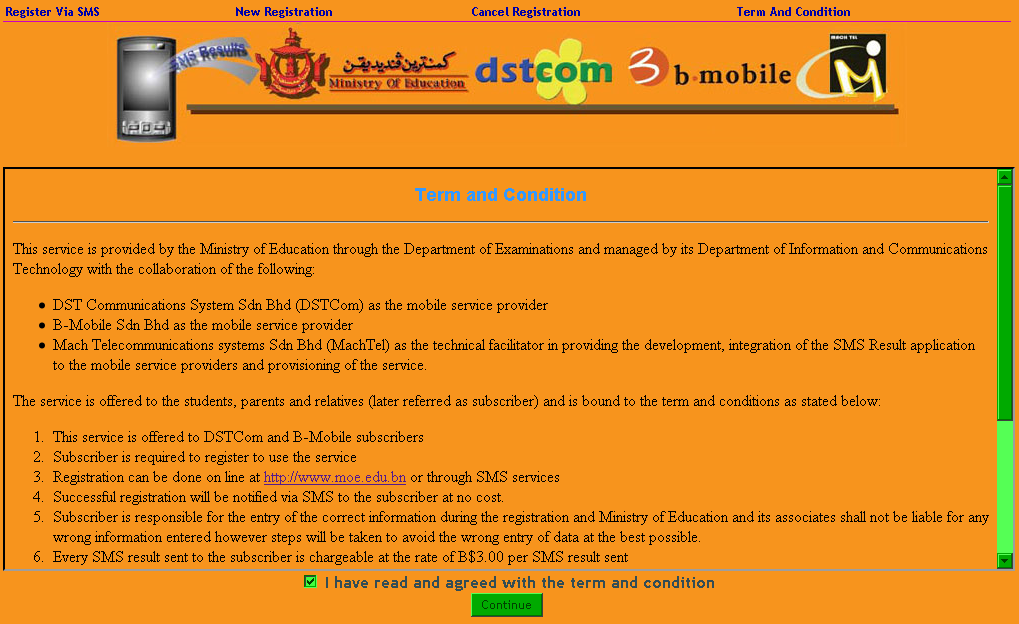
So it was today that the ‘O’, ‘AS’ & ‘A’ Level Results came out and in the recent days before, it was pretty well advertised that students could get the results by SMS. So when I heard word that the results were out I went to the Registration page to be greeted with a pretty, how would I put it, not so aesthetically pleasing site. Yes I know functionality is what is important and I do personally believe in that and I know my skills in design need a lot of work but come on people!

screenshot of SMS registration site
The site in question

So I decide to take a look around and see how they handle the registration of users….

Step 1: Input Details
Input details

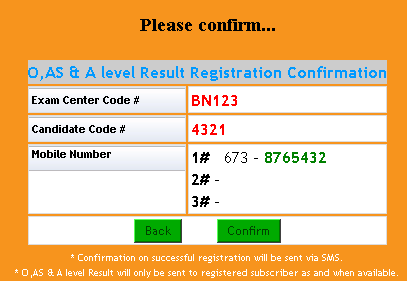
Step 2: Confirmation
Confirmation

Step 3: Nothing, we’re done!
Nothing, we're done!

It does state that registration is free which is good however they was a huge flaw in the design process of this registration. As shown in the next 2 steps:

Step 4: Receive Confirmation SMS
Registration for BN123 4321 CANDIDATE NAME is successful.
To cancel the registration, type MOE CANCEL 98765 and
send to 8885555

Step 5: Receive Results SMS
O LEVEL RESULT 2008
Exam Center: BN123
Candidate Index: 4321
A.M = A
B.M = A
BIO = A
CHE = A
COM = A
ENG = A
MAT = A
PHY = A
RSLT = 8 0

–Update: Actual candidate name and results changed for illustration purposes

Part 2 will be released once Mach Telecommunications Systems fixes the exploits in question (or if they don’t do anything about it, forcing me to release it)

Update: Read Part 2 here

The Great Brunei Flood of 2009

Like many others I was caught in the floods and inconveniences of last night. As with BruneiMotors.com I too wish to applaud the Fire resuce, Ambulance, Police and any other forces who were sent out to help the drives, the stranded and all those affected.

Some shots from Gadong
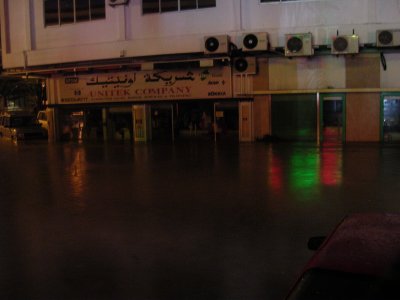
Unitek Area (next to bridge exiting Gadong via the Mall):
Unitek flooded

Unitek:
Flooded car

Car parked at the Unitek area
Unitek area & Bridge

More pics of the events of last night

The flood aftermath at RanoAdidas

Submerged! at anakbrunei.org

Heavy downpour last night cause flash flood around Brunei at BruneiMotors.com

With many people displaced/inconvenienced due to the floods or the lack of electricity, myself without electricity, it makes me think of how refugees feel. We can get so frustrated with these little inconveniences when there are so many others around the World running for their lives, not knowing if they will even live to see another day. I hope it helps us humble ourselves are realize how much we have and how much we take for granted.

Take care everybody. Drive safe. God bless!

Powered by ScribeFire.

BruDirect News RSS Feed

BruDirect dubbed Brunei’s No. 1 News Website also known as, in my books, Brunei’s No. 1 Website in advertisements and general page clutter as shown below (I dare you to click)
Brudirect screenshot

So I got fed up and created an RSS feed that automatically updates daily. After much tweaking finally I have

Brudirect News Feed: http://feeds.feedburner.com/brudirect

Updates daily, every 30 minutes

(Note: the feed contains only stories hosted on Brudirect, not external stories from Yahoo or ESPN shown on Brudirect)
For those who don’t know what RSS or news feeds are, Common Craft did a fantastic video of RSS in Plain English as show below

For if you just rather have a single webpage to read you can bookmark this page.

Powered by ScribeFire.

Of DST’s Go! and bmobile’s Zoom! (why must the names have an exclaimation mark?)

*Updated to add bmobile’s Macbook Air, Macbook, Viao offerings

So we people in Brunei finally have mobile broadband. For those who don’t know b-mobile launched their Zoom! service on the 4th April 2008 and now we have DST’s competing solution of GO! which was introduced on the 1st of May. Both are based on HSDPA which is a 3G protocol and require a 3G capable SIM card that allows voice, SMS and data.

When I first heard about Zoom! a month ago with its “up to” 3.6 Mbps connection I was intrigued and interested (which mobile warrior wouldn’t be?) so I went down to their road show at the Mall. So I went up to the guy to ask a few questions and he told me that there was 3 different speed tiers something like 1Mbps, 3.6 Mbps and something else that I can’t remember. After talking the one of the guys at their booth in the 2nd Brunei Consumer Fair last night I was told that they indeed do NOT have any tiers: just a single 7.2 Mbps (upgraded from 3.6 Mbps to meet the competition). Talk about misinformation. And the guy didn’t even want to tell me the prices plans. The guy was a bit unsure of the product as I asked if I needed to install special software for the device and whether it was cross platform and he said no. So I asked him if I were to boot into OS X or Linux would it work as well? Then he said something like no you need to install software from the CD. I take it, he was talking about the drivers but I honestly wonder how good is the Linux support as it does seem that they have Windows & Mac support which is nice but more on this later. So initially the Zoom! package is 3.6Mbps with 2GB of free data and $0.50/MB after the free usage. That how I read it until I went to the fine print or the FAQ page where it says that there is a cap of $40 on the excess data charges beyond which you are not charged, i.e. in other words for those who download loads of stuff it’s basically base price + $40 for unlimited usage. Now there comes to my other problem I had. What is the base price? It is not the listed on the website. Only after talking to them last night I found out the monthly charge just for the service is $59! So in total that would be $99 (at most) for unlimited data.

So come the 1st of May and GO! arrives and we get to see what offerings DST has up their sleeve has they had practically a month to see how Zoom! did and to strategize in order to compete. And after getting the details (all online I might add, as Jerudong Park Amphitheatre is a pretty long way to go just for the roadshow, and I just don’t have the time right now) I can say that they have indeed put up a great offer. 2 distinct plans: Basic and Unlimited (nice to see that they actually defined it properly). Prices for the basic: $38 with 2GB free data after which it’s $0.20/MB. The bill is capped at $88 (after which I assume it’s unlimited data) while the Unlimited package goes for $78. Both come with a free Simpur email account which is nice but nothing fantastic (Unlimited plan gets you Simpur Email Alert, which I guess is SMS to your phone?).

Now both solutions offer package deals with laptops and such but GO! even has a package with a wireless router (Ericsson W25 Router) that even has USB ports that support both print server and mass storage (and it better considering it cost’s $600)! b-mobile offers a Dell Vostro 1400 / HP Compaq V3700 / Asus EEE PC900. Yup that’s right the EEE PC900!! When I saw that In the papers on Friday I was estatic so I went there and only found a 701 so I was about to ‘scold’ them for getting my hopes up but decided not to. I asked them to show me how it work’s on the EEE but conveniently they didn’t have a modem to test it with. They didn’t have a modem to test it with? At a road show where you are supposed to be demoing the product? Perhaps the modem broke or something like that but still I doubt there is a good excuse for it. The guy did tell me that it does work in Linux but how true can that be if I dont’ see it before my very eyes. Now it has dawned on me I think they mean the 701 NOT the 900 because in specifications listed from a brochure they handed out it says “Intel Celeron 900MHz, 512MB RAM, 4GB SSD Drive, Display size 7″, Resolution 800×480”!!!!!!! Man and this isn’t the first time advertisement isn’t just right.

Here are the things I asked:

Me: Are you guys really giving out laptop?
b.mobile guy: Well, no actually, we’re loaning laptops. Meaning, you will have to purchase our laptop and modem when you decide to subscribe to our service.

Me: (Oh. -_-“ Why didn’t I think of that? How silly I am. I forgot there’s NOTHING free in this world)

Me: So, why is it written free here on the leaflet? (Finger pointing to the leaflet)
b.mobile guy: That…errmm…well…

Me: Never mind. Do I really have to buy your laptop when I subscribe? I mean, I already got one at home. Can I just buy the modem?
b.mobile guy: I’m sorry, sir. You really need to buy the laptop too.

Source: DENCORPORATION

Unless of course this is just another case of the people with wrong information / bad communication. But anyway so I was suprised to see in the papers today b-mobile response to GO!
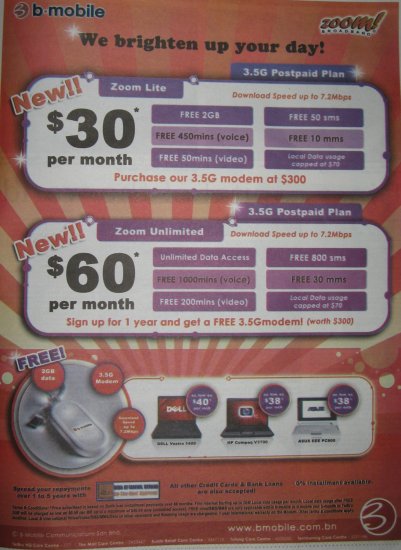
b-mobile's new offering
So finally they made a fine distinction between their Unlimited and Lite plans but what I don’t get is the “Local Data usage capped at $70” for the Unlimited plan. And there they show the “Asus EEE PC 900” which is a picture of the 701 as you can see the black bezel of around the screen that isn’t there in the 900…. (I’m sorry if I love the EEE too much but I did spark the current subnotebook / netbook revolution and I believe this form of mobility goes back to my PDA days, but I digress). But even with this new ad they still haven’t overcome one of their main problems clearly defining their costs and terms and this ambigiouty would cause me to sway to DST’s GO!. Also take note that GO! offers prepaid broadband with the following details

  • $0.05 per Mb
  • License Fees: $25
  • Preloaded Balance: $10
  • Validity 15 days

So all in all the following is a quick run down comparison of Zoom! and GO!

Zoom! GO!
Lite Unlimited Basic Unlimited
Max download speed 7.2Mbps
Free data 2GB 2GB
Excess data charge

$0.50/MB

$0.20/MB

Monthly Fee $30*? Local data capped at $70 $60*? Local data capped at $70?? $38 $78
Deposit $50 (locals) / $100 (foreigners)
Annual License $25
Extras

  • Free 450 min (voice)
  • Free 50 min (video)
  • Free 50 SMS
  • Free 10 MMS

(only for calls between b-mobile and b-mobile / Telbru phones)

  • Free 1000 min (voice)
  • Free 200 min (video)
  • Free 800 SMS
  • Free 30 MMS

(only for calls between b-mobile and b-mobile / Telbru
phones)

  • Simpur Email Account
  • Supplementary GO! Broadband monthly discounts:
    • Basic: $3
    • Unlimited: $5
  • Subsidy for yearly subscriptions
    • Basic:
      • 1 year: $100
      • 2years: $300
    • Unlimited:
      • 1 year: $300 (i.e. free modem)
      • 2years: $600 (i.e. free router)

Simpur Email Alert
Packages

  • USB Modem @ $300
  • Laptop with modem:

    • Dell Vostro 1400: as low as $40/month*
    • HP Compaq V3700: as low as $38/month*
    • Asus EEE PC 900701? as low as $38/month*
    • Macbook Air $99/month# (only 1st 50 subscriptions), Unlimited plan
    • Macbook $70/month#, Unlimited plan
    • Sony Vaio CR35 $80/month#, Unlimited plan

  • USB Modem @ $300
  • Router @ $600
  • Laptop with modem:

    • Acer Aspire 4920-6A2G16Mi:
      $48/month
      48 months contract
      GO! Basic
    • Dell Inspiron 1420
      $78/month
      30 months contract
      GO! Unlimited
    • Dell XPS M1330
      $88/month
      Contract length not stated
      GO! Unlimited
    • Macbook 2.1GHz
      $88/month
      Contract length not stated
      GO! Unlimited

OS Support

  • Windows
  • Mac
  • Linux (supposedly)

  • Windows
  • Mac
  • Linux (no mention)

‘Fine’ print * prices based on a 60 month period by installments
# prices based on 36 month subscription plan

Now b-mobile has a good offering for those who want an all-in-one solution for your mobile communications as it has both phone and data on the same SIM card (only problem) would be taking it out from the modem and put into a phone. However the free minutes and SMS/MMS are only applicable for communicating with other b-mobile / Telbru lines and, correct me if I’m wrong, but I believe most people are still with DST be it for familiarity or be it for cost effectiveness thus these free bonuses will not cover your entire monthly phone (non-data) usage. Thus I will guess I have to give the edge to DST’s GO! as I am currently still using EASI (~$25/month) and I’m strictly only looking for a data plan. But I have to commend b-mobile in it being the first to market and being quick in it’s response to the GO! prices. Indeed this is what competition is supposed to do and I’m glad that there is some. But with that if I had any advice to b-mobile it would be as follows

  • Please make your terms clear because we all want to know as much as we can before committing to such a service (especially with 60 months installments!)
  • Do not try to hide the facts this only adds suspician and confusion to your possible clients. E.g. prices: perhaps I can’t find a nice definitive monthly fee, so if there is one and I have missed it, my apologies. The brochure I got yesterday states that the Dell laptop is a “High Performance Multimedia Laptop”. Just give us the model number like the HP Compaq and Asus EEE PC (refer to last point). But this is nicely stated in the newspaper ad so why couldn’t it be in the brochure as well?
  • Make sure your staff understands the service so that they do not give out wrong information
  • Get your facts right. If you are offering an Asus EEE PC 900 I might be a customer, but if not please correct the details, misinformation will hurt your image and ‘cheated’ customers, who don’t get what they think they are getting, are not fun do deal with

Whoa super long post and that took quite a lot of my time but I guess it’s the technolust of wanting to be a true mobile warrior with my access on the go (on GO!… ok bad pun but whatever). My current toss-up between an Asus EEE PC 701 / Asus EEE PC 900 / HP Mini-Note 2133 / Macbook is making my head spin wanting good battery life but something small to carry. The Macbook is only there for easy video creation that’s all, unless Linux video editors have a major milestone (not that it is horrendous, in fact it’s pretty good what you can get for free, but there are some little annoyances that annoy me a bit too much).

P.S. I wonder if it is possible just to use a regular 3G phone as a modem via AT commands and sorts thus bypassing a need for a modem entirely. That would be the best so you can use just your phone and anytime you want it on your laptop/computer just use a USB datacacble / bluetooth.