MyDST – super app or stupor app

Being a DST user for over 10 years, MyDST has seen changes over the years and there have been ups and downs. Last year they upgraded yet again adding extra wallet / shopping features and started calling it a “super app”. While it is generally a pleasant experience there are consistent annoying points related to ads and popups that make me call it a “stupor app”. While the issue is kind of small, it is a constant annoyance as it happens every time I open the app

My experience is only for the Android side of things so I can’t speak to how it works on iOS but I’d presume it should be similar and my usage of MyDST is mainly for

  • management of Easi / Infinity home broadband (when I was Infinity user from 2020 to 2022)
  • testing out digital wallet shopping options when was released

But all in all, MyDST would have to be the best app along with its full services it provides compared to the other telcos Imagine and Progresif

Basic features all 3 telcos app have

  • Multiple accounts
    • Being able to link multiple accounts / numbers to a single login
  • Biometric login
    • Being able to use your fingerprint is just so convenient
    • For MyDST, I haven’t tested any facial recognition but I’d presume it could work the same for phones without fingerprint readers
  • Core management features
    • Quota usage
    • Bill payment
    • Top-ups
    • Purchase boosters/add-ons

Pros for MyDST

  • Web app access without needing to download app https://mydst.dst.com.bn/
    • It has limited features (no full wallet and shopping features) but has the core functionality related to mobile and home broadband management
    • Imagine also has a web app at https://imagine.dtworks.ai/icare/user/login (certainly not something you’d likely remember the full URL of)
    • Progresif has this with slight caveats https://care.progresif.com
      • It tries to force you to download the app when accessing on mobile
      • But you can still bypass this by setting browser to request the desktop site
MyDST loading on mobile browser vs Progresif Care pushing to app when using mobile browser
MyDST on the desktop
  • Saved credit cards
    • Makes purchasing add-ons / recharges a simple process: pick what you want and use your saved card to page
    • Progresif has a similar option
    • Image does not have this: you need to fill in your credit card details every single time
  • Digital wallet and includes payments/transfers with tarus
    • Progresif has this with Ding!
    • Imagine does not have digital wallet
  • Shopping ability to purchase/order things by simply choosing from the menu
    • Progresif shopping works different and is more for replacing cash payments with QR payments
  • Linking insurance to app
  • Bill payments for certain shops and government departments. Bill payment also seems to have reminders which is nifty

Cons for MyDST

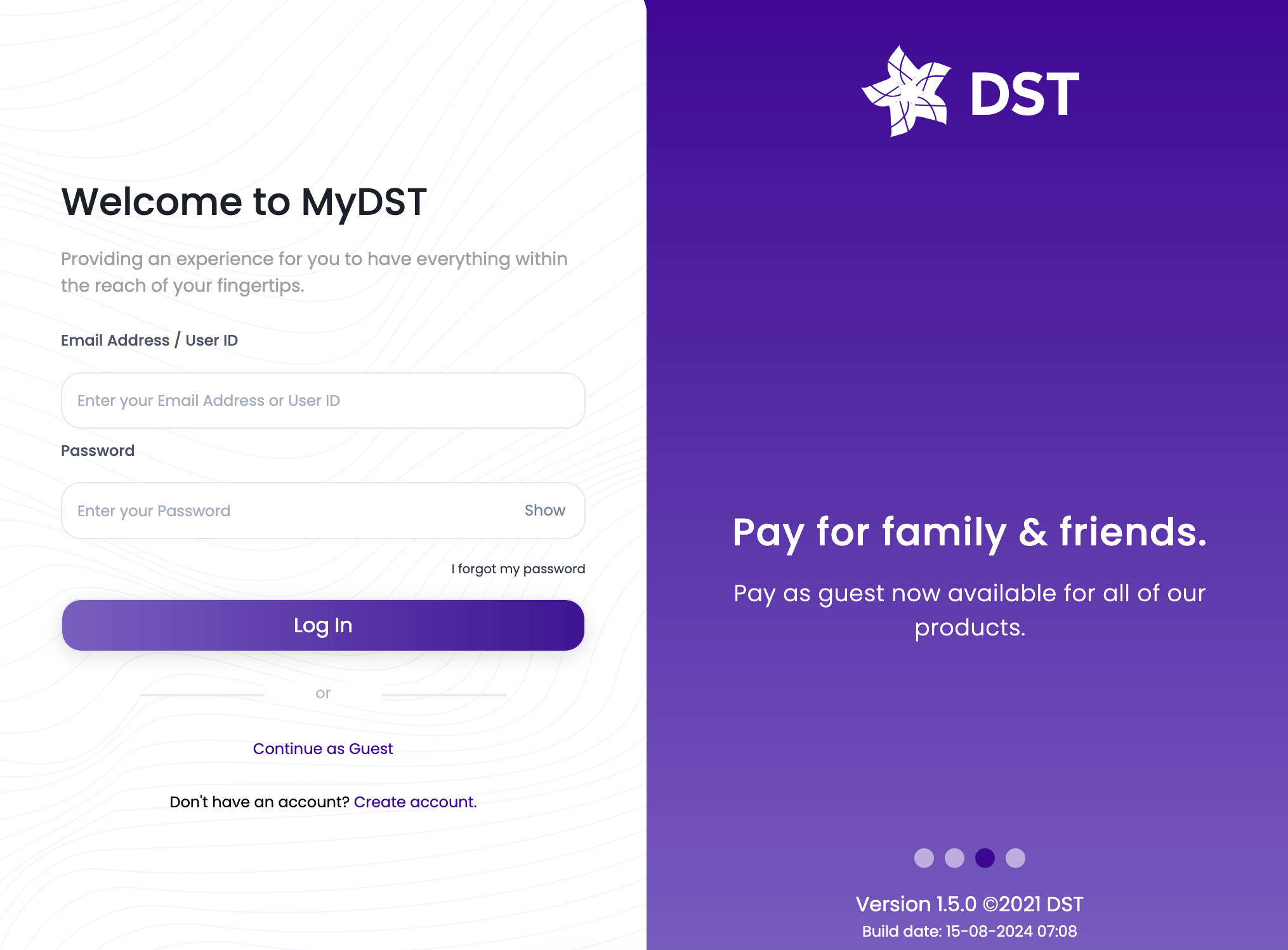
  • Annoying ads on login
  • Multiple notifications when having multiple accounts (seems fixed)
  • Web app is not as full featured as mobile app
  • Shopping option requires shops have a list/menu of their items. So may require extra work on business end
  • Limited insurance, bill payment and government options

I’ll add a bit more detail into some of the cons below

Annoying Ads after login

It started with showing a dialog box telling me that I have successfully logged in, after I just logged in. I just logged in and things are loading to show my details, of course I know I just successfully logged in. This is just a useless notification that adds an unneeded step for a user to start using the app

And now after logging into the app on the phone, it always wants to show me their latest promotion / ad even if it is not applicable me or possibly expired ones. So each time I log in I have to dismiss these ad. The worse I’ve experience so far was 4 of these ads back to back shown below

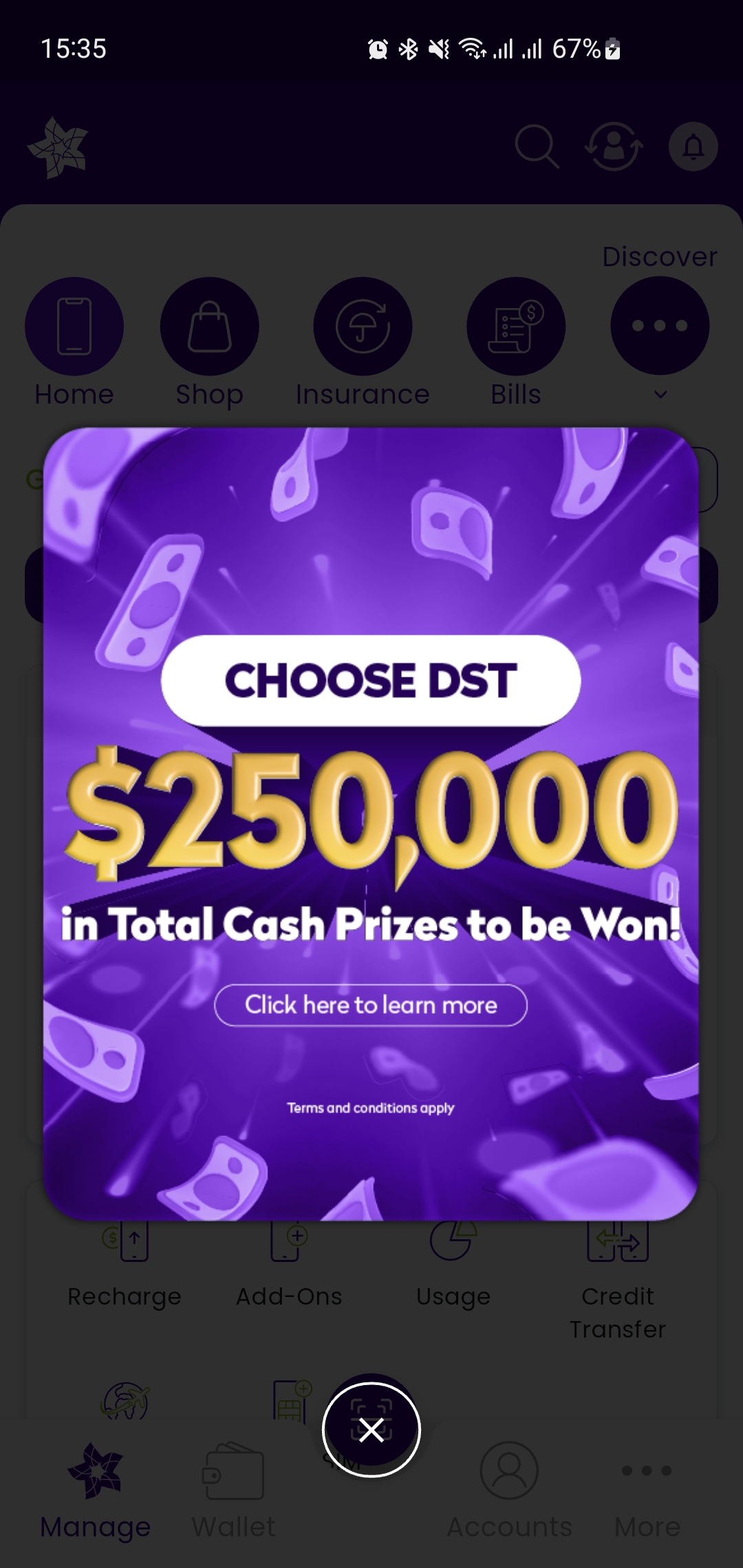
Today, it is just a single ad telling me to “Choose DST”. Ironic how the fact that popping this up each time I log in makes me want to leave DST
Multiple notifications

I have several accounts registered on MyDST applications and when going to the notifications section it used to show me one message per account registered. This was something that happened before the super app and looking at recent notifications, it seems that this issue could have been solved as I don’t see multiple duplicates

The other cons

These are not so annoying but a bit more of limitations and possible design choices

  • The web app is not as full featured as the mobile app. It has no super app features
    • No mobile wallet
    • No shopping
    • No linking of insurance
    • No bill/government service payment
  • The super app features of insurance linking, bill payment and government service payment are limited to certain providers
    • None of these are applicable to me so your mileage may vary with these features
  • For the shopping experience, it would be similar to online shopping of picking items from a cart and purchases
    • Good from the consumer perspective but could be hard for businesses to create a full itemized list of what they sell let alone keep it synced with their actual physical stock. I have no insight into the business owner perspective so I can’t speak to it.
    • It didn’t seem like there was an option to replace cash at the counter where you can order in physical location and use the app to make a payment for things that are not listed in the app. It could be possible with the regular transfer of funds feature that the digital wallet

Summary

  • MyDST is generally a good app
    • Yes it has a bloat of features which I wish there was a stripped down version
    • DST’s quest for pushing ads in the face of existing customers is annoying and makes me like Progresif’s app more and it has practically the same feature set that is important to me
  • Is it a super app? Not to me
  • Is it a stupor app? Yes indeed while it keeps using ads to me
  • Will I still use it?
    • Yes reluctantly (Easi is still the best value for my usage) and curse each time I see annoying ads or useless notifications/messages
    • So I guess they win for now
    • Hoping that Progresif / Imagine can save me (but so far based on my current ImagineGo experience, Progresif will need to be my hero)

Nationwide WiFi no more?

Before UNN helped bring Imagine, DST and Progresif to a somewhat level playing field, Telbru had their TelBru WiFi hotspots that you could connect to and it used your existing quota

We can see remnants to this in this PDF on Imagine’s website

Free Access Service
TelBru WiFi Free Access Service (“Free Access Service”) is a complementary service made available by TelBru for the public at designated TelBru WiFi locations (also known as “TelBru WiFi Zones”).

Postpaid Service
TelBru WiFi Postpaid Service (“Postpaid Service”) allows you to access and utilize your Residential Broadband Plan subscription outside of your home at any TelBru WiFi Zones.

But unfortunately the current state of if seems to be that it is only available on Progresif if you’re able to get their support to set it up but hopefully this can change in the future. See below for my experience of each telco

Imagine

  • No longer available
  • Am an Imagine Dream broadband subscriber since December 2024
  • Previously Imagine had prominently mentioned on the website and even stated that it supported multiple devices as I detailed in “Brunei Telco Wars 2022” as shown in the screenshot below taken from the Wayback Machine from January 2023
  • But now it is no longer stated on the site and when I asked their support, they told me it is no longer available. I didn’t research too much before my migration as they were previously pretty open and upfront about it being available so I presumed it would have still be around so it’s pretty unfortunate
Screenshot of Imagine website from wayback machine stating

Progresif

  • Available (if you get through to the right people)
  • I was a Progresif Fibre subscriber from September 2022 to December 2024
  • It may take a while to get set up though as I had multiple discussions to try find out about it. One person was convinced that it would only work if I had a Progresif mobile subscription which I did not have. Only after multiple follow ups with their support I managed to get it set up. It seems they had to liaise with UNN to get my account working
  • Currently their support page mentions that it is a feature
Screenshot of Progresif support page stating the following:
 
Can I use my Progresif Fibre data on the Nationwide WiFi?

Yes, you can use your Progresif Fibre to access to Nationwide WiFi. You can login with your Progresif ID (Mobile number), Password and Service number (Fixed line number).

DST

  • Never available
  • I was a DST Infinity subscriber from March 2020 (soon after their launch) to September 2022
  • Whenever I asked DST support, they all didn’t seem to know about it or some people just saying it was not supported
  • If you try to connect to DST WiFi hotspots there would be a link to this PDF file which states the following but the MyDST credentials never worked

Customer’s MyDST credentials will be used to log-on to the DST WiFi Service and therefore the user will be fully responsible for whom these credentials are shared with.

DST EASI Roaming in 2025

Summary:

  • It seems that DST has disabled automatic roaming and you need to contact them in order to enable it (Update April 2025 – I can confirm that it works. Normal roaming functionality now works so you can receive SMS notifications for free)
  • This means if you go overseas your SIM will not even connect to any network and you would not even be able to receive SMS which could be an issue if you need 2FA/OTP messages

Last year I went to Malaysia and Singapore and noticed that my DST EASI was not getting any reception – it couldn’t connect to any provider despite my other SIM roaming without issue. Tried restarting the phone, enabling disable airplane mode but it didn’t help. It didn’t matter too much to me as my other SIM with had local data for the country in question.

But when in Singapore I think I needed a 2FA message and decided to just try purchasing an EASI data roaming add-on (even though I didn’t need the data). And to my surprise I was able to get connected to the network and start receiving SMSes

I presume this could be something DST has changed last year with the typical stories we hear about DST roaming charges where the end user does not actively enable data roaming and get charged. If you’re not familiar with this, a quick search shows these 2 such stories and with the first one being the weirdest of even buying a roaming plan, but it didn’t seem to get used but they still got charged

I called DST on 151 and they told me they would activate my account to auto enable roaming in the backend and that it doesn’t have any costs unless I make calls or send SMS. So I guess only time will tell whether this actually works.

On a related note it seems they have tried to help prevent data roaming bill shock by auto subscribing you to the lowest data add-on if you connect to the data network while overseas for MOBI customers https://dst.com.bn/mobi-roaming/ which is good if you know about it and I guess is a generally good move to prevent excessive charges.

It always seems that DST is the only carrier affected by this (or maybe just that they have such a high percentage of the mobile market that we only hear stories about them). But I’ve heard stories of people who are careful and still get charged, so it is always worrying and it was one of the questions posed on KristalFMs “Telcos Tell All: Inside Brunei’s Telecommunications Transformation” roundtable with the 3 telcos and UNN.

All telcos have their issue and it will just be a matter of finding what works best for you. I created “Pick my provider” to help me continue to decide which telco to use and in general my usage of EASI for over 10+ years has gone well (it is the most cost effective with 6GB data add-on and practically no SMS / call usage). I’ve used DST’s mobile broadband service before it was rebranded to Freedom and was also using their home broadband Inifinity and both were general good and I got what I wanted.

I migrated away from DST to Progresif and now Imagine of home broadband and I have all 3 of their apps installed so there will hopefully be more stories to come so stay tuned.

Brunei Telco Wars 2022

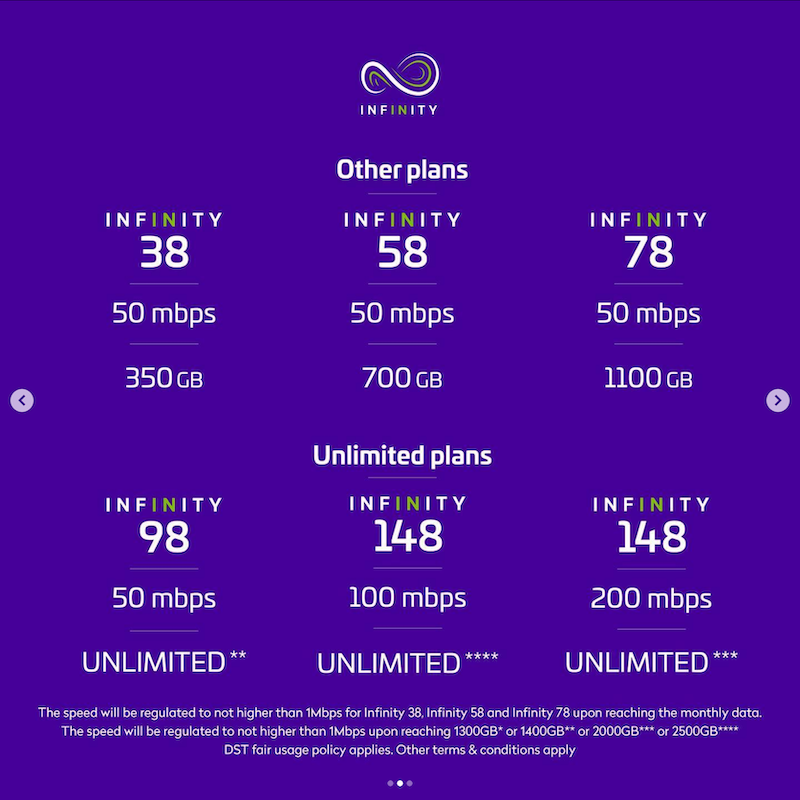
September 1st brought a UNN upgrade and now our telcos DST, Imagine and Progresif have updated their home broadband plans. Below is a summary of the changes for each telco and the latest plans

Pick My Provider https://bruneigeekmeet.com/pmp updated to help pick which provider could suit your needs (view old plans here)

Summary

DST

  • Straightforward upgrade: same price but with either more data (100GB) or faster speed
  • Good
    • Webpage seems to have all necessary information
    • Simple 5 price points and decide if you want more data / more speed
  • Bad
    • 2 year contract
    • No Nationwide WiFi
  • Ugly
    • No real “Unlimited” plan as all plans are throttled after a certain data usage
    • Extra data only being 100GB feels small and doesn’t feel like it differentiates enough between
    • Message is confusing
      • saying all plans have 100Mbps but there are plans with less than that
      • most plan details show a breakdown based on 100Mbps then “Other plans” then “Unlimited” instead of showing the 5 price points

Imagine

  • Upgrades in general get extra data and extra speed benefits
  • Good
    • Actual unlimited plans
    • Nationwide WiFi and explicitly mentioning multiple device support
  • Bad
    • 1 or 2 year contract
    • Unclear throttling info for data based plans (should be same as previous of limited to 1Mbps)
  • Ugly
    • Dowgranding plans once contract runs out and not directly mentioned on main page
    • Online chat system is not great and got no response (previous chat system was better)

Progresif

  • Consolidated plans typically with more data / speed at same price
  • Good
    • No contract needed
    • Actual unlimited plans
    • Nationwide WiFi access
    • Has 100GB for $10 data add-on with long 60 days validity
  • Bad
    • Some lower plans now pay more
    • Unclear throttling behaviour for data based plans (had to ask them as not on website)
      • no Internet for “Entry-Level” plans
      • limited to 512kbps/1Mbps for the rest (was told 2 different values from 2 different sources)
    • $10 line fee now for all plans
    • Online chat system is not great and got no response from multiple messages sent
  • Ugly
    • Now with excluding $10 line fee
      • Feels like they are the same as competition and lost an edge
      • Adds confusion for previous customers where it was previously included in the plan
      • So it is less “Simple keeping”(one of their advertised phrases in the past)

Details

DST

  • Comparing to previous plans
    • In general same price but with either more data (100GB) or faster speed (so you only get 1 benefit)
    • Exception: Infinity 38 will get faster speeds when choosing more data (previously 20Mbps now 50Mbps)
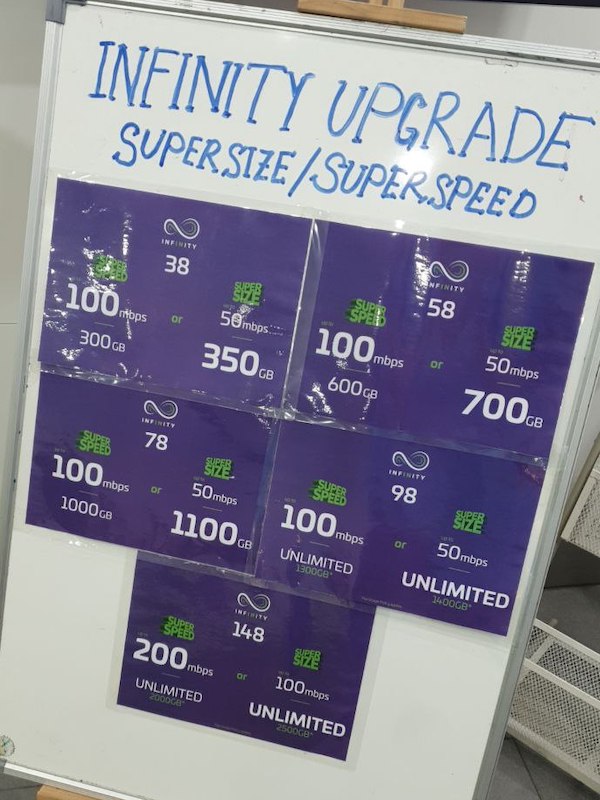
  • 5 price points and each has an option for supersize (more data) / superspeed (faster)
    • I did not understand this until I saw the following sign at a store

Imagine

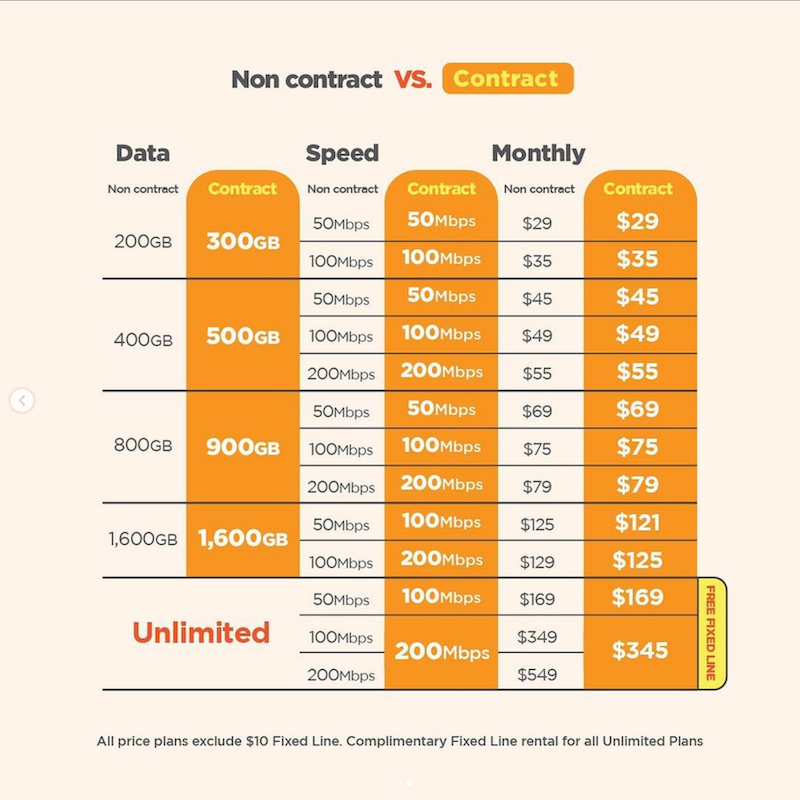
  • Comparing to existing plans
    • Upgrade gives 100GB more with faster speeds at same price
    • Exception: 1.6TB data plans quota has no data change but $4/month cheaper
  • When plans are out of contract you get less data / slower speed
    • Based on their Instagram post as could not find an info on their website
      • 800GB quota and lower: less data
      • 1.6TB data: less speed (100Mbps -> 50Mbps, 200Mbps -> 100Mbps) and $4/month extra
      • Unlimited data: plans less speed (100Mbps -> 50Mbps, 200Mbps -> 100Mbps)
      • To keep 200Mbps extra $200/month
    • There is mention of less data in Broadband FAQ but no details
      > WHAT WILL HAPPEN IF MY CONTRACT PERIOD ENDS?
      > You will automatically be moved to a no contract plan, but with less data. There will be no changes to your monthly rental. To continue enjoying more data, simply renew your contract to 12 or 24 months.
      > HOW LONG CAN I STAY UNDER A NO CONTRACT PLAN?
      > You can stay for as long as you wish. However, you will enjoy more benefits i.e. more data or savings when you renew your contract.
  • Nationwide WiFi available
  • Has real unlimited connection
  • Data based plans should throttle on exceeding data
    • No mention in website, had to ask in person and they did not know the speed
    • Likely 1Mbps as was previously
  • 1 or 2 year contract
  • Online communications not so great
    • Thier ima chat system has had a downgrade since the last time I used it
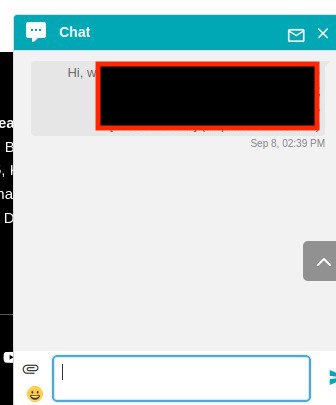
      • Says “Type a message” but you have to click buttons as they have disabled actual chat?
      • Personal identifiable information is sent in the clear in the address bar
      • Never got a response
    • Instagram direct message reply took 23 hours

Progresif

  • Consolidating multiple plans to single new plan
  • Comparing to previous plans
    • In general twice speed and slightly cheaper
    • Lower tier previous plans now pay more
      • Previously: One Home 50GB @ 20Mbps for $30 / One Home 250GB @ 20Mbps for $38
      • Now: Fibre 125GB @ 50Mbps for $35 / Fibre 250GB @ 50Mbps for $45 (Data add on 100GB for $10 valid for 60 days)
  • Now all prices **exclude** $10 line cost
  • No contract required
  • Nationwide WiFi available
    • Was told in store that it is only for a single device and multiple devices can be registered but needs to be done in store
  • Online communications not so great
    • Thier “Ask Tia” chat system has never given me a response
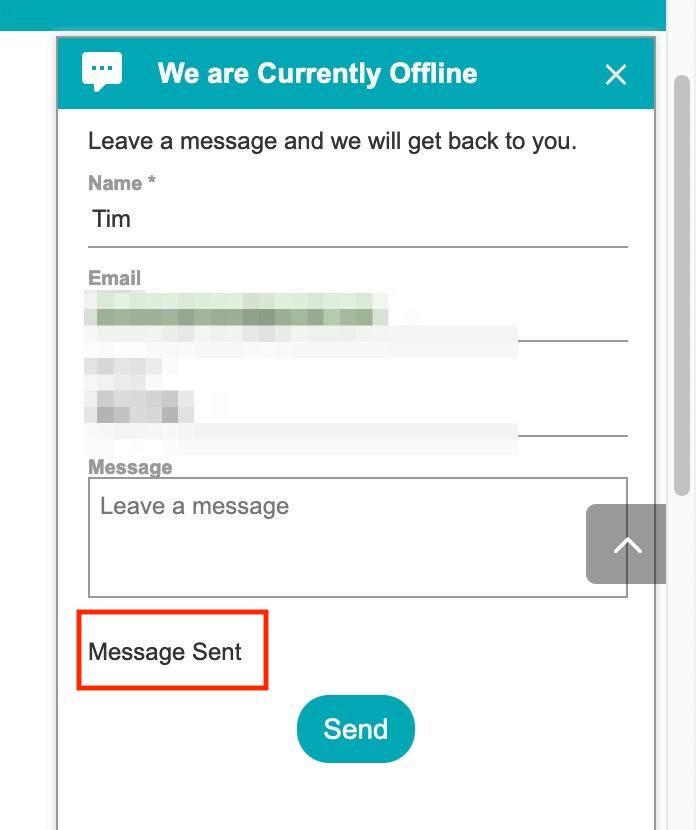
    • Prior to this recent upgrade it just said “Message sent” so I presumed it was an email and I would get a reply. Never received one
    • This time around it loads a chat interface but still I never got a respons
    • Instagram direct message reply took 31 hours

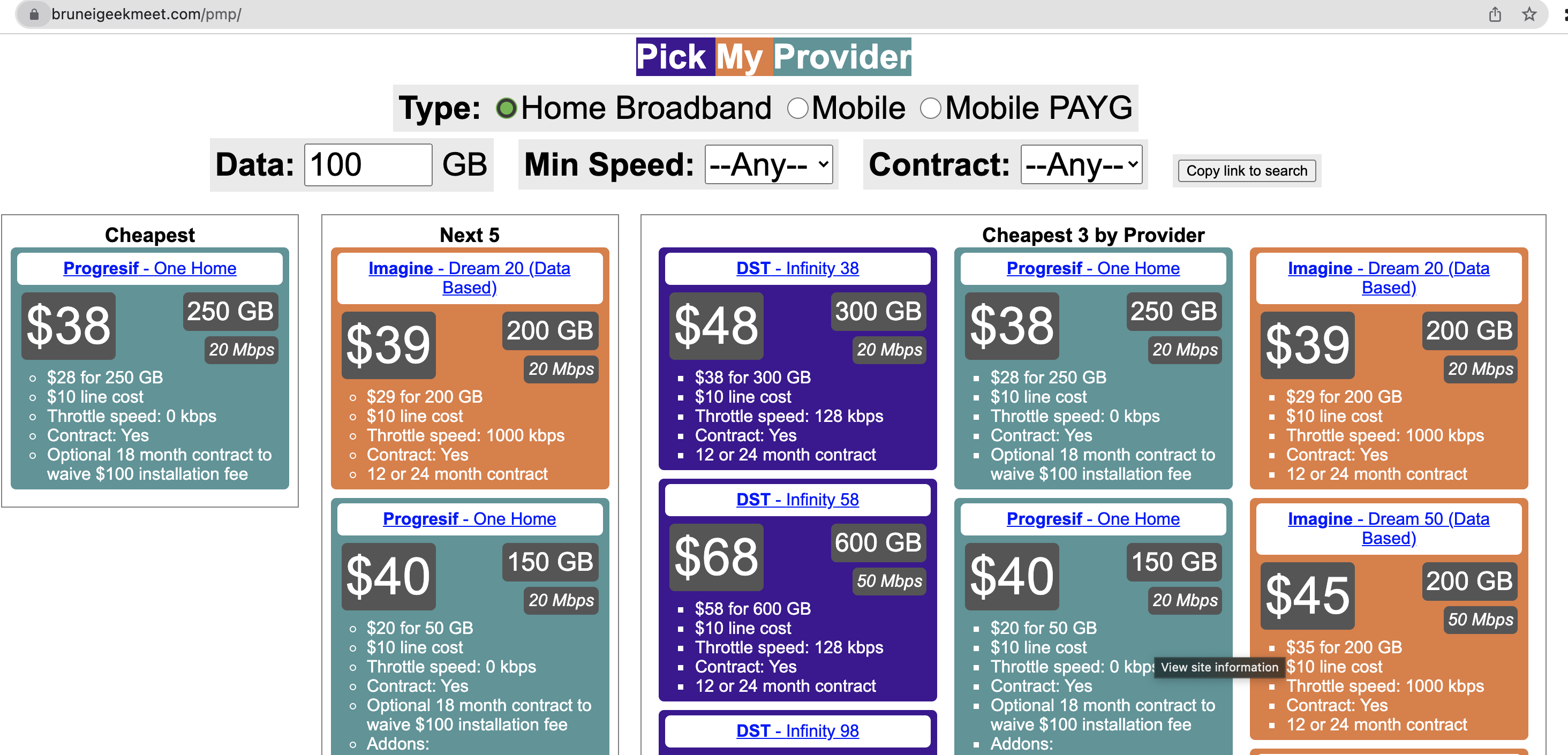
Pick My Provider

Ever since we got the revamp internet plans from DST, Imagine and Progresif (which I call the #BruneiTelcoWars) thanks to the work of UNN there have been several comparisons around and now is my turn with Pick My Provider https://bruneigeekmeet.com/pmp


Features

  • Find top 6 cheapest plans based on expected data usage
  • Shows top 3 cheapest per provider
  • Supports some filtering (e.g. minimum speed / contract)
  • Search Home Broadband (i.e. fibre), Mobile and Mobile Pay-As-You-Go
  • Displays information in tables for quick scanning of information
  • Plans are linked to source telco for more details
  • Copy link to current search to share with others

Most things are there and one current known issue is that Mobile Pay-As-You-Go search does not currently look at the number of days the data is valid: so a search for 1GB can show an addon that is only valid for 1 day. Hope to fix this one day down the road

“Intro to Dart” @ Dart Flight School, Brunei 2014

On the 15th of February the Google Developer Group (GDG) Brunei held a Dart Flight School at DST’s Signature Store.

Dart is a new language that learns from Javascript and adds features that are missing in Javascript such as classes and optional static typing. It aims to provide a better developer workflow and efficiency, better performance vs Javascript and can compile to Javascript in order to be deployed anywhere.

I prerecorded an “Intro to Dart” video just in case as with all things, technology can be troublesome at times =)  There is also a 4 hour long Hangouts on Air recording of the entire event

Intro to Dart slide deck

Dart Flight School

The code labs served as a way to learn Dart and it is even deployable on Heroku. We also covered a bit of Angular JS with a work in progress AngularJS intro project on GitHub.

All in all, Dart seems compelling that it is more performant compared to Javascript, can be compiled to Javascript so you reap the development benefit while still maintaining deployability via Javascript, having a single language for both client and server and adding ‘modern’ features added to Javascript make it easier to develop in. Certainly an alternative to Javascript+Node and perhaps something to use in a future project.

USB Modem Lock-in: The Reason to buy a 3rd party 3G USB modem

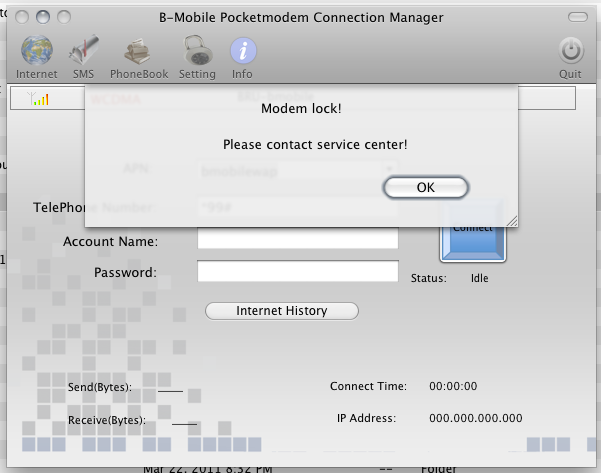
What happens when you put a DST SIM card into a b-mobiled branded TechFaith Flying Angel 46 USB 3G modem as shown below?

You get a bunch of fail as the modem is locked. This is a reason to buy a 3rd party 3G USB modem as it should support any SIM card and thus will be useful for bringing overseas as well. I contacted b-mobile who told me to contact the manufacturer. I tried to email but did not get any response from them. Perhaps it’s round 2 for trying to contact them or try to learn the inner workings for locking and unlocking modems.

DST APN for Android: Set your Internet and MMS APNs easily

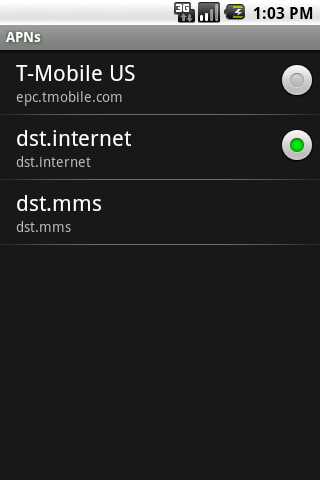
Ever have trouble setting up APN settings (or just being too lazy to type in all the configurations) for your Android device, especially for MMS? The DST APN app will help you out. Just install it, click a button and your APN settings are set and you should be able to surf via the mobile network as well as receive MMS’s.

Download links:

  • DST APN on the Android Market (web version for computers) (seems WordPress.com won’t let me put a link to the Android Market app link for Android devices, so you’re going to have to use this or just search the Market manually)
  • Direct APK download

EasiDial on the Android Market

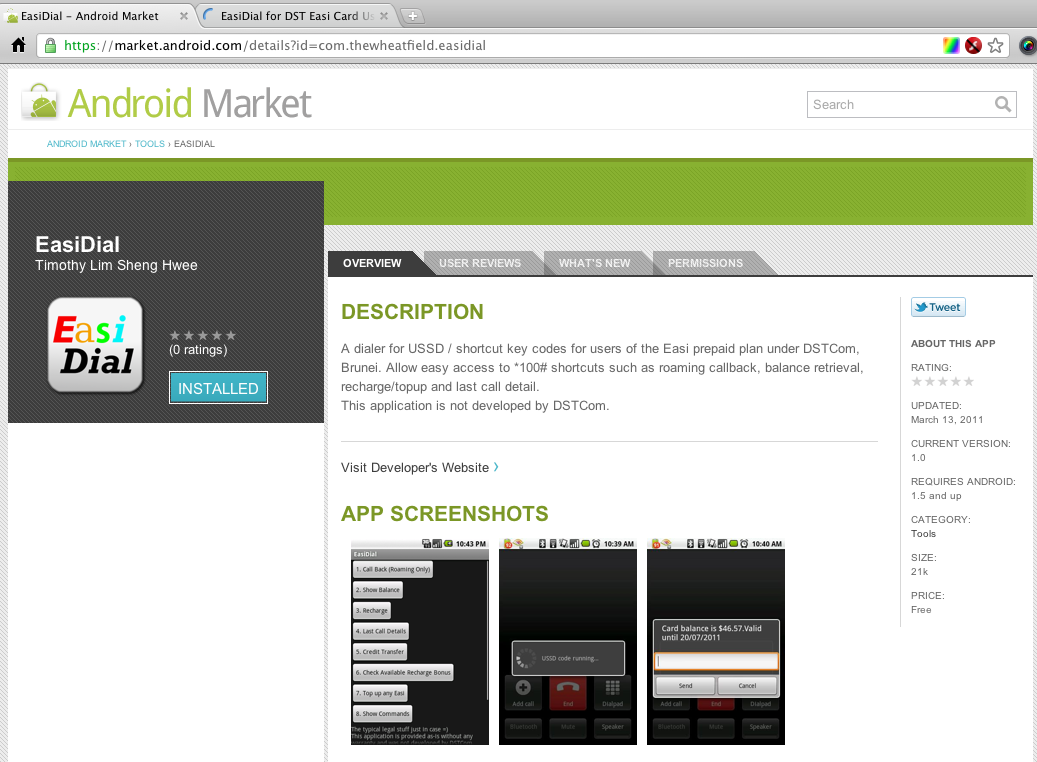
So after much time and effort (mostly making the graphics and trying to read the guidelines) my first Android app, EasiDial, is on the Android Market (or download the apk file). For more into abut EasiDial check out my original post about it. I hope to release more apps as I progress with Android development so stay tuned.

Brunei’s Mobile Network Code

This stems from a comment by faye. Seems that the phone usually detects the values from the SIM card as my Android phone auto populates the MCC and MNC fields but for some non-mainstream phones these values may need to be manually entered

A Mobile Network Code (MNC) is used in combination with a Mobile Country Code (MCC) (also known as a “MCC / MNC tuple”) to uniquely identify a mobile phone operator/carrier using the GSM, CDMA, iDEN, TETRA and UMTS public land mobile networks and some satellite mobile networks. The ITU-T Recommendation E.212 defines mobile country codes.
The following tables contain the complete list of mobile phone operators. Country information is provided for completeness, though this information is best obtained from theList of mobile country codes page, where ISO 3166-1 country codes are also cross referenced.
The MNC and MCC values within the table are decimal numbers.

Source: Wikipedia