It seems there is no easy surefire way to get the URL’s to play on all platforms. Some players recognize all URLs some recognize only some. The best bet is to try each one I’ve summarized most below:
I first read a tweet about this but it only passed me by and I didn’t click the link to the story. Surprisingly I was draw in by a total non-obvious but related tweet that stated “Digg is dead. Long live Reddit! http://bit.ly/fH6pB2” by @codinghorror(Jeff Atwood) and boy, am I sure glad I got pulled into the story this way. Watch the video below:
When I read the story by @ambermac, I tear was brought to my eye by the kind hearts over at Reddit with people wanting to contribute to the cause by getting Ted Williams a phone or clothes and some even gave job offers. From around 320,000 views when I first saw it, it is currently at 4,024,790 views 9 hours later, this is truly a heart warming story of a guy who is down on life and is just trying to get a second chance, and we (the people of the Internet) are sincerely trying to help him out in whatever way we can.
For me, today the 5th of January 2011 will be known as Ted Williams day.
So I have an Android device as I recently bought an LG-P500 also know as the Optimus One from Incomm’s website for a great deal of B$338. I hadn’t heard much of this phone previous to buying it as it’s not one of the ‘super-phones’ with all the fancy features but albeit it is a great Froyo equipped device (by default) with enough RAM to let it have a fluid interface when using it. First and foremost the details on the Incomm website is wrong: it has a capacitive screen not a resistive screen and it also has multi-touch (and thus has pinch-to-zoom).
lg p500 optimus one with box
lg p500 optimus one unboxed contents
I’ve honestly been looking out for a budget Android phone that will Froyo and this is the closest to my requirements. I can’t justify, to myself, a phone that costs more than B$400, so phones like the HTC Desire are out of the picture. I was slightly interested Huawei U8230 that Bmobile sold recently but it seemed like an end-of-life device with 2.1 being the last firmware update. Other budget Android phones would be:
Another notable device that I didn’t really see or play around with was Samsung Spica (B$388) though at that price, there isn’t much reason not to go for the Optimus One
I wanted a device with an HVGA resolution screen (480×320) as it makes it’s easier for surfing the web without the need to be constantly scrolling through the webpage. That only left the GT540 (the X10’s and Wildfire both have 320×240 screens, and the Galaxy 3 has a 400×240 screen) which has a small 3″ screen with a resistive touch screen. While it was pretty smooth and sensitive when I played with it the small screen made typing pretty hard. The Galaxy 3 has a non-typical screen resolution and while lower than the Optimus One resolution, it is the same physical size at 3.2″ meaning text will look bigger on the Galaxy 3 when compared to the Optimus One.
RAM is more than enough at 512MB to allow smooth(er) multi-tasking and allows for more caching of data if reading large/graphic intensive PDF files. This plays a major part for the overall usability of the device. I can say the Optimus One is pretty snappy and never had an issue of being forced to close/kill tasks. I’ve never needed to use the task manager to close applications in order for the device to be smooth and snappy.
A large 1500mAh battery which seems to have good reviews. I’ve had a pretty good experience last Sunday with 3G on from 7am – 630pm (with no real configuration) but truth be told, I can’t seem to replicate this as of yet, perhaps as I’ve been using it quite a bit or could be some misbehaving apps / syncing issues (an inherent Android problem I believe). Though that being said I crave for Nokia battery life where it wasn’t really an issue to be concerned with.
Other notable features
Custom LG keyboard to enable phone keypad in portrait mode. I actually prefer this, especially coming from a Nokia background and I honestly love the Nokia seems to have single hand use almost perfect. On-screen left and right cursors allow moving the cursor left and right which is good option as the device has no physical / optical trackball for scrolling or text selection.
Froyo: with features such as performance tweaking, being able to move some data application to SD card and tethering via USB/WiFi I consider Froyo as a standard for all Android devices to come with. Lower versions of Android will typically have lower performance and even have application limitations (not having some applications available to install on the device). Make budget phones do not have 2.2 by default.
Accelerometer: so it auto rotates in accordance to the orientation of the device
Some issues / tradeoffs
3.2″ screen: pretty small screen to typing on in portrait mode with the on screen QWERTY keyboard
No trackball/trackpad
No notification light
No auto brightness
No camera flash / forward facing camera
Limited space to install applications: the stock installation only has 170MB of space to install applications. Being able to move applications to the SD card (this will only move some parts of the application to the SD card and it can’t install the ) helps a bit, but this is another annoying Android issue where the device can’t use the entire SD card to install applications and only has a small section of it’s internal storage to install applications.
There is no / little LG customization of Android. They have a slightly customized LG homescreen & application launcher but it isn’t anything like HTC’s Sense, Samsung’s TouchWiz or Sony Ericsson’s Timescape custom user interfaces. These customizations and usability is always a personal preference and you can always install a 3rd party launcher (I’m currently using Launcher Pro)
With about a week using the device and Android, there are more things to be said about them both, and that will come in due time. Have a happy new year everybody!
Two days before Christmas and I bet there are people out there buying their last minute Christmas gifts. Why not take some time out to give to other other people around the World who may need it more than we (or our friends or family) do. Ever little bit counts, come help out.
Below are a list of charity organizations I’ve donated to recently. Feel free to just read up about them or even donate to them.
charity: water is a non-profit organization bringing clean and safe drinking water to people in developing nations. 100% of public donations directly fund water projects
We feed children through our “food for work” program.
We build computer labs to help students learn skills and land jobs that are key to disrupting poverty’s vicious cycle.
We provide technical assistance to charities that can not afford IT services.
We provide job experience and references to our volunteers.
Our largest project is headed by Johnny Long in East Africa. In June 2009, he and his family relocated to Uganda to focus on HFC full-time. Read more about their journey here or fund their volunteer work here.
Term I: Mon 3 January to Thurs 17 March (51 days)
Term II: Mon 28 March to Mon 6 June (50 days)
Term III: Mon 20 June to Thurs 18 August (47 days)
Term IV: Mon 05 September to Wed 30 November (52 days)
Term Holidays for School & Colleges
Term I: Fri 18 March to Sun 27 March (10 days)
Term II: Tues 7 June to Sun 19 June (13 days)
Term III: Sat 20 August to Sun 4 September (16 days)
Term IV: Thurs 1 December to Sat 31 December (31 days)
Public Holidays
Sat 1 January: New Year’s Day
Thurs 3 February: Chinese New Year
Tues 15 February: Prophet Muhammad’s Birthday
Wed 23 February: 27th National Day
Fri 18 March to Sun 27 March: 1st Term Holidays
Tues 31 May: Anniversary of RBAF
Tues 7 June to Sun 19 June: 2nd Term Holidays
Wed 29 June * : Israk Mikraj
Sat 16 July: HM the Sultan’s 66th Birthday (in substitution for Fri 15 July)
Mon 1 August * : 1st of Ramadhan
Wed 17 August: * Revelation of the Koran
Tues & Wed 30 & 31 August * : Hari Raya Aidil Fitri 1432
Sat 20 August to Sun 4 September: 3rd Term Holidays
Mon 7 November * : Hari Raya Aidil Adha
Mon 28 November * : 1st Hijrah 1433
Mon 26 December: Christmas Day (in substitution for Sun 25 December)
Thurs 1 December to Sat 31 December: 4th Term Holidays
So as I recently got a new family desktop I was setting things up and had to install Microsoft Office. I bought a copy of Microsoft office earlier this year and thus proceeded to do the activation. I proceeded with the phone activation and spoke my Installation code for verification. It could not recognize the third group of numbers. Very well. Fine. I will just type it in. Same problem! In my frustration I tweeted that this is why people pirate software. Make a legitimate user feel like a prisoner enough times and they will want to run away and pirate.
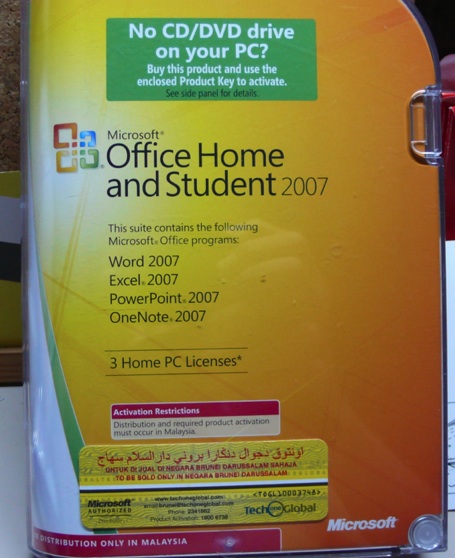
Installation Code not recognized:
Product in question: Microsoft Office 2007. Note the activation restrictions: “Distribution and required product activation must occur in Malaysia”
Luckily the sorry does not end there with me cursing Microsoft and product activation. On the box it does say that activation must occur in Malaysia. So I Googled for a Malaysian proxy, configured Internet Explorers to user a proxy (Tools > Internet Options > Connections > LAN Settings > Proxy server) and tried online activation and viola! Activated without any other problems.
So during the first week and a half in Australia, while the wife and I were trying to gather things together, we did not have a proper Internet connection. And to make matters worse, the computers that we used to go online did not all have a USB drive to save any screenshots / webpages that we wanted to keep for reference. Thus in order to ‘save’ any information we found online we had to resort to taking photos of the screen. Having them in the dedicated digital camera would be good as it would be able to keep high resolution photos of the information, however it would be a hassle trying to retrieve as we filter out which photo corresponded to which piece of information we would be looking for. So I resorted to my trusty phone, a Nokia E71, to take photos of the screen: not the best quality photos but the functionality that the phone provides, allowed me to gather the information and sort them out properly.
Method of organizing photos on the go on the Nokia E71 (and any older Nokia phones):
Take photo of the information
Rename the photo to a useful name describing the information
Open the file explorer and locate the file
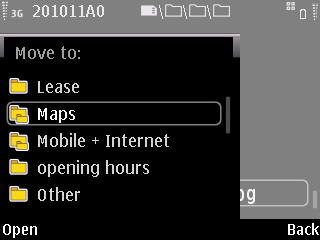
Copy/move the photo to an organized folder layout for easy retrieval (in my case I had an “Australia” folder and I copied maps to the “maps” folder, and house documents to “lease” folder)
This method would work in Android as well since you have access to the fie structure via a file explorer which typically is already installed in the device.There could be a way to do this on iOS, but an application would probably be needed and my efforts of asking around came to nothing (probably time to get an iOS device myself).
What would have been perfect of this situation would be the ability to tag photos. Tagging would allow photos to be categorized in several categories (e.g. a picture of a map of bus routes can be tagged under “map” and “transport” while maintaining a single copy of the file, as opposed to copying the same file into different folders in a file/folder structure). Browsing photos by a tag would allow quick retrieval. I was surprised when I discovered that Symbian (or S60 as most people refer it it as) was the only phone OS to have tagging out of the box: iOS and Android do not have them out of the box. It seems that Symbian has had tagging since the N97 based on this ‘How to Organize Photos on N97 & Mini with Tags” article and thus probably started with Symbian OS 9.3 (as my E71 running 9.2 does not have it). Another side note: the N8 running S^3 also has this tagging feature. I did find that Evernote does support tagging and is available for iOS and Android. It’s meant for organizing data (photos, notes) however it does require an account and Internet connection (when setting it up) and could be a hinderance.
It was the discovery of an Nokia E5 running an old smartphone operating system that made me go back to Nokia’s newest catch phrase of “It’s not technology, it’s what you do with it” because if you talk about buying a smartphone these days it’s basically iOS (in the iPhone) or Android (in many different Android phones). However, neither of these platforms can do tagging out of the box like Symbian can. It is always about what you can do with technology and not just about the hardware/software by itself. Technology should always be an enabler: helping you do to things. It is always great when you can make a device do something it was not able to do before: e.g. magnifying glass for macro photos on fixed focus camera phones or using a blacked piece of film to take photos of a candle (shown to me by @nickthien). So I put forth to all you readers that you take a look at your gadget and see what added functionality you can get out of them. Explore and make full use of your technology. Live long and prosper!
Date: Wednesday, 17th November 2010 Time: 12noon – 6pm Venue: Riverview Hotel Carpark Area Reason: Fund raising for both La Vida and SMARTER Brunei (proceeds are split 50-50) Facebook Event Page (Requires Facebook login)
Nothing to do on the afternoon of a public holiday? Stressing out over exams? Wanting something to do on a boring afternoon?
Then come over to the car park behind Riverview Hotel on the 17th of November 2010 where the LaVida Carnival will be! There will be games (loads and loads of games), food and drinks, a puppet show, magic tricks, bouncerS (Mind you, bouncerSSSSSS), a garage sale and more.
And you may be able to finally meet the Mr Friday Night you keep hearing on Pilihan FM! ;)
But the best thing is: all proceeds will go to non-profit organisations who serve the community and help those in need. 50% will go to SMARTER and 50% will go to LaVida. Not only that, the carnival helps to raise awareness about those with special needs. This is YOUR chance to help Brunei!
So I hope to see you (and your families and your friends and your schoolmates and your coworkers and your bosses… ;D) there on the 17th!
Spread the word! It’s gonna be an exciting afternoon. =)
La Vida is a parent’s resource centre and toy library, where I volunteer about two Fridays a month. The center’s mission is to care and give compassion to the community. The resources are available for loans to children with special needs and/or those who are financial needy. It is a non-profit company and the funds come from sponsorships.
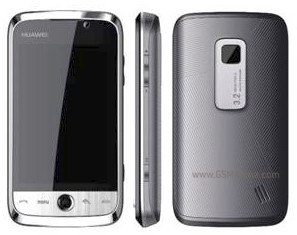
So I just came back from Australia and I found out that B-Mobile was selling the Huawei U8230 at TechXpo 2010 for only BND$299 [Source Borneo Bulletin (Friday 5th November via Website)]. See the full specifications at GSM Arena. The phone was announced in June of 2009 so it is a relatively old hardware platform but at the $299 price point it is very competitively priced. It runs Android 2.1 and uses the same processor is the old HTC Hero so expect it to perform similarly.
Older processor and may not run more modern games smoothly
Not a lot of memory (192MB RAM and 256MB ROM)
RAM is required for multi-tasking so expect to close applications
ROM is used to store applications and since this is not Android 2.2
Possibly no official 2.2 (Froyo) update
I gave B-Mobile a call to see if they have any of the units on display to play around with but alas all the units are sold out and they are waiting for a new batch to come. Not surprising that it is sold out being so cheap and offering so much with Android. I applaud B-Mobile for pushing Android at such an affordable price and, in my phone call with them, they said that it is unlocked too. The phone is not a spectacularly fantastic phone but a solid mid-range phone with great potential with Android. The fact that it is Google certified with the Android Market for downloading applications makes it even more compelling. I would highly recommend this to people wanting to get an affordable smartphone as Android is a currently well supported platform and thus has many up-to-date applications unlike Nokia’s S60.
PS. Anybody in Brunei bought this? I would love to have a hands on.
The idea for Movember was sparked in 2003 over a few beers in Melbourne, Australia. The guys behind it joked about 80’s fashion and decided it was time to bring the moustache back. In order to justify their Mos (Australian slang for moustache), they used their new looks to raise money for prostate cancer research… never dreaming that facial hair would ultimately lead to a global movement that would get men talking about a taboo subject – their health.
A Mo Bro starts Movember – the month formerly known as November – clean shaven, and grows a moustache all month long, garnering support from friends and family in the form of donations. What’s more, a Mo Bro is a walking billboard for the cause as his new look opens the door for him to talk about cancers affecting men – making the moustache a symbol, much like the pink ribbon is for breast cancer. Each Movember culminates in a Gala Partè in major cities around the globe where Mo Bros dress up to match their Mo, channeling the likes of Tom Selleck, Gandhi and Ron Burgandy, vying for the ultimate accolade: Man of Movember.
While growing a Mo is left to the guys, Mo Sistas (women who support their guys) form an important part of Movember by recruiting Mo Bros, helping to raise funds and attending Movember events.
I first heard about Movember last year on PaulDotCom Security Weekly and realizing that it is November once again, I thought I’d give it a go. I know it’s a bit late and I didn’t manage to follow the rules completely (shaving on the 1st of November, think I shaved on the 2nd and forgot to take a photo) but I guess it’s the thought that counts. Taking into account that my dad died of cancer brings this closer to home for me.
I’ve created Team Brunei for anybody willing to join me / donate to the cause.
I’ve joined under Movember Australia as I’m here at the moment and it’s raising funds for the Prostate Cancer Foundation of Australia and beyondblue (the national depression initiative), however you are free to pick a which foundation/organization to support as listed below (source), though I’m not sure if you can still join my team if you register under a different website.
Movember Australia – The Prostate Cancer Foundation of Australia and beyondblue: the national depression initiative







 The Wheat Field