Sounds of Hope Charity Gala Night

Have you heard about the Sounds of Hope Charity Gala Night?
“For Families in Poverty Fund”

soh_1200
High Resolution Image

Date: 3rd October 2009
Time: 7:30pm
Venue: Jerudong Amphitheatre
Tickets (one seat in a table of 10): B$50, B$100, B$150, B$250
Tickets (public seating): B$10
Facebook event page

For dining table tickets please contact:

Public seating tickets available at:

  • ranoadidas.com
  • FitnessZone (Tel : +673 223 3338 / +673 223 2338)
  • MVision Cinemas (Empire) (Tel: +673 241 7977 /+673 261 0361)
  • Studio Scene (Tel: Studio 1 +673 245 4528, Studio 2 +673 245 5733)
  • Chill

Catch any of their updates on the Sounds of Hope’s Twitter page. More and other information such as direct contribution to the fund can be found at Brunei.fm’s post here

It’s great to see events such as these and people reaching out the to the community of Brunei. Hope we as people of Brunei will continue to support such events but more importantly try to make a difference in the lives of those around us.

Concept Computer’s Monitor Trade In Promotion

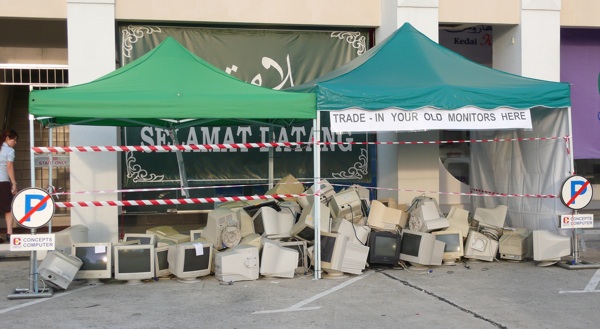
So one day I was flipping through the newspapers and I saw that Concept Computers was doing a trade in offer for old monitors to get a $50 discount on a brand new LCD monitor.

Concepts Monitor Trade-in Promo Advertisement

It’s great that they were taking both working and non-working monitors and this sort of business practise is not common in Brunei at all. So when I went to exchange 3 old non working monitor’s for LCDs I was happy to see a site of old monitors. Photos of the monitors being hauled away are available at AnakBrunei’s post

Pile of old monitors traded in

So I would assume that they were going to recycle the monitors as they accepted both working and non working monitors, but I had to check with them. Actually I wanted to get the contact of the recycling center they were going to send it to. So I asked the staff there and they informed me that I should as their boss Mr Vincent Pao. He happened to be there at the shop so I approached him and asked whether they were going to recycling the monitors. He told me that he was going to throw them away!! He did mention that they would give some away but that the last time they sent quite a lot of computer equipment to be recycled they only got B$200+ from it. So he tried another method. There were recyclers offering to take the monitors from him but he wanted to sell the monitors to them to at least get a better return on investment I guess. But they didn’t want to pay for them so he said they were better off throwing it away.

After hearing that I thought what a bummer. I’ll go hug a tree to make up for it (actually that reminds me about the ISB‘s Million Trees Project and BIBD‘s commitment to match each tree for every 4000 bought). But at least he did mention that they were giving some away. I will try to follow up on this issue as now they are having a printer/scanner trade-in: any printer/scanner for an All-In-One (Print-Copy-Scan) Epson Stylus TX100 for just B$98 available while stocks last and before 30th September. On a lighter note I have to say that Concepts Computer is the only innovating computer store in Brunei (to my knowledge), from organizing seminars on Windows 7, Panda anti-virus and now offering these trade-in offers. Other computer stores in Brunei, I hope you step up your game plan to exceed the things Concepts are doing!

Printer Trade-In

** Note: This information was gathered on the 25 August 2009 from a discussion between myself and Mr Pao. If they did end up sending it to a recycling center do let me know. Thanks

The Unofficial Lite Edition of the Brunei Times’ E-Paper

The Brunei Times has their official E-Paper which is a digital version of their actual daily print edition but it’s based on Flash and it’s pretty cumbersome to navigate and read the papers. So I managed to extract the URLs of the images and create…

The Unofficial Lite Edition of the Brunei Time’s E-Paper

Perfect to load up the Complete version, let it load and have the entire newspaper right in front of you to start off your day.

Update (19/Nov/09): Seems that Brunei Time is blocking direct image loading. While a fix is being worked on, use Brunei Times E-Paper Downloader to get the news.

Using wget to resume downloads that require cookie credentials

I’ve been having an issue recently (not sure if it’s the Mac) but it has indeed become very apparent to me, that I would download things (applications / videos / ISOs / etc) in Firefox and the download would ‘finish’. It shows it as completed in the downloads window but in fact it is a truncated download. As seen in the screenshots below the SDK finished at 1.6GB when in fact the actual full file size is 2.1GB.

Misleading completed Firefox download

I initially tried using wget to download the file but got a ERROR 403: Forbidden error probably due to some cookie credentials. So not wanting to waste my 1.6GB download that took about 12 hours I resorted to looking into getting wget to work with cookies and was happy to see that the folks who created wget indeed had an option to load the cookies file. Sweet! Very sweet indeed. So next task was to get the cookies out of Firefox which was a bit more of an issue.

Export Cookies was known to work but it was not compatible with Firefox 3.5 so I had to download the Nightly Tester Tools to allow Export Cookies to work. Export the cookies (“Tools > Export cookies”) and in Terminal/Command line and enter the wget command to resume the download as follows:
wget --server-response --continue --load-cookies cookies.txt http://location/of/download

Download wget (Windows | Mac)

Baiduri FAST not fast at all

So I decided to try Baiduri Bank’s phone banking system called FAST to see how it is and I can say my experience was a total hassle. I’ll give them props that they allow users to apply online but lucky unlucky me had to sign up through the ATM.

I did receive the letter from them a long time ago with my PIN and procedures but like any lazy person I put it somewhere and forgot about it and lost it somewhere. So I had to get my PIN reset. This wasn’t much of a problem, just had to go down to Baiduri and wait for the new pin to arrive. My own fault, I admit so no worries. So I got my new PIN the day following my request (good response time Baiduri), logged into the FAST system and tried doing some bill payment and got the error that I didn’t have any account linked to my FAST service. Looking back on it, it could have been stated in the initial documents I got telling me I had to register for the account. I called the FAST hotline and was told I would be able to get the accounts activated right away. So off to Baiduri I went again to link up my accounts. I was told I had to wait a few days for it to get activated.

So here I would like to bring up the inconsistencies between the person on the phone line and the person behind the counter serving me. I had a similar experience with AV Electronics and I really annoys me when two difference sources from the same business tell me two different things. I don’t mind understating and over delivering but overstating and under delivery is never good in the business world.

Anyway so I wait for a few days, and try the FAST service several times only to get the “there are no accounts linked to your FAST service” automated voice coming from my phone. So I finally called the hotline to tell them my situation which I had to re-register my account numbers with them and within 20 minutes they called me saying that my accounts were linked up. Finally I thought, but that wasn’t the end. So I log into the FAST service, and finally happy not to hear that I have no accounts linked to FAST and proceeded to try pay DST and Telbru bills. And what do I get? The automated voice telling me that the payment failed (I have more than enough cash in my account for the transaction to go through). I was so annoyed with that I proceeded to an ATM to pay the bills without issue. My Baiduri experience seems to be getting more frustrating from their ‘over secure’ iBanking system leading me to forget my login credentials once again.

Baiduri I love the fact that you have the functionality of bill payment via phone / ATM / iBanking. I love the fact that the response to my PIN reset request was swift. So moving away from the technical side, try work on the user experience and making it easier for the user to get what they want to get done because if your customers aren’t happy something is really wrong

OS X Snow Leopard in Brunei

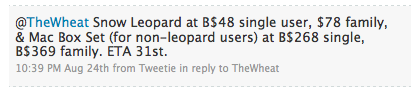
Now a Mac user for a week (thanks to the special educator’s discount =D) I knew Snow Leopard was coming and apparently it’s coming sooner than expected, on the 28th of August 2009. So I sent a tweet to AV Electronics asking them for the prices and availability in Brunei and their response was:

  • B$48: Single user
  • B$78: Family Pack (5 Apple computers in one household. Non-commercial use)
  • B$268: Single Mac Box Set (for non-leopard users)
  • B$369: Family Pack Mac Box Set (for non-leopard users)
Snow Leopard Prices in Brunei

Snow Leopard Enhancements and Refinements

Estimated time of arrival 31st August, so go book your copy at AV Electronics
Kiulap: +673 2237650/1
Mall: +673 2456436
Email: info_AT_ave.com.bn

Update 1 [2009/08/28]
So today I got a response from AV Electronic’s Twitter feed that they will have the Up-to-Date program for recent Mac owners. So recent Mac owners (Mac bought on or after 8 June 2009) should be able to get Snow Leopard at an even a greater deal. Currently in Singapore it’s S$18 so here’s hoping it will be like B$20 here.

AV Electronic's response regarding the up to date program

Funny thing though. I personally went to AV Electronics yesterday and ask them if there are any offers for recent Mac owners. And the person told me ‘no’. After that to find out today that they do offer such an offer, it makes me, as a customer, feel cheated of the facts. I would have felt even more cheated had I pre-ordered Snow Leopard at B$48 only to later find out I could have got it for cheaper. It’s not the price but the principle of the matter. Hope AV will work on their inter staff communication on their business activities to help provide customers the better service with accurate information to make the best choice.

Sounds of Hope, Brunei

The following text is taken from their Facebook Page
Sounds of Hope website URL: www.sohbrunei.com
Sounds of Hope’s BIDB Wish

It is a network of Young People in Brunei Darussalam who volunteer their time, talent and resources in helping Families in Poverty in Brunei Darussalam by giving them hope, assisting them to get back on their feet to have a better life. The group of young volunteers aim to create a community of youths against poverty.

Mission
Help achieve HM’s vision of “Zero Poverty by 2035” by mobilizing young Bruneians to engage in positive activities that will help fight poverty, all in the spirit of volunteerism and community service.

Brief Beginnings
Ms. Amalinah Abdullah invited her friends to visit some families in poverty in the various districts in Brunei Darussalam. The visits began in early March 2009. She and her friends were deeply moved with the varying situations of these families in poverty that the team wanted to help in any way they can. By just simply donating money will not be enough.

Ms. Amalinah and her friends founded “Sounds of Hope”. It is just a small informal group of young volunteers who came forward to accept the challenge of finding out the poorest among the poor in Brunei and look for creative ways to help them. They are now informally called as the SOH Team of Young Volunteers. Ms. Nur Judy Abdullah was taken in as volunteer “adviser” for the team.

Supporters
In the visits that SOH has done, the Ketua Kampong (Village Head), District Office, Officers from the Community Development Department and Islamic Religious Council were kind enough to share with us their list of people in poverty who receive monthly support from the government.

Partners
There is an upcoming Charity Gala Night which SOH is organising in partnership with the Women Business Council of Brunei Darussalam. The Charity Gala Night has been approved by the Ministry of Home Affairs this coming 3rd October 2009. The aim of the event is to raise more funds for families in poverty and assist them in various ways specifically in the areas of skills training and further education.

SOH is open to partner with other relevant NGOs and GOs on activities related to poverty reduction.

Get Involve

Mobilize
We hope to mobilize the youths in Brunei to take an active role in advocating for poverty reduction in their own communities. SOH will soon expand its team of young volunteers to the four districts of Brunei Darussalam.

Educate
Road shows/ conferences/ exhibitions will be done in the future featuring the many faces of poverty in Brunei to inform and make the youths aware on how they can participate in meaningful activities that will make a difference in the lives of families in poverty in Brunei Darussalam.

Volunteer
The spirit of volunteerism will be promoted among the young volunteers through the sharing of their time, talent and resources. The youths will be the future leaders in their own community and the best way to enhance their social consciousness level is through involvement on poverty reduction activities.

Raise Funds
Creative activities to raise funds for families in poverty will be spearheaded by SOH Team of volunteers.

Care – A community of caring volunteers

Photos
We are working on a website to post photos of our volunteer efforts and the families we have helped.

Videos
We have taken videos of our visits and will continue to document our various efforts for the benefit of the volunteers, families in poverty, government agencies and donors.

Facebook /Twitter/Blogs
A community forum in the internet will be developed to allow the youths in Brunei to voice out their ideas and advocacies in relation to HM’s titah on “zero poverty in 2035”.

Initial Programs of SOH Brunei

Adopt a Family in Poverty
A donor/sponsor can adopt a family in poverty and SOH team of volunteers will help facilitate the funding for a specific project like home repair, payment of debt (if qualified), buying of boat (for some fishermen who depends on fishing for living), buying of wheelchair for disabled people, hearing aid for the deaf, or walking cane for the blind.

Sponsor a Child’s Educational Needs
There are children who cannot go to Religious school because they cannot afford the uniform. Others cannot afford the books, bags and school projects and other fees in school.

Sponsor a Skills-Training Program for Women
Low educated women who are divorced or widowed can create or supplement their income through home-based self-generating income activities. They can only do so if they are trained in various skills such as beading (doing beadworks for clothes), massage, cooking skills, gardening, handicraft making etc.

Microcredit Program for Unemployed Women
When the women gain skills after the training, they will need some small capital to start their business. A microcredit scheme will be most helpful to jumpstart their small business.

SOUNDS OF HOPE Charity Gala Night

Fund Raising Event

” Sounds Of Hope ” (SOH) is organizing a charity gala night , which is supported by the Women Business Council of Brunei Darussalam. The SOH charity gala night is held to raise public awareness for the Brunei families suffering from poverty. The organizer is working on raising funds to help these families in easing their financial burdens as well as improving their living conditions and their daily life.

If all goes well and as planned, the charity gala night will be held on October 3, 2009 at the Jerudong Park Amphitheater around 7pm.

The Visits – An eye-opener for most young volunteers

The team, made up of Brunei’s own concerned youths, had recently visited homes of Brunei families in poverty and will continue to visit more homes within the four districts over the next few months. The visit is aimed at giving SOH young volunteers to have a first hand experience on the living conditions of families in poverty.

What the team found was disheartening. There are families that need immediate help and these families seem to have been overlooked by the Bruneian community. The families that SOH is helping are not only Brunei Malay Muslims but also those who are permanent residents.

Volunteers of SOH got a glimpse of their living conditions and their daily lives. Through interactive discussions with members of the impoverished families, SOH found out what these families needed and realized what actions can be taken to give them immediate help.

This initiative is a response to a Titah made on 4th of March 2008 during the opening ceremony of the first meeting of the 4th session of the Legislative Council by His Majesty the Sultan and Yang Di Pertuan of Brunei Darussalam, where the monarch expressed his desire for the country to achieve zero poverty rate by 2035.

SOH became aware of the lack of a specific non-government organization in Brunei to help those suffering from poverty.

SOH feels that they need to take the first step to address this issue. One of the ways they feel that they are able to help is by organizing a charity concert to raise funds to help these families.

At the same time, sounds of hope wishes to promote local talent through this charity concert.

Auditions have been held and potential performers have been selected to perform for this charity event.

After the Charity Gala Night , the funds raised through out the charity drive will go towards helping these families in poverty wherein a special committee for SOH will be formed to managed donations and funds raised.
Regular updates on where the funds go and who are the beneficiaries will be posted in the website of SOH.

Before the recipients of the funds are selected, their living conditions will be monitored and their background will be examined and at the same time all caution will be taken to ensure that only those who truly need the help will receive assistance.

Sounds Of Hope feels that it is time everyone gets together to address poverty in Brunei.

For further details, please contact:

soundsofhope.brunei_AT_gmail.com

YOU WANT TO BE A VOLUNTEER?

For those who wants to become an SOH Volunteer, please email to soundsofhope.brunei_AT_gmail.com your answers to the following questions: How do you define poverty? What does poverty mean to you? Do you have the time, talent and resources to be an SOH Volunteer? If yes, please describe how you can help. Please leave your name, brief profile, why you are interested in the issue on poverty and contact details.

Acer Aspire One eRecovery Issues: “The system is not fully installed. Please run setup again”

Having a problem restoring from a recovery partition?
Getting an error saying “The system is not fully installed. Please run setup again.” after the recovery partition copies the files to a partition and reboots?
Answer:
Make sure the recovery partition is set to hidden.
Use a Gnome Partition Editor or a Linux boot CD to do so.
Continue reading “Acer Aspire One eRecovery Issues: “The system is not fully installed. Please run setup again””

Using your phone as a Bluetooth modem in Linux

Software Package Requirements:

  • wvdial
  • bluez
  • bluetooth

Install packages for Ubutun/Debian systems
sudo apt-get install wvdial bluez bluetooth

Steps to get your Bluetooth modem working

  1. Turn phone’s Bluetooth connection and set to discoverable mode
  2. Scan for your device:
    sudo hcitool scan
    Result:
    Scanning ...
    00:11:22:33:44:55 MyPhone
  3. Search device to see if supports Dial-Up Networking (DUN) for use as a modem. Look out for RFCOMM channel
    sdptool search --bdaddr 00:11:22:33:44:55 DUN
    Result:
    Searching for DUN on 00:11:22:33:44:55 ...
    Service Name: Dial-Up Networking
    Service RecHandle: 0x1000f
    Service Class ID List:
    "Dialup Networking" (0x1103)
    Protocol Descriptor List:
    "L2CAP" (0x0100)
    "RFCOMM" (0x0003)
    Channel: 4
    Language Base Attr List:
    code_ISO639: 0x454e
    encoding: 0x6a
    base_offset: 0x100
    Profile Descriptor List:
    "Dialup Networking" (0x1103)
    Version: 0x0100
  4. Bind the modem on the RFCOMM Channel to a device
    sudo rfcomm bind /dev/rfcomm0 00:11:22:33:44:55 4
  5. Dial and connect (ensure your wvdial configuration is correct, for sample see below)
    sudo wvdial dstbt
    Result:
    --> WvDial: Internet dialer version 1.60
    --> Cannot get information for serial port.
    --> Initializing modem.
    --> Sending: ATZ
    ATZ
    OK
    --> Sending: AT+CGDCONT=,,"dst.internet"
    AT+CGDCONT=,,"dst.internet"
    OK
    --> Modem initialized.
    --> Sending: ATDT*99#
    --> Waiting for carrier.
    ATDT*99#
    CONNECT
    ~[7f]}#@!}!} } }2}#}$@#}!}$}%\}"}&} }*} } g}%~
    --> Carrier detected. Waiting for prompt.
    ~[7f]}#@!}!} } }2}#}$@#}!}$}%\}"}&} }*} } g}%~
    --> PPP negotiation detected.
    --> Starting pppd at Wed Aug 19 23:45:04 2009
    --> Pid of pppd: 17558
    --> Using interface ppp0
    --> local IP address 10.84.2.128
    --> remote IP address 10.6.6.6
    --> primary DNS address 202.152.64.27
    --> secondary DNS address 202.152.64.28
  6. You’re connected! Surf and enjoy the Internet!

Sample wvdial configuration file

  • Stored in ~/.wvdialrc
  • Change “dst.internet” to your provider’s APN

[Dialer dstbt]

Modem = /dev/rfcomm0 # modem device
Baud = 115200 # 921600 / 460800 / 115200 / 57600

Init = ATZ # far card with no PIN
# Init = ATZ+CPIN=”0000″ # for card with PIN, replace 0000 with your PIN

# If you know your ISP’s APN, specify it instead of YOUR_ISP_APN below.
# There’s also an APN table at https://wiki.ubuntu.com/NetworkManager/Hardware/3G .
# use one of the following 3 options. change to your providers APN
Init2 = AT+CGDCONT=,,”dst.internet”
#Init2 = AT+CGDCONT=1,”IP”,”YOUR_ISP_APN”
#Init2 = AT+CGDCONT=1,”IP”

# Most services/devices dial with *99# . A few seem to require *99***1#
Phone = *99#

# These often suffice, but your ISP might require different details. They’re
# often dummy details used for all users on the ISP, frequently the ISP’s
# name, but some ISP’s do require you to use a real username and password.
# any details possible
Username = internet
Password = internet

PS: bmobile customers change APN to “bmobilewap”

App of the Day: OpenWithAdd

Have a problem registering an application with a file type? Selecting the application in the open with dialog box not working? That was my frustration with my Windows 7 install… until I found this cool application: OpenWithAdd

OpenWithAdd screenshot

To register a file type with an application:

  1. Open OpenWithAdd and select the application
  2. Click "Register"
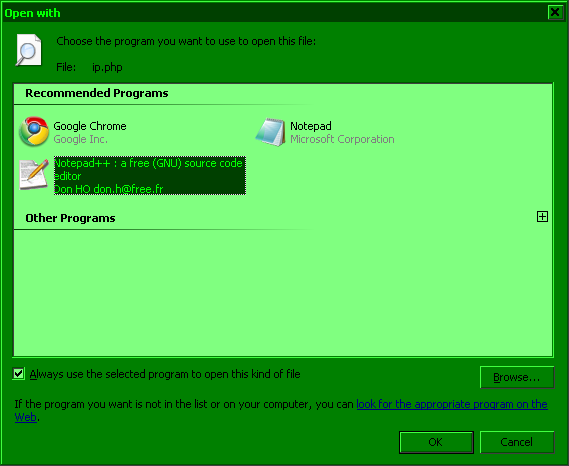
  3. Go to Explorer, right click your file > Open with > Choose default program… (the application you added should now also be listed in the Open with submenu)
    Screenshot: Right click file > Open With > Choose default program...
  4. Select the program, check "Always use the selected program to open this kind of file" and click "OK"
    Screenshot: Select application > check 'Always use the selected program to open this kidn of file' > click 'OK'

Source: Vista: Cannot associate file with program, Default Programs problem

Kudos to the developer for making the application portable, just unzip and run!