Ever had the moment where you have a friend how asks you how to save Youtube videos or any other videos online? For those who know there is Video Downloader which is available as a web service or even Firefox extension / Opera Widget. But sometimes this can be a bit challenging for some people who can’t remember the website / don’t you Firefox or Opera so here I have a little project called flv Retriever. It is available as a Windows GUI application, command line and DLL and was developed in C# with the help of #develop a.k.a. SharpDevelop (an Open Source IDE for .NET./Mono including a GUI editor!!) and Visual Studio .NET 2003 (only for the DLL creation, if anybody knows how to create a DLL with SharpDevelop let me know).
March 26: Celebrate Document Freedom Day
 The world’s FIRST Document Freedom Day has come.
It came to me as a surprised as I was checking my RSS feeds today and found in on Ubuntu Tutorials – What Are You Doing For Document Freedom Day?. Go spread the word. For freedom!!!
In a world where records are increasingly kept in electronic form, Open Standards are crucial for valuable information to outlive the application in which it was initially generated. The question of Document Freedom has severe repercussions for freedom of choice, competition, markets and the sovereignty of countries and their governments.
The Document Freedom Day (DFD) is a global day for Document Liberation with roughly 200 active teams worldwide. It is a day of grassroots effort around the world to promote and build awareness for the relevance of Free Document Formats in particular and Open Standards in general.
Singapore Trip 08
As soon as I touched down and had a look around on the 6th things looked more or less the same but feels different. 1.5 years is relatively a long time and the pace of life seems to be much faster and the crowd bigger. It has indeed been a few busy days getting stuff for people and getting my own stuff. It’s been great meeting up with old friends and having my first taste of podcasting on 65Bits. I guess so far what I wanted to achieve out of this holiday has not been fully attained. As I’ve been telling everyone this 1 month is going to be a time of rest, relaxation and more importantly reevaluation but so far on this trip I think I’ve only had some relaxation. Doing the ‘mandatory’ mom-thinks-I-don’t-have-enough-clothes shopping yesterday was a bit of a bore but the more I look at the computer stuff I can’t get back home the more I want to buy all that I can =p
Steve went off to college…
From my bumming-in-front-of-TV session yesterday:
I’ve never seen you this angry since they replaced Steve with Joe on Blue’s Clues – from Yes, Dear
Custom Search Engines: Opera vs Firefox
**Updated with new easy way below**
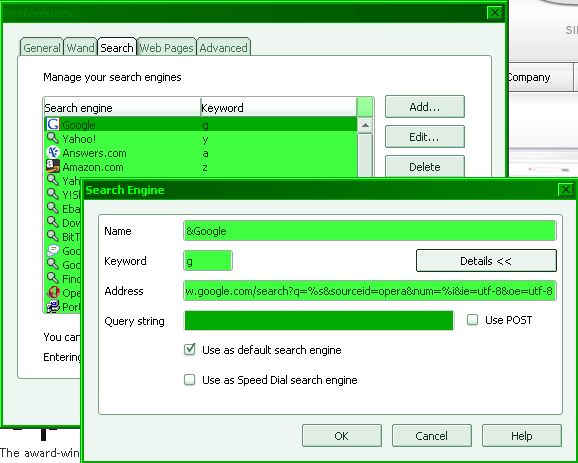
Opera
Preferences > Search
Firefox
- Create .src and icon files and put it on a local server. Example of Google.src:
<search>

	name = "Google search"

	method = "get"

	action = "http://google.com/search"

	>

<input name="q" user="">

</search>
- Create HTML page to load Javascript action to add search engine. Example:
<html>

<script type="text/Javascript">

function addEngine()

{

    if ((typeof window.sidebar == "object") && (typeof window.sidebar.addSearchEngine == "function"))

    {

        window.sidebar.addSearchEngine(

            "http://localhost/google.src",

            "http://localhost/google.png",

            "Google Search",

            "Web" );

	}

    else

    {

        alert("Mozilla M15 or later is required to add a search engine.");

    }

}

addEngine();

</script>

</html>
- Load page and add accordingly
Conclusion
Is it me or is adding a custom search engine for Firefox just way too hard? It took me a good 20 minutes just to get mine to work. I tried not having to use a local server by using relative url’s for the src and icon file but that didn’t work, it just gave me an Install Error: “This search engine isn’t supported by Firefox and can’t be installed”. Yes I know there extra search engines already provided but the issue I had was that the inbuilt Google search was redirected to the Google Brunei search with text in Malay and would not recognize English words to use with the definition feature (where you can click the search word in the top right of the page to find out the definition). So with that I provide Custom Firefox Search Engine page. It’s not much but I may probably add more custom search engines that I use there and begins some what of my Firefox tweaking and stuff.
P.S. Anybody with a better, i.e. easier way of adding a custom search engine to Firefox do let me know thanks.
** Update **
Found a quicker way here: Create Search Shortcuts. Thank you revision3
Basically all you have to do is..
- Right click ANY text box with a button next to it, i.e. a search field
- Select “Add a Keyword for this Search…” (Firefox) / “Create Search…” (Opera)
- Fill in the details name and keyword (Firefox) / just keyword (Opera)
- Click Add / Ok and start using it!
Well my sister IS pregnant so…

Multi Monitor Madness
For those who have found the joy in working with multiple monitors here are some FREE applications that I just can’t live without:
Multi-Monitor Taskbar: Adds a task bar on the non primary displays, a window title bar button to move the windows and keyboard shortcuts to move windows to other displays.
Multi Monitor Mouse: At the flick of keyboard shortcut / mouse click move your mouse to the next display instead of having to drag the mouse all the way cross boundaries. Especially useful for those laptop touchpad users!
Wish there was a way to integrate the 2 and with the user editable shortcuts but these will do for now. May the multi monitor force be with you.
GTDTiddlyWiki
GTD Tiddly Wiki is a GettingThingsDone adaptation by Nathan Bowers of Jeremy Ruston’s Open Source TiddlyWiki. The purpose of GTD Tiddly Wiki is to give users a single repository for their GTD lists and support materials so they can create/edit lists, and then print directly to 3×5 cards for use with the HipsterPDA
In a few words it’s a to-do list managed in a single, editable, saveable (is that a word?) HTML file. Doesn’t work in Opera though =( But at least it’s nice, simple and portable. Trying to get my Getting Things Done (TD) on and organise my life just a little bit better….
Debugging comas
So far today I have run into 3 comas using Visual Studio.NET
- Stepping through code and there it goes comatose on one any command (takes a long time for it to finish the task)
- Trying to stop debugging but the whole UI is frozen (can’t press the stop button nor use the keyboard shortcut)
- Starting a debug session and waiting for debug window to open (debugging ASP.NET project)
At least given time the patient does wake up from the coma but it annoys me. A LOT. But worse is the recurring coma the system has been having is trouble with the Master Browser such that “\\server.ip.address.urls” will not resolve for a looooooooong time resulting in one server not being able to retrieve the data it needs from the other server resulting in Epic fail.
Atari 2600 Controller
So what happens when you decide to take out your old Atari 2600 console with the intention of playing it only to find that the controllers don’t work? Make your own controllers of course! So I spent like 30 minutes looking for parts in Brunei. What I needed was 5 buttons (4 for direction and 1 for the fire button). We really need a good place to buy electronic parts like these in Brunei. Recommendations anybody? Anyway I found them and Batu Bersurat at the toy shop opposite Ayamku, I think it’s called Little ‘M’ Children but I could be wrong. I did my research on the controllers on Chinese New Year’s Eve (BTW Happy New Year everybody) and found it all documented online here. But I got my documentation the hard way.. With a multimeter and my own serial port connectors. That was one of the reasons I got 2 hours of sleep that night/morning. Anyway photos to come later. I need to sleep I have work in a few hours and some Android lurking to get back to too
Updates:
The original Atari 2600 controller opened up: nice simplistic circuit with the common ground and I tried to keep the same wire colour convention but I didn’t have a white so I used gray instead.

Colour | Pin # | Function
-------+-------+----------------
White  |   1   | Joystick Up
Blue   |   2   | Joystick Down
Green  |   3   | Joystick Left
Brown  |   4   | Joystick Right
       |   5   | Left Paddle
Orange |   6   | Fire
       |   7   | +5v
Black  |   8   | Ground
       |   9   | Right Paddle

Male connector on the Atari itself, controller uses female connector soldered as show below
Top view:

Bottom view:

Top view of controller:

Bottom view of controller (wire wrapped and soldered):

Now all I need is a box to put it in….
Powered by ScribeFire.
 The Wheat Field