Sickness and ailments

Thursday: threw out my back
Friday: gingerly getting about with my back pain
Saturday: slight sore throat + cough
Sunday: fever and bad sore throat that kept me in bed the WHOLE day
Monday: SUPER bad sore throat
Tuesday: Uncomfortable back, blocked ears
Wednesday: Stiff neck on both sides.. Elbow pain

Whoa its been a week of pain and rest needs to be found. And the ‘start’ of the torrent of work for November is about to begin. Work deployment starts tomorrow and then things will get hectic for work. Preparation on for last day of KOOL (25th) and rededication service (30th). Oh yeah supposedly I’m getting married this month too (mom’s friend apparently told my mom that I’m getting married this month). Wonder what preparations need to be done for that. If anybody care till me when it is and more importantly who I’m marrying do tell. Thanks.

Powered by ScribeFire.

Bluetooth ache

I am annoyed at Bluetooth and how it was hyped to be this great seamless wireless communication channel. How it ended up coming too late and having really bad pairing implementation and now my phone won’t connect to my laptop. It used to be paired, it used to work, but now no luck. Tried to repair the phone and it just says communication failure. And just as I say that Murphy and his famous law takes place and it’s working….
Well I guess thats technology: its all so logical yet illogical

Powered by ScribeFire.

Dislike Fruit

While clearing my feeds I found a post regarding the iPod with video and connecting it to a TV. After hearing of the iPod TV Out lockout, where the new iPod classic and nano (the fatty) can no longer output video without a US$49 cable as opposed to a regular cheap video cable (US$5), I was curious. Despite finding out that the post was about the older iPod with video which, is clearly stated in the title (my be the lack of sleep), I did find out something interesting. If you follow the link HOW-TO: Cheaply watch iPod videos on your TV you will read the following

2. Plugging the AV cable into the TV

You’re probably thinking that you don’t need help doing this one. Well let me tell you, you do. Since Apple wants you to buy their proprietary cable, they decided to be sneaky. They send the video over the Red RCA cable (usually yellow). Therefore, they send the audio over the white and yellow cables. Oh you’re so tricky Apple, whatever will we do? In easier words, do the following:

Red RCA plug -> TV’s yellow RCA jack
Yellow RCA plug -> TV’s white RCA jack
White RCA plug -> TV’s red RCA jack

A standard RCA output but non-standard function. Just another example of the Apple lock-in for those who try putting a regular cable find out it doesn’t work properly and do not know better and end up buying a ‘specialized’ cable.

Anyway I took a look at the Leopard Guided Tour and there are some interesting and cool things being introduced (Quick Look, iChat screen sharing and Time Machine). Strange enough there was a good discussion on Windows Weekly 38. With Windows Vista still being introduced (to me, due to the slow uptake), the recent release of Ubuntu 7.10 last week and the soon to be released Leopard (tomorrow) there really is a 3 way OS battle that I hope to give a few thoughts about in a later post.

Powered by ScribeFire.

App of the Day: ScribeFire

In my search of being lazy and wanting to blog I stumbled upon ScribeFire which is a Firefox extension/add-on.
Features that I love:

  • image upload function (to ftp or WordPress itself)
  • Tags (or Categories for WordPress – don’t think can add/delete/modify though)
  • WYSIWYG/source editing
  • I highly suggest it as if you use Firefox it’s just a simple add-on and doesn’t require installation of a separate application while providing good and simple blogging tools. Only downside is that there doesn’t seem to be much information of on the features it provides on the ScribeFire website.

    Powered by ScribeFire.

    Edit: My bad you can add new Categories. You can even edit posts if you press the right button (which I didn’t the first time :P)

    Frogger

    So here I am at my sister’s place for the night as my mom wishes that she not stay alone while her husband, my brother-in-law, (okay that still sounds weird to say and type for that matter) and while lying down in front of the TV I see something move out of the corner of my eye. I turn my head and see a frog!
    froggie

    Powered by ScribeFire.

    App of the Day: Crossloop

    Just want to say Crossloop rocks!

    CrossLoop – Simple Secure Screen Sharing

    • Connect Any Two PCs on Earth
    • Available in 21 Languages
    • File Transfer Capability
    • Switch control to make collaboration easier
    • View Only and Share Control modes

    Indeed simple to use, the only problem is that there needs to be an actual person on both ends as there is manual interaction which is actually an added layer of security.

    On the computer you want to connect to.

    1) Start Crossloop

    2) Click the Host tab

    3) Tell friend (the person who wants to control the PC) the Access Code

    4) Click Connect (can specify if session is to be controllable by the client or just a view only session by clicking the keyboard and mouse icon)

    or

    For the connecting client computer

    1) Start Crossloop

    2) Get Access Code and type it in

    3) Click Connect

    4) Host computer screen should pop up in a VNC window for control / view (depending on host setting)


    Technorati : , , ,

    Powered by Zoundry

    Edit:- I don’t know why I called it Crossloops when it is so clearly stated Crossloop (no wonder I couldn’t find info about it in Google :P)

    So long farewell it’s time to say Goodbye…. It’s not Goodbye.. It’s see you later…

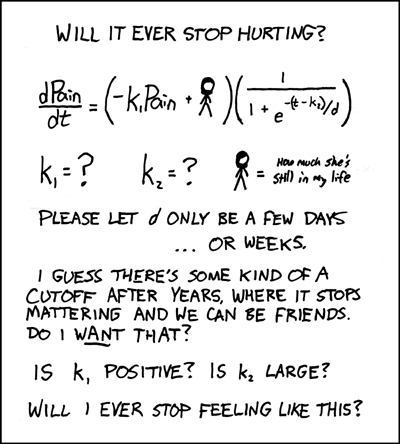
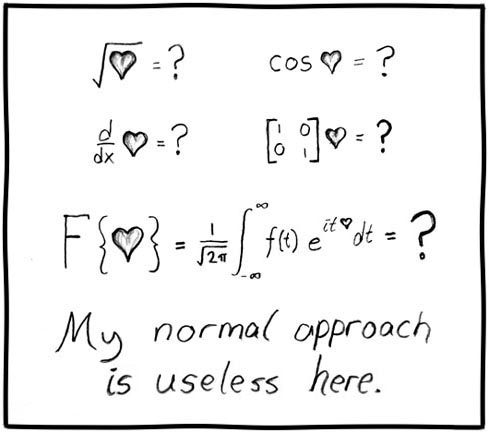
    As my dear dear is on the flight on her way to the land of British and Scottish the realization is slowly setting in.. After dinner and an hour of CS and back home and it’s sinking in slowly… Anyway just a few thoughts from xkcd (it’s not exactly like that but you get the point)
    dPain_over_dt.png
    useless.jpg

    So it’s a so long for now and all the best for Ms Ruth Lim Ya Chee and Mr Andrew Tan Teck Ho. Enjoy yourselves, study hard and make a difference

    Blogged with Flock