Bmobile’s iPhone Promotion

If you haven’t heard, b-mobile has subsidized iPhones 3GS’s with a b-mobile subscription contract of 18 months. This is one of the first subsidized mobile phone price plans I’ve seen in Brunei. The other would be DST‘s October promotion offerings that offered a Nokia E75, Nokia E52 and Sony Ericsson C901 with contracts of 6 months. With b-mobile having first introduced their mobile broadband Zoom! which was followed up by DST’s Go!, what I hope to see is more competition among the 2 mobile phone providers which in the end leads to the consumer winning. Recently in Singapore, M1 and StarHub released their iPhone plans which led SingTel to change their previous plans (most notably the increase of free data to 12GB, from a typical measly 500MB/1GB), so as consumers we have to love competition.

I went down to b-mobile to find out more about the iPhone and they mentioned that is it the never locked version and that they are handling the mobile phone service while AV Electronics handles all the other iPhone/Apple/iTunes/Applications related aspects of this deal. While talking to the guy at the bmobile counter he did mention that bmobile was getting the iPhone and DST was going to get the Blackberry. Rumour has it that the Blackberry will be reveal next year but timing is still not confirmed. If it does come to fruition people will be happy (especially the High Commissioner of Canada, who urged Brunei to set up a Blackberry Network).

Initially when asking about the HTC Touch Diamond Pro and Samsung Jet (which was a few weeks back) the guy told me that the details would be released later, but on further inquiry today I was told that both are available but you would have to custom order it and the personnel could not disclose the price plans as marketing was not present. I find that awkward that they are selling a product but have not disclosed the pricing. Anyway the price plans for the subsidized iPhone are as follows.

Note: Contract is for 18 months and the total costs listed are based on the prices for locals that included 1 annual license fee of $25 and a deposit of $50. For foreigners add another $50 to the total cost (as deposits for foreigners is $100 vs $50 for locals).

iPhone 3GS 16GB

Phone Cost (B$) Monthly Cost (B$) Total Cost (B$)
Smart $35 Package 999 35 1704
Smart $45 Package 799 45 1684
Smart $55 Package 599 55 1664
Smart $65 Package 399 65 1644

iPhone 3GS 32GB

Phone Cost (B$) Monthly Cost (B$) Total Cost (B$)
Smart $35 Package 1199 35 1904
Smart $45 Package 999 45 1884
Smart $55 Package 799 55 1864
Smart $65 Package 599 65 1844

Price Plan Details:

Free Voice minutes Free SMS Free MMS Free Data
Smart $35 Package 300 100 20 1.5GB
Smart $45 Package 500 200 30 3GB
Smart $55 Package 1000 300 40 10GB
Smart $65 Package 1200 500 50 Unlimited

Note: Beyond the free data, the user is chargeable at 20c/MB up to $40 at which the user can use unlimited data

If you are planning to take b-mobile up on this subsidized iPhone I would recommend subscribing using the Smart $65 Package as it has the lowest up-front payment, the cheapest in the long run and provides the best in terms of perks (especially the unlimited data). With the iPhone you use it as a broadband modem at it would be easy to exceed the 1.5GB/3GB of the 2 lower priced plans and considering that $40 corresponds to 200MB which isn’t much at all. If you take the $65 package, the iPhone can be considered as a Zoom! subscription ($65/month for iPhone vs $60/month for Zoom!) but has so much more benefits.

If you’re looking for a iPhone or even if you’re just looking to get a mobile broadband subscription (Zoom! from b-mobile or Go! from DST) I would recommend the Smart $65 Package bundled with the iPhone of your choice. You get an unlimited broadband connection which can be tethered to your computer wherever you are and the highly coveted iPhone which is currently the best smartphone platform at the moment.

Brunei eGovernment Citizen Survey

Do take some time out out fill in the eGovernment Citizen Survey

What is the purpose?

With the input from the community this survey will help the Prime Minister Office to identify which e-Government services are important to the citizens.

The survey is 28 pages in total and can get pretty time consuming. A compiled version is available here if you want to peruse the questions or even if you want to prepare your answers before answering the real survey.

This is organized by the Prime Minister’s Office, Infocom Federation Brunei in collaboration with E-Government National Centre and BAG Networks. I have to say kudos to the people in charge for taking the initiative for getting the public’s stand and input on something as important is this. I hope other organizations will take an example and try to communicate with the public to understand what is desired. This will help save time and resources of implementing a system only to find out that it is not wanted, thus not used and thus goes to waste.

Participants stand a chance to win prizes such as:

If you are inclined to meet the people in charge and ask further questions there are two more roadshows this coming Tuesday (15th December in Seria) and Sunday (20th December in Temburong)

Fixing BruDirect’s Grey Container of Emptiness

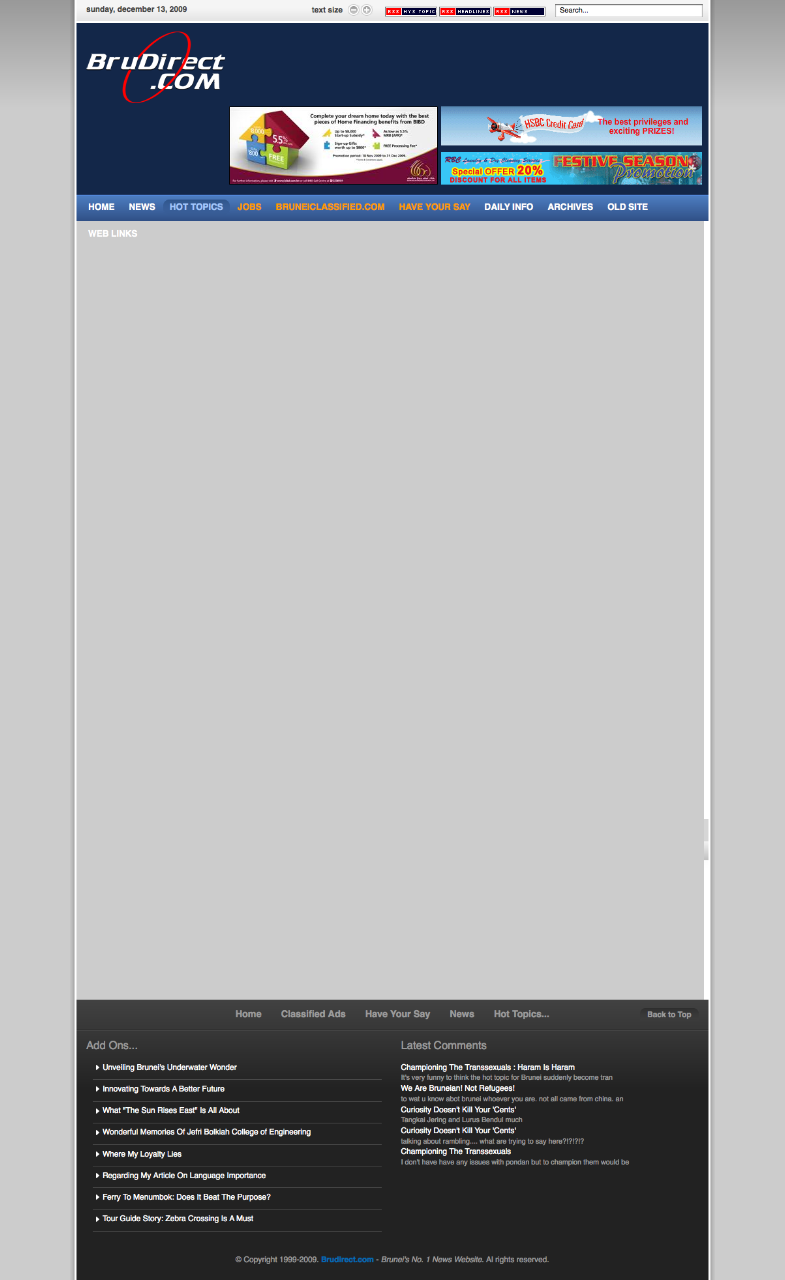
If you have a problem with BruDirect website showing a grey box instead of showing the content, read on for have several workarounds/fixes

The problem:
Grey box instead of content as shown in the screenshot below:

Workaround (temporary fix that needs to be repeated)

  • For any browser (though doesn’t seem to work in Opera): Click the small “Decrease Font Size” button at the top of the screen

  • For Opera:
  • Shift + G to disable styles

Fix (once configured will be fixed even if browser/computer is restarted)

  • For Firefox:
    • Add a userContent.css in your profile/chrome directory
      • OS X: ~/Library/Application Support/Firefox/Profiles/[random 8 characters].default/chrome/
      • Windows: %appdata%MozillaFirefoxProfiles[random 8 characters].defaultchrome
      • Linux: ~/.mozilla/firefox/[random 8 characters].default/chrome
    • Add the following code into the file
    • @-moz-document domain(brudirect.com) {
      a.link span {
      font-size: 11px;
      }
      }
    • Restart Firefox and the menu bar text should be smaller and fit on a single line
  • For Opera:
    • Create a “brudirect.css” file
    • Add the following code into the file
      a.link span {
      font-size: 11px;
      }
    • Right click the page > Edit Site Preferences > Display Tab > My Style Sheet
    • Select the “brudirect.css” file that was created
    • Refresh the page

Offline Installers

Have you ever started to download an application and after downloading it you realized that what you downloaded wasn’t the application but a downloader application. I’ve always disliked this as it requires an Internet connection and isn’t an installer that I can just pass around to friends. So this post is dedicated to getting those full installers.

Google Chrome: Download page
Basically add “?standalone=1” to the end of the URL of the download page that shows the Terms of Service

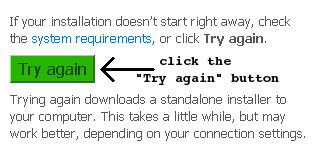
Live Essentials: Download page (On the download page, there is a column on the right with a “Try again” button. On pressing this button you will get the full download)

AVG: Download page

  1. On the initial download page, go to the bottom and where you can download the file direct from AVG servers.
  2. On the following page there is a link for the offline version (linked above) which is the complete installer

Skype: Direct Download | Download Page
Instead of the regular installer look for the business version that includes the MSI installer

Java runtime:
Click the “all Java downloads here” link on the Java download page

More Brunei Recycling Bins

More recycling bins spotted at University Brunei Darussalam (UBD). Recycling Bins in Brunei page updated. Spotted some at BEDB and Maktab Sains / Science College but alas no pictures yet.

Concepts Computers is not Recycling

So I finally managed to talk to Mr Vincent Pao, the General Manager of Concepts Computer regarding the recycling issue that I had, resulting in my “Concepts Computer Lying to Us?” post. In my talk with him about a few things but most important to me at the this time was the recycling issue. He stated that people from the recycling place came and picked up the equipment and that he did not have the contact number of the place or of the person in charge. He mentioned the place was at “Sungai Akar” which I believed to be the Sungai Akar rubbish dump. He said there is a little building/section where they recycle the equipment.

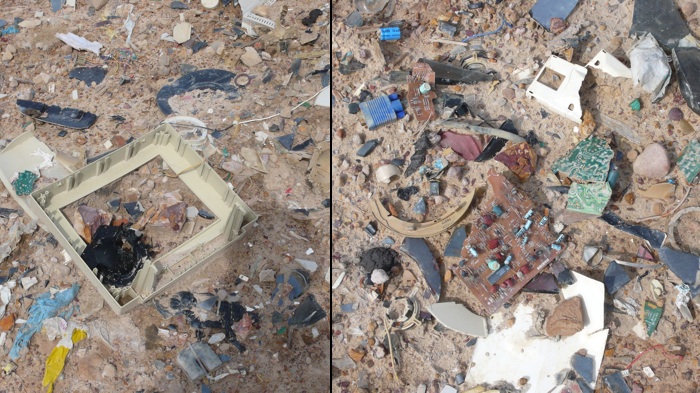
Today I went to the rubbish dump to try and find this recycling place that was supposed to be there. After some walking around and talking to the workers there, I was directed to “Ah Huat” who told me that they did pick up the equipment from Concepts but they are not recycling it. They are merely taking the equipment apart and dumping them in the dump. As shown below you can see the remains of some of the monitors and some PCB (printed circuit board) remains.

I admit, in my last post I was a bit harsh on Concepts, but after some thinking it could be a misunderstanding or miscommunication. It could have been that the person misled Mr Pao to think they were recycling or it could have been a misunderstanding on Mr Pao’s side. Whatever the story may be, I believe everybody should just know that at the end of the day the items being traded-in are not being recycled

Brunei Times

It seems that my Brunei Times E-Paper Lite Edition seems to be having issues that Brunei Times is blocking direct access to the images. The Brunei Times downloader still works however so in the meantime that should be used to download and view the images.

A fix will be worked on when I can find the time to fit it in. Life’s pretty busy at the moment =)

Why you should get a Netbook

Just let me say it….. I love Netbooks. Just the convenience factor, price point, battery life and decent performance combined make it a perfect 2nd computer for enthusiasts and a great tool for lower income groups to get started with computers. I believe schools could benefit a great deal from them too thats to the price point. I have always been one for mobile computing and that started off with the whole PDAs of yesteryear (Pocket PCs, Psions and Palms) that has morphed into smartphones of today (too bad I did not try the MessagePad/Newton though I did see it behind the glass display when I visited Labuan). Did you know that the Symbian OS (now Symbian) that is on almost all Nokia smartphones has it’s history in the Psion PDAs? But I digress. Now on to the reason why you should get a Netbook.

Convenience

When compared to regular laptops the sheer convenience is apparent. The first thing to note about a netbook is that it is compact and light. It lets you put it in your bag and not even notice that it is there. That may even be enough for some, who lug around their laptops that they have been using for a year or so and have dismal battery life thus being limited to places where you can use it as you are always looking for a power point to plug in and charge. This brings me to the second great thing about netbooks: the outstanding battery life. The Toshiba NB200 can run for over 9 usable hours! Heck I bet the average netbook would beat out the average laptop on battery life.

More Functional than a Phone

More functional in display size/resolution and due to it having a full operating system. A larger screen with larger resolution lets you surf webpages with ease and provides the full web experience together with Flash. You can also easily enjoy your movies or videos on the large screen without straining your eyes. A full operating system means you won’t be tied down to the limitations of a trimmed down phone operating system and typically with a keyboard you will certainly be able to get more work done more efficiently on a netbook compared to a phone.

Cheap

When I got my first laptop it was over B$3000. Now you can get relatively good laptops for B$1500 but netbooks differentiate themselves by being mostly being under B$1000 (starting from B$600). Within my group of friends that I know have laptops, they end up non-functional after the 3rd year (motherboard failure, graphics failure, mechanical failure i.e. falling apart, etc) which makes me wonder if it really is worth spending all that money just to see it disappear once the device stops working. Most netbooks will be even be cheaper than smartphones that won’t match up to work functionality of a netbook.

Conclusion

Netbooks are great for those mobile warriors that are limited by their phone offerings or the weight of the laptop that requires constant charging when on the go. Netbooks are great for students who need a mobile computer to do their school assignments. The sheer convenience of a netbook must e experienced. I miss my Acer Aspire One as I use my Macbook Pro now: the AA1 was so much more convenient but I had to switch to a proper laptop as the netbook could not keep up with my needs as a heavy power user when I work (for the typical work scenario of Microsoft Office usage and browsing the web it will be more than fine). For other aspects of my AA1 usage, it is still great. Now netbooks are not perfect and you should find out the things you need to know about netbooks before getting one. Also now the lines of netbooks and laptops and sublaptops are blurring with products like the Acer Timeline series that brings laptops to a better standing with good battery life and lighter weight and also with netbooks getting larger (11 and even 12 inch screen). At the end of the day: know what you need, know what the offerings can give you and make the best choice for your needs.

Application of the Day: Right Zoom

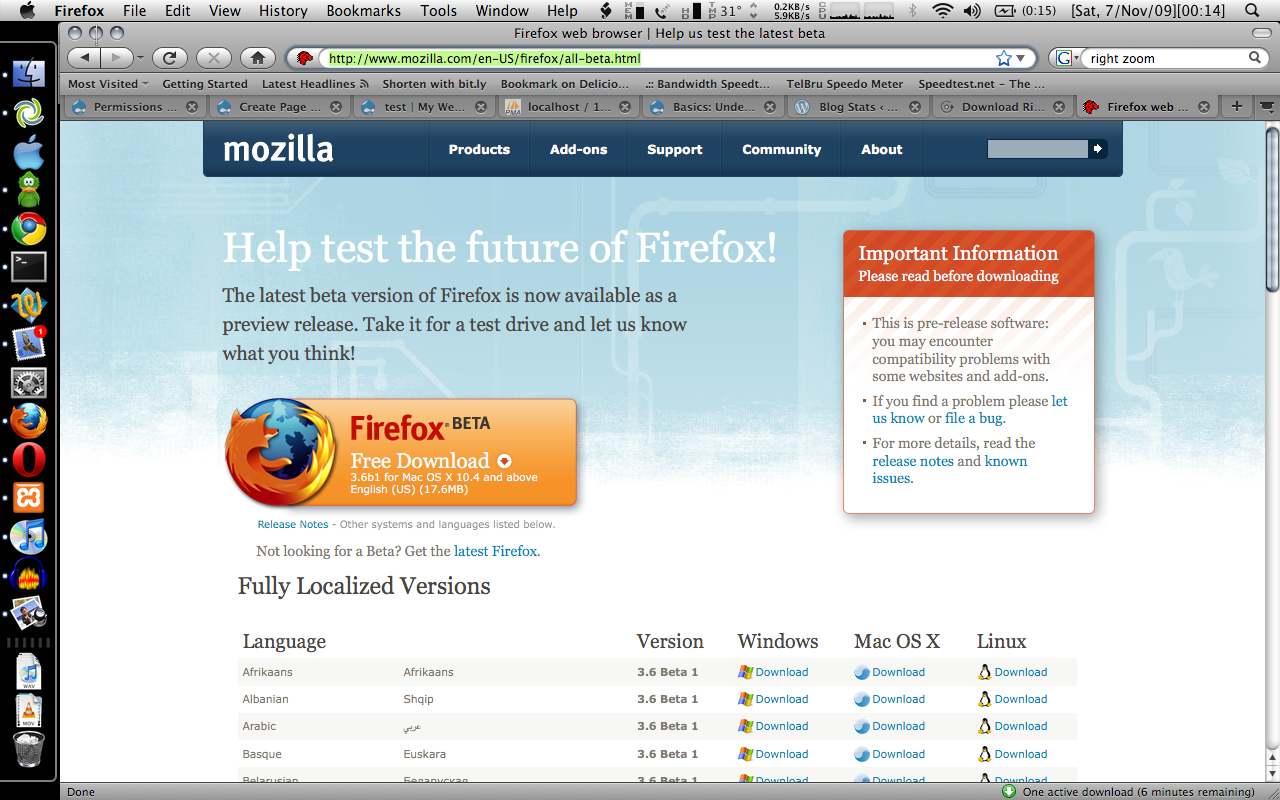
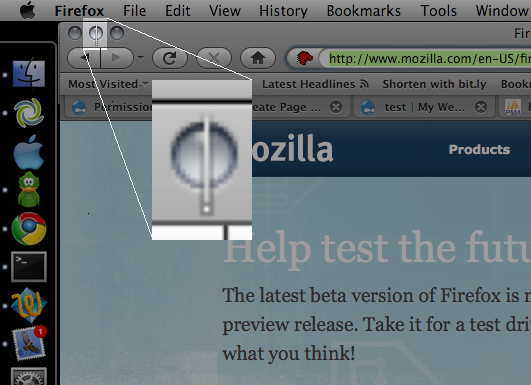
So I downloaded the new Firefox beta and for some reason I couldn’t find the Downloads window when I used the shortcut or selected it from the Window menu item. It took me a while and then I saw it. Look carefully at the image below and you will see the ‘hidden’ download window

wheres the firefoxs download window

See it yet? No? Well the answer is below:

theres the firefox hidden download window

Now how the heck do I resize something when I can’t even see the buttons nor the bottom right window resizer? I tried clicking/resizing on the window but to no avail. No shortcut is available for OS X to resize or maximize the window (one of my issues with OS X). Thankfully I found Right Zoom that enables me to maximize a window using a keyboard shortcut. Selected the window using Command + ` after Command + Tabbing onto the Firefox icon, pressed Command + Shift + E to maximize and there I found my download window back again! Phew..

Right Zoom was created to change the default behavior of the Zoom button in OS X to make it behave like Window’s and Linux’s Maximize button. It also lets uses assign a customizable keyboard shortcut to maximize the window. As I won’t have my Alt+Space, X as I have in Windows, this is the next best thing. Right Zoom runs in the background and is probably something you want to start automatically when you login (System Preferences > Accounts > Login Items).