DST and bmobile’s Revised Mobile Plans

Posting this up because I couldn’t find the DST revised plans on their website. All I can say is that this is what competition is all about: in the end the customers win. Now lets just hope Telbru gets competition for eSpeed

DST Revised Prima Plans

$35
Essential Voice Plan
$55
Extra Voice Plan
$55
Extra Text Plan
$85
Executive Voice Plan
$85
Executive Text Plan
$165
Elite Voice Plan
Free Voice (minutes) 300 2000 500 4000 2000 Unlimited
Free SMS 100 200 600 400 1200 Unlimited
Free MMS 20 55 55 85 85 Unlimited
Free Data 1.5GB 5GB 5GB 10GB 10GB 20GB

Source: Brunei Times E-Paper (view newspaper promo advert)

For good measure I’ve throw in bmobile‘s revised rates too

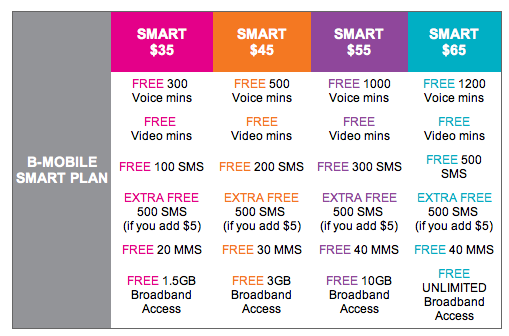
Bmobile’s Revised Plans

Smart $35 Smart $45 Smart $55 Smart $65
Free Voice (minutes) 300 500 1000 1200
Free SMS 100 200 300 500
Free MMS 20 30 40 40
Free Data 1.5GB 3GB 10GB Unlimited

Source: bmobile website (view screenshot)
Brunei National Swimming Pool Opening Hours

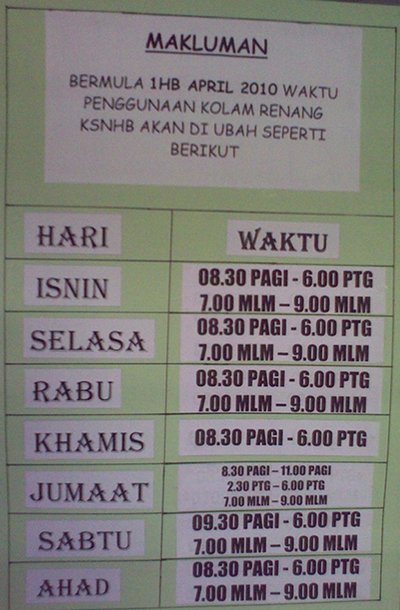
For all those swimmers out there, here’s the new opening hours for the pool for your reference:

Monday: 830am-6pm, 7pm-9pm
Tuesday: 830am-6pm, 7pm-9pm
Wednesday: 830am-6pm, 7pm-9pm
Thursday: 830am-6pm
Friday: 830am-11am, 230pm-6pm, 7pm-9pm
Saturday: 930am-6pm, 7pm-9pm
Sunday 830am-6pm, 7pm-9pm

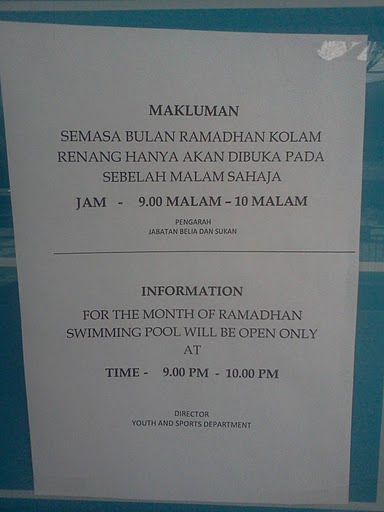
Update (15/Aug/2011): During Puasa / Ramadhan the pools is only open from 9pm-10pm

Brunei National Stadium Swimming Pool Opening Hours
Swimming Pool Opening Hours
Opening Hours During Ramdhan/Puasa 9pm-10pm

eSpeed Upgrade!

It all started with Tiong Loong’s tweet that stated:

Telbru is upgrading our espeed 512kbps bandwidth >>See my test result http://www.speedtest.net/result/762446092.png #brunei
source

So when I got home from work that day I did some speed tests and was pleasantly surprised that it was true!

Bandwidth Test showing 1Mbps down, 300kbps+ up
1Mbps+ down, 300kbps+ up

And so today 1/April/2010 Telbru confirmed it (but honestly what a bad day to pick to announce it)

Plan Old Bandwidth New Upgraded Bandwidth
e-Speed Value Surf 512kbps 1Mbps
e-Speed Lite Surf 640kbps 1.5Mbps
e-Speed Super Surf 768kbps 2Mbps
e-Speed Premium Surf 1Mbps 2.5Mbps
Corporate Broadband Lite 2Mbps 3.5Mbps
Corporate Broadband Max 3.5Mbps 5Mbps

eSpeed Upgrade poster

Speed on Demand page finally loads!

I checked my router IP today and was pleasantly surprised that it has change to 118.x.x.x as show below and was surprised to see that the Speed on Demand page actually loaded!

New Router IP of 118.x.x.x
New eSpeed Router IP: 118.x.x.x
Speed on Demand login page
It finally loads!

So I can confirm that router IPs of 118.x.x.x can access the login page and I presume can use the service as well. Will try test this out in the coming days

PS. The images have been manipulated to hide my exact IP address but this is no Aprils fools prank =)

Short Message Service Centre Numbers in Brunei

DST: +673 879 5000

bmobile: +673 810 1010

For some reason my EASI SIM card has default SMS Centre Number of M1, a Singapore mobile phone provider, so whenever I change phones I will always have to manually set this up in order to send SMS’s. Just set up the HTC Hero for it and it took quite a while but finally managed to get it. It was in the Message application’s settings not the general settings (Home > Settings) of the phone which was a bit confusing and I guess a bit more polish to go for Android. Threw in the steps for (Nokia) S60 phones too just for good measure

Android (1.5)

  • Messages application > Settings

S60 (Mostly Nokia Smart Phones)

  • Menu > Communications > Messaging
    • Options > Settings > Text Message > Message centres
    • Options > New message centre
    • Options > Settings > Text Message > Message centre in use (select newly created entry)

More on Telbru’s Speed on Demand service

After reading a friend’s Tweet I ran into Telbru’s promotion on their Speed on Demand service. I decided to give them a ring to find out whether it is available to all eSpeed users as based on previous findings it was only available to some.

Speed on Demand Promo : 15-31 March

So basically I found out that users with a modem/router WAN IP starting with 119 (IP 119.*.*.*) are actually applicable for the Speed on Demand service. They are still undergoing upgrading and maintenance work for other IP ranges and intending to migrate 61.*.*.* users to 119.*.*.*.

So finally some clarification from Telbru on this matter. And the speculation that it was for newer users on a specific network was correct. Sad that there is no official press release and that this information has to be continually dug up rather than presented by the folks over at Telbru. With the redesigned of the eSpeed website, here’s hoping to a new year with a change in how Telbru handles their public relations and information delivery.

PS: On a side note thanks to Bahrin (I hope thats the right spelling) for taking my call at the 121 hotline and giving me this much needed clarification and information. Kudos to you and you made my day by finally speaking to a courteous, competent and well informed person =)

Update (1/April/2010): Seems that IPs of 118.x.x.x also get the Speed on Demand

Of Keypads and Touchscreens

If there is one thing you’ll always use on your phone it will be the keypad/keyboard whether it is a physical one or an onscreen version. I’ve always seemed to prefer phones with traditional keys (non QWERTY) as I like having the tactile feedback and also the ability to blind type. With the past 2 of my phones (Nokia 3110c, Nokia E51), I’ve had the issue that the keys are pretty hard to press (i.e. it requires quite a bit of force to press down) so after a long text message or instant-message chats, my thumbs would get tired. This led me to look into the ‘clickiness’ of keypads of phones as I was looking for a phone under $200 recently (with Bluetooth, card slot for music, a 3.5mm headphone jack & preferably 3G). I was pretty disappointed with the results and only found the Nokia 6303c had a nice ‘light’ keypad which buttons not requiring too much pressure to activate (The Nokia 3120c was pretty nice too but not as good as the 6303c).

There are several factors playing into the physical keypad of a phone: button spacing, button size, button placement and button activation pressure (as mentioned above). With all these factors playing into the keypad it made me wonder whether touchscreen keyboards would be better. Currently I have my sister’s HTC Hero and managed to play with a friend’s iPod touch recently. So I managed to get a good feel for both of them and here are some takes on their usability.

Android (1.5) - QWERTY Keyboard layout

Initially the Hero’s onscreen keyboard was frustrating to me – especially in portrait mode. It made me think I had fat fingers and it was painfully slow to type and correct any mistakes. There is auto correct which does a pretty good job but when it comes to words that it doesn’t recognize it can get frustrating. First of all if you type a word, it will display several suggested words (which it thinks you’re typing) above the actual word being typed. If you press space (to move on to the next work) it will automatically use the word it thinks you’re typing. An example is if I want to type “Bsb” it will auto suggest “Van” and if I press space it will replace “Bsb” (that I typed) with “Van”. Now you can add “Bsb” to the dictionary and it will be recognized the next time but this can be annoying if you’re using acronyms or names of places or just a language that it doesn’t understand (e.g. Malay). You can use the onscreen keyboard in landscape mode which makes this much easier for thumb typing but I think the lack of multi-touch implementation (there is multi-touch on the browser with pinch zoom) on the keyboard phone prevents users from typing even faster. At at times the keyboard lags behind the typing so you get delayed typing. In my frustrations of the Hero I honestly wanted to get a Bluetooth keyboard or find a way to use a Nokia phone as a Bluetooth keyboard. Take note that the screen size of the Hero is smaller than the iPod touch / iPhone and makes the keyboard mode even smaller and harder to type on in comparison. After a few days with it, I’ve managed to make it more manageable but still I had better results with the iPod touch in the limited time I’ve had to play with it. Finally I have switched the keyboard mode to phone keypad which emulates the typical 1-9 button configurations with the appropriate letters as a normal phone with physical keys and it can toggle predictive T9 input on or off easily at the touch of an on-screen button.

Android (1.5) - Phone Keypad layout

I can honestly say that the iPod touch (and thus the iPhone) has a very good onscreen keyboard: Apple must have done great user experience testing and I have to say they have got it nearly perfect. The onscreen keyboard was large enough to type with both my thumbs in the portrait mode with few mistakes from the little time I had with it. I know that they have tweaked the keyboard making buttons ‘bigger’ based on which letter is more probable and this worked well for the words in English that I typed. I found that the auto-suggested word is just as cumbersome as the Android implementation: when typing a word that it does not understand, it will only show a single suggested word (as opposed to Android’s multiple words) and pressing the spacebar will auto-correct it to the word that it thinks you are typing. To prevent this, just tap the ‘X’ to close the suggested word panel. It didn’t seem that you could add words to the dictionary from normal text input which means you could get frustrated typing non-recognized words (you can add words to the dictionary via Safari but its a bit of a kludge).

On both on-screen keyboards I wasn’t too impressed with inputting symbols. Perhaps I’m just not used to it yet but I found it too troublesome and time consuming to type symbols. After playing with on-screen keyboards I still like physical keys and honestly I like the way Nokia has implemented the keypads on their devices along with the symbol selection. So in the meantime I will look for a Bluetooth keyboard on EBay to see if anything looks good.

Related Article: A good comparison on the virtual Keyboards on iPhone and Android

Bmobile’s 1st Generation 3.5G HSDPA Modem in Ubuntu/Linux

bmobile's 1st Generation 3.5G HSDPA modem

Ever since I had the opportunity of using bmobile‘s 3.5G modem to get mobile broadband (via Zoom!) I was curious to see whether it would work in Linux. After much testing, I did manage to get it to work but it wasn’t consistent (it only seemed to work when the modem was tied to /dev/ttyUSB0, so I kepted plugging it in and out and redialed to see if it worked).

For the newer bmobile modem check out this page courtesy of @jikam

Test system: Running Ubuntu 9.04.

  1. Get usb_modeswitch (in Ubuntu / Debian you can “apt-get install usb_modeswitch” which makes things much easier)
  2. Get the usb_modeswitch.conf file and put it in /etc/
  3. The modem is identified an Alcatel One Touch X020 / X030 / MDB-100HU / Nuton 3.5G (lsusb will show ) so search usb_modeswitch.conf and uncomment the section for DefaultVendor, DefaultProduct, TargetVendor, TargetProduct and MessageContent

    ########################################################
    # Alcatel One Touch X020 (aka OT-X020, aka MBD-100HU, aka Nuton 3.5G), works with Emobile D11LC
    # Alcatel One Touch X030 (aka OT-X030, aka Nuton NT36HD)
    #
    # Contributor: Aleksandar Samardzic, Marcelo Fernandez

    ;DefaultVendor= 0x1c9e
    ;DefaultProduct= 0x1001

    ;TargetVendor= 0x1c9e
    ;TargetProduct= 0x6061

    # only for reference and 0.x versions
    # MessageEndpoint=0x05

    ;MessageContent="55534243123456780000000000000606f50402527000000000000000000000"

    ########################################################

    to

    ########################################################
    # Alcatel One Touch X020 (aka OT-X020, aka MBD-100HU, aka Nuton 3.5G), works with Emobile D11LC
    # Alcatel One Touch X030 (aka OT-X030, aka Nuton NT36HD)
    #
    # Contributor: Aleksandar Samardzic, Marcelo Fernandez

    DefaultVendor= 0x1c9e
    DefaultProduct= 0x1001

    TargetVendor= 0x1c9e
    TargetProduct= 0x6061

    # only for reference and 0.x versions
    # MessageEndpoint=0x05

    MessageContent="55534243123456780000000000000606f50402527000000000000000000000"

    ########################################################

  4. Do the actual mode switch for the modem to change the device from USB storage to modem mode:
    sudo usb_modeswitch
  5. Create the USB serial device for dial up:
    sudo modprobe usbserial vendor=0x1c9e product=0x6061
    This step created 3 devices (/dev/ttyUSB0, /dev/ttyUSB1, /dev/ttyUSB2) on my system.
  6. Use the Network Manager Applet to configure a new broadband modem connection with the B-Mobile configuration (APN: bmobilewap)

As mentioned this does not work consistently, so if it doesn’t seem to connection try plugging the USB modem out and back in and retry. I will try find a way to get this more consistent, but hopefully this will help those who are trying to get it to work

OMNI upgrade prices for existing E-Speed subscribers

Ever since the OMNI package was introduced I was curious to see what the upgrade pricing would be. I went to find out the cost for an upgrade to OMNI Lite from an existing E-Speed 512kbps connection and was sadly disappointed to hear that to sign up for OMNI, you would have to pay the same price as a new registration. My quest to have cheap mobile broadband was quelled at that point but recently I was asked if there was an upgrade price to OMNI from existing an E-Speed plan so I decided to take another look and was glad to find out that there was an upgrade path.

OMNI FAQ: Upgrade from Existing E-Speed Subscription

The upgrade cost is B$185 /B$235 (depending on IC)
[3G USB Modem ($100)
+ Deposit ($50 for Yellow or Red IC / $100 for Green IC)
+ Annual License Fee ($25)
+ Administration fee ($10)]

A new registration for OMNI Lite is $263 / $313 and OMNI Max is $325 / $375.

I was told that the cost is the same even if I want to upgrade to OMNI Max (1Mbps E-Speed + 7.2Mbps Zoom) from my existing 512kbps eSpeed Value Surf connection which would be a great upgrade path (saving $140)

Zoom! is a mixed bag of goodness and annoyance as mentioned in my previous findings but for $20/month on top of an existing eSpeed Value Surf subscription, I have to say that OMNI is very good value for money subscription.
(OMNI Max subscription is $22/month on top of eSpeed Premium Surf and OMNI Corporate only $12/month on top of Corporate Broadband Max)

Note: the 3G USB modem is locked to b-mobile SIM and thus cannot be used with any other SIM card. Also upon upgrade, the subscription is considered as a single entity so if you want to terminate either service (eSpeed or Zoom!) you will have to terminate both subscription and resubscribe for the service you want to keep.

Windows XP DPI Registry Fix

The other day I ran into a laptop where the desktop looks like the following screenshot.

Tiny Text and System Icons

Click on the picture to view the full resolution for the image. The text is too small and as you can see there are 3 rows of icons in the system tray! The system tray is the default size and it can fit 3 rows of icons when it can normally only have 1. Tried clicking on “Advanced” button in the “Display Properties” Tab (shown below) and a DLL crashed.

Display Properties Dialog Box

Tried Changing things in the “Advanced Appearance” dialog and managed to make things more usable but it did not solve the problem.

Advanced Appearance Dialog Box

Then it dawned on me that it may be the DPI settings, which can only be accessed when clicking the “Advanced” button to get the graphics card advanced dialog box. But since it crashed I had to get an alternative fix

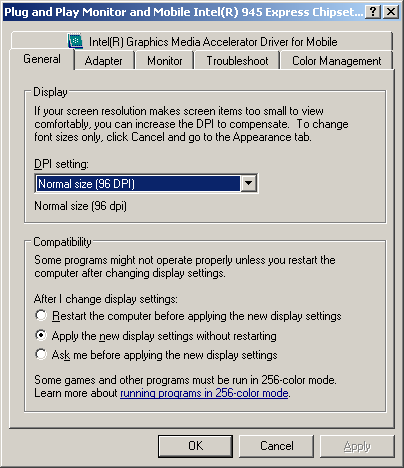
General Tab of Graphics Card Advanced Dialog Box

After some Googling I found this and modified the registry as follows:

[HKEY_LOCAL_MACHINE\SOFTWARE\Microsoft\Windows NT\CurrentVersion\FontDPI]
"LogPixels"=dword:00000060

[HKEY_LOCAL_MACHINE\SOFTWARE\Microsoft\Windows NT\CurrentVersion\Fonts]
"Courier 10,12,15 (VGA res)"="COURE.FON"
"MS Serif 8,10,12,14,18,24 (VGA res)"="SERIFE.FON"
"MS Sans Serif 8,10,12,14,18,24 (VGA res)"="SSERIFE.FON"
"Small Fonts (VGA res)"="SMALLE.FON"

[HKEY_LOCAL_MACHINE\SOFTWARE\Microsoft\Windows NT\CurrentVersion\GRE_Initialize]
"FIXEDFON.FON"="vgafix.fon"
"FONTS.FON"="vgasys.fon"
"OEMFONT.FON"="vgaoem.fon"

[HKEY_LOCAL_MACHINE\SYSTEM\CurrentControlSet\Hardware Profiles001\Software\Fonts]
"FIXEDFON.FON"="vgafix.fon"
"FONTS.FON"="vgasys.fon"
"OEMFONT.FON"="vgaoem.fon"
"LogPixels"=dword:00000060

[HKEY_LOCAL_MACHINE\SYSTEM\CurrentControlSet\Hardware Profiles\Current\Software\Fonts]
"FIXEDFON.FON"="vgafix.fon"
"FONTS.FON"="vgasys.fon"
"OEMFONT.FON"="vgaoem.fon"
"LogPixels"=dword:00000060

Rebooted and viola! Back to business as per normal