Joikuspot + bmobile Zoom! + OS X = Data Corruption?

So I’ve been using Joikuspot to tether my bmobile Zoom! wirelessly to my MacBook Pro running OS X and I noticed some weird hiccups and glitches that show some sort of corruption of the data bits I’m receiving from the Internet. The 4 main issues are

  1. Corrupted Webpages: that will show HTML markup in the middle or end of the page or even load gibberish

  2. Corrupted Images: the image will not fully load and reloading will not solve it (forgot to try clearing the cache though, I used Opera Turbo instead)

    Check out Lizzette Piltch’s Photos at Dragon Con 2010 for the full TMNT costumes among others

  3. Corrupted downloads: downloading the same file multiple times gives different md5sum hashes. Downloading directly from the phone seemed to get the file properly (so perhaps this rules out bmobile’s Zoom! as part of the problem)

  4. Interrupted videos streams: YouTube shows that it has loaded the whole video (after seeing the red progress ‘bar’ load fully) but in the middle of the video it just stops (this is different from truncated video streams where if you monitor the red progress bar it will jump from the middle to the end abruptly when loading the file)
Marul seems to have no issues for his Joikuspot so could it be OS X? Or could it just be an unreliable Internet connection from bmobile? Whatever is the cause of a combination of causes it does get annoying and wonder if there are ways to detect what’s going on and solve this strange problem of mine.

Don’t We All Love Competition?

So it all started with Concepts offering a promotion for senior citizens (aged 50 and above) and DST card holders for the Acer Aspire One 255 for B$498. Soon after that I saw Yappe advertise in the newspaper offering the same model netbook for the same price. Not to be out done Netcom offered a similar offering but with the Acer Aspire 533. The 533 is equipped with the newer N475 processor, runs DDR3 RAM and has Bluetooth 3.0 according to the specifications while the 255 runs on an older processor with DDR2 RAM (and no Bluetooth according to specs). According to the specifications the 255 could also come with a lower rated 3 cell battery meaning a lower battery life. On a bright note both seem to support Android InstantOn which I am curious to play around with. I will update on the configurations when I can but all I can say is that I continue to support Concepts as they are the leaders in these promotions and it is good to see that other shops are following suit and trying to compete. However it is a bit hard to support Concepts here when the 533 from Netcom seems like a better deal. At the end of the day we, the consumers, are the ones who benefit from this competition and I for one am welcome to see more competition in Brunei. Perhaps the next step is to offer better customer support/service?

DST and bmobile’s Revised Mobile Plans

Posting this up because I couldn’t find the DST revised plans on their website. All I can say is that this is what competition is all about: in the end the customers win. Now lets just hope Telbru gets competition for eSpeed

DST Revised Prima Plans

$35
Essential Voice Plan
$55
Extra Voice Plan
$55
Extra Text Plan
$85
Executive Voice Plan
$85
Executive Text Plan
$165
Elite Voice Plan
Free Voice (minutes) 300 2000 500 4000 2000 Unlimited
Free SMS 100 200 600 400 1200 Unlimited
Free MMS 20 55 55 85 85 Unlimited
Free Data 1.5GB 5GB 5GB 10GB 10GB 20GB

Source: Brunei Times E-Paper (view newspaper promo advert)

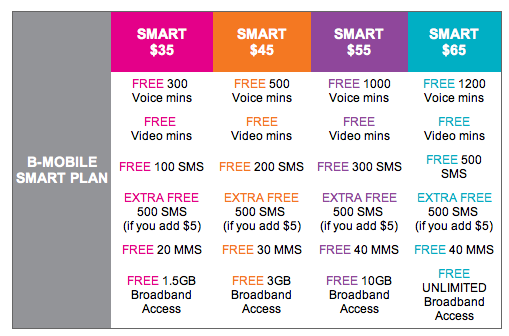
For good measure I’ve throw in bmobile‘s revised rates too

Bmobile’s Revised Plans

Smart $35 Smart $45 Smart $55 Smart $65
Free Voice (minutes) 300 500 1000 1200
Free SMS 100 200 300 500
Free MMS 20 30 40 40
Free Data 1.5GB 3GB 10GB Unlimited

Source: bmobile website (view screenshot)

Bmobile’s 1st Generation 3.5G HSDPA Modem in Ubuntu/Linux

bmobile's 1st Generation 3.5G HSDPA modem

Ever since I had the opportunity of using bmobile‘s 3.5G modem to get mobile broadband (via Zoom!) I was curious to see whether it would work in Linux. After much testing, I did manage to get it to work but it wasn’t consistent (it only seemed to work when the modem was tied to /dev/ttyUSB0, so I kepted plugging it in and out and redialed to see if it worked).

For the newer bmobile modem check out this page courtesy of @jikam

Test system: Running Ubuntu 9.04.

  1. Get usb_modeswitch (in Ubuntu / Debian you can “apt-get install usb_modeswitch” which makes things much easier)
  2. Get the usb_modeswitch.conf file and put it in /etc/
  3. The modem is identified an Alcatel One Touch X020 / X030 / MDB-100HU / Nuton 3.5G (lsusb will show ) so search usb_modeswitch.conf and uncomment the section for DefaultVendor, DefaultProduct, TargetVendor, TargetProduct and MessageContent

    ########################################################
    # Alcatel One Touch X020 (aka OT-X020, aka MBD-100HU, aka Nuton 3.5G), works with Emobile D11LC
    # Alcatel One Touch X030 (aka OT-X030, aka Nuton NT36HD)
    #
    # Contributor: Aleksandar Samardzic, Marcelo Fernandez

    ;DefaultVendor= 0x1c9e
    ;DefaultProduct= 0x1001

    ;TargetVendor= 0x1c9e
    ;TargetProduct= 0x6061

    # only for reference and 0.x versions
    # MessageEndpoint=0x05

    ;MessageContent="55534243123456780000000000000606f50402527000000000000000000000"

    ########################################################

    to

    ########################################################
    # Alcatel One Touch X020 (aka OT-X020, aka MBD-100HU, aka Nuton 3.5G), works with Emobile D11LC
    # Alcatel One Touch X030 (aka OT-X030, aka Nuton NT36HD)
    #
    # Contributor: Aleksandar Samardzic, Marcelo Fernandez

    DefaultVendor= 0x1c9e
    DefaultProduct= 0x1001

    TargetVendor= 0x1c9e
    TargetProduct= 0x6061

    # only for reference and 0.x versions
    # MessageEndpoint=0x05

    MessageContent="55534243123456780000000000000606f50402527000000000000000000000"

    ########################################################

  4. Do the actual mode switch for the modem to change the device from USB storage to modem mode:
    sudo usb_modeswitch
  5. Create the USB serial device for dial up:
    sudo modprobe usbserial vendor=0x1c9e product=0x6061
    This step created 3 devices (/dev/ttyUSB0, /dev/ttyUSB1, /dev/ttyUSB2) on my system.
  6. Use the Network Manager Applet to configure a new broadband modem connection with the B-Mobile configuration (APN: bmobilewap)

As mentioned this does not work consistently, so if it doesn’t seem to connection try plugging the USB modem out and back in and retry. I will try find a way to get this more consistent, but hopefully this will help those who are trying to get it to work

Daikyo Recycling Center Sdn Bhd, Brunei

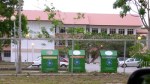
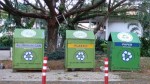
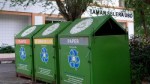
After finding out that Concepts wasn’t recycling and having spotted recycling bins around Brunei I wanted to find out more about the recycling company Daikyo. So I started by calling them and asking about the locations of their recycling bins in Brunei. To my surprise the lady told me that she could not give that information to me which seemed to defeat the purpose of placing recycling bins around Brunei for people to use. I was told that the recycling bins were placed upon request of the school / company / organization where the bins are located and that people can actually come down to their site to sell things. Curious at the ability to sell stuff I took a trip to their site located at Serasa (Map location on Wikimapia).

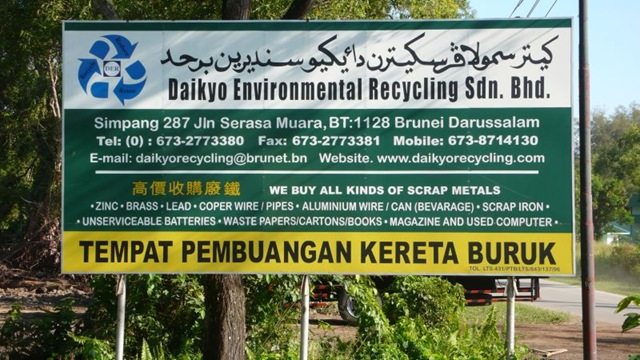
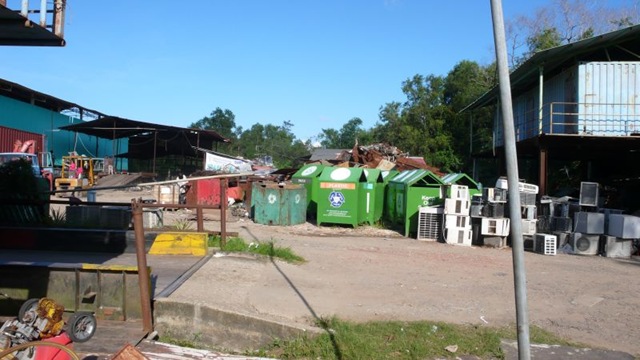
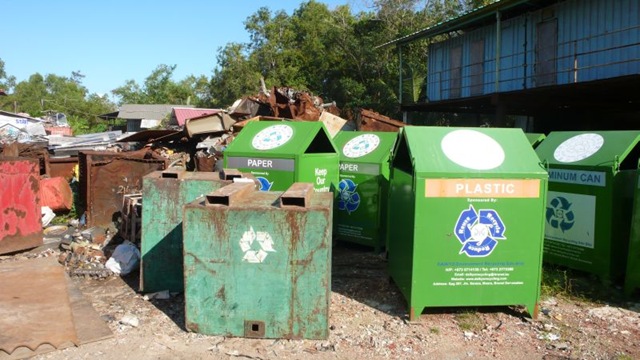
Daikyo was formerly known as Matusin Recycling and as you can see from the sign below they buy all kinds of scrap metal items ranging from plastics to scrap metal to old computers. I wish they were more willing to share information about their operations in Brunei but alas perhaps I will try another day. In the meantime get a look at the place from a few photos I took while I was there

Daikyo Environmental Recycling Sdn Bhd

We buy all kinds of scrap metal:
Zinc, Brass, Lead, Copper Wires/Pipes, Aluminium Wire/Can (Beverage), Scrap Iron, Unserviceable batteries, Waste Papers/Cartons/Books, Magazines and Used Computer
Tempat Pembuangan Kerata Buruk (rubbish dump for condemned cars)

Simpang 287, Jln Serasa Muara, BT 1128, Brunei Darussalam

Tel: +673 2773380, Fax: +673 2773381

E-mail: daikyorecycling@brunet.bn Website: www.daikyorecycling.com

Source: Their signboard shown below

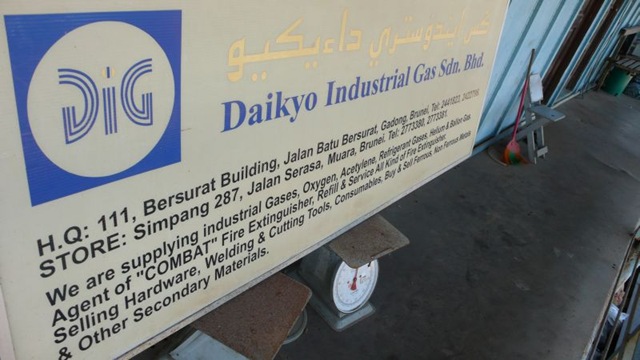
Daikyo Environmental Recycling Sdn Bhd Signboard Daikyo - Entrance Daikyo - Pile of Parts Daikyo - Overview 1 Daikyo - Overview 2 Daikyo - Overview 3 Daikyo - Lonely Old Recycling Bin Daikyo - Old and New Recycling bins Daikyo - Old Recyling Bin - Matusin Recycling Industry Company Daikyo Industrial Gas Sdn Bhd Signboard

Brunei School Terms, Exams & Public Holidays for 2010

School Terms
Term I: Mon 4 Jan – Thurs 18 March (51 days)
Term II: Mon 29 March – Thurs 3 June (48 days)
Term III: Mon 21 June – Thurs 2 Sept (50 days)
Term IV: Mon 20 Sept – Tues 30 Nov (51 days)

School Holidays
Term I: Fri 19 March – Sun 28 March (10 days)
Term II: Fri 4 June – Sun 20 June (17 days)
Term III: Fri 3 Sept – Sun 19 Sept (17 days)
Term IV: Wed 1 Dec – Fri 31 Dec (31 days)

Examination Dates
7 – 14 Jan: Lower Secondary Assessmen Retakes
12 May – 11 June: Brunei-Cambridge G.C.E. ‘O’ Level (May/June)
12 May – 11 June: Brunei-Cambridge G.C.E. ‘AS’ & ‘A’ Level (May/June)
4 – 7 Oct: Primary School Assessment (PSR) (Penilaian Sekolah Rendah)
11 – 16 Oct: Student Progress Examination (SPE) (Peperiksaan Kemajuan Pelajar)
11 Oct – 20 Nov: Brunei-Cambridge G.C.E. ‘O’ Level (Oct/Nov)
11 Oct – 20 Nov: Brunei-Cambridge G.C.E. ‘AS’ & ‘A’ Level (Oct/Nov)
24 & 26 Sept: Arab School Candidacy (PCKSA) (Pemilihan Calon Ke Sekolah Arab)
20 – 29 Nov: (SSSRU) (Sijil Sekolah-Sekolah Rendah Ugama Dh VI)
11 – 21 Oct: Student Progress Evaluation (PKP) (Penilaian Kemajuan Pelajar)
20 Sept – 9 Oct: Certificate of Regilous Studies (SPUB) (Sijil Pelajaran Ugama Brunei)
20 Sept – 9 Oct: Pre-Certificate of Regilous Studies (Pra-STPUB) (Pra-Sijil Tinggi Pelajaran Ugama Brunei)
20 Sept – 9 Oct: Higher Certificate of Regilous Studies (STPUB) (Sijil Tinggi Pelajaran Ugama Brunei)

Public Holidays
2 Jan (Sat): New Year’s Day (In replacement of Fri 1 Jan )
15 Feb (Mon): Chinese New Year (In replacement of Sun 14 Feb)
23 Feb (Tues): National Day
27 Feb (Sat): Maulud Nabi Muhammad SAW (In replacement of Fri 26 Feb)
31 May (Mon): Royal Brunei Armed Forces Day
10 July (Sat): Israk Mikraj
15 July (Thurs): Sultan’s Birthday
11 Aug (Wed): Start of Ramadan
28 Aug (Sat): Anniversary of the Revelation of the Quran (In replacement of Fri 27 Aug)
11 & 13 Sept (Sat & Mon): Hari Raya Aidilfitri (In replacement of Fri 10 & Sun 12 Sept)
16 Nov (Tues): Hari Raya Aidiladha
7 Dec (Tues): Islamic New Year
25 Dec (Sat): Christmas Day

Brunei eGovernment Citizen Survey

Do take some time out out fill in the eGovernment Citizen Survey

What is the purpose?

With the input from the community this survey will help the Prime Minister Office to identify which e-Government services are important to the citizens.

The survey is 28 pages in total and can get pretty time consuming. A compiled version is available here if you want to peruse the questions or even if you want to prepare your answers before answering the real survey.

This is organized by the Prime Minister’s Office, Infocom Federation Brunei in collaboration with E-Government National Centre and BAG Networks. I have to say kudos to the people in charge for taking the initiative for getting the public’s stand and input on something as important is this. I hope other organizations will take an example and try to communicate with the public to understand what is desired. This will help save time and resources of implementing a system only to find out that it is not wanted, thus not used and thus goes to waste.

Participants stand a chance to win prizes such as:

If you are inclined to meet the people in charge and ask further questions there are two more roadshows this coming Tuesday (15th December in Seria) and Sunday (20th December in Temburong)

More Brunei Recycling Bins

More recycling bins spotted at University Brunei Darussalam (UBD). Recycling Bins in Brunei page updated. Spotted some at BEDB and Maktab Sains / Science College but alas no pictures yet.

Concepts Computers is not Recycling

So I finally managed to talk to Mr Vincent Pao, the General Manager of Concepts Computer regarding the recycling issue that I had, resulting in my “Concepts Computer Lying to Us?” post. In my talk with him about a few things but most important to me at the this time was the recycling issue. He stated that people from the recycling place came and picked up the equipment and that he did not have the contact number of the place or of the person in charge. He mentioned the place was at “Sungai Akar” which I believed to be the Sungai Akar rubbish dump. He said there is a little building/section where they recycle the equipment.

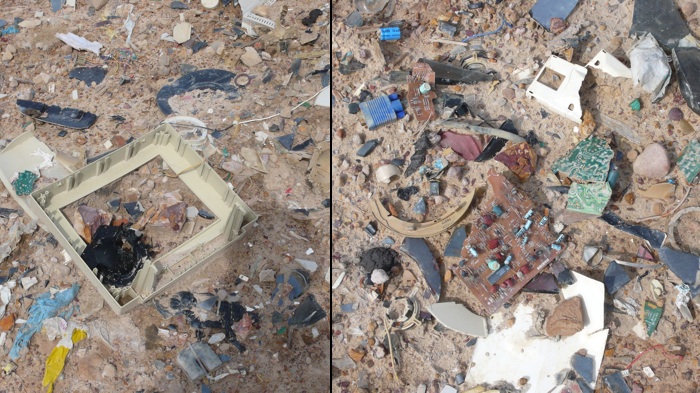
Today I went to the rubbish dump to try and find this recycling place that was supposed to be there. After some walking around and talking to the workers there, I was directed to “Ah Huat” who told me that they did pick up the equipment from Concepts but they are not recycling it. They are merely taking the equipment apart and dumping them in the dump. As shown below you can see the remains of some of the monitors and some PCB (printed circuit board) remains.

I admit, in my last post I was a bit harsh on Concepts, but after some thinking it could be a misunderstanding or miscommunication. It could have been that the person misled Mr Pao to think they were recycling or it could have been a misunderstanding on Mr Pao’s side. Whatever the story may be, I believe everybody should just know that at the end of the day the items being traded-in are not being recycled