Brunei National Swimming Pool Opening Hours

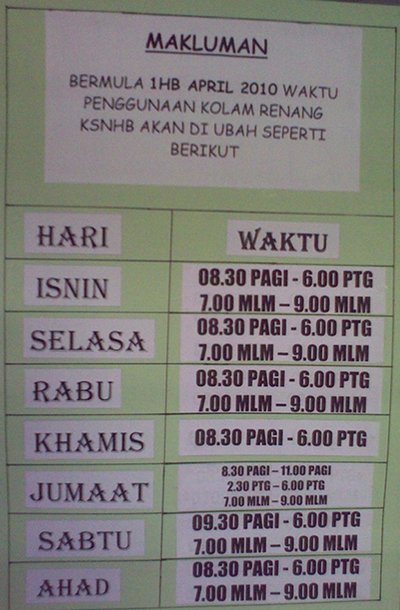
For all those swimmers out there, here’s the new opening hours for the pool for your reference:

Monday: 830am-6pm, 7pm-9pm
Tuesday: 830am-6pm, 7pm-9pm
Wednesday: 830am-6pm, 7pm-9pm
Thursday: 830am-6pm
Friday: 830am-11am, 230pm-6pm, 7pm-9pm
Saturday: 930am-6pm, 7pm-9pm
Sunday 830am-6pm, 7pm-9pm

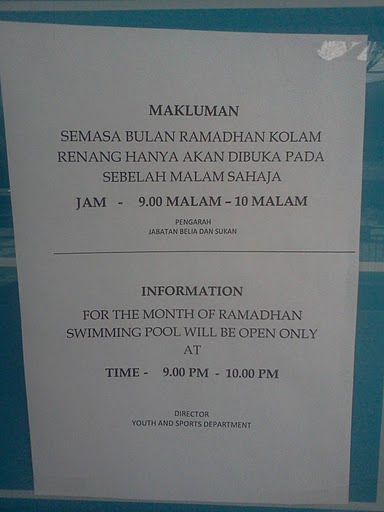
Update (15/Aug/2011): During Puasa / Ramadhan the pools is only open from 9pm-10pm

Brunei National Stadium Swimming Pool Opening Hours
Swimming Pool Opening Hours
Opening Hours During Ramdhan/Puasa 9pm-10pm

eSpeed Upgrade!

It all started with Tiong Loong’s tweet that stated:

Telbru is upgrading our espeed 512kbps bandwidth >>See my test result http://www.speedtest.net/result/762446092.png #brunei
source

So when I got home from work that day I did some speed tests and was pleasantly surprised that it was true!

Bandwidth Test showing 1Mbps down, 300kbps+ up
1Mbps+ down, 300kbps+ up

And so today 1/April/2010 Telbru confirmed it (but honestly what a bad day to pick to announce it)

Plan Old Bandwidth New Upgraded Bandwidth
e-Speed Value Surf 512kbps 1Mbps
e-Speed Lite Surf 640kbps 1.5Mbps
e-Speed Super Surf 768kbps 2Mbps
e-Speed Premium Surf 1Mbps 2.5Mbps
Corporate Broadband Lite 2Mbps 3.5Mbps
Corporate Broadband Max 3.5Mbps 5Mbps

eSpeed Upgrade poster

Speed on Demand page finally loads!

I checked my router IP today and was pleasantly surprised that it has change to 118.x.x.x as show below and was surprised to see that the Speed on Demand page actually loaded!

New Router IP of 118.x.x.x
New eSpeed Router IP: 118.x.x.x
Speed on Demand login page
It finally loads!

So I can confirm that router IPs of 118.x.x.x can access the login page and I presume can use the service as well. Will try test this out in the coming days

PS. The images have been manipulated to hide my exact IP address but this is no Aprils fools prank =)

Short Message Service Centre Numbers in Brunei

DST: +673 879 5000

bmobile: +673 810 1010

For some reason my EASI SIM card has default SMS Centre Number of M1, a Singapore mobile phone provider, so whenever I change phones I will always have to manually set this up in order to send SMS’s. Just set up the HTC Hero for it and it took quite a while but finally managed to get it. It was in the Message application’s settings not the general settings (Home > Settings) of the phone which was a bit confusing and I guess a bit more polish to go for Android. Threw in the steps for (Nokia) S60 phones too just for good measure

Android (1.5)

  • Messages application > Settings

S60 (Mostly Nokia Smart Phones)

  • Menu > Communications > Messaging
    • Options > Settings > Text Message > Message centres
    • Options > New message centre
    • Options > Settings > Text Message > Message centre in use (select newly created entry)

More on Telbru’s Speed on Demand service

After reading a friend’s Tweet I ran into Telbru’s promotion on their Speed on Demand service. I decided to give them a ring to find out whether it is available to all eSpeed users as based on previous findings it was only available to some.

Speed on Demand Promo : 15-31 March

So basically I found out that users with a modem/router WAN IP starting with 119 (IP 119.*.*.*) are actually applicable for the Speed on Demand service. They are still undergoing upgrading and maintenance work for other IP ranges and intending to migrate 61.*.*.* users to 119.*.*.*.

So finally some clarification from Telbru on this matter. And the speculation that it was for newer users on a specific network was correct. Sad that there is no official press release and that this information has to be continually dug up rather than presented by the folks over at Telbru. With the redesigned of the eSpeed website, here’s hoping to a new year with a change in how Telbru handles their public relations and information delivery.

PS: On a side note thanks to Bahrin (I hope thats the right spelling) for taking my call at the 121 hotline and giving me this much needed clarification and information. Kudos to you and you made my day by finally speaking to a courteous, competent and well informed person =)

Update (1/April/2010): Seems that IPs of 118.x.x.x also get the Speed on Demand

Bmobile’s 1st Generation 3.5G HSDPA Modem in Ubuntu/Linux

bmobile's 1st Generation 3.5G HSDPA modem

Ever since I had the opportunity of using bmobile‘s 3.5G modem to get mobile broadband (via Zoom!) I was curious to see whether it would work in Linux. After much testing, I did manage to get it to work but it wasn’t consistent (it only seemed to work when the modem was tied to /dev/ttyUSB0, so I kepted plugging it in and out and redialed to see if it worked).

For the newer bmobile modem check out this page courtesy of @jikam

Test system: Running Ubuntu 9.04.

  1. Get usb_modeswitch (in Ubuntu / Debian you can “apt-get install usb_modeswitch” which makes things much easier)
  2. Get the usb_modeswitch.conf file and put it in /etc/
  3. The modem is identified an Alcatel One Touch X020 / X030 / MDB-100HU / Nuton 3.5G (lsusb will show ) so search usb_modeswitch.conf and uncomment the section for DefaultVendor, DefaultProduct, TargetVendor, TargetProduct and MessageContent

    ########################################################
    # Alcatel One Touch X020 (aka OT-X020, aka MBD-100HU, aka Nuton 3.5G), works with Emobile D11LC
    # Alcatel One Touch X030 (aka OT-X030, aka Nuton NT36HD)
    #
    # Contributor: Aleksandar Samardzic, Marcelo Fernandez

    ;DefaultVendor= 0x1c9e
    ;DefaultProduct= 0x1001

    ;TargetVendor= 0x1c9e
    ;TargetProduct= 0x6061

    # only for reference and 0.x versions
    # MessageEndpoint=0x05

    ;MessageContent="55534243123456780000000000000606f50402527000000000000000000000"

    ########################################################

    to

    ########################################################
    # Alcatel One Touch X020 (aka OT-X020, aka MBD-100HU, aka Nuton 3.5G), works with Emobile D11LC
    # Alcatel One Touch X030 (aka OT-X030, aka Nuton NT36HD)
    #
    # Contributor: Aleksandar Samardzic, Marcelo Fernandez

    DefaultVendor= 0x1c9e
    DefaultProduct= 0x1001

    TargetVendor= 0x1c9e
    TargetProduct= 0x6061

    # only for reference and 0.x versions
    # MessageEndpoint=0x05

    MessageContent="55534243123456780000000000000606f50402527000000000000000000000"

    ########################################################

  4. Do the actual mode switch for the modem to change the device from USB storage to modem mode:
    sudo usb_modeswitch
  5. Create the USB serial device for dial up:
    sudo modprobe usbserial vendor=0x1c9e product=0x6061
    This step created 3 devices (/dev/ttyUSB0, /dev/ttyUSB1, /dev/ttyUSB2) on my system.
  6. Use the Network Manager Applet to configure a new broadband modem connection with the B-Mobile configuration (APN: bmobilewap)

As mentioned this does not work consistently, so if it doesn’t seem to connection try plugging the USB modem out and back in and retry. I will try find a way to get this more consistent, but hopefully this will help those who are trying to get it to work

OMNI upgrade prices for existing E-Speed subscribers

Ever since the OMNI package was introduced I was curious to see what the upgrade pricing would be. I went to find out the cost for an upgrade to OMNI Lite from an existing E-Speed 512kbps connection and was sadly disappointed to hear that to sign up for OMNI, you would have to pay the same price as a new registration. My quest to have cheap mobile broadband was quelled at that point but recently I was asked if there was an upgrade price to OMNI from existing an E-Speed plan so I decided to take another look and was glad to find out that there was an upgrade path.

OMNI FAQ: Upgrade from Existing E-Speed Subscription

The upgrade cost is B$185 /B$235 (depending on IC)
[3G USB Modem ($100)
+ Deposit ($50 for Yellow or Red IC / $100 for Green IC)
+ Annual License Fee ($25)
+ Administration fee ($10)]

A new registration for OMNI Lite is $263 / $313 and OMNI Max is $325 / $375.

I was told that the cost is the same even if I want to upgrade to OMNI Max (1Mbps E-Speed + 7.2Mbps Zoom) from my existing 512kbps eSpeed Value Surf connection which would be a great upgrade path (saving $140)

Zoom! is a mixed bag of goodness and annoyance as mentioned in my previous findings but for $20/month on top of an existing eSpeed Value Surf subscription, I have to say that OMNI is very good value for money subscription.
(OMNI Max subscription is $22/month on top of eSpeed Premium Surf and OMNI Corporate only $12/month on top of Corporate Broadband Max)

Note: the 3G USB modem is locked to b-mobile SIM and thus cannot be used with any other SIM card. Also upon upgrade, the subscription is considered as a single entity so if you want to terminate either service (eSpeed or Zoom!) you will have to terminate both subscription and resubscribe for the service you want to keep.
Daikyo Recycling Center Sdn Bhd, Brunei

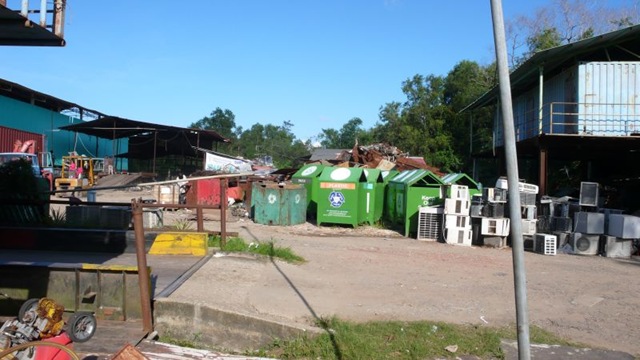
After finding out that Concepts wasn’t recycling and having spotted recycling bins around Brunei I wanted to find out more about the recycling company Daikyo. So I started by calling them and asking about the locations of their recycling bins in Brunei. To my surprise the lady told me that she could not give that information to me which seemed to defeat the purpose of placing recycling bins around Brunei for people to use. I was told that the recycling bins were placed upon request of the school / company / organization where the bins are located and that people can actually come down to their site to sell things. Curious at the ability to sell stuff I took a trip to their site located at Serasa (Map location on Wikimapia).

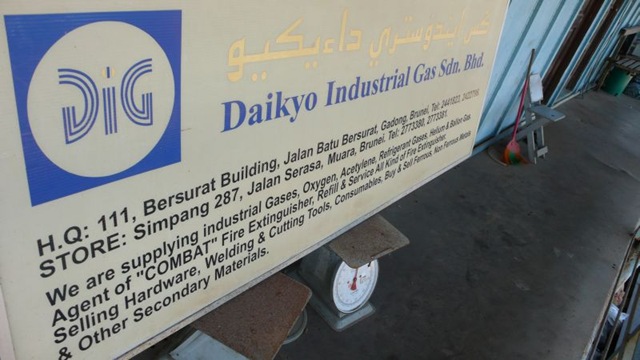
Daikyo was formerly known as Matusin Recycling and as you can see from the sign below they buy all kinds of scrap metal items ranging from plastics to scrap metal to old computers. I wish they were more willing to share information about their operations in Brunei but alas perhaps I will try another day. In the meantime get a look at the place from a few photos I took while I was there

Daikyo Environmental Recycling Sdn Bhd

We buy all kinds of scrap metal:
Zinc, Brass, Lead, Copper Wires/Pipes, Aluminium Wire/Can (Beverage), Scrap Iron, Unserviceable batteries, Waste Papers/Cartons/Books, Magazines and Used Computer
Tempat Pembuangan Kerata Buruk (rubbish dump for condemned cars)

Simpang 287, Jln Serasa Muara, BT 1128, Brunei Darussalam

Tel: +673 2773380, Fax: +673 2773381

E-mail: daikyorecycling@brunet.bn Website: www.daikyorecycling.com

Source: Their signboard shown below

Daikyo Environmental Recycling Sdn Bhd Signboard Daikyo - Entrance Daikyo - Pile of Parts Daikyo - Overview 1 Daikyo - Overview 2 Daikyo - Overview 3 Daikyo - Lonely Old Recycling Bin Daikyo - Old and New Recycling bins Daikyo - Old Recyling Bin - Matusin Recycling Industry Company Daikyo Industrial Gas Sdn Bhd Signboard

Brunei School Terms, Exams & Public Holidays for 2010

School Terms
Term I: Mon 4 Jan – Thurs 18 March (51 days)
Term II: Mon 29 March – Thurs 3 June (48 days)
Term III: Mon 21 June – Thurs 2 Sept (50 days)
Term IV: Mon 20 Sept – Tues 30 Nov (51 days)

School Holidays
Term I: Fri 19 March – Sun 28 March (10 days)
Term II: Fri 4 June – Sun 20 June (17 days)
Term III: Fri 3 Sept – Sun 19 Sept (17 days)
Term IV: Wed 1 Dec – Fri 31 Dec (31 days)

Examination Dates
7 – 14 Jan: Lower Secondary Assessmen Retakes
12 May – 11 June: Brunei-Cambridge G.C.E. ‘O’ Level (May/June)
12 May – 11 June: Brunei-Cambridge G.C.E. ‘AS’ & ‘A’ Level (May/June)
4 – 7 Oct: Primary School Assessment (PSR) (Penilaian Sekolah Rendah)
11 – 16 Oct: Student Progress Examination (SPE) (Peperiksaan Kemajuan Pelajar)
11 Oct – 20 Nov: Brunei-Cambridge G.C.E. ‘O’ Level (Oct/Nov)
11 Oct – 20 Nov: Brunei-Cambridge G.C.E. ‘AS’ & ‘A’ Level (Oct/Nov)
24 & 26 Sept: Arab School Candidacy (PCKSA) (Pemilihan Calon Ke Sekolah Arab)
20 – 29 Nov: (SSSRU) (Sijil Sekolah-Sekolah Rendah Ugama Dh VI)
11 – 21 Oct: Student Progress Evaluation (PKP) (Penilaian Kemajuan Pelajar)
20 Sept – 9 Oct: Certificate of Regilous Studies (SPUB) (Sijil Pelajaran Ugama Brunei)
20 Sept – 9 Oct: Pre-Certificate of Regilous Studies (Pra-STPUB) (Pra-Sijil Tinggi Pelajaran Ugama Brunei)
20 Sept – 9 Oct: Higher Certificate of Regilous Studies (STPUB) (Sijil Tinggi Pelajaran Ugama Brunei)

Public Holidays
2 Jan (Sat): New Year’s Day (In replacement of Fri 1 Jan )
15 Feb (Mon): Chinese New Year (In replacement of Sun 14 Feb)
23 Feb (Tues): National Day
27 Feb (Sat): Maulud Nabi Muhammad SAW (In replacement of Fri 26 Feb)
31 May (Mon): Royal Brunei Armed Forces Day
10 July (Sat): Israk Mikraj
15 July (Thurs): Sultan’s Birthday
11 Aug (Wed): Start of Ramadan
28 Aug (Sat): Anniversary of the Revelation of the Quran (In replacement of Fri 27 Aug)
11 & 13 Sept (Sat & Mon): Hari Raya Aidilfitri (In replacement of Fri 10 & Sun 12 Sept)
16 Nov (Tues): Hari Raya Aidiladha
7 Dec (Tues): Islamic New Year
25 Dec (Sat): Christmas Day

DST Go! + Netbook promotion

After stumbling across this complaint on DST’s promotion of bundling an Acer Aspire One with Go! subscription I went down to DST to find out whether the complaint was valid. The promotion banner is shown below

DST's Go!   Netbook Promotion

The complaint basically says that the $543 up-front payment advertised is for the laptop + modem and not the 6 month subscription which would add up to the same amount. If this was the case it would have been a real scam and after my findings that Concepts is not recycling and also Sheraton pizza issue makes me wonder if we need a consumer rights / better business bureau in Brunei to monitor and catch any businesses doing any sleight of hand tactics or wordings that will misled customers.

So I went to DST in Delima and asked if the promotion was still valid. I was told that it was no longer valid so my hopes were dashed to find out if the complaint was valid. So a few weeks later I went to pay my mom’s DST bill and thought I would ask if there were any laptop promotions for the Go! subscription as previously had and I was in luck. The lady at the counter told me the offer of the Acer netbook was still valid, though low on stock (about 6 units left). So after she explained things to me I found out that the complaint that $543 was to pay for the laptop and modem is not true for the current promotion. Now things could be different now than what was previously told to the customer when they made this complaint. It could have also just been a staff member who did not understand the promotion or was simply trying to personally scam the customer or it could even be DST changing the promotion. But that aside, according to her the lady basically you are just paying $78 x 21 months for the regular non-student Unlimited plan and that the only extra charges is for the deposit ($50 for locals, $100 otherwise) and license fee ($25). The $543 is an advance for the last 6 months of the subscription meaning you pay ($543 + deposit + license fee) up-front and 15 months of $78 (or 24 months of $58), starting from the month after purchase. This means locals will pay in total $1713 ($543 + 15 * 78) for the regular package or $1815 ($423 + 24 * 58) for the student package (foreigners add $50 due deposit of $100 instead of $50)

So in essence you are signing up for a 21 (or 30) month contract and you pay a flat rate of $78 (or $58) a month and you get a free netbook and modem which is a pretty darn good deal. As with all contracts you are tied down to the provider and in this case it’s for 21 (or 30) months which may seem long but you could easily get a 3G wireless router (eg. Prolink 3.5 mobile broadband router) to connect the modem to and use it for Internet at the office or at home. A very viable option for office use without having to pay commercial prices for an E-Speed line.

So DST has this offer going for their mobile broadband while bmobile has their iPhone promotion. Being somebody who is looking for an unlimited 3G broadband plan both these offers seem enticing and will be something I cover in a future post as I decided which one to take, if any at all.