Enabling Auto-Focus on the Nokia E71 for Qik and uStream video streaming

I found this out accidentally the a few weeks back. I was playing around with the Qik or uStream application and realized it was auto focusing, but the Nokia E71 by default in the video recording application does not have auto focus. After playing around a bit more I found that you need to enable auto focus in the camera application (by pressing ‘T’) and get red corners (it doesn’t work if you get green corners) before switching to Qik / uStream clients. If anybody knows what the significance of red vs green corners when you auto-focus on the E71 do let me know for I am curious why it doesn’t work for green corners but does for red.

  1. Launch the Camera Application
  2. Enable auto-focus by pressing ‘T’. Make sure you get red corners as it doesn’t work if you get green corners. Just keep pressing ‘T’ until you get red corners
  3. Click home and launch Qik or uStream and auto-focus should be enabled

Getting the Windows Vista/7 64-bit to play with unsigned drivers

When Microsoft introduced Windows Vista 64-bit and later Windows 7 64-bit they implemented a security feature that will only allow signed drivers to work with the operating system. This is a way to ensure that only the proper driver can be installed with the hardware device to ensure stability and security but for regular consumers this can be a big hassle. A 64-bit operating system is needed to address more than 4GB of RAM (32-bit operating systems can only address a maximum of 4GB) so if you have less than 4GB RAM I would stick with 32-bit as the hassles of 64-bit isn’t worth it.

In order to get unsigned drivers to work use Driver Signature Enforcement Overrider. I managed to get it working with the bmobile’s 1st Generation 3.5G HSDPA Modem as show below

bmobile's 1st Generation 3.5G HSDPA modem

bmobile’s 1st Generation 3.5G HSDPA modem

Just follow the following steps:

  1. Disable User Access Control (UAC) (Vista | Windows 7)
  2. Run DSEO and click the “Enable Test Mode” button
  3. Click the “Sign a File” button and specify the location of the driver / sys file (location of the file can be found in “Device Manager”, device’s “Properties”, “Driver” tab, click “Driver details”)
  4. Reboot the computer and things should work

Now I wouldn’t recommend disabling UAC as it is a form of security that would prevent possible malware but if you need to use the hardware and don’t want to spend money to get compatible hardware or don’t want to downgrade to a 32-bit operating system of Windows then I guess it’s one of the choices you have to make.

A Tale of Telbru

Telbru recently joined the Twitter sphere (@Telbru) and I hope this is part of them getting their act together and telling the customers what’s going on. I believe anybody living in Brunei knows how much people dislike the e-Speed (and now the Zoom!) experience. Complaints of slow speeds and connectivity issues are always heard every few days it seems. Sometimes Telbru will respond and other times not, but honestly they need to be more transparent in what they are doing. The same goes for all their other services; as goes with my Speed on Demand findings, there often is no official word on what is happening.

Maybe it’s just me but having a problem and not being told what is being done really annoys me. If you tell me what is being done or even if you tell me why it can’t be done, I will be more understanding. Just say something and treat your customer right by give them information they deserve. You can tell us that you are doing nothing but only if you have valid reasons (not excuses). Reach out and communicate with your customers. As mentioned before they recently started with Twitter (@Telbru) and slightly with Facebook (Telbru 4 U). I initially thought the eSpeed forum would have been a place for Telbru to communicate with their customers but alas it is not – no updates since June 2008.

Recently people were complaining that the eSpeed Upgrade was a joke because:

  • There was no improvement for them (the typical complaints: eSpeed not working and/or slow)
  • Their line was not yet upgraded even up till now (over 2 weeks since they announced the upgrade)
  • Recently it is supposed that peer-to-peer (P2P) in the form of bittorrent has been blocked

After some probing Telbru told me that they are rolling out the upgrades to different sections at a time and people will get them in due time. This information needs to be stated somewhere online from their official source. Just advertising that they have upgraded when in fact people have still yet to get an upgrade will just lead to further discontentment among those who did not get the upgrade: leading to them complaining about eSpeed being a joke in this case.

The official word is that they are not blocking bittorrent but users are still complaining of it not being to download properly. Initially I torrented an Ubuntu 9.04 ISO a few weeks back and it seemed to have no connections so I left it overnight and in the morning it managed to finish downloading but my total upload was 0. I suspect that somewhere in the early morning they unblock torrents when the traffic is low and continue blocking it in the morning. There has to be a reason for the upload to be 0 because previously it was fine. More recently I torrented Ubuntu 10.04 and it managed to fully download via torrent and it did manage to upload, however it did take 30 minutes to actually connect to peers and start downloading.

On a related note of discontentment with Telbru, their SpeedOnDemand service (logon page available only to newer networks) which has been advertised in October last year and recently in March this year, is still not available for all users, only those on the newer network. There is still no product service page on the eSpeed website and the only information I have on SpeedOnDemand is from what I gathered from asking them questions and I have documented in my posts here and here.

It seems to be that with the upgrade advert and the SpeedOnDemand service it seems that they are trying to grab people’s attention by introducing something new hoping to get the public’s support. Which they will initially get. But once customers try it out and find out that they can’t access it, they will get more frustrated with Telbru.

Honestly Telbru I give you kudos to setting up your twitter account and actively trying to get into contact with people having issues with eSpeed but you need to do more to get the public faith back. I’m sure the public perception of Telbru from the constant eSpeed and Zoom! complaints isn’t that great. I myself didn’t have much faith in Telbru with my on eSpeed issues – traffic bottleneck causing difficulty in surfing at home with lots of timeouts despite constant connectivity and having to renew IP every day after returning from work. I am happy after switching to the new Alcatel modem from the old Huawei modem which resulted in a constant and consistent connection with the combination of the eSpeed upgrade.

In order to improve I suggest that that Telbru give press releases or official information documenting what they are doing and to stop with any of the advertising that gives false hope to or misleads customers. Let us know and be transparent of the repair works or roll out works that are currently underway or are planned and the estimated time of completion. If anybody is like me, knowing what is happening will allow me to be more tolerable of any issues rather than being kept in the dark. I suggest they continue with something like their eSpeed forum giving FAQs, possible solutions as well as updates on their works. Telbru I wish you the best and hope you do this right.

Nokia Chargers

broken nokia 2 5mm charger tip

This is what I hate about Nokia’s current 2.5mm charger. I charge my phone, my phone drops with the charger attached and I get a bent charger tip. The charger will still typically work until it’s been battered into submission and gets broken as shown below. This is my second Nokia charger tip to bite the dust.

Instead of buying a new charger I just bought a cheap B$3 adapter from BIT Computer that converts an older 3.5mm Nokia charger to the new 2.5mm tip. Works perfect and if it gets broken it’s just a $3 change. Saves money and recycles an old charger. Win for me, win for the Earth. You can buy this adapter from Deal Extreme.

nokia 3 5mm to 2 5mm adaptor

Just make sure the old charger has an output rating of DC 5.0V, 800mA (I tried on an even older 3.5mm charger that has a rating of 3.7V, 355mA and I get a “Not charging” message on the phone, so you need the right rating)

nokia charger ratings

Microsoft Office 2007 – Brunei Activation

MS Office 2007
MS Office 2007
MS Office 2007 Activation Details

Product activation for the following version of Microsoft Office 2007 is to done by calling 1800 6738 from a land lineonly, not a mobile phone line.

I was told from TechOneGlobal that there is no recourse for those people without a land line. You will need get a hold of a land line, which isn’t too bad because it is a told free number but still I believe that there should be way to activate without one. By the way, the activation process is all automated and can be done via voice or button presses. The voice interaction with the bot is a pretty interesting experience.

I had a few problems when activating this product without this knowledge:

  1. Activation cannot be done over the Internet: as stated on the box it must be done in Malaysia. You must call the Product Activation phone number
  2. I tried calling the number with my mobile phone: the number was engaged for over an hour and only the next day, did it give me an automated message saying that the number was not assigned. I had to call Tech One Global to find out that I needed to call using a land line in order to get through

Honestly these things should be made clear to the buyer to avoid the inconveniences I experienced. No where is it stated that you cannot activate online and that a land line must be used to call the Product Activation telephone number. Yes, it does say activation in Malaysia only, but it did have the Tech One Global sticker (stuck on the plastic wrap) saying that it is to be sold in Brunei only, so logically, they could have made the necessary changes in the activation process so that these items shipped to Brunei could be activated here instead of requiring customers to call.

Also, since the number is not available to mobile phone callers why did I get the engaged tone instead of the automated message saying that the number wasn’t assigned? It would have at least tipped me off earlier. Perhaps this is a telephony matter but it should state on the sticker that activation must be done via a land line.

Hopefully this will help you guys save time and answer any tech support calls you may get regarding this.

PS: I’m not sure if this is the only version sold in Brunei or if there are ones that can be activated within Brunei. For all to know I bought this at Yappe Computer so I suggest you look elsewhere to see if there are any other versions of Office that can be activated in Brunei

Local Bandwidth Tests

With the recent changes with eSpeed you’d like to know if you’ve been upgraded so here are 2 local bandwidth test sites that should enable you to check your bandwidth with between you and Telbru (and DST possibly)

http://202.160.12.27 (no Flash required)
http://202.160.42.10/index.html (Flash Required)

Note that these will show you local link within Brunei and just because your local link has the full bandwidth doesn’t necessarily mean that all your downloads will get the full speed of connection. To check the speed with the outside world try bandwidth testers like Speedtest.net.

DST and bmobile’s Revised Mobile Plans

Posting this up because I couldn’t find the DST revised plans on their website. All I can say is that this is what competition is all about: in the end the customers win. Now lets just hope Telbru gets competition for eSpeed

DST Revised Prima Plans

$35
Essential Voice Plan
$55
Extra Voice Plan
$55
Extra Text Plan
$85
Executive Voice Plan
$85
Executive Text Plan
$165
Elite Voice Plan
Free Voice (minutes) 300 2000 500 4000 2000 Unlimited
Free SMS 100 200 600 400 1200 Unlimited
Free MMS 20 55 55 85 85 Unlimited
Free Data 1.5GB 5GB 5GB 10GB 10GB 20GB

Source: Brunei Times E-Paper (view newspaper promo advert)

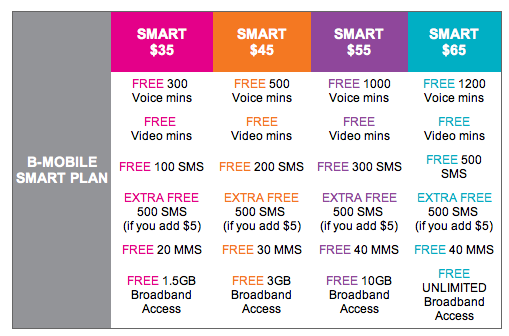
For good measure I’ve throw in bmobile‘s revised rates too

Bmobile’s Revised Plans

Smart $35 Smart $45 Smart $55 Smart $65
Free Voice (minutes) 300 500 1000 1200
Free SMS 100 200 300 500
Free MMS 20 30 40 40
Free Data 1.5GB 3GB 10GB Unlimited

Source: bmobile website (view screenshot)

eSpeed Upgrade!

It all started with Tiong Loong’s tweet that stated:

Telbru is upgrading our espeed 512kbps bandwidth >>See my test result http://www.speedtest.net/result/762446092.png #brunei
source

So when I got home from work that day I did some speed tests and was pleasantly surprised that it was true!

Bandwidth Test showing 1Mbps down, 300kbps+ up
1Mbps+ down, 300kbps+ up

And so today 1/April/2010 Telbru confirmed it (but honestly what a bad day to pick to announce it)

Plan Old Bandwidth New Upgraded Bandwidth
e-Speed Value Surf 512kbps 1Mbps
e-Speed Lite Surf 640kbps 1.5Mbps
e-Speed Super Surf 768kbps 2Mbps
e-Speed Premium Surf 1Mbps 2.5Mbps
Corporate Broadband Lite 2Mbps 3.5Mbps
Corporate Broadband Max 3.5Mbps 5Mbps

eSpeed Upgrade poster

Speed on Demand page finally loads!

I checked my router IP today and was pleasantly surprised that it has change to 118.x.x.x as show below and was surprised to see that the Speed on Demand page actually loaded!

New Router IP of 118.x.x.x
New eSpeed Router IP: 118.x.x.x
Speed on Demand login page
It finally loads!

So I can confirm that router IPs of 118.x.x.x can access the login page and I presume can use the service as well. Will try test this out in the coming days

PS. The images have been manipulated to hide my exact IP address but this is no Aprils fools prank =)

Short Message Service Centre Numbers in Brunei

DST: +673 879 5000

bmobile: +673 810 1010

For some reason my EASI SIM card has default SMS Centre Number of M1, a Singapore mobile phone provider, so whenever I change phones I will always have to manually set this up in order to send SMS’s. Just set up the HTC Hero for it and it took quite a while but finally managed to get it. It was in the Message application’s settings not the general settings (Home > Settings) of the phone which was a bit confusing and I guess a bit more polish to go for Android. Threw in the steps for (Nokia) S60 phones too just for good measure

Android (1.5)

  • Messages application > Settings

S60 (Mostly Nokia Smart Phones)

  • Menu > Communications > Messaging
    • Options > Settings > Text Message > Message centres
    • Options > New message centre
    • Options > Settings > Text Message > Message centre in use (select newly created entry)