More on Telbru’s Speed on Demand service

After reading a friend’s Tweet I ran into Telbru’s promotion on their Speed on Demand service. I decided to give them a ring to find out whether it is available to all eSpeed users as based on previous findings it was only available to some.

Speed on Demand Promo : 15-31 March

So basically I found out that users with a modem/router WAN IP starting with 119 (IP 119.*.*.*) are actually applicable for the Speed on Demand service. They are still undergoing upgrading and maintenance work for other IP ranges and intending to migrate 61.*.*.* users to 119.*.*.*.

So finally some clarification from Telbru on this matter. And the speculation that it was for newer users on a specific network was correct. Sad that there is no official press release and that this information has to be continually dug up rather than presented by the folks over at Telbru. With the redesigned of the eSpeed website, here’s hoping to a new year with a change in how Telbru handles their public relations and information delivery.

PS: On a side note thanks to Bahrin (I hope thats the right spelling) for taking my call at the 121 hotline and giving me this much needed clarification and information. Kudos to you and you made my day by finally speaking to a courteous, competent and well informed person =)

Update (1/April/2010): Seems that IPs of 118.x.x.x also get the Speed on Demand

Of Keypads and Touchscreens

If there is one thing you’ll always use on your phone it will be the keypad/keyboard whether it is a physical one or an onscreen version. I’ve always seemed to prefer phones with traditional keys (non QWERTY) as I like having the tactile feedback and also the ability to blind type. With the past 2 of my phones (Nokia 3110c, Nokia E51), I’ve had the issue that the keys are pretty hard to press (i.e. it requires quite a bit of force to press down) so after a long text message or instant-message chats, my thumbs would get tired. This led me to look into the ‘clickiness’ of keypads of phones as I was looking for a phone under $200 recently (with Bluetooth, card slot for music, a 3.5mm headphone jack & preferably 3G). I was pretty disappointed with the results and only found the Nokia 6303c had a nice ‘light’ keypad which buttons not requiring too much pressure to activate (The Nokia 3120c was pretty nice too but not as good as the 6303c).

There are several factors playing into the physical keypad of a phone: button spacing, button size, button placement and button activation pressure (as mentioned above). With all these factors playing into the keypad it made me wonder whether touchscreen keyboards would be better. Currently I have my sister’s HTC Hero and managed to play with a friend’s iPod touch recently. So I managed to get a good feel for both of them and here are some takes on their usability.

Android (1.5) - QWERTY Keyboard layout

Initially the Hero’s onscreen keyboard was frustrating to me – especially in portrait mode. It made me think I had fat fingers and it was painfully slow to type and correct any mistakes. There is auto correct which does a pretty good job but when it comes to words that it doesn’t recognize it can get frustrating. First of all if you type a word, it will display several suggested words (which it thinks you’re typing) above the actual word being typed. If you press space (to move on to the next work) it will automatically use the word it thinks you’re typing. An example is if I want to type “Bsb” it will auto suggest “Van” and if I press space it will replace “Bsb” (that I typed) with “Van”. Now you can add “Bsb” to the dictionary and it will be recognized the next time but this can be annoying if you’re using acronyms or names of places or just a language that it doesn’t understand (e.g. Malay). You can use the onscreen keyboard in landscape mode which makes this much easier for thumb typing but I think the lack of multi-touch implementation (there is multi-touch on the browser with pinch zoom) on the keyboard phone prevents users from typing even faster. At at times the keyboard lags behind the typing so you get delayed typing. In my frustrations of the Hero I honestly wanted to get a Bluetooth keyboard or find a way to use a Nokia phone as a Bluetooth keyboard. Take note that the screen size of the Hero is smaller than the iPod touch / iPhone and makes the keyboard mode even smaller and harder to type on in comparison. After a few days with it, I’ve managed to make it more manageable but still I had better results with the iPod touch in the limited time I’ve had to play with it. Finally I have switched the keyboard mode to phone keypad which emulates the typical 1-9 button configurations with the appropriate letters as a normal phone with physical keys and it can toggle predictive T9 input on or off easily at the touch of an on-screen button.

Android (1.5) - Phone Keypad layout

I can honestly say that the iPod touch (and thus the iPhone) has a very good onscreen keyboard: Apple must have done great user experience testing and I have to say they have got it nearly perfect. The onscreen keyboard was large enough to type with both my thumbs in the portrait mode with few mistakes from the little time I had with it. I know that they have tweaked the keyboard making buttons ‘bigger’ based on which letter is more probable and this worked well for the words in English that I typed. I found that the auto-suggested word is just as cumbersome as the Android implementation: when typing a word that it does not understand, it will only show a single suggested word (as opposed to Android’s multiple words) and pressing the spacebar will auto-correct it to the word that it thinks you are typing. To prevent this, just tap the ‘X’ to close the suggested word panel. It didn’t seem that you could add words to the dictionary from normal text input which means you could get frustrated typing non-recognized words (you can add words to the dictionary via Safari but its a bit of a kludge).

On both on-screen keyboards I wasn’t too impressed with inputting symbols. Perhaps I’m just not used to it yet but I found it too troublesome and time consuming to type symbols. After playing with on-screen keyboards I still like physical keys and honestly I like the way Nokia has implemented the keypads on their devices along with the symbol selection. So in the meantime I will look for a Bluetooth keyboard on EBay to see if anything looks good.

Related Article: A good comparison on the virtual Keyboards on iPhone and Android

Bmobile’s 1st Generation 3.5G HSDPA Modem in Ubuntu/Linux

bmobile's 1st Generation 3.5G HSDPA modem

Ever since I had the opportunity of using bmobile‘s 3.5G modem to get mobile broadband (via Zoom!) I was curious to see whether it would work in Linux. After much testing, I did manage to get it to work but it wasn’t consistent (it only seemed to work when the modem was tied to /dev/ttyUSB0, so I kepted plugging it in and out and redialed to see if it worked).

For the newer bmobile modem check out this page courtesy of @jikam

Test system: Running Ubuntu 9.04.

  1. Get usb_modeswitch (in Ubuntu / Debian you can “apt-get install usb_modeswitch” which makes things much easier)
  2. Get the usb_modeswitch.conf file and put it in /etc/
  3. The modem is identified an Alcatel One Touch X020 / X030 / MDB-100HU / Nuton 3.5G (lsusb will show ) so search usb_modeswitch.conf and uncomment the section for DefaultVendor, DefaultProduct, TargetVendor, TargetProduct and MessageContent

    ########################################################
    # Alcatel One Touch X020 (aka OT-X020, aka MBD-100HU, aka Nuton 3.5G), works with Emobile D11LC
    # Alcatel One Touch X030 (aka OT-X030, aka Nuton NT36HD)
    #
    # Contributor: Aleksandar Samardzic, Marcelo Fernandez

    ;DefaultVendor= 0x1c9e
    ;DefaultProduct= 0x1001

    ;TargetVendor= 0x1c9e
    ;TargetProduct= 0x6061

    # only for reference and 0.x versions
    # MessageEndpoint=0x05

    ;MessageContent="55534243123456780000000000000606f50402527000000000000000000000"

    ########################################################

    to

    ########################################################
    # Alcatel One Touch X020 (aka OT-X020, aka MBD-100HU, aka Nuton 3.5G), works with Emobile D11LC
    # Alcatel One Touch X030 (aka OT-X030, aka Nuton NT36HD)
    #
    # Contributor: Aleksandar Samardzic, Marcelo Fernandez

    DefaultVendor= 0x1c9e
    DefaultProduct= 0x1001

    TargetVendor= 0x1c9e
    TargetProduct= 0x6061

    # only for reference and 0.x versions
    # MessageEndpoint=0x05

    MessageContent="55534243123456780000000000000606f50402527000000000000000000000"

    ########################################################

  4. Do the actual mode switch for the modem to change the device from USB storage to modem mode:
    sudo usb_modeswitch
  5. Create the USB serial device for dial up:
    sudo modprobe usbserial vendor=0x1c9e product=0x6061
    This step created 3 devices (/dev/ttyUSB0, /dev/ttyUSB1, /dev/ttyUSB2) on my system.
  6. Use the Network Manager Applet to configure a new broadband modem connection with the B-Mobile configuration (APN: bmobilewap)

As mentioned this does not work consistently, so if it doesn’t seem to connection try plugging the USB modem out and back in and retry. I will try find a way to get this more consistent, but hopefully this will help those who are trying to get it to work

OMNI upgrade prices for existing E-Speed subscribers

Ever since the OMNI package was introduced I was curious to see what the upgrade pricing would be. I went to find out the cost for an upgrade to OMNI Lite from an existing E-Speed 512kbps connection and was sadly disappointed to hear that to sign up for OMNI, you would have to pay the same price as a new registration. My quest to have cheap mobile broadband was quelled at that point but recently I was asked if there was an upgrade price to OMNI from existing an E-Speed plan so I decided to take another look and was glad to find out that there was an upgrade path.

OMNI FAQ: Upgrade from Existing E-Speed Subscription

The upgrade cost is B$185 /B$235 (depending on IC)
[3G USB Modem ($100)
+ Deposit ($50 for Yellow or Red IC / $100 for Green IC)
+ Annual License Fee ($25)
+ Administration fee ($10)]

A new registration for OMNI Lite is $263 / $313 and OMNI Max is $325 / $375.

I was told that the cost is the same even if I want to upgrade to OMNI Max (1Mbps E-Speed + 7.2Mbps Zoom) from my existing 512kbps eSpeed Value Surf connection which would be a great upgrade path (saving $140)

Zoom! is a mixed bag of goodness and annoyance as mentioned in my previous findings but for $20/month on top of an existing eSpeed Value Surf subscription, I have to say that OMNI is very good value for money subscription.
(OMNI Max subscription is $22/month on top of eSpeed Premium Surf and OMNI Corporate only $12/month on top of Corporate Broadband Max)

Note: the 3G USB modem is locked to b-mobile SIM and thus cannot be used with any other SIM card. Also upon upgrade, the subscription is considered as a single entity so if you want to terminate either service (eSpeed or Zoom!) you will have to terminate both subscription and resubscribe for the service you want to keep.

Windows XP DPI Registry Fix

The other day I ran into a laptop where the desktop looks like the following screenshot.

Tiny Text and System Icons

Click on the picture to view the full resolution for the image. The text is too small and as you can see there are 3 rows of icons in the system tray! The system tray is the default size and it can fit 3 rows of icons when it can normally only have 1. Tried clicking on “Advanced” button in the “Display Properties” Tab (shown below) and a DLL crashed.

Display Properties Dialog Box

Tried Changing things in the “Advanced Appearance” dialog and managed to make things more usable but it did not solve the problem.

Advanced Appearance Dialog Box

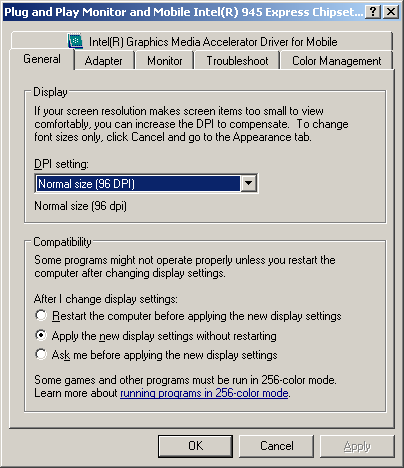
Then it dawned on me that it may be the DPI settings, which can only be accessed when clicking the “Advanced” button to get the graphics card advanced dialog box. But since it crashed I had to get an alternative fix

General Tab of Graphics Card Advanced Dialog Box

After some Googling I found this and modified the registry as follows:

[HKEY_LOCAL_MACHINE\SOFTWARE\Microsoft\Windows NT\CurrentVersion\FontDPI]
"LogPixels"=dword:00000060

[HKEY_LOCAL_MACHINE\SOFTWARE\Microsoft\Windows NT\CurrentVersion\Fonts]
"Courier 10,12,15 (VGA res)"="COURE.FON"
"MS Serif 8,10,12,14,18,24 (VGA res)"="SERIFE.FON"
"MS Sans Serif 8,10,12,14,18,24 (VGA res)"="SSERIFE.FON"
"Small Fonts (VGA res)"="SMALLE.FON"

[HKEY_LOCAL_MACHINE\SOFTWARE\Microsoft\Windows NT\CurrentVersion\GRE_Initialize]
"FIXEDFON.FON"="vgafix.fon"
"FONTS.FON"="vgasys.fon"
"OEMFONT.FON"="vgaoem.fon"

[HKEY_LOCAL_MACHINE\SYSTEM\CurrentControlSet\Hardware Profiles001\Software\Fonts]
"FIXEDFON.FON"="vgafix.fon"
"FONTS.FON"="vgasys.fon"
"OEMFONT.FON"="vgaoem.fon"
"LogPixels"=dword:00000060

[HKEY_LOCAL_MACHINE\SYSTEM\CurrentControlSet\Hardware Profiles\Current\Software\Fonts]
"FIXEDFON.FON"="vgafix.fon"
"FONTS.FON"="vgasys.fon"
"OEMFONT.FON"="vgaoem.fon"
"LogPixels"=dword:00000060

Rebooted and viola! Back to business as per normal

The Apple iPad

The Apple iPad

The Apple iPad was just announced yesterday and Engadget has a nice launch day roundup for their coverage and if you read the editorial many are disappointed or don’t see anything great about the device. While it is an evolutionary device it could have been killed by the hype of what it would be and how it would revolutionize the way we use tablets (which it doesn’t as the moment). Touted too much of a tablet, it is actually more of a media player / content consumption device / ebook reader.

Some of the iPad specifications:

  • Multitouch 9.7" screen
  • 1024×768 resolution screen
  • 720p HD video playback
  • 9.56" x 7.47" x 0.5" (242.8mm x 189.7mm x 13.4mm)
  • 10 hours battery life
  • 1.5 / 1.6 pounds (0.68 / 0.73 kg) (Wi-Fi / Wi-Fi + 3G model)
  • iPhone OS
  • Wi-Fi version: US$499/$599/$699 (16GB/32GB/64GB)
  • Wi-Fi + 3G : US$629/$729/$829 (16GB/32GB/64GB)

Coming for a netbook background all these specifications look great except for the iPhone OS and possibly the price point. Most netbooks have a 10” screen with a resolution of only 1024×600 and most websites made for these lower resolutions especially since the browser window (with toolbars + menus) already consumes some screen real estate leaving an even smaller portion for proper web browsing. Having a 1024×768 resolution screen that can be oriented landscape or portrait gives the device added flexibility in rendering webpages.

Having 720p HD video playback and 10 hours of battery life the iPad trumps almost all netbooks and to add insult to injury it is lighter and smaller. Now while this battery life estimate is not tested, Apple’s battery life specifications typically hold up in real world testing (I can personally attest to the 13" Mac Book Pro battery life). Having a 1st generation netbook that gets about 4 hours of battery life and having a 13" Mac Book Pro with 7 hours battery life, 10 hours of usage out of the iPad is simply outstanding especially given the size and weight of the device. A typically netbook will be about 3 pounds and about 3 times the thickness of an iPad with a battery life of about 9 hours (current Pine-trail netbooks) and costs in the range of US$300-$400.

The biggest issue is that it comes with the iPhone OS which limits connectivity with only iTunes and that it does not do real multi-tasking (limited multi-tasking ala iPhone). Multi-tasking is a huge factor if they’re touting it as a tablet which is why I don’t really consider it a full-fledge tablet but more of a bigger iPod touch and fits in between an e-book reader and a tablet (both of which where widely seen at CES this year: e-book readers and tablets at CES). For now I will stick with my netbook and wait for ION (or similar technology) to get better for possibly gaming netbooks like the upcoming Alienware M11x.

So in essence the iPad is a bigger iPod touch: more than an e-book reader, less than a tablet


Other notable facts:

  • Seemed very responsive (kudos to the processor)
  • 3G models are unlocked
  • iWorks available (US$10 an application)
  • Projector output possible (with an additional adapter)
  • Bluetooh / Accelerometer / A-GPS (A-GPS available only in the 3G model)
  • Microphone for possible VOIP over 3G

Issues with the iPad

  • No multi-tasking (yet?)
  • No Flash (yet?)
  • No camera
  • Tied down to iTunes and Apple
  • Micro SIM slot (not the typical normal SIM slot)
  • No native USB (use dock connector with extra attachments)
  • Finger-printed filled screen
  • Terrible name: iSlate or iTablet would have been fine, but iPad is just weird

DST Go! + Netbook promotion

After stumbling across this complaint on DST’s promotion of bundling an Acer Aspire One with Go! subscription I went down to DST to find out whether the complaint was valid. The promotion banner is shown below

DST's Go!   Netbook Promotion

The complaint basically says that the $543 up-front payment advertised is for the laptop + modem and not the 6 month subscription which would add up to the same amount. If this was the case it would have been a real scam and after my findings that Concepts is not recycling and also Sheraton pizza issue makes me wonder if we need a consumer rights / better business bureau in Brunei to monitor and catch any businesses doing any sleight of hand tactics or wordings that will misled customers.

So I went to DST in Delima and asked if the promotion was still valid. I was told that it was no longer valid so my hopes were dashed to find out if the complaint was valid. So a few weeks later I went to pay my mom’s DST bill and thought I would ask if there were any laptop promotions for the Go! subscription as previously had and I was in luck. The lady at the counter told me the offer of the Acer netbook was still valid, though low on stock (about 6 units left). So after she explained things to me I found out that the complaint that $543 was to pay for the laptop and modem is not true for the current promotion. Now things could be different now than what was previously told to the customer when they made this complaint. It could have also just been a staff member who did not understand the promotion or was simply trying to personally scam the customer or it could even be DST changing the promotion. But that aside, according to her the lady basically you are just paying $78 x 21 months for the regular non-student Unlimited plan and that the only extra charges is for the deposit ($50 for locals, $100 otherwise) and license fee ($25). The $543 is an advance for the last 6 months of the subscription meaning you pay ($543 + deposit + license fee) up-front and 15 months of $78 (or 24 months of $58), starting from the month after purchase. This means locals will pay in total $1713 ($543 + 15 * 78) for the regular package or $1815 ($423 + 24 * 58) for the student package (foreigners add $50 due deposit of $100 instead of $50)

So in essence you are signing up for a 21 (or 30) month contract and you pay a flat rate of $78 (or $58) a month and you get a free netbook and modem which is a pretty darn good deal. As with all contracts you are tied down to the provider and in this case it’s for 21 (or 30) months which may seem long but you could easily get a 3G wireless router (eg. Prolink 3.5 mobile broadband router) to connect the modem to and use it for Internet at the office or at home. A very viable option for office use without having to pay commercial prices for an E-Speed line.

So DST has this offer going for their mobile broadband while bmobile has their iPhone promotion. Being somebody who is looking for an unlimited 3G broadband plan both these offers seem enticing and will be something I cover in a future post as I decided which one to take, if any at all.

Application of the Day: VobEdit

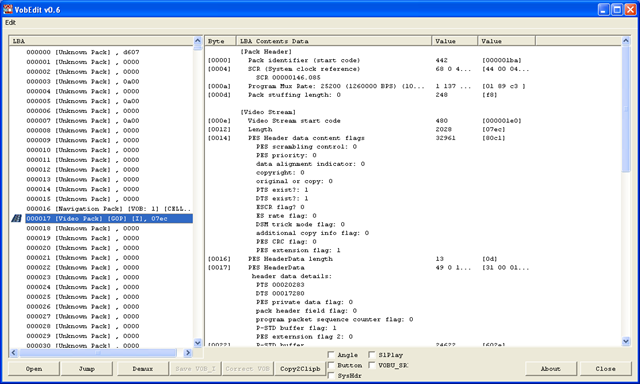
VobEdit screenshot - main screen

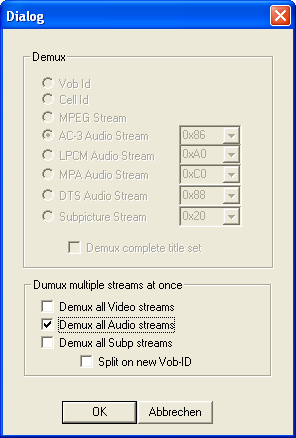
VobEdit (download link) allows you to extract the audio and/or video files from DVD VOB files. Typically I will use ffmpeg to extract audio or video streams from DVDs, but sometimes the DVD were not burned properly giving ffmpeg an error that prevents the extraction. Here is where VobEdit comes it. Select the VOB file, click the "demux" button, select the stream, select save location and you’re done! Other features include splitting, joining and remuxing VOB files

VobEdit screenshot - extract all audio streams 

Kudos to Doom 9 for providing great resources for VOB tools and many other DVD/encoding/transcoding information

bmobile Zoom! (+ E-Speed, DST Go!) Findings

Ever since bmobile and DST launched their mobile broadband offerings (Zoom! and Go!)I was interested to see which one offered the best deal. I’ve had a few weeks with the bmobile’s Zoom! service using the older modem with 3.6Mbps max speeds and did some speed tests and real world tests. In the real world tests it got frustrating at times with quite a few timeouts and YouTube videos loading only to stop loading half way. Real world download tests weren’t fantastic, typically under 512kbps which is even slower than the lowest tier E-Speed plan. My regular locations were at home in Jalan Kebangsaan Lama, and at the old airport road which is basically just across Telbru Headquarters. After a while I found out that doing a regular speed test at Speedtest.net was not giving optimal results, I would get less than 300kbps (~40KB/s) download speeds but in actual fact when I download podcasts I would get over 500kbps (~60KB/s) easily.

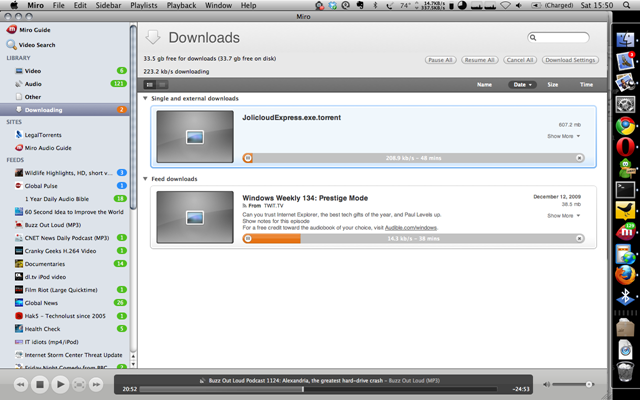
I found that if I do multiple downloads/connections I would be able to get faster speeds. I was able to roughly max out the modem to the full 3.6Mbps connection (but that was close to Telbru, not at home). At home torrenting some music off Jamendo managed to get up to 100KB/s but it was not consistent. Below shows a torrent downloading at over 200KB/s.

Jollicloud torrent getting over 300KB/s download on bmobile's Zoom!

I know location and people/connection saturation are important factors for any mobile broadband connections and honestly I’m pretty jealous of David Cheok’s reports on his Go! getting good speeds in Subok

“actually.. have been getting avg 500KB daily.. last night was good coz it broke 700KB..”  (via Twitter)

He also went on to say the following statement which I totally agree with:

“if downloading is your thing, Go for GO. If good response time/less lag, Zoom. Even better, espd.” (via Twitter)

That also brings me to another important fact that Go! seems to have pretty bad upload speeds (up to 20x less than Zoom!). If you’re planning on uploading photos or doing some streaming video from your webcam or even Skype, Go! may not be the answer you’re looking for. For anything to do with uploads, stick to E-Speed or Zoom!

Zoom! speedtests: Behind MOE (Old Airport), Jalan Kebangsaan Lama, Desa Cafe (Delima), Aman Complex, MOF

Go! speedtestsBehind MOE (Old Airport), Jalan Kebangsaan Lama, Giant

Bmobile’s iPhone Promotion

If you haven’t heard, b-mobile has subsidized iPhones 3GS’s with a b-mobile subscription contract of 18 months. This is one of the first subsidized mobile phone price plans I’ve seen in Brunei. The other would be DST‘s October promotion offerings that offered a Nokia E75, Nokia E52 and Sony Ericsson C901 with contracts of 6 months. With b-mobile having first introduced their mobile broadband Zoom! which was followed up by DST’s Go!, what I hope to see is more competition among the 2 mobile phone providers which in the end leads to the consumer winning. Recently in Singapore, M1 and StarHub released their iPhone plans which led SingTel to change their previous plans (most notably the increase of free data to 12GB, from a typical measly 500MB/1GB), so as consumers we have to love competition.

I went down to b-mobile to find out more about the iPhone and they mentioned that is it the never locked version and that they are handling the mobile phone service while AV Electronics handles all the other iPhone/Apple/iTunes/Applications related aspects of this deal. While talking to the guy at the bmobile counter he did mention that bmobile was getting the iPhone and DST was going to get the Blackberry. Rumour has it that the Blackberry will be reveal next year but timing is still not confirmed. If it does come to fruition people will be happy (especially the High Commissioner of Canada, who urged Brunei to set up a Blackberry Network).

Initially when asking about the HTC Touch Diamond Pro and Samsung Jet (which was a few weeks back) the guy told me that the details would be released later, but on further inquiry today I was told that both are available but you would have to custom order it and the personnel could not disclose the price plans as marketing was not present. I find that awkward that they are selling a product but have not disclosed the pricing. Anyway the price plans for the subsidized iPhone are as follows.

Note: Contract is for 18 months and the total costs listed are based on the prices for locals that included 1 annual license fee of $25 and a deposit of $50. For foreigners add another $50 to the total cost (as deposits for foreigners is $100 vs $50 for locals).

iPhone 3GS 16GB

Phone Cost (B$) Monthly Cost (B$) Total Cost (B$)
Smart $35 Package 999 35 1704
Smart $45 Package 799 45 1684
Smart $55 Package 599 55 1664
Smart $65 Package 399 65 1644

iPhone 3GS 32GB

Phone Cost (B$) Monthly Cost (B$) Total Cost (B$)
Smart $35 Package 1199 35 1904
Smart $45 Package 999 45 1884
Smart $55 Package 799 55 1864
Smart $65 Package 599 65 1844

Price Plan Details:

Free Voice minutes Free SMS Free MMS Free Data
Smart $35 Package 300 100 20 1.5GB
Smart $45 Package 500 200 30 3GB
Smart $55 Package 1000 300 40 10GB
Smart $65 Package 1200 500 50 Unlimited

Note: Beyond the free data, the user is chargeable at 20c/MB up to $40 at which the user can use unlimited data

If you are planning to take b-mobile up on this subsidized iPhone I would recommend subscribing using the Smart $65 Package as it has the lowest up-front payment, the cheapest in the long run and provides the best in terms of perks (especially the unlimited data). With the iPhone you use it as a broadband modem at it would be easy to exceed the 1.5GB/3GB of the 2 lower priced plans and considering that $40 corresponds to 200MB which isn’t much at all. If you take the $65 package, the iPhone can be considered as a Zoom! subscription ($65/month for iPhone vs $60/month for Zoom!) but has so much more benefits.

If you’re looking for a iPhone or even if you’re just looking to get a mobile broadband subscription (Zoom! from b-mobile or Go! from DST) I would recommend the Smart $65 Package bundled with the iPhone of your choice. You get an unlimited broadband connection which can be tethered to your computer wherever you are and the highly coveted iPhone which is currently the best smartphone platform at the moment.